Invoering
Thank you for choosing the OUKITEL Smartwatch. This device is designed to enhance your daily life with smart features, comprehensive health monitoring, and various sports modes. This manual provides detailed instructions to help you set up, operate, and maintain your smartwatch effectively. Please read this manual thoroughly before use to ensure optimal performance and longevity of your device.
Wat zit er in de doos?
- OUKITEL Smartwatch
- Oplaadkabel
- Gebruiksaanwijzing
Installatiehandleiding
1. De smartwatch opladen
Laad uw smartwatch volledig op voordat u hem voor de eerste keer gebruikt. Sluit de magnetische oplaadkabel aan op de oplaadcontacten aan de achterkant van het horloge en steek het USB-uiteinde in een voedingsadapter (niet meegeleverd) of een USB-poort van een computer. Een volledige lading duurt doorgaans ongeveer 2.5 uur.

Image: The OUKITEL Smartwatch connected to its magnetic charging cable, displaying a charging icon on its screen.
A full charge provides approximately 5-10 days of normal usage and up to 30 days in standby mode.
2. App-installatie en koppeling
To unlock all features, download the companion app (e.g., "GloryFit" as mentioned in reviews) on your smartphone. The app is compatible with iOS 9.0+ and Android 6.0+ devices.
- Scan the QR code in the user manual or search for the app name in your phone's app store (Apple App Store for iOS, Google Play Store for Android).
- Installeer en open de app.
- Volg de instructies op het scherm om een account aan te maken en je profiel in te stellen.file.
- Schakel Bluetooth in op uw smartphone.
- In the app, search for your OUKITEL Smartwatch and select it to pair. Confirm the pairing request on both your phone and the smartwatch.
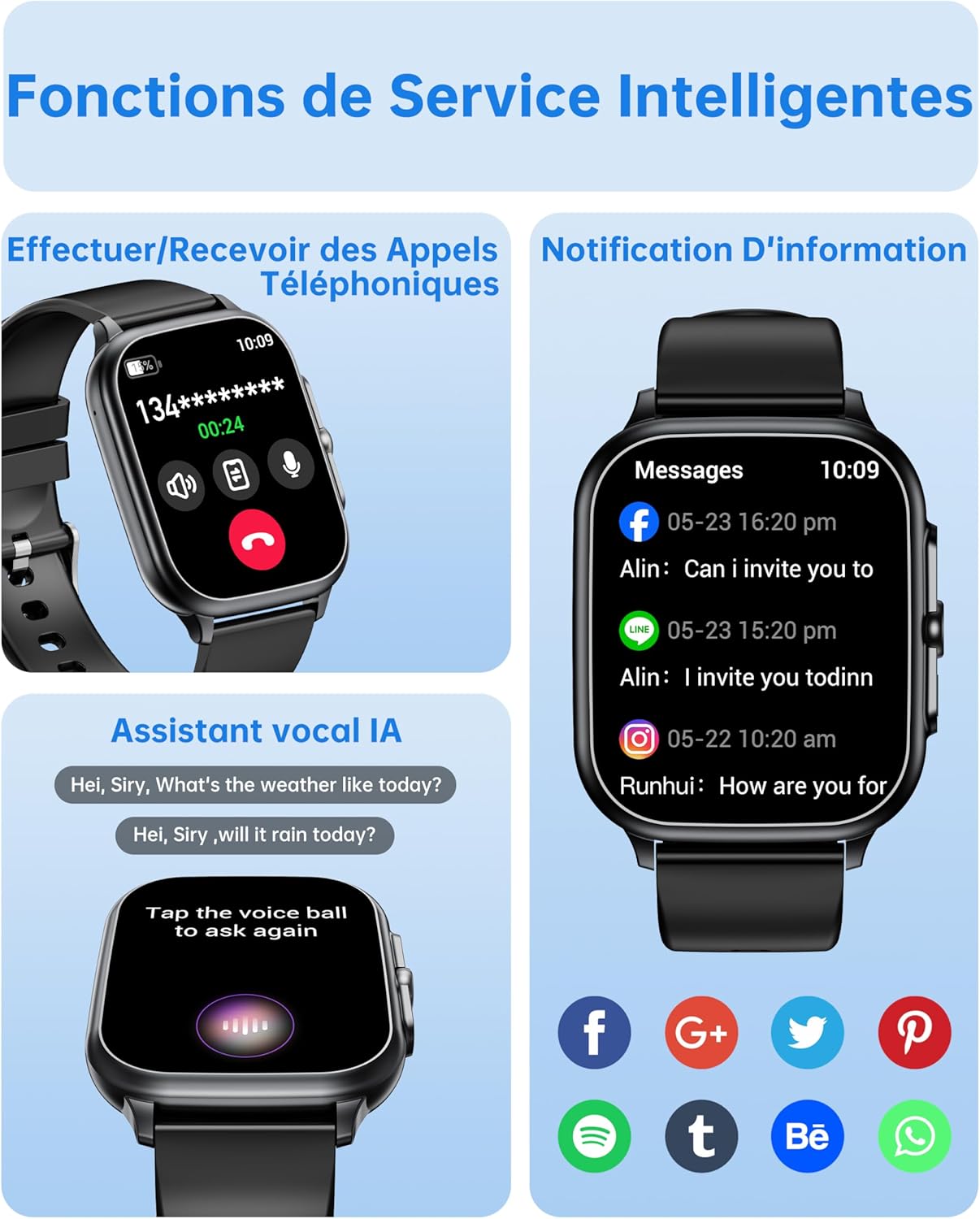
Image: The OUKITEL Smartwatch screen showing an incoming call interface, illustrating its Bluetooth call functionality and readiness for connection.
Gebruiksaanwijzing
Basisnavigatie
The OUKITEL Smartwatch features a 1.91-inch HD touchscreen for intuitive control. Swipe left, right, up, or down to navigate through menus and functions. Press the side button to return to the home screen or access the app list.
Slimme functies
- Bluetooth-oproepen: Once paired with your phone, you can make and receive calls directly from your smartwatch. Access the dial pad, call history, or contacts on your watch.
- AI-spraakassistent: Utilize the integrated AI voice assistant (e.g., Alexa) to perform voice commands such as asking questions, checking the weather, or initiating calls.
- Meldingen: Receive real-time notifications for calls, SMS, and various social media apps (WhatsApp, Facebook, etc.) directly on your wrist.
- Muziekbediening: Bedien de muziekweergave op je smartphone (afspelen, pauzeren, nummers overslaan) rechtstreeks vanaf je smartwatch.
- Andere functies: Includes weather forecasts, stopwatch, timer, alarm clock, remote camera control, and a "Find My Phone" feature.

Image: A composite image showing the smartwatch interface for making/receiving calls, displaying app notifications, and interacting with the AI voice assistant.
Gezondheidsmonitoring
The smartwatch provides 24/7 health tracking to help you monitor your well-being.
- Hartslagmonitoring: Houdt de hele dag door uw hartslag bij. View realtime gegevens en historische trends in de app.
- Bloedzuurstof (SpO2) bewaking: Meet de zuurstofsaturatie in uw bloed.
- Slaap bijhouden: Analyseert uw slaappatroon, inclusief diepe slaap, lichte slaap en wakkere perioden, om de slaapkwaliteit te verbeteren.
- Stressmonitoring: Houdt je stressniveau in de gaten.

Image: A composite image showing the smartwatch displaying heart rate, blood oxygen levels, and sleep duration data, alongside a person running outdoors.
Sportmodi en activiteitstracking
The smartwatch offers over 100 indoor and outdoor sports modes, including walking, running, cycling, hiking, basketball, and football. It records exercise data such as steps, heart rate, and calories burned.

Image: A person on a bicycle, with the smartwatch displaying various sports modes and an activity analysis screen showing duration, heart rate, calories, and steps.
Aanpassing
Personalize your smartwatch with over 100 built-in watch faces. You can also upload your favorite photos to create unique custom dials through the companion app. The watch supports 6 different menu styles.

Image: The OUKITEL Smartwatch showcasing different menu styles and customizable watch faces, including options to use personal photos.
Onderhoud
Waterbestendigheid (IP68)
The OUKITEL Smartwatch is IP68 waterproof, meaning it is resistant to splashes, rain, and sweat. It can withstand daily water exposure like hand washing. However, it is niet geschikt for hot baths, saunas, diving, or exposure to corrosive liquids like seawater.

Image: The OUKITEL Smartwatch highlighting its IP68 water resistance with icons representing protection against rain, hand washing, and perspiration.
Reiniging en verzorging
- Veeg het horloge en de band regelmatig af met een zachte, droge doek.
- Gebruik geen agressieve chemicaliën of schurende materialen.
- Zorg ervoor dat de oplaadcontacten schoon en droog zijn voordat u gaat opladen.
Probleemoplossing
| Probleem | Mogelijke oplossing |
|---|---|
| Smartwatch gaat niet aan. | Zorg ervoor dat het horloge volledig is opgeladen. Sluit het minstens 30 minuten aan op de oplader. |
| Kan geen koppeling maken met smartphone. |
|
| Onnauwkeurige metingen van gezondheidsgegevens. |
|
| Screen turns on too frequently (as noted in reviewS). | Check the watch settings for "Raise to Wake" or "Wrist Sense" features. You may be able to adjust sensitivity or disable it if it's causing unwanted screen activation. |
| Er verschijnen geen meldingen. |
|
Specificaties
| Merk | Oukitel |
| Modelnummer | B0FXGFXMT5 |
| Besturingssysteem | iOS, Android |
| Schermgrootte | 1.91 inch |
| Connectiviteitstechnologie | Bluetooth |
| Speciale kenmerken | AI Voice Assistant & Notifications, 100+ Sports Modes, 1.91 Inch HD Screen |
| Compatibele apparaten | Smartphone |
| Waterbestendigheid | IP68 |
| GPS | Geen GPS |
| Vorm | Rechthoekig |
| Doelgroep | Women, Men |
Garantie en ondersteuning
The OUKITEL Smartwatch comes with a 1 jaar fabrieksgarantieDeze garantie dekt materiaal- en fabricagefouten bij normaal gebruik.
Voor technische ondersteuning, hulp bij het oplossen van problemen of garantieclaims kunt u contact opnemen met de klantenservice van OUKITEL via hun officiële kanalen. website or the contact information provided with your purchase. Please have your model number (B0FXGFXMT5) and proof of purchase ready when contacting support.


