1. Inleiding
This manual provides essential information for the safe and efficient operation of your Thomson 43FT2S15 FHD LED Smart TV. Please read this manual thoroughly before using the television and retain it for future reference.
2. Veiligheidsinformatie
Volg altijd de basisveiligheidsmaatregelen wanneer u dit product gebruikt om het risico op brand, elektrische schokken en letsel te beperken.
- Stel de TV niet bloot aan regen of vocht.
- Blokkeer de ventilatieopeningen niet.
- Zorg ervoor dat het netsnoer goed geaard is.
- Plaats de tv niet op een onstabiele kar, standaard, statief, beugel of tafel.
- Haal de stekker van de televisie uit het stopcontact tijdens onweer of wanneer u de televisie gedurende langere tijd niet gebruikt.
- Laat alle onderhoudswerkzaamheden over aan gekwalificeerd onderhoudspersoneel.
3. Inhoud van het pakket
Controleer of alle hieronder vermelde artikelen in uw pakket zitten:
- Thomson 43FT2S15 FHD LED Smart TV
- Stroomadapter
- Afstandsbediening
- Gebruikershandleiding (dit document)
- Garantiekaart

Afbeelding: Voorzijde view of the Thomson 43FT2S15 Smart TV.
4. Instellen
4.1 fysieke installatie
The Thomson 43FT2S15 TV is designed for table mounting. Ensure the TV is placed on a stable, flat surface.

Image: Diagram showing the dimensions of the Thomson 43FT2S15 Smart TV. The screen size is 109 cm (43 inches) diagonally, with a width of 95 cm and height of 60 cm (including stand). The depth is 6 cm.
Afmetingen (B x H x D): 95 cm x 60 cm x 6 cm (without stand, depth is 6 cm). The screen diagonal is 109 cm (43 inches).
4.2 Apparaten aansluiten
Sluit uw externe apparaten aan op de juiste poorten van de tv. Raadpleeg onderstaande afbeelding voor de locaties van de poorten.
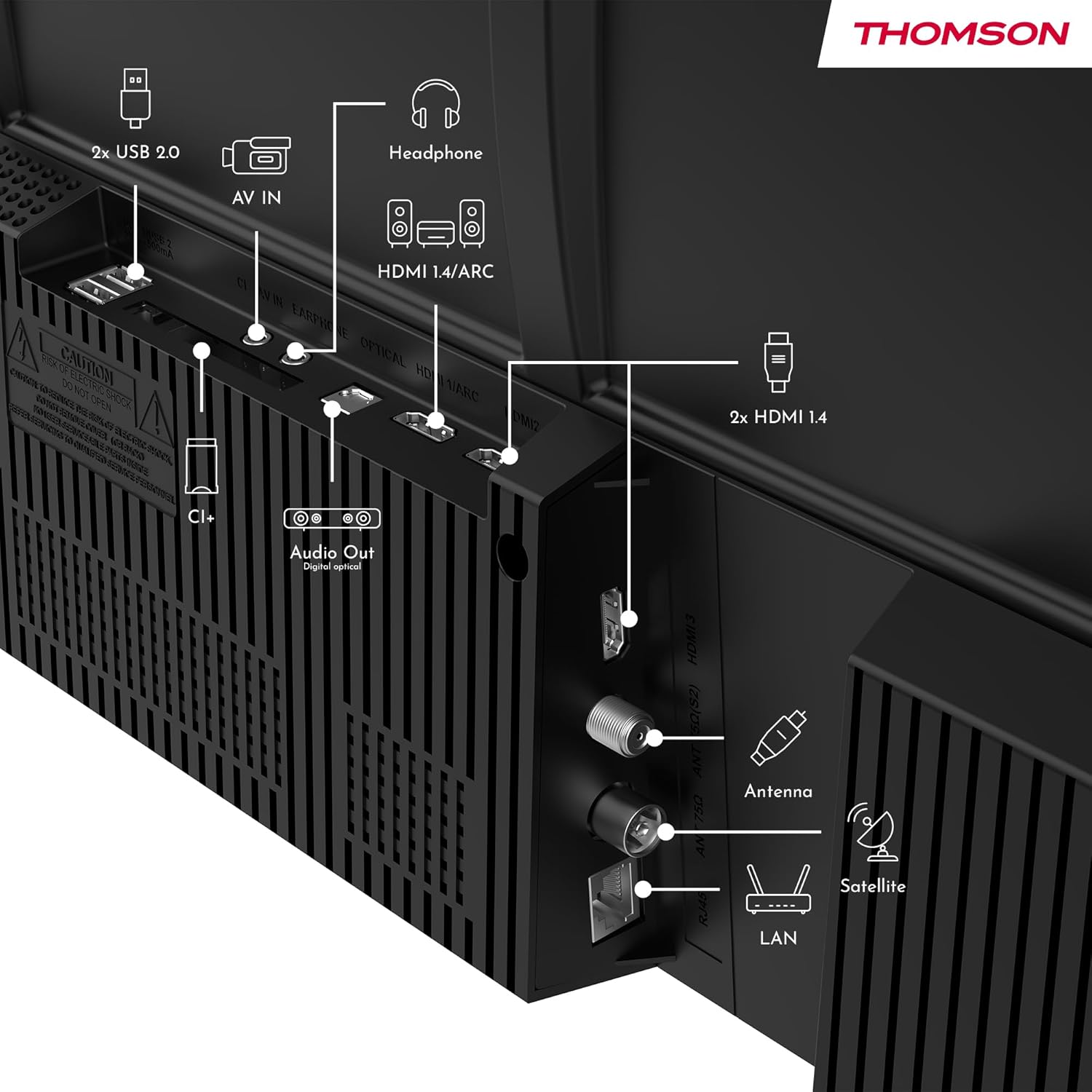
Afbeelding: Achterkant view of the Thomson 43FT2S15 Smart TV showing various connection ports. These include 2x USB 2.0, AV IN, Headphone out, HDMI 1.4/ARC, Optical Audio Out, CI+, Antenna (DVB-T2/C), Satellite (DVB-S2), and LAN (Ethernet).
- HDMI: Connect external devices like Blu-ray players, game consoles, or set-top boxes. The TV has 2 HDMI 1.4 ports, one with ARC support.
- USB-poort: For connecting USB storage devices. The TV has 2 USB 2.0 ports.
- Antenne/Satelliet: Connect your terrestrial or satellite antenna for live TV.
- LAN (Ethernet): Voor een bekabelde internetverbinding.
- Wifi: Voor draadloze internetverbinding.
- Bluetooth: Voor het aansluiten van compatibele draadloze accessoires.
- Audio-uitgang (optisch): Voor aansluiting op een extern geluidssysteem.
- Koptelefoon: Voor het aansluiten van een hoofdtelefoon.
- CI+-sleuf: For inserting a Conditional Access Module (CAM) for encrypted channels.
5. Gebruiksaanwijzing
5.1 In-/uitschakelen
Connect the power adapter to the TV and a power outlet. Press the power button on the remote control to turn the TV on or off.
5.2 TiVo OS en slimme functies
Your Thomson Smart TV is powered by TiVo OS, which integrates live TV, streaming applications, and on-demand services into a single, intuitive interface. Personalized recommendations help you discover new content.

Image: The Thomson Smart TV displaying the TiVo OS interface with various streaming apps like Netflix, Canal+, Prime Video, YouTube, and Disney+.
5.3 Spraakbesturing
Use the TiVo Voice Control feature to navigate channels, open applications, or search for content across different platforms using voice commands. The remote control includes a microphone for this function.

Image: The Thomson Smart TV remote control highlighting the voice control microphone, backlit buttons, and direct access buttons for streaming services.
5.4 Wireless Display
Mirror content from your smartphone, tablet, or laptop to the TV screen using the Wireless Display function. This allows for easy sharing of videos, photos, and applications.
5.5 Audio and Video Enhancements
- Dolby-audio: Experience enhanced sound quality with Dolby Audio, providing clear dialogue and immersive, multi-dimensional effects.

Image: A Thomson Smart TV displaying content with visual representations of sound waves, indicating the Dolby Audio feature.
- HDR10: Enjoy sharper contrast and lifelike colors with HDR10 technology, revealing details in both bright highlights and deep shadows.

Image: A split-screen comparison showing the difference between SDR (Standard Dynamic Range) and HDR10 (High Dynamic Range) image quality on a Thomson Smart TV, demonstrating improved contrast and color.
5.6 afstandsbediening
The ergonomic remote control features backlit buttons for easy navigation in low light conditions. It also includes direct access buttons for popular streaming services such as Netflix, YouTube, Prime Video, Disney+, and Canal+.
6. Onderhoud
Om de levensduur en optimale prestaties van uw tv te garanderen, dient u de volgende onderhoudsrichtlijnen te volgen:
- Het scherm schoonmaken: Veeg het scherm voorzichtig schoon met een zachte, pluisvrije doek. Gebruik voor hardnekkige vlekken een speciaal voor tv's ontwikkelde schermreiniger. Breng deze aan op de doek, niet rechtstreeks op het scherm.
- De kast schoonmaken: Gebruik een zachte, droge doek om de tv-kast schoon te maken. Gebruik geen schuurmiddelen of oplosmiddelen.
- Ventilatie: Zorg ervoor dat de ventilatieopeningen aan de achterkant van de tv niet geblokkeerd zijn om oververhitting te voorkomen.
- Stroomkabel: Controleer regelmatig het netsnoer op beschadigingen. Neem bij schade contact op met gekwalificeerd servicepersoneel voor vervanging.
7. Probleemoplossing
Als u problemen ondervindt met uw tv, raadpleeg dan de volgende veelvoorkomende stappen voor probleemoplossing:
- Geen stroom:
- Controleer of het netsnoer goed is aangesloten op de tv en het stopcontact.
- Controleer of het stopcontact werkt door er een ander apparaat in te steken.
- Probeer eens op de aan/uit-knop van de tv zelf te drukken, en niet alleen op de afstandsbediening.
- Geen beeld/geluid:
- Controleer of de juiste ingangsbron is geselecteerd (bijv. HDMI 1, Antenne).
- Controleer alle kabelverbindingen tussen de tv en externe apparaten.
- Pas het volume aan en zorg ervoor dat het geluid van de televisie niet gedempt is.
- Afstandsbediening werkt niet:
- Vervang de batterijen in de afstandsbediening.
- Zorg ervoor dat er zich geen obstakels bevinden tussen de afstandsbediening en de IR-sensor van de tv.
- Smart TV Features Not Working (Wi-Fi/Apps):
- Controleer je internetverbinding. Start je router indien nodig opnieuw op.
- Go to the TV's network settings to ensure it's connected to Wi-Fi or Ethernet.
- Probeer de tv opnieuw op te starten.
For more complex issues, please contact customer support or refer to the manufacturer's webplaats.
8. Specificaties
Key technical specifications for the Thomson 43FT2S15 FHD LED Smart TV:
| Functie | Specificatie |
|---|---|
| Merk | Janssen |
| Model | 43FT2S15 |
| Schermgrootte | 43 inch (109 cm) |
| Weergavetechnologie | LED |
| Oplossing | 1920x1080 (volledige resolutie) |
| Vernieuwingsfrequentie | 60Hz |
| Beeldverhouding | 16:9 |
| Besturingssysteem | TiVo OS |
| Audiotechnologie | Dolby Audio (Dolby Atmos encoding) |
| HDR-ondersteuning | HDR10 |
| Connectiviteit | Wi-Fi, Ethernet, Bluetooth, 2x HDMI 1.4 (1x ARC), 2x USB 2.0, Optical Audio Out, AV In, Headphone, CI+ |
| Stemmechanieken | DVB-T2/C/S2 (Triple Tuner) |
| Ondersteunde internetdiensten | Netflix, YouTube, Prime Video, Disney+, Canal+, Browser |
| Afmetingen (Product) | 6 x 95 x 60 cm; 6.5 kg |
| Energie-efficiëntieklasse | E |

Image: Energy efficiency label for the Thomson 43FT2S15 Smart TV, showing an energy class of E and energy consumption of 42 kWh/1000h (SDR) and 46 kWh/1000h (HDR).
Raadpleeg de EPREL-database voor gedetailleerde productinformatie. https://eprel.ec.europa.eu/qr/1969521
9. Garantie en ondersteuning
Your Thomson 43FT2S15 TV comes with a warranty. Please refer to the included Warranty Card for specific terms and conditions.
For technical support or service inquiries, please contact the manufacturer:
- Fabrikant: Stroomview Besloten vennootschap
- Webwebsite: www.streamview.nl
- E-mailadres: contact@streamview.nl
- Telefoon: +4318900066
Please have your model number (43FT2S15) and purchase information ready when contacting support.


