Invoering
The JBL GRIP is a compact, portable Bluetooth speaker designed to deliver powerful JBL Pro Sound. It features AI Sound Boost technology for optimized audio output with minimal distortion. With its durable, dustproof, and waterproof design, the JBL GRIP is suitable for various environments and activities. This manual provides essential information for the proper use and maintenance of your speaker.

Image: The JBL GRIP speaker lineup in different colors, highlighting its portability.
Wat zit er in de doos?
Upon unboxing your JBL GRIP speaker, please ensure all components are present:
- JBL GRIP Portable Bluetooth Speaker
- Snelstartgids
- USB-C Charging Cable (Note: USB charging cable is not included in some regions, please check packaging)

Image: A purple JBL GRIP speaker, representing the main product.
Product voorbijview
Familiarize yourself with the key features and components of your JBL GRIP speaker.
Bediening en poorten
- Aan/uit-knop: Bevindt zich op het bovenpaneel.
- Bluetooth-koppelingsknop: Located on the top panel, for connecting to devices.
- Afspelen/Pauzeren-knop: Bevindt zich op het bovenpaneel.
- Knoppen volume omhoog / omlaag: Bevindt zich op het bovenpaneel.
- USB-C-oplaadpoort: Located on the side panel, protected by a cover.
- Omgevingslicht: Integrated on the side panel, offering customizable lighting effects.

Afbeelding: Boven view of the JBL GRIP speaker, highlighting the control buttons.
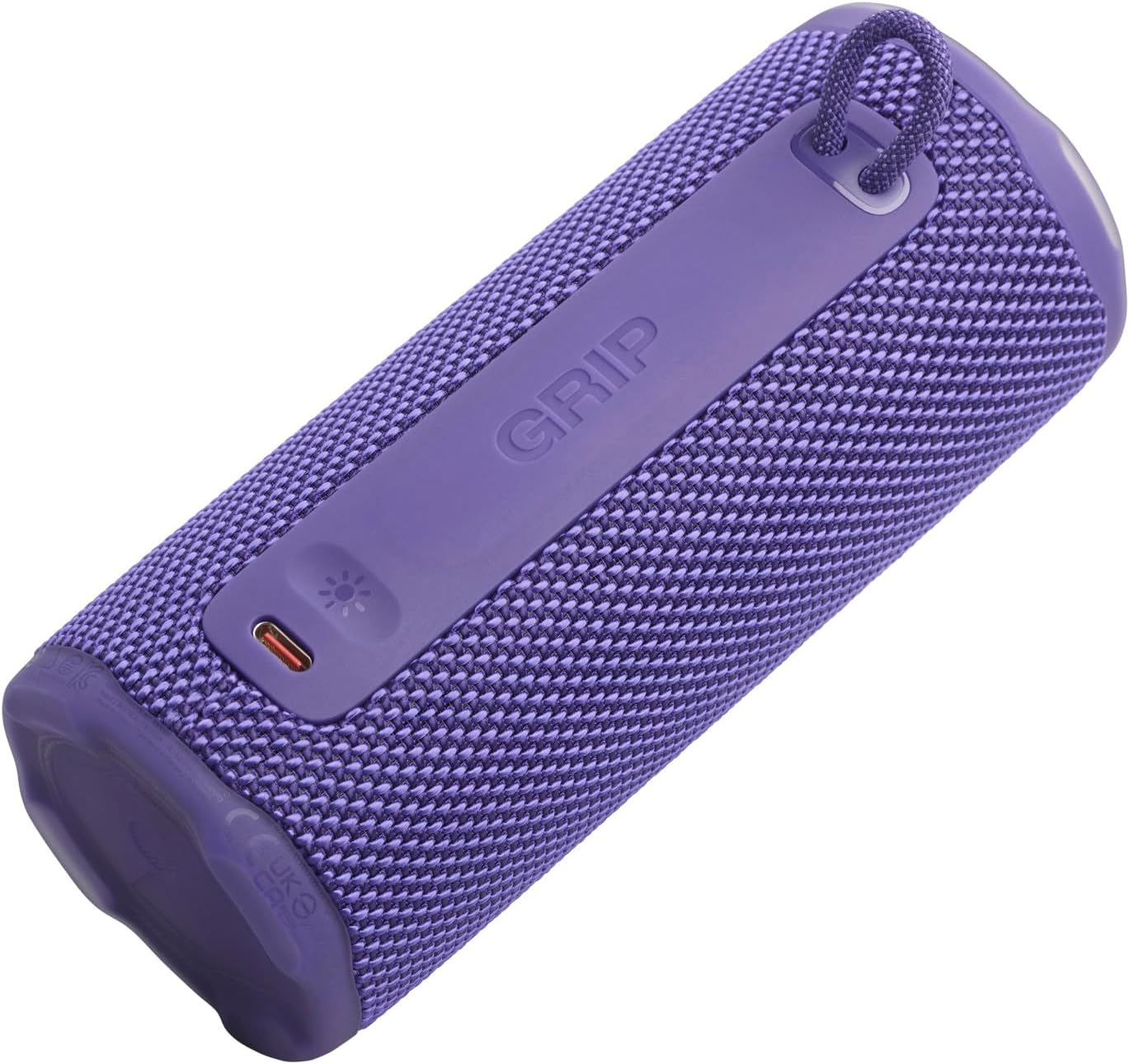
Afbeelding: Zijkant view of the JBL GRIP speaker, showing the USB-C charging port and the ambient light strip.
Belangrijkste kenmerken
- AI Sound Boost: Real-time music analysis algorithm optimizes output and suppresses distortion for enhanced sound quality.
- IP68 stof- en waterdicht: Designed to withstand immersion in water and protect against dust ingress.
- Omgevingslicht: Customizable LED light on the speaker's rear panel to set the mood.
- Lange afspeeltijd: Up to 12 hours of continuous playback, extendable by an additional 2 hours with Playtime Boost.
- Aura Cast Multi-Speaker Connection: Connect multiple JBL GRIP speakers for a wider sound experience.
- JBL Portable App Compatibility: Control settings, customize ambient light, and manage features via the dedicated app.

Image: An internal diagram of the JBL GRIP speaker, illustrating the AI Sound Boost chip and dual passive radiators for enhanced bass.
Instellen
De luidspreker opladen
- Zoek de USB-C-oplaadpoort aan de zijkant van de luidspreker.
- Open het beschermkapje van de USB-C-poort.
- Connect one end of the USB-C charging cable to the speaker and the other end to a compatible USB power adapter (not included).
- De led-indicator geeft de laadstatus weer. Een volledige lading duurt ongeveer 3 uur.
- Once fully charged, disconnect the cable and securely close the protective cover to maintain IP68 rating.
Bluetooth-koppeling
- Power on the JBL GRIP speaker by pressing the Power button.
- Press the Bluetooth button on the top panel. The LED indicator will flash, indicating pairing mode.
- On your device (smartphone, tablet, etc.), go to Bluetooth settings and select "JBL GRIP" from the list of available devices.
- Once connected, the LED indicator on the speaker will turn solid.
Gebruiksaanwijzing
Basis afspelen
- Afspelen/Pauzeren: Druk één keer op de knop Afspelen/Pauze.
- Volumeregeling: Gebruik de knoppen Volume omhoog (+) en Volume omlaag (-).
- Track overslaan: Druk twee keer op de afspeel-/pauzeknop voor het volgende nummer. Druk drie keer op de knop voor het vorige nummer.
Omgevingslichtregeling
The JBL GRIP features an ambient light that can be customized to match your mood.
- Standaardmodi: Cycle through pre-set light themes by pressing the dedicated light button (if available, otherwise use app).
- Aanpassing: For advanced customization of brightness and color, download and use the JBL Portable app.

Image: A JBL GRIP speaker displaying its customizable ambient light feature.
Aura Cast Multi-Speaker Connection
Aura Cast allows you to connect multiple JBL GRIP speakers for a synchronized audio experience.
- Ensure all JBL GRIP speakers are powered on and in pairing mode.
- Follow the instructions in the JBL Portable app to initiate Aura Cast pairing.
- Once connected, audio will play simultaneously across all linked speakers.

Image: A visual representation of multiple JBL speakers connected using Aura Cast for multi-room audio.
JBL draagbare app
Download the JBL Portable app from your device's app store to unlock additional features and control options for your JBL GRIP speaker. The app allows you to:
- Equalizerinstellingen aanpassen.
- Customize ambient light themes and brightness.
- Manage Aura Cast connections.
- Firmware van de luidspreker bijwerken.

Image: A screenshot of the JBL Portable app interface, showing customization options for sound and lighting.
Onderhoud
Waterdicht en stofdicht (IP68)
The JBL GRIP speaker is rated IP68, meaning it is dust-tight and protected against continuous immersion in water up to 1.5 meters for up to 30 minutes. To maintain this rating:
- Zorg ervoor dat het klepje van de USB-C-poort goed gesloten is voordat u de luidspreker blootstelt aan water of stof.
- Stel de luidspreker niet bloot aan zout water of andere chemicaliën. Spoel de luidspreker na blootstelling af met schoon water en droog hem grondig af.
- Avoid using the speaker in extreme temperatures.

Image: A JBL GRIP speaker in water, demonstrating its IP68 waterproof capability.
Schoonmaak
Gebruik een zachte, droge doek om je luidspreker schoon te maken.amp doek. Gebruik geen schurende reinigingsmiddelen of oplosmiddelen.
Probleemoplossing
| Probleem | Mogelijke oplossing |
|---|---|
| De luidspreker gaat niet aan. | Zorg ervoor dat de batterij is opgeladen. Sluit de luidspreker aan op een stroombron met behulp van de USB-C-kabel. |
| Koppelen via Bluetooth is niet mogelijk. |
|
| Geen geluid of zacht volume. |
|
| De omgevingsverlichting werkt niet. | Check settings in the JBL Portable app. Ensure the speaker is powered on. |
Specificaties
| Functie | Detail |
|---|---|
| Modelnaam | JBL GRIP |
| Modelnummer van het product | JBLGRIPPUR |
| Luidsprekertype | Portable Speaker |
| Draadloze technologie | Bluetooth |
| Frequentieband | 2400 MHz - 2483.5 MHz |
| Frequentierespons | 20 kHz |
| Maximaal uitgangsvermogen | 16 W |
| Energiebron | Batterij (lithium-ion) |
| Levensduur van de batterij | Up to 12 hours (extendable by 2 hours with Playtime Boost) |
| Oplaadtijd | Ongeveer 3 uur |
| Waterdicht/Stofdicht Classificatie | IP68 |
| Productafmetingen (D x B x H) | 6.5x6.4x15.3cm |
| Productgewicht | 385 gram |
| Controlemethode | Toepassing |
| Meegeleverde componenten | Snelstartgids |

Image: A diagram illustrating the dimensions and weight of the JBL GRIP speaker.
Garantie en ondersteuning
The JBL GRIP speaker comes with a limited warranty. Please refer to the included Quick Start Guide or visit the official JBL website for detailed warranty information and support contacts.
For technical assistance, troubleshooting, or to register your product, please visit www.jbl.com/support.


