1. Belangrijke veiligheidsinstructies
Please read all instructions carefully before using the Defy DBF300 Bladeless Fan. Retain this manual for future reference.
- Zorg er altijd voor dat de ventilator op een stabiele, vlakke ondergrond staat om kantelen te voorkomen.
- Gebruik de ventilator niet met een beschadigd snoer of stekker. Als het snoer beschadigd is, moet het worden vervangen door de fabrikant, diens serviceagent of een vergelijkbaar gekwalificeerd persoon om gevaar te voorkomen.
- Keep hands, fingers, hair, and loose clothing away from the fan's air inlet and outlet openings.
- Dompel de ventilator, het snoer of de stekker niet onder in water of andere vloeistoffen.
- Haal de stekker van de ventilator uit het stopcontact wanneer u deze niet gebruikt, voordat u hem schoonmaakt of voordat u hem verplaatst.
- Dit apparaat is niet bedoeld voor gebruik door personen (inclusief kinderen) met beperkte fysieke, sensorische of mentale vermogens, of met een gebrek aan ervaring en kennis, tenzij zij onder toezicht staan of instructies hebben gekregen over het gebruik van het apparaat door een persoon die verantwoordelijk is voor hun veiligheid.
- Kinderen moeten onder toezicht staan om ervoor te zorgen dat ze niet met het apparaat spelen.
- Do not use the fan outdoors or in wet conditions.
- Do not block air openings or operate near curtains or other objects that could block airflow.
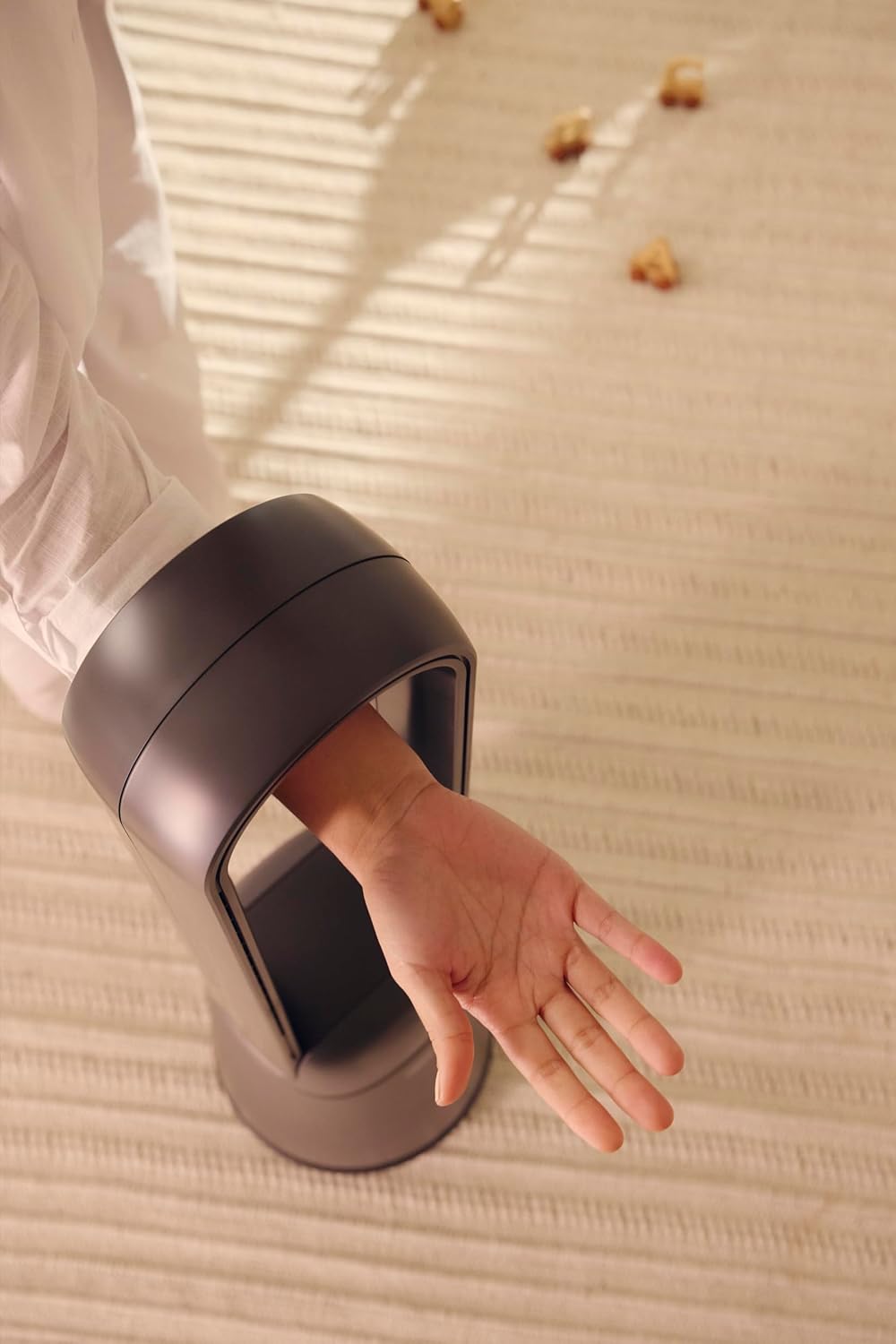
Figure 1: The bladeless design ensures safety, allowing a hand to pass through the air loop without obstruction.
2. Product voorbijview
The Defy DBF300 is a bladeless fan designed for efficient and quiet air circulation. It features multiple speed settings, various wind modes, and convenient remote control operation.

Figuur 2: Voorzijde view of the Defy DBF300 Bladeless Fan.
Belangrijkste kenmerken:
- Bladeless design for enhanced safety and easy cleaning.
- Up to 20 wind speed settings for precise airflow control.
- Multiple wind modes: Strong, Natural, Sleep, and Smart adaptive wind.
- Oscillation function with 4 modes for wide area coverage.
- Wireless remote control for convenient operation.
- Integrated touch-sensitive control panel on the unit.
- Timer function for automatic shut-off, adjustable up to 8 hours.
- Fluisterstille werking.
3. Instellen
3.1 Uitpakken
- Haal de ventilator voorzichtig uit de verpakking.
- Controleer tijdens het transport op eventuele schade. Gebruik het product niet als het beschadigd is en neem contact op met de klantenservice.
- Ensure all components are present: the main fan unit and the remote control.
3.2 Plaatsing
- Place the fan on a firm, level, and stable surface.
- Ensure there is adequate space around the fan for optimal airflow, avoiding obstructions like walls, furniture, or curtains.
- Do not place the fan in direct sunlight or near heat sources.
- Keep the fan away from areas where it might be exposed to water or high humidity.
3.3 Stroomaansluiting
- Before plugging in, ensure the power supply voltage komt overeen met het typeplaatje op de ventilator.
- Insert the power plug firmly into a suitable electrical outlet.
4. Gebruiksaanwijzing
The Defy DBF300 Bladeless Fan can be operated using the touch control panel on the unit or the provided remote control.
4.1 Configuratiescherm voorbijview

Figure 3: The fan's touch control panel and digital display.
- Aan/uit-knop (①): Turns the fan On or Off.
- Speed Adjustment (②): Increases or decreases wind speed.
- Mode Selection (③): Cycles through Strong, Natural, Sleep, and Smart adaptive wind modes.
- Oscillation (④): Activates or deactivates the oscillation function.
- Timer (⑤): Sets the auto shut-off timer.
- Digitaal display: Shows current speed, mode, or timer setting.
4.2 afstandsbediening

Figure 4: The remote control for the Defy DBF300 Bladeless Fan.
The remote control duplicates all functions available on the fan's control panel. Ensure the remote has working batteries (typically 2x AAA, not included) and is pointed towards the fan's receiver for optimal operation.
- Aan/uit-knop: Turns the fan On or Off.
- Snelheid +/- knoppen: Adjusts the wind speed (1-20).
- Modusknop: Cycles through Strong, Natural, Sleep, and Smart modes.
- Oscillatieknop: Toggles oscillation On/Off.
- Timer-knop: Sets the auto shut-off timer (1-8 hours).
4.3 Algemene werking
- Aan/uit: Press the Power button on the control panel or remote. The digital display will illuminate.
- Windsnelheid aanpassen: Use the Speed adjustment buttons on the control panel or the +/- buttons on the remote. The display will show the current speed level (1-20).
- Selecting Wind Mode: Press the Mode button to cycle through the available modes:
- Sterke modus: Provides a consistent, powerful airflow.
- Natuurlijke modus: Simulates natural breezes by varying wind speed.
- Slaapstand: Operates at a lower, quieter speed, gradually decreasing over time for comfortable sleep.
- Smart Adaptive Wind: Adjusts airflow based on ambient conditions (if sensor equipped, otherwise maintains a gentle flow).
- Activating Oscillation: Press the Oscillation button. The fan will begin to rotate horizontally. Press again to stop oscillation. There are 4 oscillation modes, which can be cycled through by repeatedly pressing the oscillation button.
- De timer instellen: Press the Timer button. Each press will increase the timer setting by 1 hour, up to a maximum of 8 hours. The fan will automatically turn off after the set time. To cancel the timer, cycle through until '00' or 'OFF' is displayed, or turn the fan off.
5. Onderhoud
Regular cleaning and proper storage will ensure the longevity and optimal performance of your Defy DBF300 Bladeless Fan.
5.1 Reinigen
- Haal altijd de stekker van de ventilator uit het stopcontact Haal de stekker uit het stopcontact voordat u gaat schoonmaken.
- Veeg de buitenkant van de ventilator schoon met een zachte, vochtige doek.amp doek. Gebruik geen schurende reinigingsmiddelen of oplosmiddelen.
- For the air inlet and outlet, use a soft brush or a vacuum cleaner with a brush attachment to remove dust and debris. The bladeless design makes these areas easily accessible for cleaning.
- Ensure no water or liquid enters the internal components of the fan.
- Laat de ventilator volledig drogen voordat u hem weer aansluit en in gebruik neemt.
5.2 Opslag
- If storing the fan for an extended period, clean it thoroughly as per the instructions above.
- Bewaar de ventilator in de originele verpakking of dek hem af om hem tegen stof te beschermen.
- Keep the fan in a cool, dry place, away from direct sunlight and extreme temperatures.
6. Probleemoplossing
Voordat u contact opneemt met de klantenservice, raadpleegt u de volgende handleiding voor probleemoplossing voor veelvoorkomende problemen.
| Probleem | Mogelijke oorzaak | Oplossing |
|---|---|---|
| De ventilator gaat niet aan. | Geen stroomvoorziening. Netsnoer niet goed aangesloten. | Zorg ervoor dat de ventilator is aangesloten op een werkend stopcontact. Controleer de aansluiting van het netsnoer. |
| Zwakke of geen luchtstroom. | Luchtinlaat/uitlaat geblokkeerd. Ventilatorsnelheid te laag ingesteld. | Check for obstructions and clear them. Verhoog de ventilatorsnelheid. |
| Afstandsbediening werkt niet. | Batterijen zijn leeg of verkeerd geplaatst. Obstructie tussen afstandsbediening en ventilator. | Replace batteries (2x AAA). Ensure correct polarity. Remove any objects blocking the signal path. Point remote directly at the fan. |
| Ventilator maakt vreemd geluid. | Ventilator staat niet op een vlakke ondergrond. Interne obstructie of beschadiging. | Plaats de ventilator op een stabiel, vlak oppervlak. Als het geluid aanhoudt, stop dan met het gebruik en neem contact op met de klantenservice. |
7. Specificaties
| Model | DBF300 |
| Merk | Defy |
| Kleur | Metaalgrijs |
| Vermogen / Wattage | 36 watt |
| Productafmetingen (D x B x H) | 28D x 25B x 97H centimeter |
| Artikelgewicht | 6.7 kg |
| Speciale functie | Bladeless, Oscillation, Remote Control, Timer |
| Energiebron | Elektrische kabel |
8. Garantie en ondersteuning
For detailed warranty information, please refer to the warranty card included with your product or visit the official Defy webwebsite. Bewaar uw aankoopbewijs voor eventuele garantieclaims.
If you encounter any issues not covered in this manual or require further assistance, please contact Defy customer support. Contact details can typically be found on the Defy webwebsite of uw productverpakking.
You can visit the Defy Store for more information: Defy Store on Amazon.