1. Inleiding
This manual provides detailed instructions for the installation, operation, and maintenance of your Girafit GRF-T350SW 3K 5MP Indoor/Outdoor Pan/Tilt/Zoom Wi-Fi Security Camera. Please read this manual thoroughly before using the product to ensure proper functionality and safety. Keep this manual for future reference.
2. Product voorbijview
Belangrijkste kenmerken
- 3K 5MP Resolution with 4X Digital Zoom: Biedt duidelijke en gedetailleerde videobeeldentage.
- 360° draaien en 180° kantelen: Offers comprehensive coverage of your monitoring area.
- AI Person/Pet/Vehicle Detection: Advanced artificial intelligence for accurate identification of subjects, reducing false alerts.
- Automatische bewegingsdetectie: Volgt automatisch gedetecteerde objecten binnen het gezichtsveld van de camera. view.
- Sterrenlichtkleuren nachtzicht: Enhanced low-light performance for vivid color images at night.
- Tweerichtingsaudio: Ingebouwde microfoon en luidspreker voor realtimecommunicatie.
- Auto Alert Siren: Schrikt indringers af met een hoorbaar alarm.
- IP65 weerbestendige classificatie: Suitable for outdoor use in various weather conditions.
- Flexibele opslagopties: Supports encrypted US cloud storage and local Micro SD card storage (up to 256GB).
- 2.4GHz/5GHz Wi-Fi Connectivity: Dual-band Wi-Fi support for stable connection.
Wat zit er in de doos?
- Girafit GRF-T350SW Camera Body
- Stroomadapter
- Montageschroeven en ankers
- Montagesjabloon
- Gebruiksaanwijzing

Figure 2.1: Girafit GRF-T350SW camera showing its pan and tilt capabilities.

Figure 2.2: The Girafit GRF-T350SW camera operating reliably in both rainy and sunny conditions, highlighting its IP65 weatherproof design.
3. Instellen
3.1 fysieke installatie
- Kies een locatie: Select a suitable outdoor or indoor location that provides the desired viewing angle and is within range of your Wi-Fi network. Ensure the power outlet is accessible.
- Monteer de camera: Use the provided mounting template to mark drill holes. Secure the mounting bracket to the wall or ceiling using the screws and anchors. Attach the camera to the bracket.
- Sluit stroom aan: Plug the power adapter into the camera and then into a power outlet. The camera will power on and initiate its startup sequence.
3.2 App-installatie en account aanmaken
- Download the Girafit App: Zoeken naar 'Girafit' in your smartphone's app store (iOS or Android) and download the official application.
- Maak een account aan: Open de app en volg de instructies op het scherm om een nieuw account te registreren.
3.3 Netwerkverbinding
- Apparaat toevoegen: In the Girafit app, tap the '+' icon to add a new device. Select your camera model.
- Volg de instructies in de app: The app will guide you through connecting the camera to your 2.4GHz or 5GHz Wi-Fi network. This typically involves scanning a QR code displayed on your phone with the camera lens.
- Voltooiing: Zodra de camera is verbonden, verandert de statusindicator en ziet u de livebeelden in de app.
4. In bedrijf
4.1 Bediening van pannen, kantelen en zoomen
Van het leven view in the Girafit app, use the on-screen controls to remotely adjust the camera's viewing angle. The camera supports 360° horizontal pan and 180° vertical tilt. You can also digitally zoom in up to 4X to view details.

Figure 4.1: Visual comparison demonstrating the clarity of 3K 5MP resolution with 4X zoom compared to standard 3MP resolution.
4.2 Bewegingsdetectie en automatische tracking
The camera features advanced AI detection capabilities to identify humans, pets, and vehicles. When motion is detected, the camera can automatically track the subject, zoom in, record the event, and send push notifications to your smartphone.
- Detectie inschakelen: Navigate to the camera settings in the app to enable AI Person/Pet/Vehicle Detection.
- Detectiezones instellen: Definieer specifieke gebieden binnen de camera view where you want motion detection to be active.
- Activate Auto Tracking: Enable auto tracking in the settings to allow the camera to follow detected subjects.
- Auto Alert Siren: Configure the camera to trigger an audible siren upon detection to deter unwanted visitors.

Figure 4.2: Illustration of the camera's automatic tracking feature, showing a person being followed with a 4X zoom.

Figure 4.3: The camera's AI accurately detecting a human, a pet, and a vehicle in a home environment.

Figure 4.4: The camera detecting activity in a defined hexagonal area and issuing an auto voice alert.
4.3 Nachtzicht
The GRF-T350SW offers multiple night vision modes for clear surveillance in low-light conditions.
- Sterrenlichtkleuren nachtzicht: Utilizes a Starlight Sensor and f/1.6 aperture to capture more light, providing full-color video even in very dim environments.
- Infrarood modus: Standaard zwart-wit nachtzicht met infrarood-LED's.
- Spotlight-modus: Activates built-in spotlights to illuminate the area and capture color video when motion is detected at night.
You can switch between these modes or set them to automatic in the app settings.

Figure 4.5: Visual representation of the camera's Starlight Color Night Vision, Infrared Mode, and Spotlight Mode capabilities.
4.4 Tweerichtingsaudio
The integrated microphone and speaker allow for two-way communication. You can speak through the camera to visitors or deter intruders directly from your smartphone via the Girafit app.
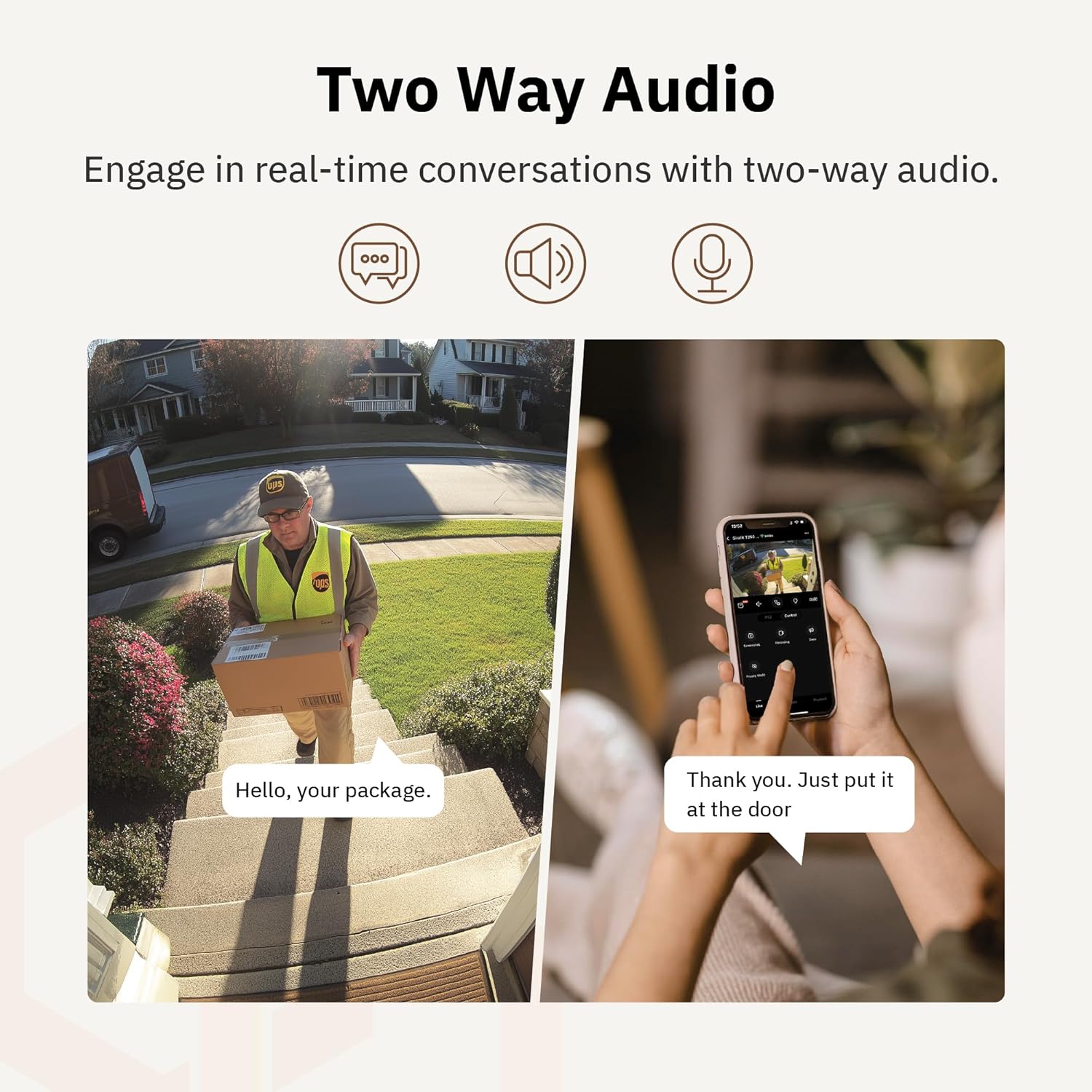
Figuur 4.6: Een examphet gebruik van tweewegsaudio om te communiceren met een bezorger aan de deur.
4.5 Privacymodus
For enhanced privacy, the camera features a privacy mode. When activated, the camera lens physically tilts down by 180°, ensuring no live feed is captured or transmitted. This provides 100% privacy protection when needed.

Figure 4.7: The camera in privacy mode, with the lens tilted downwards to ensure no recording or live view.
4.6 Video-opslag
The camera supports two primary methods for video storage:
- Micro SD kaart: Insert a Micro SD card (up to 256GB, not included) into the designated slot on the camera for local storage of recordings.
- Cloudopslag: Girafit offers encrypted cloud storage services in the US. Refer to the app for subscription options and details.
5. Onderhoud
5.1 Reinigen
Om optimale prestaties te behouden, dient u de cameralens en de behuizing regelmatig schoon te maken. Gebruik hiervoor een zachte, droge doek.amp Gebruik een doek om stof en vuil te verwijderen. Vermijd het gebruik van agressieve chemicaliën of schurende materialen die de lens of de afwerking kunnen beschadigen.
5.2 firmware-updates
Girafit regularly releases firmware updates to improve camera performance, add new features, and enhance security. Check the Girafit app periodically for available updates and follow the in-app instructions to install them. Ensure the camera has a stable power supply during updates.
6. Probleemoplossing
- Camera maakt geen verbinding met wifi:
- Zorg ervoor dat uw wifi-netwerk 2.4 GHz of 5 GHz is en dat het wachtwoord correct is.
- Plaats de camera dichter bij uw wifi-router.
- Start uw router en de camera opnieuw op.
- Slechte videokwaliteit:
- Controleer de snelheid van uw internetverbinding.
- Maak de cameralens schoon.
- Zorg ervoor dat de camera voldoende stroom krijgt.
- Bewegingsdetectie werkt niet:
- Controleer of bewegingsdetectie is ingeschakeld in de app-instellingen.
- Pas de detectiegevoeligheid en de detectiezones aan.
- Zorg ervoor dat er geen obstakels zijn die de camera blokkeren view.
- Problemen met tweerichtingsaudio:
- Check microphone and speaker permissions for the Girafit app on your phone.
- Zorg ervoor dat de microfoon en luidspreker van de camera niet worden geblokkeerd.
For further assistance, please contact Girafit customer support.
7. Specificaties
| Functie | Beschrijving |
|---|---|
| Modelnaam | GRF-T350SW |
| Resolutie video-opname | 3K (5MP) |
| Binnen-/buitengebruik | Openlucht |
| Connectiviteitstechnologie | Wi-Fi (2.4GHz/5GHz), Wired |
| Energiebron | Elektrische kabel |
| Montagetype | Muurbevestiging |
| Speciale functie | 2-Way Audio, AI Detection (Human/Pet/Vehicle), Auto Tracking, Color Night Vision, IP65 Weatherproof |
| Compatibele apparaten | Desktop, Laptop, Smartphone (Android/iOS) |
| Artikelafmetingen (L x B x H) | 2.63 x 2.63 x 4.76 inch |
| Artikelgewicht | 14.7 ons |
| Opslagopties | Micro SD-kaart (tot 256 GB), cloudopslag |
| UPC | 764742517881 |
8. Garantie en ondersteuning
Girafit products are designed for reliability and performance. For warranty information, please refer to the warranty card included with your product or visit the official Girafit website. For technical support, troubleshooting assistance, or any inquiries regarding your Girafit GRF-T350SW camera, please contact Girafit customer service through the contact information provided on the official website or within the Girafit app.


