Invoering
This instruction manual provides detailed guidance for the installation and maintenance of ConvOw replacement parts designed for the Xiaomi Mijia M40 D110CN Omni Infinite Robot Vacuum. Proper installation and regular maintenance ensure optimal performance and longevity of your robot vacuum cleaner.
Product voorbijview
This combination pack includes essential replacement components to maintain the cleaning efficiency of your Xiaomi Mijia M40 D110CN robot vacuum.
Meegeleverde componenten:
- Main Brush (1 piece)
- HEPA Filters (6 pieces)
- Dweildoeken (8 stuks)
- Dust Bags (8 pieces)
- Zijborstels (4 stuks)
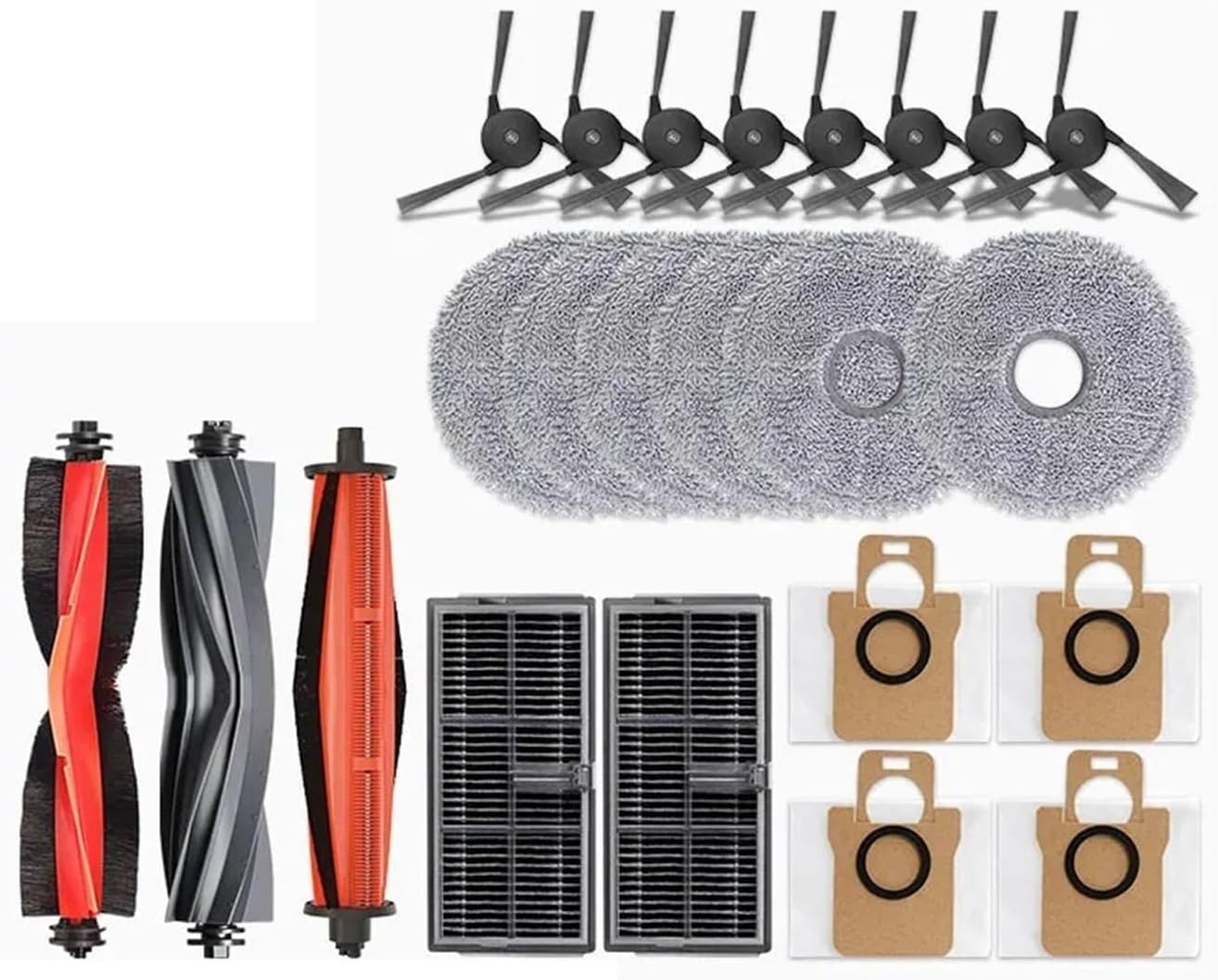
Image: A complete set of ConvOw replacement parts, including main brush, side brushes, HEPA filters, mop cloths, and dust bags, laid out for the Xiaomi Mijia M40 D110CN robot vacuum.

Image: An organized display of the ConvOw replacement parts kit, clearly indicating the quantity of each component: 1 main brush, 6 filters, 8 mop cloths, 8 dust bags, and 4 side brushes.
Installatiehandleiding
Before installing any replacement parts, ensure your robot vacuum is powered off and disconnected from its charging base.
1. Installatie van de hoofdborstel
- Flip the robot vacuum over to access the main brush compartment.
- Locate and open the main brush cover, usually secured by latches.
- Verwijder de oude hoofdborstel.
- Insert the new main brush, ensuring the ends align with the slots.
- Close the main brush cover until it clicks into place.

Afbeelding: Een gedetailleerde view of the detachable main brush, highlighting its flexible soft glue and tight nylon bristles designed for effective dust removal and easy cleaning by unscrewing the end caps.
2. Installatie van de zijborstel
- Draai de robotstofzuiger om.
- Unscrew the retaining screw(s) holding the old side brush in place.
- Remove the old side brush.
- Align the new side brush with the post and secure it with the screw(s).

Image: Two side brushes with wear-resistant hair bundles, designed to effectively collect dropped hair and dust during high-speed rotation, ensuring thorough cleaning of edges and corners.
3. Installatie van het HEPA-filter
- Open the dustbin compartment on your robot vacuum.
- Verwijder de vuilnisbak.
- Locate the filter housing within the dustbin and remove the old HEPA filter.
- Insert the new HEPA filter into the housing, ensuring a snug fit.
- Reinstall the dustbin into the robot vacuum.

Image: A HEPA filter designed to filter dust, and provide antibacterial and deodorant properties, effectively capturing fine particles to maintain air quality.
4. Installatie van de dweil
- Locate the mop module on your robot vacuum.
- Remove the used mop cloth, typically attached via Velcro or a sliding mechanism.
- Attach the new mop cloth to the mop module, ensuring it is securely fastened.
- Reattach the mop module to the robot vacuum.

Image: A circular mop cloth, made from tightly arranged fibers, designed for strong water absorption and effective cleaning and stain removal on various floor types.
5. Dust Bag Installation
- Open the dust collection compartment on your robot vacuum's auto-empty station (if applicable) or the robot itself.
- Verwijder voorzichtig de volle stofzak en zorg ervoor dat de opening goed is afgesloten om te voorkomen dat er stof ontsnapt.
- Insert a new dust bag, aligning it correctly within the compartment.
- Sluit de deur van het compartiment goed.

Image: Two dust bags illustrating a double filtration system, designed for meticulous and efficient dust collection without leakage, preventing fine dust from entering the motor room.
Onderhoud
Regular maintenance of your robot vacuum's accessories is crucial for maintaining its cleaning performance and extending its lifespan.
- Hoofdborstel: Inspect weekly for tangled hair or debris. Use the cleaning tool provided with your vacuum to remove any obstructions. Replace every 6-12 months, or sooner if visibly worn.
- Zijborstels: Check weekly for bent or damaged bristles. Clean off any hair or debris. Replace every 3-6 months, or if bristles are splayed or broken.
- HEPA-filters: Tap out dust weekly. Do not wash. Replace every 2-3 months to maintain filtration efficiency and prevent motor strain.
- Dweildoeken: Wash after each use. Replace every 1-3 months, or when they show signs of wear or reduced absorption.
- Stofzakken: Replace when full. The frequency depends on usage and household dust levels.
Note: Replacement frequency may vary based on usage, pet presence, and environmental factors.
Probleemoplossing
If you experience issues after replacing parts, consider the following:
- Verminderde zuigkracht: Ensure the HEPA filter is correctly seated and not clogged. Check the dust bag for fullness or improper installation.
- Poor Sweeping Performance: Verify side brushes are installed correctly and not tangled. Check the main brush for obstructions or wear.
- Ineffective Mopping: Ensure the mop cloth is clean and properly attached. Check the water tank (if applicable to your vacuum model) for sufficient water.
- Ongebruikelijke geluiden: Power off the vacuum and inspect all brushes for tangled hair or foreign objects. Ensure all covers are securely closed.
Specificaties
| Onderdeel | Materiaal | Verenigbaarheid |
|---|---|---|
| Hoofdborstel | Plastic, Nylon, Rubber | Xiaomi Mijia M40 D110CN Omni Infinite Robot Vacuum |
| Zijborstels | Kunststof, nylon | Xiaomi Mijia M40 D110CN Omni Infinite Robot Vacuum |
| HEPA-filters | High-efficiency filter material | Xiaomi Mijia M40 D110CN Omni Infinite Robot Vacuum |
| Dweildoeken | Ultra-fine fiber | Xiaomi Mijia M40 D110CN Omni Infinite Robot Vacuum |
| Stofzakken | Vliesstof | Xiaomi Mijia M40 D110CN Omni Infinite Robot Vacuum |
Note: Product dimensions and item weight are for the overall package, not individual components.
Ondersteuningsinformatie
For further assistance, questions regarding installation, or to report any issues with your ConvOw replacement parts, please contact the seller or manufacturer directly through the platform where the purchase was made. Refer to your purchase records for specific contact details.


