Invoering
Welcome to the HONOR 400 Lite 5G Smartphone user manual. This guide provides essential information for setting up, operating, maintaining, and troubleshooting your new device. Please read this manual thoroughly to ensure optimal performance and longevity of your smartphone.
Wat zit er in de doos?
Upon unboxing your HONOR 400 Lite, you should find the following items:
- HONOR 400 Lite 5G-smartphone
- USB-kabel
- Sim-uitwerptool
- Snelstartgids
- Garantiekaart
Note: The specific contents may vary by region.
Apparaat voorbijview
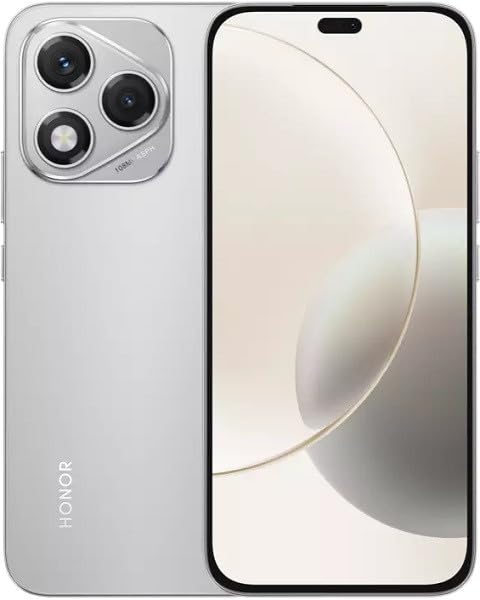
Image: The HONOR 400 Lite 5G Smartphone in Velvet Grey, showcasindoor het strakke design en de cameramodule aan de achterzijde.
The HONOR 400 Lite features a 6.7-inch AMOLED display with a resolution of 1080 x 2412 pixels. The device is equipped with a powerful camera system, including a 108 MP main sensor. Its ergonomic design ensures a comfortable grip and easy access to all physical buttons and ports.
Instellen
1. SIM-kaartinstallatie
- Zoek de SIM-kaarthouder aan de zijkant van uw toestel.
- Plaats het SIM-uitwerpgereedschap in het kleine gaatje naast de lade en druk stevig totdat de lade eruit springt.
- Place your Nano-SIM card(s) and/or eSIM (if applicable) into the tray with the gold contacts facing down, ensuring they are correctly aligned.
- Duw de lade voorzichtig terug in het apparaat totdat deze op zijn plaats klikt.
Belangrijk: This smartphone is designed for GSM networks only and is not compatible with CDMA networks (e.g., Verizon, Sprint, US Cellular in the USA). Please verify network compatibility with your service provider before use.
2. Eerste keer inschakelen
- Houd de aan/uit-knop (meestal aan de rechterkant) ingedrukt totdat het HONOR-logo verschijnt.
- Volg de instructies op het scherm om de eerste installatie te voltooien, waaronder het selecteren van de taal, het maken van een wifi-verbinding en het instellen van een Google-account.
Uw apparaat bedienen
Weergavefuncties
The 6.7-inch AMOLED display offers vibrant colors and deep blacks. Utilize gestures for navigation, access quick settings by swiping down from the top, and customize your home screen layout and widgets to personalize your experience.
Cameragebruik
Your HONOR 400 Lite is equipped with a high-resolution 108 MP main camera. Open the Camera app to access various modes such as Photo, Video, Portrait, and more. Tap on the screen to focus and use the on-screen shutter button to capture images or start recording videos. Explore settings for advanced options like HDR and AI enhancements.
Batterij en opladen
The device is powered by a 5230mAh non-removable battery. Use the provided USB cable to charge your device. Connect the USB-C end to your phone and the USB-A end to a compatible power adapter (not always included, check box contents) or computer USB port. For optimal charging speed, use a compatible fast charger.
Onderhoud
- Software-updates: Regularly check for and install system updates to ensure your device has the latest features, security patches, and performance improvements. Go to Settings > System & updates > Software update.
- Schoonmaak: Gebruik een zachte, pluisvrije doek om het scherm en de behuizing van je telefoon schoon te maken. Vermijd agressieve chemicaliën of schurende materialen.
- Opslagbeheer: Regelmatig onnodige zaken opruimen fileapps en apps om opslagruimte vrij te maken en optimale prestaties te behouden.
Probleemoplossing
If you encounter issues with your HONOR 400 Lite, try the following common troubleshooting steps:
- Apparaat reageert niet: Houd de aan/uit-knop ongeveer 10 seconden ingedrukt om het apparaat geforceerd opnieuw op te starten.
- App crasht: Wis de cache en gegevens van de app (Instellingen > Apps > [App-naam] > Opslag > Cache wissen/Gegevens wissen) of installeer de app opnieuw.
- Batterijverbruik: Check battery usage in Settings to identify power-hungry apps. Reduce screen brightness and disable unnecessary features like GPS or Wi-Fi when not in use.
- Netwerkproblemen: Ensure your SIM card is correctly inserted. Try toggling Airplane Mode on and off. If issues persist, contact your network provider.
Specificaties
| Modelnaam | Eer 400 Lite |
| Weergave | 6.7 inch AMOLED, 1080 x 2412 pixels |
| Verwerker | Mediatek Dimensity 7025 Ultra (6 nm), Octa-core (2x2.5 GHz Cortex-A78 & 6x2.0 GHz Cortex-A55) |
| RAM | 12GB |
| Interne opslag | 256 GB (niet uitbreidbaar) |
| Achteruitrijcamera | 108 MP, f/1.8, (wide), 1/1.67", PDAF; 16 MP, f/2.5, (wide) |
| Besturingssysteem | Androïde 15 |
| Batterij | 5230mAh, non-removable |
| Netwerk compatibiliteit | 2G, 3G, 4G, 5G (GSM Only) |
| Kleur | Velvet Grey |
| Speciale kenmerken | Dubbele simkaart |
Garantie en ondersteuning
Your HONOR 400 Lite smartphone comes with a standard manufacturer's warranty. Please refer to the included Warranty Card for detailed terms and conditions, including coverage period and service procedures. For technical support or further assistance, please visit the official HONOR support website of neem contact op met hun klantenservice.
Bewaar uw aankoopbewijs voor garantieclaims.


