1. Inleiding
Bedankt voor uw aankoopasing the iFFALCON 40S55T 40-inch Full HD Google TV. This manual provides essential information for the safe and efficient use of your television. Please read it thoroughly before operating the device and retain it for future reference.
The iFFALCON 40S55T is a tunerless smart TV designed for streaming content, offering a Full HD display, Google TV operating system, Chromecast built-in, and Dolby Audio for an immersive entertainment experience.
2. Veiligheidsinformatie
Volg altijd de basisveiligheidsmaatregelen wanneer u deze televisie gebruikt om het risico op brand, elektrische schokken en letsel te beperken.
- Stel de TV niet bloot aan regen of vocht.
- Open de tv nietasing; laat alle onderhoudswerkzaamheden over aan gekwalificeerd personeel.
- Zorg voor voldoende ventilatie rondom de TV.
- Houd de televisie uit de buurt van direct zonlicht, warmtebronnen en sterke magnetische velden.
- Gebruik uitsluitend het netsnoer en de accessoires die door de fabrikant zijn meegeleverd.
- Haal de stekker van de televisie uit het stopcontact tijdens onweer of wanneer u de televisie gedurende langere tijd niet gebruikt.
3. Inhoud van het pakket
Controleer of alle artikelen in de doos aanwezig zijn:
- iFFALCON 40S55T 40-inch Full HD Google TV
- Afstandsbediening
- TV-standaard (2 stuks)
- Schroeven voor tv-standaard
- Stroomkabel
- Garantiekaart
- Gebruiksaanwijzing (dit document)
4. Instellen
4.1 De tv-standaard bevestigen
- Leg de tv voorzichtig met het scherm naar beneden op een zachte, vlakke ondergrond om schade aan het scherm te voorkomen.
- Plaats elk standaardstuk op één lijn met de bijbehorende sleuven aan de onderkant van de tv.
- Bevestig de standaards met de meegeleverde schroeven. Zorg ervoor dat ze stevig vastzitten.
4.2 Stroom aansluiten
Sluit de voedingskabel aan op de voedingsingang van de tv en steek de stekker vervolgens in een stopcontact. De tv gaat dan in de stand-bymodus.
4.3 Initial Setup (Google TV & Network)
Bij het eerste inschakelen begeleidt de tv u door het installatieproces van Google TV. Dit omvat:
- Taal selectie.
- Verbinding maken met een Wi-Fi-netwerk.
- Signing in with your Google account to access personalized content and apps.
- Accepteren van de algemene voorwaarden.
4.4 Connectiviteit
The iFFALCON 40S55T offers various connection options for external devices.

Afbeelding: Overview of the TV's connectivity options, including HDMI, USB, Bluetooth, and Wi-Fi.
- HDMI-poorten: Sluit externe apparaten aan, zoals spelconsoles, Blu-ray-spelers of settopboxen.
- USB-poort: Voor het aansluiten van USB-opslagapparaten om media af te spelen files.
- Wifi: For wireless internet connection to access streaming services and online features.
- Bluetooth: For connecting wireless headphones, speakers, or other Bluetooth-enabled accessories.
4.5 Tunerless Operation
This TV is designed as a tunerless model, meaning it does not have a built-in tuner for terrestrial (over-the-air) broadcasts. To watch terrestrial, BS, or CS broadcasts, an external tuner is required and must be purchased separately.

Image: The iFFALCON 40S55T TV showcasing its smart features, highlighting its tunerless design and ability to enjoy internet video content without an antenna connection.
5. De tv bedienen
5.1 Afstandsbediening voorbijview
The remote control provides access to all TV functions, including power, volume, channel navigation, and smart TV features. It also supports voice search via 'Hey Google'.

Image: The TV remote control, featuring quick access buttons for popular streaming services and a dedicated microphone button for voice commands.
- Aan/uit-knop: Hiermee zet u de televisie aan of uit.
- Navigatie knoppen: Gebruik de richtingsknoppen en de OK-knop om door de menu's te navigeren.
- Volume-/kanaalknoppen: Adjust volume and change channels (if an external tuner is connected).
- App-snelkoppelingsknoppen: Direct access to popular streaming services like Netflix, YouTube, etc.
- Microfoonknop: Press and hold to activate 'Hey Google' voice search.
5.2 Google TV-functies
Your iFFALCON TV runs on Google TV, providing a personalized and integrated entertainment experience.
- Inhoudsaggregatie: Google TV organizes movies, shows, and live TV from all your apps and subscriptions into one place.
- Gepersonaliseerde aanbevelingen: Gebaseerd op uw viewing history and preferences, Google AI suggests content you might enjoy.
- Zoeken met stem: Use the 'Hey Google' feature on your remote to quickly find content, get information, or control smart home devices.
- Chromecast ingebouwd: Easily cast content from your smartphone, tablet, or computer directly to your TV screen.

Image: A smartphone screen mirroring content to the iFFALCON TV, demonstrating the Chromecast built-in feature for enjoying mobile content on a larger display.
5.3 Beeldinstellingen
The TV incorporates advanced image processing technologies to deliver a superior viewervaring.
- AI PQ Processor: TCL's proprietary AiPQ Processor intelligently adjusts image quality at the pixel level, enhancing clarity, color, and contrast for a vivid and realistic picture.
- Full HD (FHD): Experience sharp and detailed images with Full High Definition resolution, offering 200% more detail than standard HD screens.

Image: A visual comparison illustrating the enhanced detail and clarity provided by Full HD resolution compared to standard HD.
- HDR10/HLG Support: Enjoy a wider range of colors and contrast with HDR10 and HLG compatibility, revealing stunning detail in both bright and dark scenes.

Afbeelding: Het tv-scherm toontasing the vibrant and detailed picture quality achieved with HDR10/HLG technology.
- Micro-verduistering: This technology analyzes the image in hundreds of separate zones to adjust brightness and darkness independently, enhancing contrast and picture quality.

Image: A visual representation of Micro Dimming technology, illustrating how it enhances contrast and picture depth by adjusting brightness in specific areas of the screen.
5.4 Sound Settings (Dolby Audio)
The TV features Dolby Audio for clear, rich, and immersive sound.
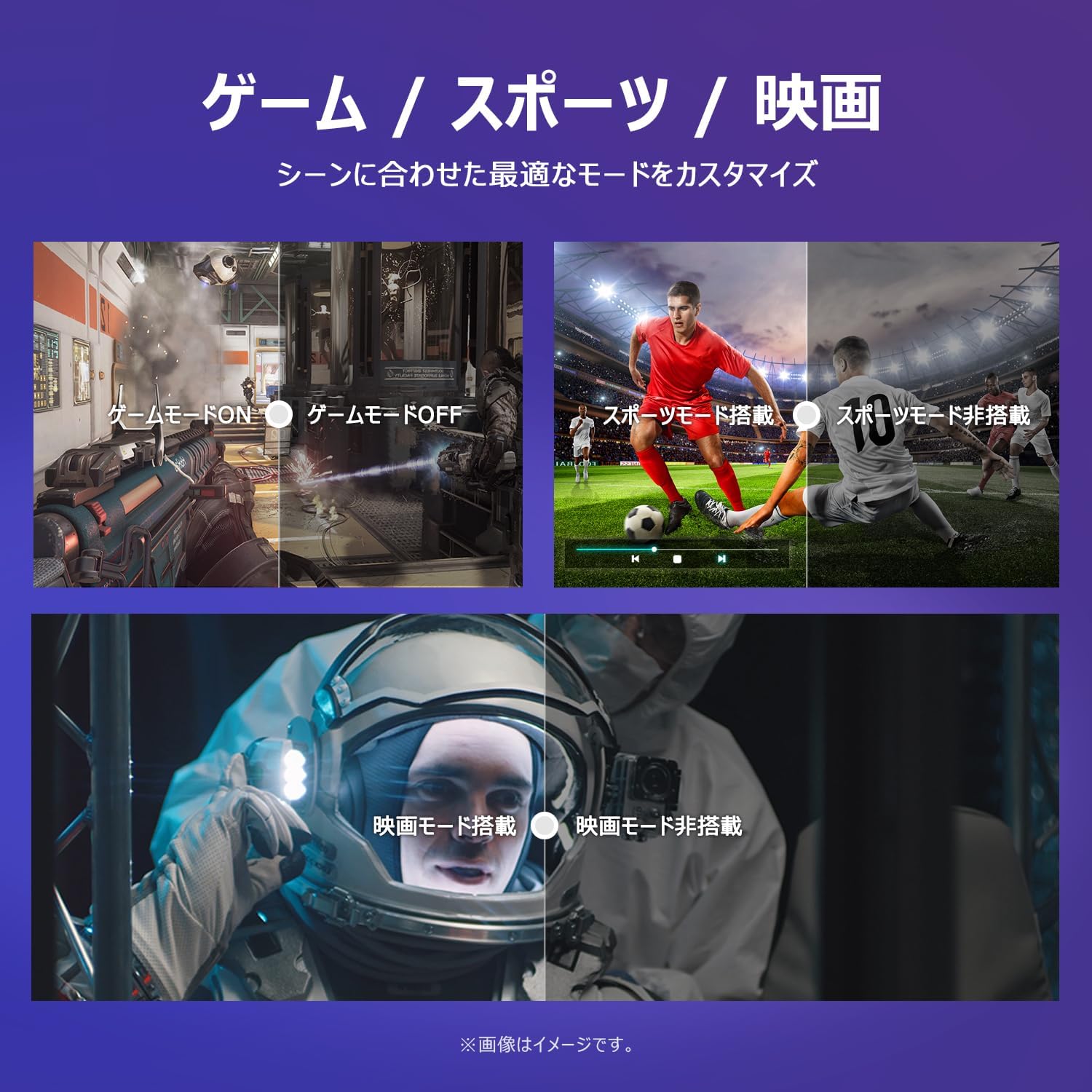
Image: The TV screen with a visual representation of sound, highlighting the immersive audio experience provided by Dolby Audio.
Access the sound settings menu to adjust modes like Standard, Music, Movie, or Custom to suit your preferences.
5.5 Spelmodus
Activate Game Mode for an optimized gaming experience with reduced input lag.
Image: Visual comparisons demonstrating the optimized settings for Game Mode, Sports Mode, and Movie Mode, adapting the TV's performance to different content types.
The TV also offers dedicated Sports Mode and Movie Mode to enhance viewing for specific content types.
5.6 Systeeminstellingen
The quick settings menu allows you to customize frequently used system settings and rearrange their order for intuitive and convenient access.

Afbeelding: A view of the TV's quick system settings interface, illustrating how users can easily access and customize various functions like brightness, picture mode, and network settings.
6. Onderhoud
Goed onderhoud en verzorging verlengen de levensduur van uw televisie.
- Het scherm schoonmaken: Veeg het scherm voorzichtig schoon met een zachte, pluisvrije doek. Gebruik voor hardnekkige vlekken een speciaal voor tv's ontwikkelde schermreiniger. Breng deze aan op de doek, niet rechtstreeks op het scherm.
- Het schoonmaken van de Casing: Gebruik een zachte, droge doek om de tv schoon te vegenasing. Gebruik geen schurende reinigingsmiddelen of oplosmiddelen.
- Ventilatie: Zorg ervoor dat de ventilatieopeningen aan de achterkant van de tv niet geblokkeerd zijn om oververhitting te voorkomen.
- Stroomkabel: Controleer regelmatig het netsnoer op beschadigingen. Neem bij schade contact op met de klantenservice voor een vervanging.
7. Probleemoplossing
Als u problemen ondervindt met uw tv, raadpleeg dan de volgende veelvoorkomende problemen en oplossingen. Als het probleem aanhoudt, neem dan contact op met de klantenservice.
| Probleem | Mogelijke oorzaak | Oplossing |
|---|---|---|
| Geen stroom | Stroomkabel niet aangesloten; Stopcontact werkt niet | Ensure power cable is securely plugged in; Test outlet with another device |
| Geen beeld, maar wel geluid | Onjuiste invoerbron; probleem met extern apparaat | Druk op de 'Input'-knop op de afstandsbediening om de juiste bron te selecteren; controleer de aansluitingen van externe apparaten |
| Geen geluid, maar wel beeld | Volume gedempt of te laag; Probleem met extern audiosysteem | Unmute or increase volume; Check audio cable connections to external sound system |
| Afstandsbediening werkt niet | Batterijen leeg; Obstructie tussen afstandsbediening en tv | Vervang de batterijen; verwijder eventuele obstakels; zorg ervoor dat de afstandsbediening op de infraroodsensor van de tv is gericht. |
| Kan geen verbinding maken met wifi | Onjuist wachtwoord; Routerprobleem; TV te ver van router | Controleer het wifi-wachtwoord; herstart de router; plaats de tv dichter bij de router of gebruik een wifi-versterker. |
8. Specificaties
Detailed technical specifications for the iFFALCON 40S55T TV:

Image: Dimensional drawing of the iFFALCON 40S55T TV, indicating its physical measurements.
| Functie | Specificatie |
|---|---|
| Schermgrootte | 40 inch |
| Weergavetype | VA Liquid Crystal |
| Oplossing | Volledig HD (1920 x 1080) |
| Vernieuwingsfrequentie | 60Hz |
| Beeldverhouding | 16:9 |
| Contrastverhouding | 1000:1 |
| Besturingssysteem | Google-tv |
| Audio-uitgang | 20 Watts (2.1 channels) |
| HDMI-poorten | 2 |
| USB-poorten | 1 |
| Draadloze connectiviteit | Wi-Fi, Bluetooth |
| Productafmetingen (B x H x D) | 89.2 x 55.8 x 18.4 cm (met standaard) |
| Productgewicht | 4.63 kg |
| Geschikt voor wandmontage | Ja |
| Meegeleverde accessoires | Stand, Remote Control, Warranty Card, Power Cable |
9. Garantie en ondersteuning
Your iFFALCON 40S55T TV comes with a manufacturer's warranty. Please refer to the included warranty card for specific terms, conditions, and duration of coverage.
For technical support, troubleshooting assistance beyond this manual, or warranty claims, please contact iFFALCON customer service. Contact information can typically be found on the warranty card or the official iFFALCON webplaats.
Please have your model number (40S55T) and purchase date ready when contacting support.


