Invoering
The STRONG Leap-UNA TV Streaming Stick is a compact and powerful device designed to transform your television into a smart TV, providing instant access to a vast array of streaming content. Powered by Android TV 11, it offers seamless 2K resolution streaming with Wi-Fi 5 connectivity. This manual provides detailed instructions for setting up, operating, and maintaining your Leap-UNA streaming stick to ensure an optimal entertainment experience.
Veiligheidsinformatie
- Lees alle instructies voordat u het apparaat gebruikt.
- Stel het apparaat niet bloot aan regen, vocht of extreme temperaturen.
- Zorg voor voldoende ventilatie rond het apparaat om oververhitting te voorkomen.
- Gebruik alleen de voedingsadapter die bij het apparaat is geleverd.
- Probeer het apparaat niet zelf te demonteren of te repareren. Laat alle onderhoudswerkzaamheden over aan gekwalificeerd personeel.
- Houd het apparaat uit de buurt van direct zonlicht en warmtebronnen.
Inhoud van het pakket
Controleer of alle items aanwezig zijn en in goede staat zijn:
- STRONG Leap-UNA 2K Android TV Streaming Stick
- Afstandsbediening
- Power Adapter (or USB cable for power)
- HDMI Extender (if included)
- Gebruikershandleiding (dit document)
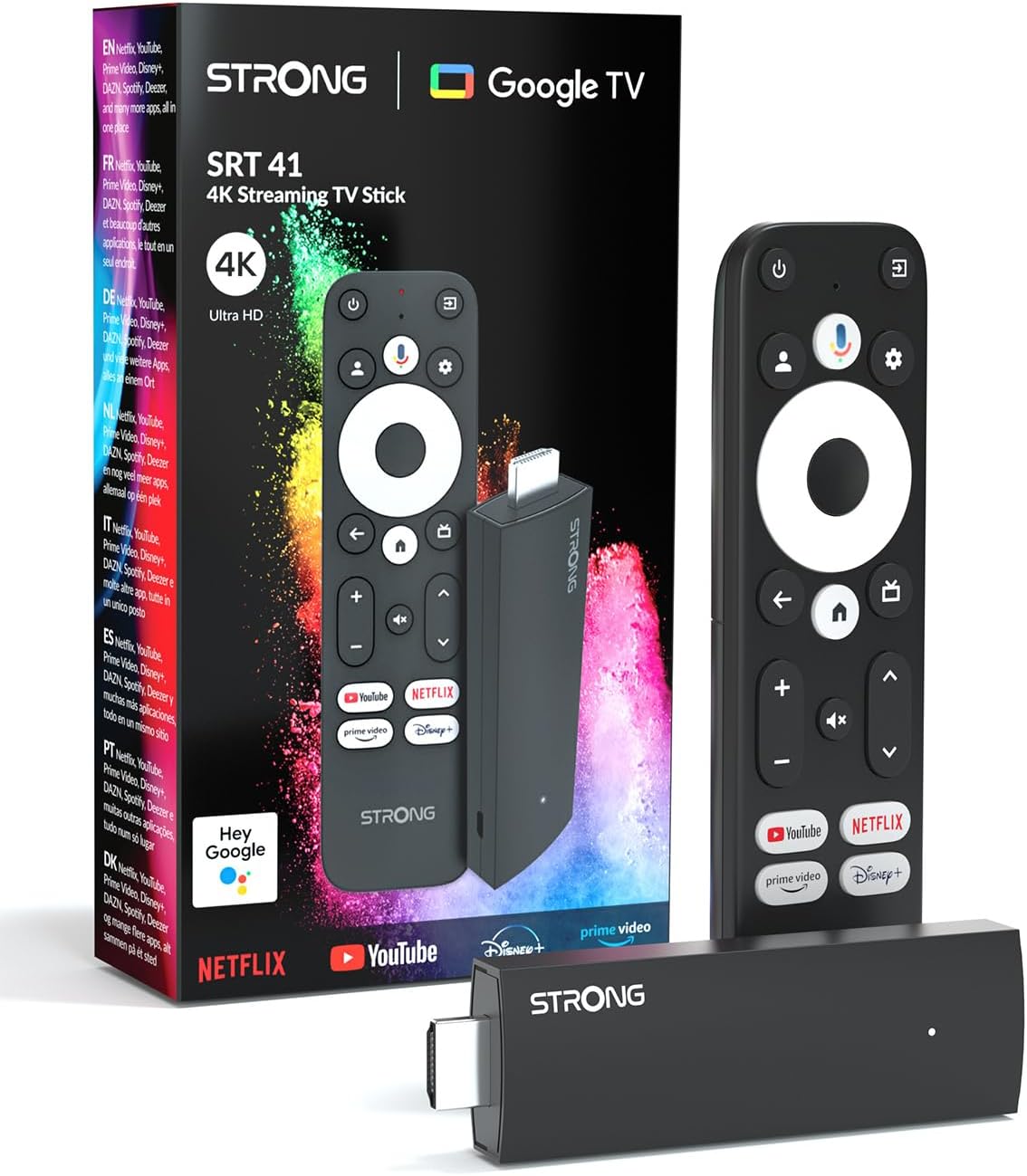
Image: The STRONG Leap-UNA streaming stick, its remote control, and the product packaging. This shows the main components included in the box.
Product voorbijview
The Leap-UNA stick is designed for ease of use and portability. It connects directly to your TV's HDMI port.
Apparaatcomponenten:
- Streaming Stick: Compact device with an HDMI connector for TV and a Micro USB port for power.
- Afstandsbediening: Features dedicated buttons for power, navigation, volume, Google Assistant, and quick access to popular streaming services like Netflix and YouTube.

Image: A close-up of the STRONG Leap-UNA streaming stick, highlighting its compact design and connectivity options including HDMI and Micro USB ports.
Instellen
Follow these steps to set up your STRONG Leap-UNA streaming stick:
- Aansluiten op tv: Plug the STRONG Leap-UNA streaming stick directly into an available HDMI port on your television. If space is limited, use an HDMI extender (if provided).
- Inschakelen: Connect the power adapter to the Micro USB port on the streaming stick and then plug the adapter into a power outlet. The device will power on automatically.
- Selecteer HDMI-ingang: Use your TV's remote control to select the correct HDMI input source to which the Leap-UNA stick is connected.
- Afstandsbediening koppelen: Follow the on-screen instructions to pair your remote control. This usually involves pressing and holding specific buttons on the remote close to the stick.
- Verbinden met wifi: On the screen, select your Wi-Fi network from the list and enter the password. Ensure you have a stable internet connection for optimal streaming.
- Google-account instellen: Sign in with your Google account. This is necessary to access the Google Play Store, Google Assistant, and other Google services. If you don't have one, you can create one.
- Apps installeren: After initial setup, you can download and install your favorite streaming applications like Netflix, Amazon Prime Video, YouTube, and Disney+ from the Google Play Store.

Image: Visual representation of the simple setup process: 1. Connect the stick to your TV. 2. Connect to your internet box (Wi-Fi). 3. Start streaming your content.
Gebruiksaanwijzing
De afstandsbediening gebruiken:
The included remote control allows you to navigate the Android TV interface and control your streaming experience.
- Navigatiepad: Gebruik het ronde touchpad om door de menu's te navigeren en items te selecteren.
- Terugknop: Keert terug naar het vorige scherm.
- Thuis knop: Keert terug naar het startscherm van Android TV.
- Google Assistent-knop: Druk om spraakopdrachten te activeren.
- Volumeknoppen: Pas het tv-volume aan.
- Speciale app-knoppen: Quickly launch Netflix, YouTube, Prime Video, and Disney+ (if available).

Image: The remote control for the STRONG Leap-UNA, highlighting its dedicated app buttons and the wide range of applications available through Google Play.
Spraakbesturing met Google Assistent:
The integrated Google Assistant allows you to control your device and search for content using your voice. Press the Google Assistant button on your remote and speak your command. Examples omvatten:
- "Netflix openen"
- "Zoek naar actiefilms"
- "Speel [Filmtitel] af"
- "Hoe is het weer?"

Image: The STRONG Leap-UNA remote control positioned in front of a TV screen, illustrating the use of Google Assistant for voice commands, such as "Avvia Netflix" (Start Netflix).
Chromecast ingebouwd:
With Chromecast built-in, you can cast content directly from your smartphone, tablet, or computer to your TV. Simply open a compatible app on your mobile device and tap the Cast icon ▶ to send the content to your TV.

Image: A TV screen displaying content being cast via Google Cast, with a smartphone in the foreground demonstrating the casting functionality.
Onderhoud
To ensure the longevity and optimal performance of your STRONG Leap-UNA streaming stick, follow these maintenance guidelines:
- Schoonmaak: Gebruik een zachte, droge doek om het apparaat schoon te maken. Gebruik geen vloeibare reinigingsmiddelen of spuitbussen.
- Ventilatie: Ensure the device is placed in a well-ventilated area and that its vents are not blocked.
- Software-updates: The device may receive automatic software updates. Ensure it is connected to the internet to receive these updates, which improve performance and add new features.
- Opslag: Wanneer u het apparaat gedurende langere tijd niet gebruikt, bergt u het op op een koele, droge plaats.
Probleemoplossing
If you encounter issues with your STRONG Leap-UNA streaming stick, refer to the following common problems and solutions:
| Probleem | Mogelijke oorzaak | Oplossing |
|---|---|---|
| Geen stroom/apparaat gaat niet aan | Stroomkabel niet goed aangesloten; Defecte stroomadapter; Probleem met stopcontact. | Controleer alle stroomaansluitingen. Probeer een ander stopcontact. Controleer of de stroomadapter werkt. |
| Geen beeld op tv | Incorrect HDMI input selected; Loose HDMI connection; TV compatibility issue. | Ensure your TV is on the correct HDMI input. Reconnect the HDMI cable. Try a different HDMI port on your TV. |
| Afstandsbediening reageert niet | Batteries are low or dead; Remote not paired; Obstruction between remote and stick. | Replace batteries. Re-pair the remote control (refer to Setup section). Ensure no obstructions. |
| Buffering of slechte streamingkwaliteit | Weak Wi-Fi signal; Internet speed issues; Network congestion. | Move the stick closer to your Wi-Fi router. Restart your router. Check your internet speed. Reduce other network activity. |
| Apps crashen of bevriezen | App error; Insufficient memory; Software glitch. | Restart the app. Clear the app's cache (Settings > Apps > [App Name] > Clear cache). Restart the streaming stick. |
Specificaties
| Functie | Detail |
|---|---|
| Merk | Sterk |
| Modelnaam | Leap-UNA |
| Besturingssysteem | Android-tv 11 |
| Oplossing | 2K |
| Connectiviteitstechnologie | Bluetooth, HDMI, IR, Wi-Fi (Wi-Fi 5) |
| Ondersteunde internetdiensten | Netflix, Amazon Prime Video, Disney+, YouTube |
| RAM-grootte | 1GB |
| Afmetingen | 9L x 3B x 1.5H centimeter |
| Compatibele apparaten | TV, smartphone, tablet, personal computer, laptop |
| Kleur | Zwart |
Garantie en ondersteuning
STRONG products are designed for reliability and performance. For warranty information and technical support, please refer to the warranty card included with your product or visit the official STRONG website. You can also contact customer support through the details provided on the packaging or website for assistance with any issues not covered in this manual.
Voor de meest recente informatie en ondersteuning kunt u terecht op: www.sterk.tv