1. Inleiding
This manual provides essential information for setting up, operating, and maintaining your new realme 14 Pro+ 5G Smartphone. Please read it carefully to ensure optimal performance and longevity of your device.
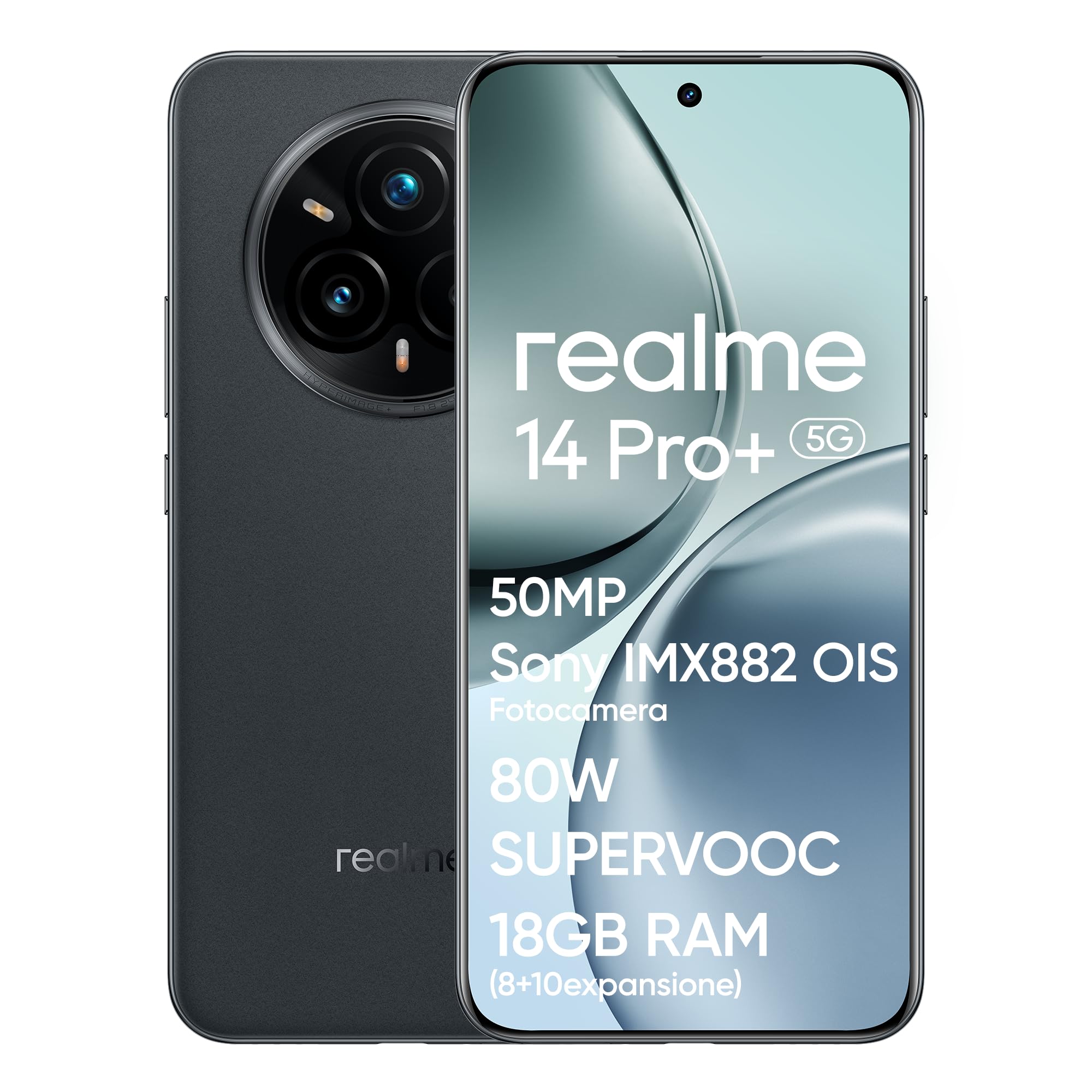
Afbeelding 1.1: Voorkant view of the realme 14 Pro+ 5G Smartphone.
2. Apparaat voorbijview
The realme 14 Pro+ 5G is a high-performance smartphone featuring a Snapdragon 7s Gen 3 5G chipset, a 50MP Sony IMX896 OIS camera, and a Quad-Curve display. It is designed for robust daily use with IP69, IP68, and IP66 water and dust resistance.
Belangrijkste kenmerken:
- Verwerker: Snapdragon 7s Gen 3 5G Chipset for fast and efficient performance.
- Camerasysteem: 50MP Sony IMX896 OIS Main Camera, 3X Periscope Sony OIS Camera, 32MP Selfie Camera, 112° Ultra-Wide Camera, MagicGlow Triple Flash.
- Weergave: Immersive Quad-Curve AMOLED display with 120Hz refresh rate and AI Visual Protection.
- Batterij: 5260mAh capacity with 80W SUPERVOOC fast charging.
- Duurzaamheid: IP69, IP68, and IP66 water and dust resistance.
- Ontwerp: Unique Pearl White (color-changing) or Suede Grey finish.

Afbeelding 2.1: voorbijview of key features including processor, camera, display, battery, and water resistance.
3. Installatiehandleiding
3.1 Uitpakken en eerste inspectie
Carefully remove all components from the box. Verify that the smartphone and all accessories are present and undamaged. The box should contain the smartphone and a charger.
3.2 SIM-kaarten plaatsen
- Zoek de SIM-kaarthouder aan de zijkant van het apparaat.
- Plaats het SIM-uitwerpgereedschap in het kleine gaatje naast de lade en druk voorzichtig totdat de lade eruit springt.
- Plaats uw nano-simkaarten in de daarvoor bestemde sleuven in de lade. Zorg ervoor dat de gouden contactpunten naar beneden wijzen.
- Plaats de SIM-lade voorzichtig terug in de telefoon.
3.3 Inschakelen en eerste configuratie
- Houd de aan/uit-knop (aan de rechterkant) ingedrukt totdat het realme-logo verschijnt.
- Volg de instructies op het scherm om je taal te selecteren, verbinding te maken met een wifi-netwerk en je Google-account in te stellen.
- Je wordt begeleid bij het instellen van beveiligingsfuncties zoals ontgrendeling met vingerafdruk en gezichtsherkenning.

Afbeelding 3.1: Zijkant profile of the realme 14 Pro+ 5G, illustrating button placement.
4. Uw smartphone bedienen
4.1 Weergavefuncties
The realme 14 Pro+ 5G features an advanced Quad-Curve AMOLED display. This display offers a 120Hz refresh rate for smooth scrolling, a 1.5K resolution (1080x2400), 1.07 Billion True Colors, and a peak brightness of 1500 nits. AI Visual Protection with 3840Hz PWM dimming helps reduce eye strain.

Image 4.1: The Quad-Curve display of the realme 14 Pro+ 5G.
4.2 camerasysteem
Your device is equipped with a versatile camera system for capturing high-quality photos and videos:
- Hoofdcamera: 50MP Sony IMX896 OIS sensor (f/1.8 aperture, 1/1.56" sensor size) for ultra-sharp portraits and 4K video recording.
- Periscoop-telefotocamera: 3X Sony OIS (IMX882, f/2.65 aperture) with up to 120X SuperZoom.
- Ultragroothoekcamera: 112° veld van view.
- Selfiecamera: 32MP with AI Beauty algorithms.
- MagicGlow Triple Flash: Provides adjustable luminosity and color temperature for realistic portraits in various lighting conditions.
Advanced AI features include AI Ultra Clarity 2.0 for enhanced image sharpness, AI Snap for capturing fast-moving subjects, and AI Eraser 2.0 for removing unwanted objects from photos.

Afbeelding 4.2: Gedetailleerd view of the realme 14 Pro+ 5G camera system.
Video 4.1: Officiële productvideopresentatieasing the realme 14 Pro+ 5G smartphone's features and capabilities, including camera and durability.
4.3 Prestaties en gaming
Powered by the Snapdragon 7s Gen 3 5G chipset, the realme 14 Pro+ 5G delivers fast and fluid performance. It supports 120 FPS gaming for an enhanced mobile gaming experience. The dedicated GT Mode further optimizes performance for demanding applications.
4.4 Batterij en opladen
The device is equipped with a 5260mAh battery, providing extended usage. The 80W SUPERVOOC fast charging technology allows for rapid recharging, minimizing downtime.
5. Onderhoud
5.1 Uw apparaat schoonmaken
- Gebruik een zachte, pluisvrije doek om het scherm en de behuizing van de telefoon schoon te maken.
- Vermijd het gebruik van agressieve chemicaliën of schurende materialen, aangezien deze de afwerking kunnen beschadigen.
- For ports, use a soft brush or compressed air to gently remove dust and debris.
5.2 Software-updates
Controleer regelmatig op software-updates en installeer deze om ervoor te zorgen dat uw apparaat over de nieuwste functies, beveiligingspatches en prestatieverbeteringen beschikt. U vindt deze optie meestal in Instellingen > Over de telefoon > Software-update.
5.3 Batterijonderhoud
- Stel de telefoon niet bloot aan extreme temperaturen.
- Use only the official 80W SUPERVOOC charger and cable for optimal charging performance and battery health.
- Bij langdurige opslag laadt u de batterij op tot ongeveer 50% en schakelt u het apparaat uit.
6. Probleemoplossing
6.1 Veelvoorkomende problemen en oplossingen
- Apparaat gaat niet aan: Zorg ervoor dat de batterij is opgeladen. Sluit de lader aan en wacht een paar minuten voordat u het apparaat opnieuw probeert in te schakelen.
- Problemen met opladen: Check if the charger and cable are securely connected. Try a different power outlet or charger.
- Connectivity problems (Wi-Fi/Bluetooth/5G): Toggle airplane mode on and off. Restart the device. Check network settings.
- Camera werkt niet: Restart the camera app or the device. Ensure no other app is using the camera.
- Apps die crashen: Clear the cache of the problematic app (Settings > Apps > [App Name] > Storage > Clear cache). If the issue persists, reinstall the app.
6.2 Fabrieksinstellingen herstellen
Als u aanhoudende softwareproblemen ondervindt, kunt u deze mogelijk oplossen door de fabrieksinstellingen te herstellen. Waarschuwing: Hiermee worden alle gegevens op uw telefoon gewist. Maak een back-up van belangrijke gegevens voordat u verdergaat. Ga naar Instellingen > Systeem > Resetopties > Wis alle gegevens (fabrieksreset).
7. Specificaties
| Functie | Specificatie |
|---|---|
| Merk | rijk |
| Modelnaam | realme 14 Pro+ 5G |
| Modelnummer | 6941764439740 |
| Verwerker | Snapdragon 7s Gen 3, 2.4 GHz |
| RAM | 8GB |
| Interne opslag | 256GB |
| Besturingssysteem | Android (realme UI 6.0) |
| Weergavetype | AMOLED Quad-Curve |
| Weergaveresolutie | 1080x2400 |
| Hoofdcamera | 50MP Sony IMX896 OIS |
| Videoresolutie | 4K (3840x2160) |
| Batterijcapaciteit | 5260 mAh (lithium-polymeer) |
| Connectiviteit | 5G, Bluetooth, Wi-Fi |
| Water-/stofbestendigheid | IP69, IP68, IP66 |
| Gewicht | 500 gram |
| Meegeleverde componenten | Box (Smartphone and Charger) |
8. Garantie en ondersteuning
8.1 Productgarantie
Your realme 14 Pro+ 5G Smartphone is covered by a limited warranty. The terms and conditions of this warranty may vary based on your region and point of purchase. Please refer to the warranty card included with your product or contact your retailer for specific details regarding warranty duration and coverage.
8.2 Klantenservice
For technical assistance, troubleshooting, or service inquiries, please visit the official realme support website or contact their customer service hotline. Contact information can typically be found on the realme official webwebsite of in de documentatie die bij uw apparaat is geleverd.


