1. Inleiding
This manual provides detailed instructions for the installation, operation, and maintenance of your ZUMIMALL BK05 3MP Outdoor Security Camera. Please read this manual thoroughly before using the product to ensure proper functionality and safety.
Inhoud van het pakket
Controleer of alle hieronder vermelde artikelen in uw pakket zitten:
- BK05 Camera x1
- Gebruiksaanwijzing x1
- Charging Set (10ft USB-C Cable & Adapter) x1
- Schroevenset x1
- Waarschuwingskaart x1
- Positioneringssticker x1

Image: Contents of the ZUMIMALL BK05 Security Camera package.
2. Product voorbijview
The ZUMIMALL BK05 is a 3MP outdoor security camera designed for comprehensive surveillance. It features 360° PTZ (Pan-Tilt-Zoom) auto-tracking, 24/7 continuous recording, dual-band 2.4G/5G WiFi connectivity, color night vision with a built-in floodlight, and two-way audio communication. The camera is also compatible with Alexa for voice control.
Belangrijkste kenmerken
- 3MP resolutie: Biedt heldere en scherpe videobeelden.tage.
- 360° PTZ Auto-Tracking: Automatically follows moving targets with 355° horizontal and 90° vertical rotation.
- 24/7 continue opname: Wired power ensures constant surveillance.
- Dual-band WiFi: Supports both 2.4GHz and 5GHz networks for flexible connectivity.
- Kleur Nachtzicht: Built-in floodlight enables full-color video even in low-light conditions.
- Tweerichtingsaudio: Integrated microphone and speaker for real-time communication.
- Bewegings- en geluidsdetectie: Sends real-time alerts upon detecting activity.
- IP66 Weerbestendig: Ontworpen om bestand te zijn tegen verschillende weersomstandigheden buitenshuis.

Image: Visual comparison highlighting the detail captured by the ZUMIMALL 3MP camera.
3. Installatie en installatie
3.1 fysieke installatie
The camera supports both ceiling and wall mounting. Use the included positioning sticker and screw set to mark and secure the installation location.
- Choose an ideal spot for mounting, ensuring a clear view en toegang tot een stopcontact.
- Use the positioning sticker to mark drill holes.
- Boor gaten en plaats indien nodig muurankers.
- Secure the camera base with the provided screws.
- Connect the camera to the power adapter using the 10ft USB-C cable and plug it into a power outlet. Ensure the Type-C cable connector is waterproofed.

Image: Illustration of the two-step installation process for wall or ceiling mounting.
3.2 App-verbinding en Wi-Fi-instellingen
The ZUMIMALL BK05 camera connects via dual-band 2.4GHz or 5GHz Wi-Fi. For optimal performance, check signal stability via the ZUMIMALL app before setup.
- Download the ZUMIMALL app from your device's app store.
- Maak een account aan of log in.
- Tap 'Add Device' and select your camera model (BK05).
- Follow the in-app instructions to connect the camera to your Wi-Fi network. You will be prompted to select either a 2.4GHz or 5GHz network and enter the password.
- Scan de QR-code die op je telefoon wordt weergegeven met de cameralens.
- Once connected, the camera will indicate successful pairing, and you can begin live viewind.
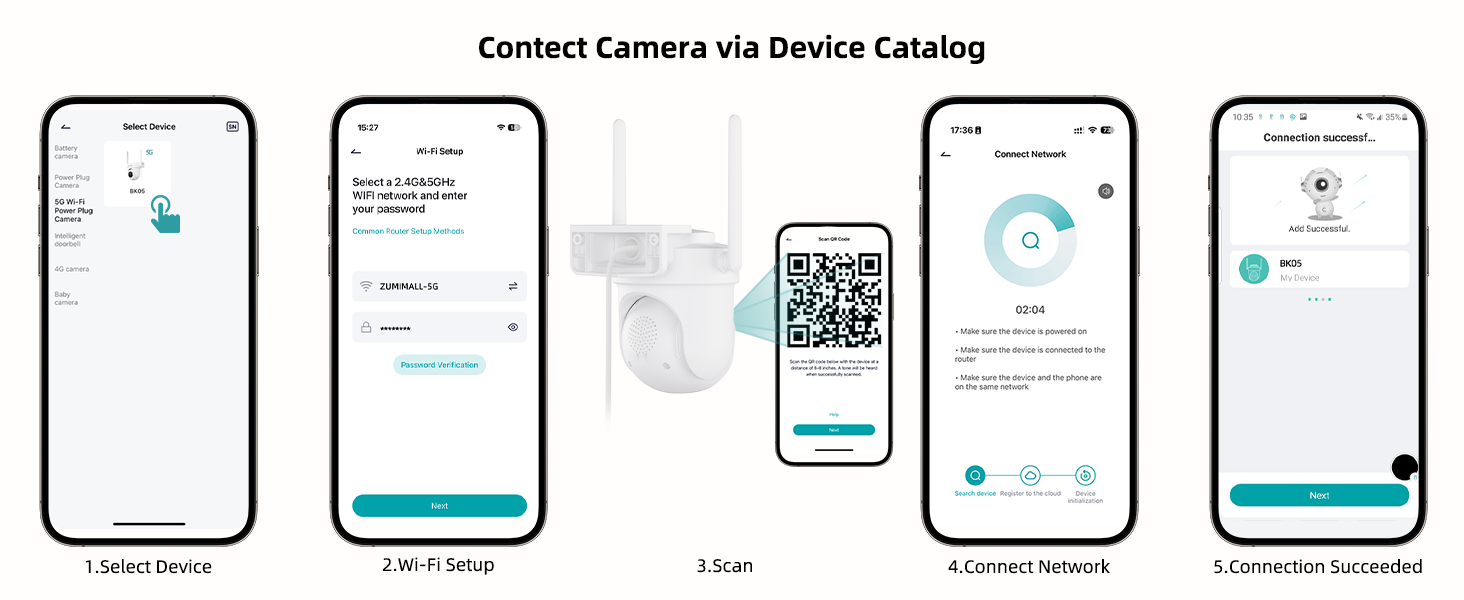
Image: Step-by-step guide for connecting the camera to the ZUMIMALL app.

Image: Explanation of dual-band Wi-Fi support (2.4GHz and 5GHz).
4. Gebruiksaanwijzing
4.1 Levend View en PTZ-besturing
Access the live feed through the ZUMIMALL app. You can remotely control the camera's pan (horizontal) and tilt (vertical) movements to adjust the viewhoek.
- From the app's home screen, tap on your camera to view de live-feed.
- Use the on-screen controls to pan (355°) and tilt (90°) the camera.

Image: PTZ control in action, showing the camera tracking movement.
4.2 Auto-Tracking and Motion Detection
The camera can automatically detect and track moving objects, sending alerts to your smartphone.
- Enable 'Motion Detection' and 'Auto-Tracking' in the camera settings within the app.
- Customize detection sensitivity (Low, Medium, High) to reduce false notifications.
- Set specific detection zones to monitor critical areas and ignore irrelevant ones.

Image: Demonstration of 360° motion tracking.

Image: Accurate detection settings within the app.

Image: Setting up a custom detection zone.
4.3 Opname en opslag
De camera ondersteunt 24/7 continue opname en biedt flexibele opslagopties.
- Micro SD kaart: Insert a Micro SD card (up to 128GB, not included) for local storage. The camera will automatically overwrite old footage wanneer de kaart vol is.
- Cloudopslag: Optional cloud storage plans are available for event recordings (6-second clips, saved for 7 days free). Premium cloud storage offers additional features.

Image: 24/7 continuous recording feature.

Image: Non-subscription storage options with Micro SD card and cloud.
4.4 Night Vision and Floodlight
The camera provides clear night vision, including full-color options with its built-in floodlight.
- The built-in floodlight provides 33ft (10 meters) of color night vision.
- Adjust night vision settings in the app to choose between infrared (black and white) or color night vision.

Image: 2K Color Night Vision with spotlight functionality.
4.5 Tweerichtingsaudio
Communiceer met bezoekers of schrik indringers af met behulp van de tweewegsaudiofunctie van de camera.
- Tik op het microfoonpictogram in de live view interface om via de luidspreker van de camera te spreken.
- De microfoon van de camera neemt geluid op uit het bewakingsgebied.

Afbeelding: Tweewegs audiocommunicatiefunctie.
4.6 Smart AI Analysis and Audible Alarm
The camera utilizes AI for intelligent detection and can trigger audible alarms.
- The camera can differentiate between humans, pets, cars, and packages (some features may require premium cloud plans).
- An audible alarm can be triggered when noise exceeds 65 decibels, providing proactive protection.
- When motion or humanoids are detected, the camera can trigger both audio and strobe light alarms.

Image: Smart AI analysis detecting different objects.

Image: Audible alarm feature with noise sensitivity settings.

Image: Audio warning and strobe light feature.
4.7 Alexa-integratie
Connect your ZUMIMALL camera with Amazon Alexa for convenient voice control.
- Ensure the camera is already added to the ZUMIMALL app.
- Open de Alexa-app.
- Tap the "More" button in the bottom left corner.
- Select "Skills & Games" and search for "Zumimall."
- Click on the "Zumimall" skill, then tap "ENABLE TO USE."
- Log in to your Zumimall account and click "Authorize."

Image: Voice assistant integration with Alexa and Google Assistant.
4.8 Apparaat delen
Deel de toegang tot je camera met familieleden of vertrouwde personen.
- The ZUMIMALL app allows sharing with up to 5 online devices.
- There is no limit to the number of users you can share access with.

Image: Device sharing feature for multiple users and devices.
5. Onderhoud
5.1 Weerbestendigheid
The ZUMIMALL BK05 camera is IP66-rated, ensuring protection against dust and water jets. It is designed to function in temperatures ranging from -20°C to 50°C.
- Ensure the camera is installed correctly, following the instructions, especially regarding the waterproof Type-C cable connector.
- Do not install the camera upside down to maintain waterproof performance and proper feed display.
5.2 Algemeen onderhoud
- Regularly check the camera lens for dirt or obstructions and clean gently with a soft, dry cloth.
- Ensure the power adapter remains dry for optimal performance.
- Periodically check the mounting for stability.
6. Probleemoplossing
6.1 Veelvoorkomende problemen en oplossingen
- Camera maakt geen verbinding met wifi:
Ensure your Wi-Fi network is 2.4GHz or 5GHz. Check Wi-Fi signal strength at the camera's location using the ZUMIMALL app. Verify the Wi-Fi password is correct. Try restarting your router and the camera. - Regelmatige onderbrekingen:
Improve Wi-Fi signal strength by moving the camera closer to the router or using a Wi-Fi extender. Ensure there are no major obstructions (e.g., thick walls) between the camera and the router. - Motion detection alerts are too frequent/infrequent:
Adjust the detection sensitivity settings in the app. Configure specific detection zones to focus on relevant areas. - Night vision is unclear:
Ensure the camera lens is clean. Check if the floodlight is enabled for color night vision. Ensure there are no reflective surfaces close to the camera that could interfere with infrared or floodlight illumination. - Problemen met tweerichtingsaudio:
Check the volume settings in the app. Ensure there are no obstructions blocking the microphone or speaker on the camera. Verify your phone's microphone permissions for the ZUMIMALL app. - Camera not recording 24/7:
Ensure the camera is continuously powered via the included adapter. If using an SD card, verify it is inserted correctly, formatted, and has sufficient storage capacity.
7. Specificaties
| Functie | Specificatie |
|---|---|
| Modelnaam | BK05 |
| Resolutie video-opname | 3MP (2K) |
| Connectiviteitstechnologie | Wireless (2.4G & 5G Wi-Fi), Plug-in Power |
| Viewhoek: | 360 graden (355° pan, 90° kanteling) |
| Nachtzichtbereik | 10 meter (33ft) |
| Opslagopties | Micro SD (tot 128 GB), Cloudopslag |
| Weerbestendigheid | IP66 |
| Bedrijfstemperatuur | -20°C tot 50°C |
| Compatibele apparaten | Alexa, Smartphone (Android, iOS) |
| Energiebron | Elektrische kabel |
| Artikelafmetingen (L x B x H) | 5.9 x 5 x 5 inch |
| Artikelgewicht | 16 ons (0.45 kilogram) |
8. Garantie en ondersteuning
ZUMIMALL is committed to providing quality products and customer support.
8.1 Klantenservice
For any technical queries or assistance, please contact ZUMIMALL customer support. The brand offers one-on-one online support to ensure you receive the help you need.
8.2 Beschermingsplannen
Extended protection plans are available for purchase to cover your device beyond the standard warranty period:
- 2-jarig beschermingsplan
- 3-jarig beschermingsplan
- Complete Protect (maandelijks abonnement voor in aanmerking komende aankopen)
For details on these plans, please refer to the product listing or contact ZUMIMALL directly.