1. Inleiding
This manual provides detailed instructions for the installation, operation, and maintenance of your Xigmatek Aqua V AIR Arctic Mid-Tower PC Case. Please read this manual thoroughly before beginning any installation to ensure proper setup and safe operation. Retain this manual for future reference.
2. Veiligheidsinformatie
Neem de volgende veiligheidsmaatregelen in acht tijdens de installatie en het gebruik:
- Haal altijd de stekker uit het stopcontact voordat u onderdelen installeert of verwijdert.
- Draag een antistatische polsband om schade door elektrostatische ontlading (ESD) aan gevoelige componenten te voorkomen.
- Handle components carefully. Avoid touching pins or circuit boards directly.
- Zorg voor voldoende ventilatie rondom de pc-kast om oververhitting te voorkomen.
- Houd kleine onderdelen en gereedschap uit de buurt van kinderen.
- Probeer de behuizing of de onderdelen ervan niet te wijzigen, aangezien dit uw garantie ongeldig kan maken en veiligheidsrisico's met zich mee kan brengen.
3. Inhoud van het pakket
Controleer of alle artikelen in het pakket aanwezig zijn:
- Xigmatek Aqua V AIR Arctic Mid-Tower PC Case
- Accessory kit (screws, standoffs, cable ties)
- Gebruikershandleiding (dit document)
If any items are missing or damaged, contact your retailer or Xigmatek support.
4. Product voorbijview
The Xigmatek Aqua V AIR Arctic is a mid-tower PC case designed for high-performance gaming configurations. It features tempered glass panels for component visibility and optimized airflow with pre-installed ARGB fans.

Figuur 4.1: Voor-links view of the Xigmatek Aqua V AIR Arctic PC case, showcasing the tempered glass front and side panels, and the pre-installed ARGB fans.

Afbeelding 4.2: Achter view of the PC case, showing the I/O shield cutout, expansion slots, and rear fan mount.
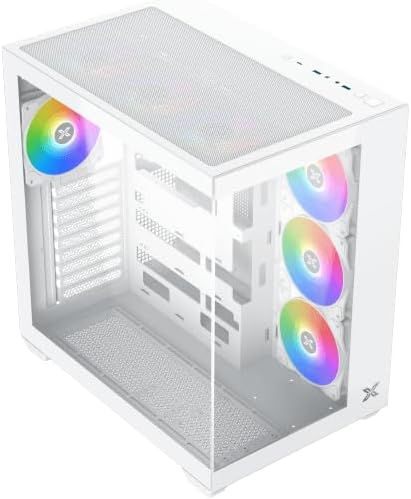
Figuur 4.3: Van boven naar beneden gekanteld view, highlighting the top mesh panel for additional cooling and the internal layout.
5. Installatie en installatie
Follow these steps to install your PC components into the Xigmatek Aqua V AIR Arctic case.
5.1. De zaak voorbereiden
- Plaats de koffer op een vlakke, stabiele ondergrond.
- Remove the tempered glass side panel by unscrewing the thumb screws at the rear and carefully sliding it off. Place it on a soft, non-abrasive surface to prevent scratches.
- Remove the opposite steel side panel by unscrewing the thumb screws and sliding it off.
5.2. Moederbordinstallatie
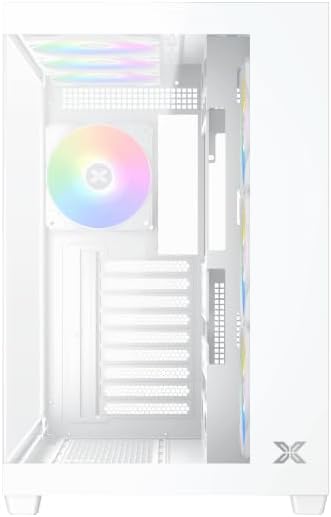
Figuur 5.1: Interieur view of the case, illustrating the motherboard mounting area and cable routing cutouts.
- Plaats het I/O-schild in de uitsparing aan de achterkant van de behuizing.
- Align your motherboard with the pre-installed standoffs. Ensure the standoffs match your motherboard's form factor (ATX, Micro ATX).
- Secure the motherboard using the provided screws from the accessory kit. Do not overtighten.
5.3. Installatie van de voedingseenheid (PSU)
- Locate the PSU mounting bracket at the bottom rear of the case.
- Slide your PSU into the designated compartment from the rear of the case.
- Bevestig de voedingseenheid aan de behuizing met behulp van de schroeven die bij de voedingseenheid zijn meegeleverd.
5.4. Installatie van opslagstation
The case supports multiple storage drives:
- 2.5" SSD's: Mount directly to the SSD trays located behind the motherboard tray. Secure with screws.
- 3.5" harde schijven: Install into the drive cage located beneath the PSU shroud. Slide the drive into the tray and secure with screws.
5.5. Installatie van de grafische kaart (GPU) en uitbreidingskaart
- Verwijder de benodigde afdekkingen van de uitbreidingssloten aan de achterkant van de behuizing.
- Insert your graphics card or other expansion cards into the appropriate PCIe slots on the motherboard.
- Secure the cards with the provided screws.
5.6. Kabelbeheer
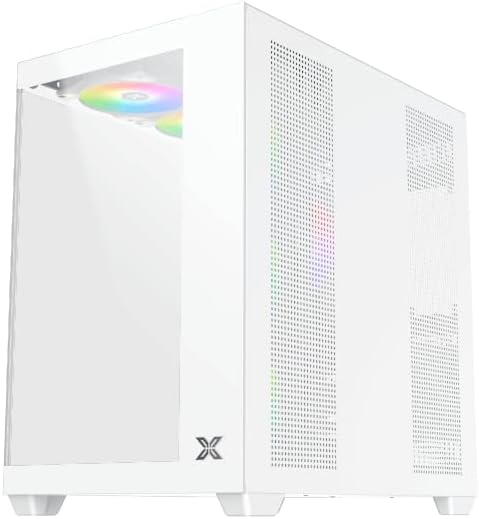
Figuur 5.2: View behind the motherboard tray, illustrating the ample space and tie-down points for effective cable management.
Gebruik de kabeldoorvoeropeningen en bevestigingspunten achter de moederbordtray om kabels netjes te ordenen. Dit verbetert de luchtcirculatie en het uiterlijk.
- Connect all necessary power cables from the PSU to the motherboard, GPU, and storage drives.
- Connect front panel cables (USB, audio, power/reset switches, LED indicators) to the corresponding headers on your motherboard. Refer to your motherboard manual for specific header locations.
- Connect the ARGB fan cables to the integrated fan controller or directly to your motherboard's ARGB headers if available.
5.7. Ventilator- en radiatorsteun
The Xigmatek Aqua V AIR Arctic comes with 7 pre-installed 120mm ARGB fans. Additional cooling options are available:
- Voorkant: Supports up to 3 x 120mm or 2 x 140mm fans / 240mm, 280mm, 360mm radiators.
- Bovenkant: Supports up to 3 x 120mm or 2 x 140mm fans / 240mm, 280mm, 360mm radiators.
- Achterkant: Supports 1 x 120mm fan.
- Onderkant: Supports up to 3 x 120mm fans.
Ensure proper fan orientation for optimal airflow (intake at front/bottom, exhaust at rear/top).
6. In bedrijf
Once all components are installed and cables are connected, replace the side panels. Connect your monitor, keyboard, mouse, and power cable. Press the power button on the front panel to start your system.
The pre-installed ARGB fans can be controlled via the integrated controller (if present) or through compatible motherboard software, allowing customization of lighting effects and fan speeds.
7. Onderhoud
Regelmatig onderhoud zorgt ervoor dat uw pc-componenten optimaal presteren en langer meegaan.
- Stofvrij maken: Periodically clean dust filters (top, front, bottom) to maintain good airflow. Use compressed air to remove dust from inside the case and components.
- Buitenreiniging: Veeg de buitenoppervlakken af met een zachte, damp doek. Vermijd schurende reinigingsmiddelen of oplosmiddelen.
- Controle van kabelbeheer: Controleer regelmatig de kabelgeleiding om er zeker van te zijn dat geen kabels de ventilatoren of de luchtstroom belemmeren.
8. Probleemoplossing
Als u problemen ondervindt, raadpleeg dan de volgende veelvoorkomende stappen voor probleemoplossing:
- Het systeem start niet op:
- Zorg ervoor dat de voeding is ingeschakeld en goed is aangesloten op het stopcontact.
- Verify all power cables (24-pin ATX, 8-pin CPU, PCIe, SATA) are securely connected.
- Check front panel power switch connections to the motherboard.
- Geen beelduitvoer:
- Ensure the monitor cable is connected to the graphics card (not the motherboard I/O if using a dedicated GPU).
- Plaats de grafische kaart en RAM-modules opnieuw.
- Fans not spinning or ARGB not working:
- Controleer de stroomaansluitingen van de ventilator op het moederbord of de ventilatorcontroller.
- Verify ARGB connections to the controller or motherboard headers.
- Ensure any fan control software or BIOS settings are correctly configured.
For more complex issues, consult your component manuals or contact Xigmatek technical support.
9. Specificaties
| Functie | Detail |
|---|---|
| Modelnaam | Aqua V AIR Arctic |
| Modelnummer | EN45837 |
| Soort zaak | Middentoren |
| Moederbordcompatibiliteit | ATX, Micro-ATX |
| Materiaal | Steel Alloy, Tempered Glass |
| Kleur | Wit |
| Voorgeïnstalleerde ventilatoren | 7 x 120 mm ARGB-ventilatoren |
| Maximale GPU-lengte | 410mm |
| USB-poorten | 3 |
| Gewicht | 8.8 kilogram |
10. Garantie en ondersteuning
Xigmatek products are manufactured to high quality standards. For warranty information, please refer to the warranty card included with your product or visit the official Xigmatek website. For technical support or inquiries, please contact Xigmatek customer service through their official channels.
Officieel Webwebsite: www.xigmatek.com


