1. Inleiding
This manual provides essential information for the proper setup, operation, maintenance, and troubleshooting of your Meizu mblu 21 4G LTE smartphone. Please read this manual thoroughly before using your device to ensure optimal performance and longevity.
The Meizu mblu 21 features a 6.79-inch HD display, a 13MP dual camera system, and runs on Android 14. It is designed for efficient performance and reliable connectivity.
2. Instellen
2.1 Pakketinhoud
Controleer of uw pakket de volgende items bevat:
- Meizu mblu 21 Smartphone
- Stroomadapter
- Snelstartgids (indien meegeleverd)
2.2 Installatie van SIM-kaart en microSD-kaart
The Meizu mblu 21 supports Dual Nano SIM cards and a MicroSD card for expandable storage.
- Zoek de SIM-lade aan de zijkant van uw toestel.
- Insert the SIM ejector tool (not included, use a thin pin if necessary) into the small hole on the SIM tray to eject it.
- Place your Nano SIM card(s) and/or MicroSD card into the designated slots on the tray, ensuring proper orientation.
- Plaats de SIM-lade voorzichtig terug in de telefoon totdat deze vastklikt.
2.3 Eerste keer inschakelen en netwerkconfiguratie
- Press and hold the power button until the Meizu logo appears.
- Volg de instructies op het scherm om de eerste installatie te voltooien, waaronder het selecteren van de taal, het maken van een wifi-verbinding en het instellen van een Google-account.
- For cellular connectivity, ensure your SIM card is active. This device is an international version and in the USA market, it operates exclusively on T-Mobile's 4G LTE network. Outside the USA, it is compatible with various carriers worldwide.
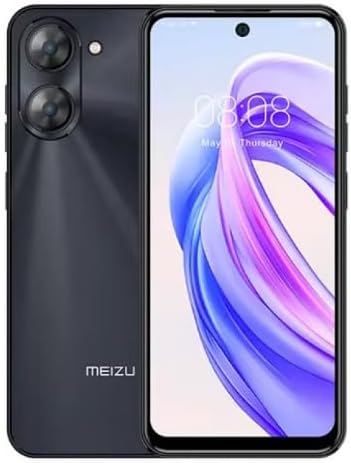
Afbeelding 2.3.1: Voor en achter view of the Meizu mblu 21 smartphone. The front displays the screen with a punch-hole camera, while the rear shows the dual camera module and the Meizu branding.
3. Gebruiksaanwijzing
3.1 Basisnavigatie (Android 14)
Your Meizu mblu 21 runs on Android 14, offering an intuitive user experience. Use gestures or on-screen navigation buttons to move between apps, access settings, and manage notifications.
3.2 Cameragebruik
The device features a 13MP Smart Camera on the rear and an 8MP front camera. Open the Camera app to capture photos and videos. Utilize various modes and settings for optimal results.
3.3 Beveiligingsfuncties
Unlock your device using the side-mounted fingerprint sensor for instant access or the 8MP front camera for Smart Face Unlock.
3.4 Connectiviteit
- Wifi: Supports Dual-Band Wi-Fi (2.4GHz and 5GHz) for stable internet access.
- Bluetooth: Bluetooth 5.0 for connecting to wireless accessories.
- Volte: Enjoy clearer voice calls with VoLTE HD Calls.

Afbeelding 3.4.1: Visual representation of key connectivity and operating system features, including Android 14, Dual-Band Wi-Fi, Bluetooth 5.0, and VoLTE HD Calls.
4. Onderhoud
4.1 Algemeen onderhoud
- Houd uw apparaat droog en uit de buurt van extreme temperaturen.
- Maak het scherm en de behuizing schoon met een zachte, pluisvrije doek. Vermijd agressieve chemicaliën.
- Bescherm het scherm met een schermbeschermer en de behuizing met een beschermhoes om krassen en beschadigingen te voorkomen.
4.2 Batterijbeheer
The 4900mAh battery is designed for all-day performance. To prolong battery life:
- Zorg ervoor dat de batterij niet te vaak volledig ontladen wordt.
- Gebruik de meegeleverde voedingsadapter om op te laden.
- Optimize background app usage and screen brightness in settings.

Afbeelding 4.2.1: Een interne view of the Meizu mblu 21 smartphone highlighting the 4900mAh battery, emphasizing its capacity for extended use.
5. Probleemoplossing
5.1 Veelvoorkomende problemen en oplossingen
- Apparaat gaat niet aan: Zorg ervoor dat de batterij is opgeladen. Sluit de stroomadapter aan en probeer het opnieuw.
- Problemen met netwerkconnectiviteit: Check if your SIM card is properly inserted and active. Verify network settings and ensure you are within T-Mobile's coverage area in the USA.
- Trage prestaties: Sluit onnodige achtergrondapplicaties af. Wis de cache en tijdelijke bestanden. files. Restart the device.
- Batterij raakt snel leeg: Reduce screen brightness, disable unused features like Bluetooth or GPS, and check for power-intensive apps.
If problems persist, consider performing a factory reset (back up your data first) or contacting customer support.
6. Specificaties
| Modelnummer | M416L |
| Besturingssysteem | Androïde 14 |
| Weergave | 6.79 Inches HD, 2340 x 1080 Resolution, 90Hz Adaptive Refresh Rate |
| Verwerker | Octa Core 1.6GHz ARM Mali-G57 |
| Geheugen | 64 GB Internal Storage, 4 GB RAM |
| Batterij | 4900mAh (4.9E+3 Milliamp Hours) Lithium Polymer |
| Achteruitrijcamera | 13MP Smart Camera, 5P Precision Lens |
| Voorcamera | 8MP |
| Cellulaire technologie | 4G LTE FDD: 2,3,4,5,7,8,12,17,26,28,66; 3G WCDMA: 2/4/5/8; 2G Quad Band |
| SIM-type | Dual Nano SIM + MicroSD |
| Wi-Fi | Dual-band (2.4 GHz en 5 GHz) |
| Bluetooth | 5.0 |
| Audio-aansluiting | USB-type C |
| Artikelgewicht | 14 ons |
| FCC-ID | 2ANQ6-M416L |

Afbeelding 6.1: The Meizu mblu 21 smartphone presented in its Titan Black color variant, showcasing het ontwerp.
7. Garantie en ondersteuning
For warranty information, please refer to the warranty card included with your product or consult the retailer where the device was purchased. Meizu provides support for its products. For further assistance, please visit the official Meizu website of neem contact op met hun klantenservice.


