1. Inleiding
This manual provides instructions for the safe and effective use of your iJoy Disney Stitch Disco Party Bluetooth Over-Ear Headphones. Please read this manual thoroughly before operating the device and retain it for future reference.

Afbeelding 1.1: Voorkant view of the iJoy Disney Stitch Disco Party Bluetooth Over-Ear Headphones.
2. Inhoud van het pakket
Controleer of alle artikelen in het pakket aanwezig zijn:
- iJoy Disney Stitch Disco Party Bluetooth Over-Ear Headphones
- USB-oplaadkabel
- Hulp-audiokabel
- Beschermende draagtas
- Gebruiksaanwijzing
3. Product voorbijview
Maak uzelf vertrouwd met de onderdelen en bedieningselementen van de hoofdtelefoon.
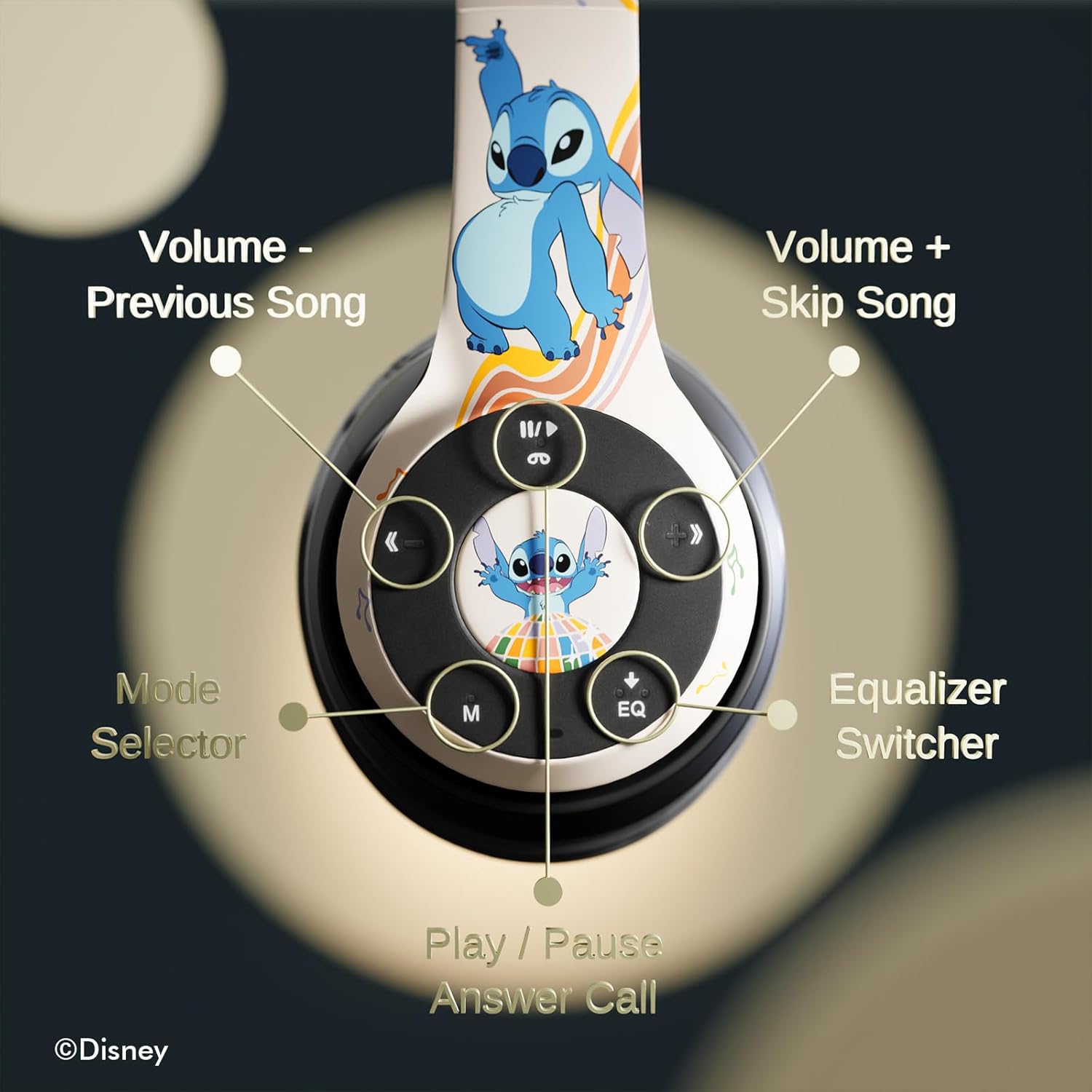
Afbeelding 3.1: Gedetailleerd view van de bedieningsknoppen op de rechter oorschelp.
Controle Functies:
- Volume - / Vorig nummer: Kort indrukken om het volume te verlagen, lang indrukken om het vorige nummer te halen.
- Volume + / Skip Song: Kort indrukken om het volume te verhogen, lang indrukken om het volgende nummer te volgen.
- Play / Pause / Answer Call: Short press to play/pause music or answer/end a call. Long press to reject a call.
- Mode Selector (M): Press to switch between Bluetooth, Micro SD, and FM Radio modes.
- Equalizer Switcher (EQ): Press to cycle through available equalizer presets.
- LED-indicator: Displays power, charging, and Bluetooth connection status.
- Ingebouwde microfoon: Voor handsfree bellen.
- Micro SD-kaartsleuf: For direct audio playback from a Micro SD card.
4. Instellen
4.1. De hoofdtelefoon opladen
Before initial use, fully charge the headphones. Connect the supplied USB charging cable to the charging port on the headphones and to a USB power source (e.g., computer USB port, wall adapter). The LED indicator will illuminate during charging and change color or turn off when charging is complete. A full charge provides approximately 15 hours of playtime.

Image 4.1: The headphones offer up to 15 hours of audio playback on a single charge.
4.2. Bluetooth-koppeling
- Zorg ervoor dat de hoofdtelefoon is opgeladen en uitgeschakeld.
- Houd de aan/uit-knop ingedrukt totdat het ledlampje knippert. Dit geeft aan dat de koppelingsmodus actief is.
- Schakel Bluetooth in op uw apparaat (smartphone, tablet, enz.) en zoek naar beschikbare apparaten.
- Select "iJoy Stitch Headphones" from the list of found devices.
- Zodra de verbinding tot stand is gebracht, stopt de LED-indicator met knipperen en blijft deze continu branden.

Image 4.2: The headphones are compatible with various Bluetooth-enabled devices.
4.3. Gebruik van Micro SD-kaart
Insert a Micro SD card (not included) into the Micro SD card slot on the headphones. The headphones will automatically switch to Micro SD mode and begin playing audio files from the card. Use the Mode button to switch to this mode if already in another mode.
5. Gebruiksaanwijzing
5.1. Aan/uit
- Inschakelen: Press and hold the Power button until the LED indicator illuminates.
- Uitschakelen: Houd de aan/uit-knop ingedrukt totdat het led-lampje uitgaat.
5.2. Muziek afspelen
- Afspelen/Pauzeren: Druk op de knop Afspelen/Pauzeren.
- Volgende nummer: Druk lang op de Volume + knop.
- Vorig nummer: Druk lang op de Volume-knop.
- Volume omhoog: Druk kort op de Volume + knop.
- Volume verminderen: Druk kort op de Volume-knop.
5.3. Oproepbeheer
- Oproep beantwoorden/beëindigen: Druk op de knop Afspelen/Pauzeren.
- Oproep afwijzen: Druk lang op de afspeel-/pauzeknop.
5.4. FM-radiofunctie
In FM Radio mode (selected via the Mode button), the headphones can scan and play FM radio stations. Use the Volume +/- buttons to change stations or adjust volume.
5.5. Equalizer Function
Press the EQ button to cycle through different audio equalizer presets, adjusting the sound profile naar uw voorkeur.
6. Onderhoud
6.1. Schoonmaken
Wipe the headphones with a soft, dry cloth. Do not use abrasive cleaners or solvents. Avoid exposing the headphones to excessive moisture.
6.2. Opslag
When not in use, store the headphones in the provided protective carrying case. The foldable design allows for compact storage, protecting them from damage.
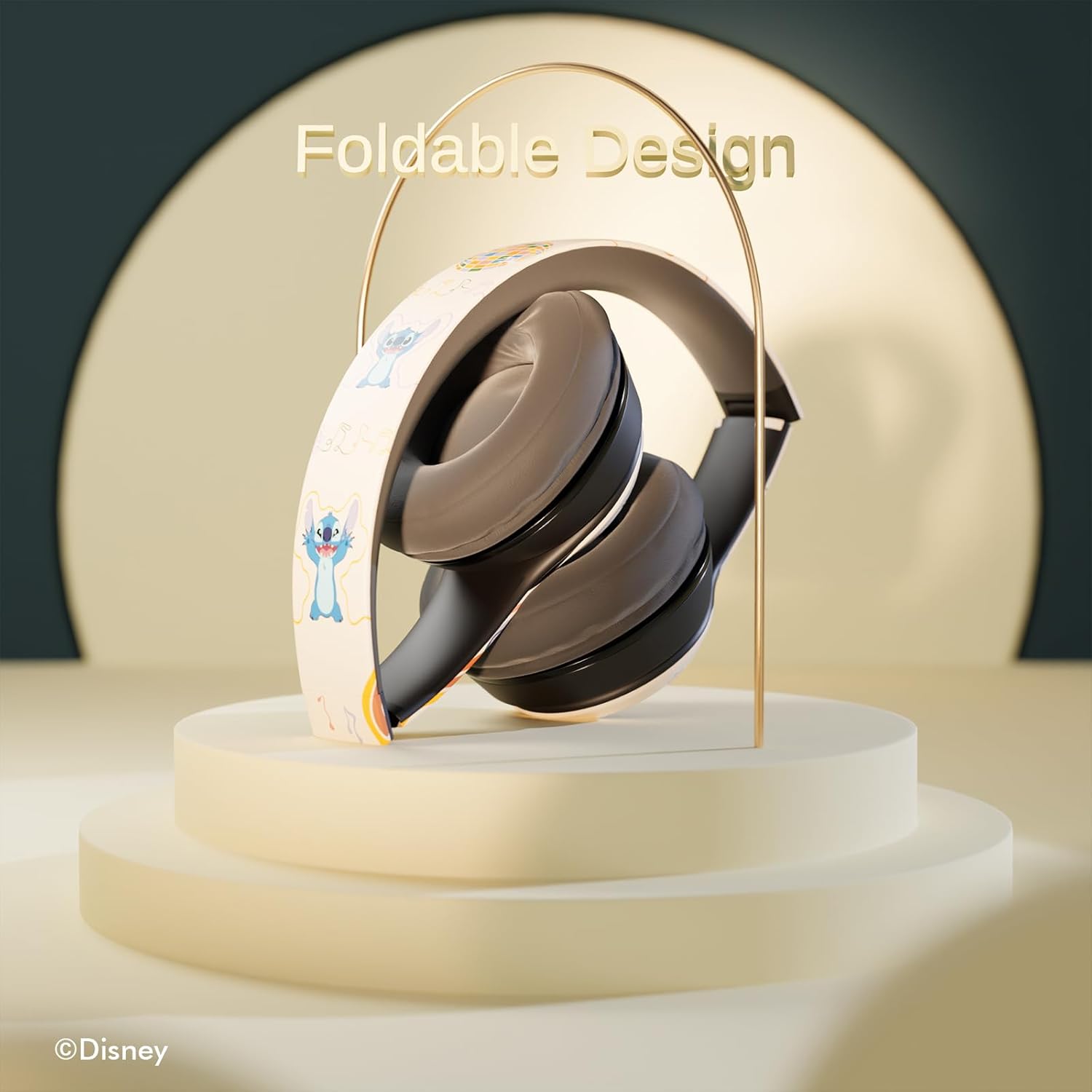
Image 6.1: The headphones feature a foldable design for easy storage and portability.
7. Probleemoplossing
Als je problemen ondervindt met je hoofdtelefoon, raadpleeg dan de volgende veelvoorkomende problemen en oplossingen:
- Geen stroom: Zorg ervoor dat de hoofdtelefoon volledig is opgeladen. Sluit hem aan op een stroombron en controleer de led-indicator.
- Kan niet koppelen via Bluetooth:
- Zorg ervoor dat de hoofdtelefoon in de koppelingsmodus staat (LED knippert).
- Controleer of Bluetooth is ingeschakeld op uw apparaat.
- Plaats de hoofdtelefoon dichter bij uw apparaat.
- Turn off and on both the headphones and your device, then attempt pairing again.
- Geen geluid:
- Controleer het volumeniveau op zowel de hoofdtelefoon als het aangesloten apparaat.
- Ensure the headphones are correctly paired or the audio cable is fully inserted.
- If using a Micro SD card, ensure it contains compatible audio files en correct is ingevoegd.
- Slechte geluidskwaliteit:
- Ga dichter bij uw Bluetooth-apparaat staan om interferentie te verminderen.
- Zorg ervoor dat er geen obstakels tussen de hoofdtelefoon en uw apparaat zijn.
- Probeer een andere audiobron of file.
8. Specificaties
| Modelnaam | Disney Stitch Disco Party |
| Artikelmodelnummer | 810146469544 |
| Connectiviteitstechnologie | Draadloos (Bluetooth) |
| Draadloze communicatietechnologie | Bluetooth |
| Leeftijdscategorie (beschrijving) | Volwassene, Kind |
| Controletype | Volumeregeling, aanraakgevoelig |
| Speciale kenmerken | Built-in Radio Receiver, Foldable and Adjustable headband, Micro SD Card Plug-in, Microphone Included |
| Artikelgewicht | 0.26 kilogram (9.1 ounces) |
| Batterijen | 1 lithium-polymeerbatterij (meegeleverd) |
| Frequentiebereik | 20 Hz - 20,000 Hz |
| Waterbestendigheidsniveau | Niet waterbestendig |
| Plaatsing van de oren | Over het oor |
| Geluidsbeheersing | Geluidsisolatie |

Image 8.1: The headphones feature sound isolation and include an auxiliary cable for wired connection.
9. Veiligheidsinformatie
Volg de onderstaande veiligheidsrichtlijnen om schade aan het apparaat of persoonlijk letsel te voorkomen:
- Do not expose the headphones to extreme temperatures, direct sunlight, or excessive moisture.
- Zorg ervoor dat de hoofdtelefoon niet valt en dat hij niet wordt blootgesteld aan harde stoten.
- Do not disassemble or attempt to repair the headphones yourself. This may void the warranty and cause damage.
- Adjust volume to a moderate level to prevent hearing damage. Prolonged exposure to loud sounds can cause permanent hearing loss.
- Gebruik geen koptelefoon tijdens het autorijden, fietsen of in situaties waarin het niet kunnen horen van omgevingsgeluiden gevaarlijk kan zijn.
10. Garantie en ondersteuning
This product is covered by a manufacturer's warranty. For specific warranty details, please refer to the documentation included with your purchase or contact iJoy customer support. For technical assistance or inquiries, please visit the official iJoy website of neem contact op met de klantenservice.


