Invoering
This manual provides detailed instructions for the installation, operation, and maintenance of your HUPEJOS V50-4CH 4-Channel Dash Cam. Please read this manual thoroughly before using the device to ensure proper functionality and safety.
Product voorbijview
The HUPEJOS V50-4CH is a compact 4-channel dash camera system designed to provide comprehensive vehicle surveillance. It features front, left, right, and rear cameras, offering 360-degree coverage. Key features include:
- 4-kanaals opname: Simultaneous recording from front, left, right, and rear cameras.
- Hoge resolutie: Front camera records at 2K, rear at 1080p, and left/right at 720p.
- Ingebouwde GPS: Registreert gegevens over de snelheid en locatie van het voertuig.
- 5GHz wifi: For fast playback and sharing via smartphone app.
- Stembesturing: Handsfree bediening voor diverse functies.
- G-sensor: Automatic locking of important video files tijdens botsingen.
- Loop-opname: Continuously records, overwriting older files wanneer de SD-kaart vol is.
- 24-uurs parkeermodus: Requires a hardwire kit (not included) for continuous surveillance when parked.
- Nachtzicht: Enhanced low-light recording with F1.8 aperture and IR lights.
- CPL-filter: Reduces glare and reflections for improved image quality.
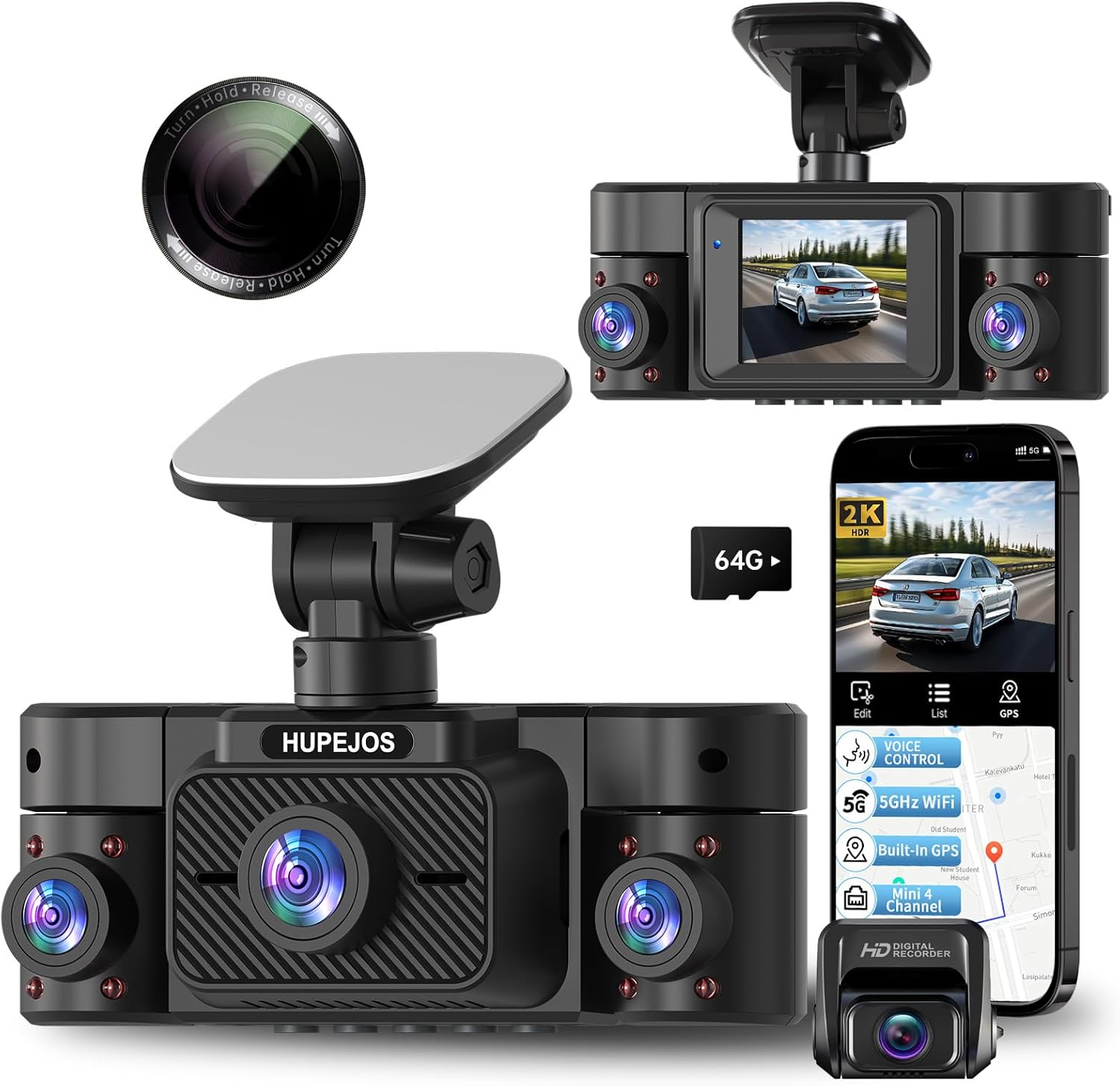
Image: The HUPEJOS V50-4CH dash cam, showing its compact design, multiple camera lenses, and the included CPL filter. A smartphone screen displays the companion app interface with recording and GPS features.

Image: An illustration highlighting the key features of the HUPEJOS V50-4CH dash cam, including 360-degree all-round protection, voice control, 5GHz Wi-Fi, built-in GPS, G-sensor lock, loop recording, 2-inch IPS screen, 4K UHD video recording (note: product description states 2K front, 1080p rear, 720p side), night vision, WDR/HDR, 24-hour parking mode, and included 64GB micro SD card.
Wat zit er in de doos?
Controleer bij het uitpakken of alle onderdelen aanwezig zijn:
- HUPEJOS V50-4CH Dash Cam Unit
- CPL-filter
- Mounting Hardware (e.g., suction cup mount, adhesive mount)
- Autolader
- USB-kabel
- Gebruikershandleiding (dit document)
- 64GB Micro SD Card (as indicated in feature image)
Instellen en installeren
- Bereid de SD-kaart voor: Insert the provided 64GB Micro SD card into the dash cam's SD card slot. It is recommended to format the SD card within the dash cam settings before first use.
- De dashcam monteren:
- Maak het gedeelte van de voorruit waar de dashcam gemonteerd zal worden schoon.
- Attach the mounting hardware (suction cup or adhesive mount) to the dash cam.
- Securely attach the dash cam to the windshield, ensuring it does not obstruct your view. Position it centrally for optimal front camera coverage.
- Adjust the camera angles for the front, left, right, and rear lenses to cover desired areas.
- Stroomaansluiting:
- Sluit de autolader aan op de stroomaansluiting van de dashcam.
- Sluit het andere uiteinde van de autolader aan op de 12V-aansluiting van uw voertuig (sigarettenaansteker).
- Route the power cable neatly along the windshield and dashboard edges to avoid interference with driving.
- CPL Filter Installation:
- Gently attach the CPL filter to the front camera lens.
- Rotate the CPL filter while observing the screen to reduce glare from the dashboard or reflections from the windshield.

Image: The HUPEJOS V50-4CH dash cam mounted on a car's windshield, demonstrating its compact size and how it integrates into the vehicle's interior without obstructing the driver's view.

Image: A close-up of the CPL filter, showing its design for attachment to the dash cam lens. The text on the filter indicates "Turn Hold Release" for adjustment.
Gebruiksaanwijzing
Basisbediening
- Aan/uit: De dashcam schakelt automatisch in en begint met opnemen zodra het contact van het voertuig wordt aangezet. Hij schakelt automatisch uit wanneer het contact wordt uitgezet.
- Opnamemodi: The dash cam supports continuous loop recording. When the memory card is full, the oldest unprotected files worden overschreven.
- Schermweergave: The 2-inch IPS screen displays live views from the cameras. You can switch between different camera views or display all four simultaneously via the menu settings.
Stembediening
The V50-4CH supports voice commands for hands-free operation. Common commands include:
- "Video start"
- "Video stoppen"
- "Toon camera aan de voorzijde"
- "Schakel wifi in"
- "Scherm inschakelen"
- "Maak een foto"

Image: A driver interacting with the HUPEJOS V50-4CH dash cam using voice commands, illustrating the hands-free operation feature for safe driving.
Wi-Fi Connectivity and App Usage
The dash cam features built-in 5GHz Wi-Fi for quick connection to your smartphone. Download the dedicated app (refer to the dash cam's screen or packaging for app name/QR code) to:
- View leef fotage.
- Opgenomen video's afspelen.
- Download video's naar uw telefoon.
- Instellingen aanpassen.
- Deel footage.

Image: Demonstrates the built-in 5GHz Wi-Fi for fast data transfer to a smartphone and the built-in GPS feature, which allows viewing real-time vehicle speed and tracking data in recordings on a laptop or smartphone.
GPS-functionaliteit
The integrated GPS module records your vehicle's speed and location data. This information is embedded in the video files en kan zijn viewed using the dedicated playback software on a computer or through the smartphone app, providing crucial evidence in case of an incident.
G-sensor (noodopname)
The built-in G-sensor detects sudden impacts or rapid acceleration/deceleration. When triggered, it automatically locks the current video segment, preventing it from being overwritten by loop recording. These emergency fileDe bestanden worden opgeslagen in een aparte map op de SD-kaart.

Image: Illustrates the loop recording function (every 3 minutes, oldest files overwritten), the G-sensor for automatic locking of important files during impacts, and the 24-hour parking mode with radar precision monitoring (requires separate hardwire kit).
24-uurs parkeermodus
For continuous surveillance when your vehicle is parked, the dash cam supports a 24-hour parking mode. This feature requires a separate hardwire kit (not included, suggested ASIN: B0DMR2SLFH) to provide constant power to the dash cam. In parking mode, the dash cam can detect motion or impacts and record automatically.
CPL Filter Adjustment
The CPL (Circular Polarizing Lens) filter helps reduce reflections and glare from the windshield, dashboard, and other shiny surfaces, improving video clarity and color saturation. To adjust, gently rotate the outer ring of the CPL filter until reflections are minimized on the dash cam's screen. This adjustment is best done during daylight hours.
Onderhoud
- De lens reinigen: Gebruik een zachte, pluisvrije doek om de cameralenzen voorzichtig schoon te maken. Vermijd schurende materialen of agressieve chemicaliën.
- Onderhoud van de SD-kaart: Regularly format the SD card (at least once a month) within the dash cam's settings to ensure optimal performance and prevent data corruption. Replace the SD card if you notice frequent errors or reduced performance.
- Firmware-updates: Controleer die van de fabrikant webControleer de website regelmatig op firmware-updates. Het bijwerken van de firmware kan de prestaties verbeteren en nieuwe functies toevoegen.
- Bedrijfstemperatuur: Stel de dashcam niet gedurende langere perioden bloot aan extreme temperaturen.
Probleemoplossing
| Probleem | Mogelijke oplossing |
|---|---|
| Dashcam gaat niet aan. |
|
| De opname stopt onverwacht. |
|
| De videokwaliteit is slecht of wazig. |
|
| Problemen met de wifi-verbinding. |
|
| Stembesturing reageert niet. |
|
Specificaties
| Functie | Detail |
|---|---|
| Modelnaam | V50-4CH |
| Merk | HUPEJOS |
| Resolutie video-opname | Front: 2K, Rear: 1080p, Left/Right: 720p |
| Speciale kenmerken | 360 Degree Coverage, 4 Channel Recording, CPL Filter, Built-in GPS, 5GHz Wi-Fi, Voice Control, G-Sensor, Loop Recording, 24-Hour Parking Mode, Night Vision (WDR/HDR, F1.8 aperture, 8 IR lights) |
| Connectiviteitstechnologie | USB, draadloos (Wi-Fi) |
| Montagetype | Voorruitmontage, dashboardmontage |
| Controlemethode | Aanraken, stem |
| Meegeleverde componenten | CPL Filter, Mounting Hardware, Car Charger, USB Cable, 64GB Micro SD Card |
| Kleur | Zwart |
| Afmetingen (ongeveer) | Length: 4.8 Inch, Height: 1.8 Inch |

Image: Illustrates the 4-channel recording capabilities of the HUPEJOS V50-4CH dash cam, showing simultaneous views from the front (2K), rear (1080p), and left/right (720p) cameras, providing comprehensive coverage.

Afbeelding: Een gedetailleerde view of the HUPEJOS V50-4CH dash cam, emphasizing its 360-degree full protection with four cameras. It shows the approximate viewing angles for the front (150°), left (150°), right (150°), and rear cameras.
Garantie en ondersteuning
For warranty information, technical support, or service inquiries, please refer to the contact details provided on the product packaging or visit the official HUPEJOS webwebsite. Bewaar uw aankoopbewijs als aankoopbewijs voor garantieclaims.


