Invoering
The Neoteck ZT-FS1 Anemometer Wind Meter is a multifunctional digital instrument designed for measuring wind speed, air volume, temperature, and humidity. It is suitable for various applications including HVAC system testing, outdoor activities, and environmental monitoring. This manual provides detailed instructions for the proper use and maintenance of your device.
Wat zit er in de doos?
- 1 x Neoteck ZT-FS1 Wind Speed Gauge
- 2 x AAA-batterijen
- 1 x Gebruikershandleiding
- 1 x Schroevendraaier
Product voorbijview
Familiarize yourself with the components and controls of your Neoteck ZT-FS1 Anemometer.

Afbeelding 1: Voor- en achterkant View of the Neoteck ZT-FS1 Anemometer with labeled components.
- Ventilatorbladen: Rotates to measure wind speed and airflow.
- Temperatuur- en vochtigheidssensor: Detects ambient temperature and relative humidity.
- Antislip ontwerp: Biedt een stevige grip.
- LCD-scherm: Displays measurement readings and unit indicators.
- Aan/uit-knop (U): Hiermee schakelt u het apparaat in of uit.
- Backlight Button (BL): Hiermee kunt u de achtergrondverlichting van het LCD-scherm in- of uitschakelen.
- UNIT-knop: Cycles through different measurement units.
- HOLD MAX/MIN Button: Toggles between data hold, maximum value, and minimum value display.
- VEL FLOW/AREA Button: Switches between wind speed (VEL) and air volume (FLOW/AREA) measurement modes.
- Batterij Hoes: Beschermt het batterijcompartiment.
Instellen
Batterij installatie
- Zoek het batterijklepje aan de achterkant van het apparaat.
- Gebruik de meegeleverde schroevendraaier om het batterijklepje te openen.
- Plaats twee AAA-batterijen en let op de juiste polariteit (+/-).
- Plaats het batterijklepje terug en zet het vast met de schroef.
Gebruiksaanwijzing
Power On/Off and Backlight
- Druk op de Power Button (U) om het apparaat in te schakelen.
- Houd de Power Button (U) om het apparaat uit te schakelen.
- Druk op de Backlight Button (BL) to activate the LCD backlight for low-light conditions. Press again to turn it off.

Figure 2: The backlit LCD screen provides clear readings in various lighting conditions.
Wind Speed Measurement
To measure wind speed:
- Zorg ervoor dat het apparaat is ingeschakeld.
- Druk op de SNELHEIDSSTROOM/OPPERVLAKTE button until 'VEL' is displayed on the screen, indicating wind speed mode.
- Point the fan blades directly into the wind. The display will show the current wind speed.
- Druk op de EENHEID button to cycle through the available wind speed units: Knots, km/h, mph, m/s, ft/s, ft/min.
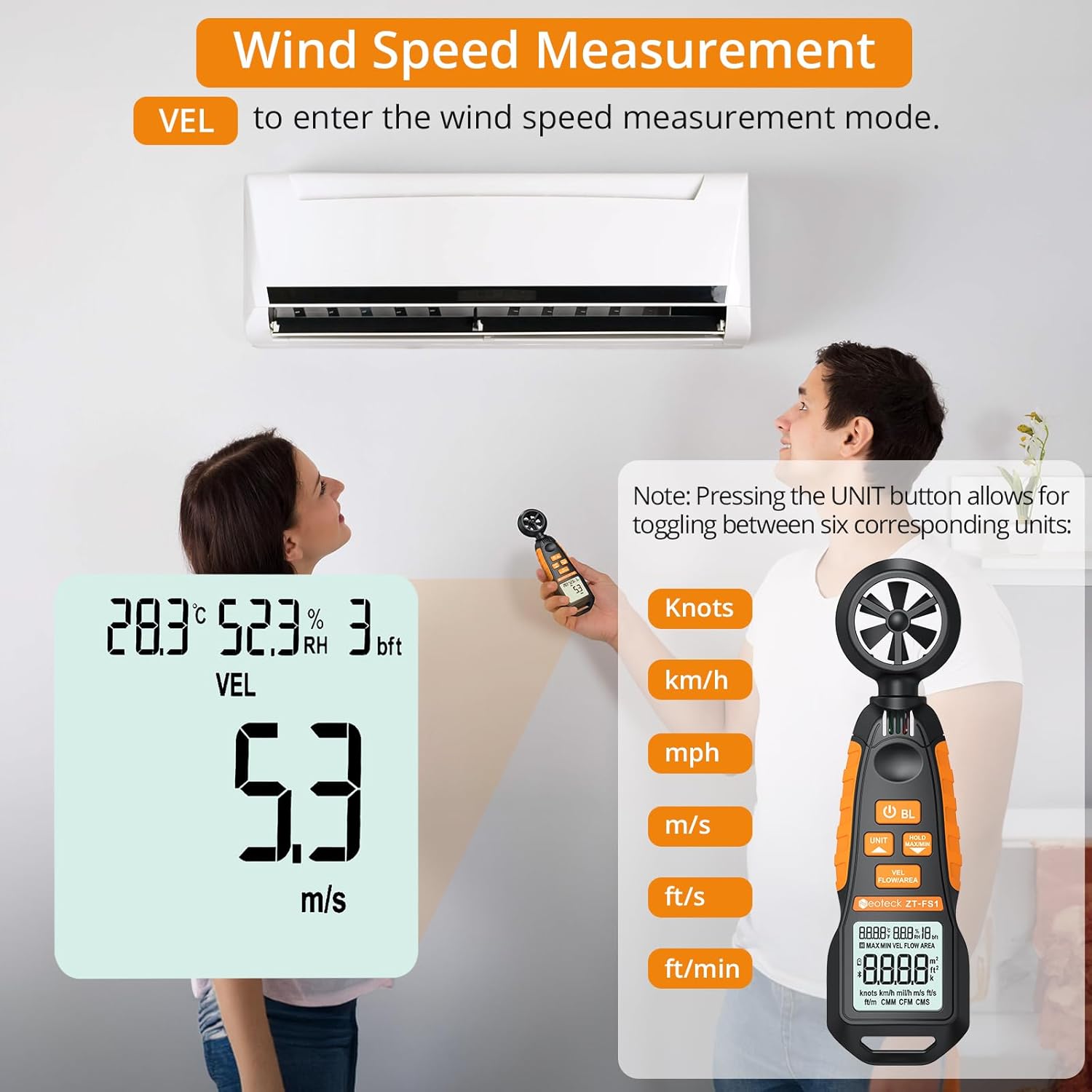
Figure 3: Measuring wind speed with the anemometer. The display shows current speed and unit options.
Air Volume Measurement (CFM/CMM/CMS)
To measure air volume:
- Zorg ervoor dat het apparaat is ingeschakeld.
- Druk op de SNELHEIDSSTROOM/OPPERVLAKTE button until 'FLOW' is displayed on the screen, indicating air volume mode.
- Before measurement, you must input the cross-sectional area of the duct or vent. Refer to the full manual for detailed instructions on entering area values.
- Align the fan of the instrument vertically with the air outlet. The display will show the air volume.
- Druk op de EENHEID button to cycle through the available air volume units: CMM (Cubic meter/minute), CFM (Cubic inch/minute), CMS (Cubic meter per second).
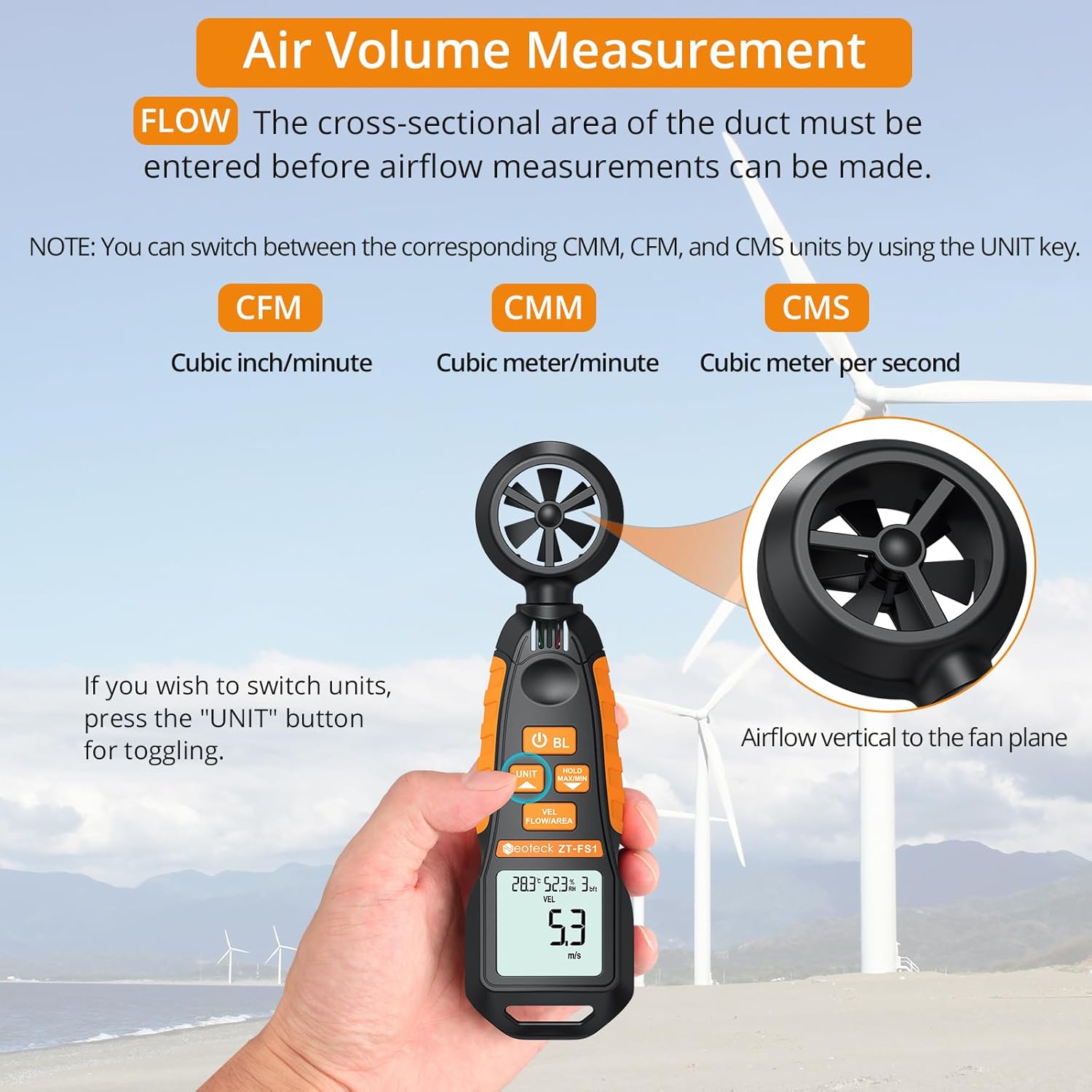
Figure 4: Measuring air volume from a duct. Ensure the cross-sectional area is correctly entered.
Temperatuur- en vochtigheidsmeting
The device continuously measures ambient temperature and relative humidity. These readings are displayed on the upper part of the LCD screen. Note that the temperature and humidity sensor may require at least 30 minutes to adapt to a new environment for accurate readings.
Data Hold and Max/Min Functions
- Druk op de MAX/MIN VASTHOUDEN button once to activate the Data Hold function. The current reading will be frozen on the display. Press again to exit.
- Houd de MAX/MIN VASTHOUDEN button for more than 2 seconds to enter the Maximum/Minimum measurement mode. The display will cycle between the maximum (MAX) and minimum (MIN) values recorded since entering this mode. Press and hold again to exit.
Auto-Shutdown Function
The device features an auto-shutdown function to conserve battery power. If no button is pressed for a certain period (typically 15 minutes), the device will automatically turn off.
- To disable auto-shutdown: While the device is off, hold the MAX/MIN VASTHOUDEN knop en druk vervolgens op de Power Button (U) for 2 or more seconds. Five beeps will confirm that auto-shutdown is disabled.
Mediabronnen
Officiële productvideo
Video 1: An official product video demonstrating the Neoteck Anemometer's functions for testing wind speed and airflow.
Specificaties
| Functie | Detail |
|---|---|
| Merk | Neoteck |
| Modelnummer | NTK259 |
| Materiaal | Glas, metaal, kunststof |
| Afmetingen (L x B x H) | 6.97 x 1.97 x 1.18 inch |
| Artikelgewicht | 85 gram (3 ounces) |
| Windsnelheidsbereik | 0.4-30 m/s (0.895-67.11 mph) |
| Nauwkeurigheid windsnelheid | ± 2% |
| Resolutie windsnelheid | 0.1 m/s |
| Temperatuurbereik | -20.0℃ tot 60.0℃ |
| Temperatuurnauwkeurigheid | ± 2℃ |
| luchtvochtigheid | 0.0% tot 99.9% RV |
| Nauwkeurigheid vochtigheid | ± 2% relatieve luchtvochtigheid |
| Sampleng tarief | Elke 5 seconden |
| Energiebron | 2 x AAA-batterijen (meegeleverd) |
| Weergave | LCD met achtergrondverlichting |
| Automatische uitschakeling | Ja (kan worden uitgeschakeld) |
Onderhoud
- Houd het apparaat schoon en droog. Gebruik een zachte, damp doek om schoon te maken. Gebruik geen schurende schoonmaakmiddelen of oplosmiddelen.
- Vermijd langdurige blootstelling van het apparaat aan extreme temperaturen, hoge luchtvochtigheid of direct zonlicht.
- Als u het apparaat gedurende een langere periode niet gebruikt, verwijder dan de batterijen om lekkage te voorkomen.
- Handle the fan blades carefully to prevent damage, as this can affect measurement accuracy.
Probleemoplossing
- Apparaat gaat niet aan: Controleer of de batterijen correct zijn geplaatst en voldoende lading hebben. Vervang de batterijen indien nodig.
- Onjuiste metingen: Ensure the fan blades are clean and unobstructed. Allow the temperature/humidity sensor sufficient time (approx. 30 minutes) to adapt to the environment.
- Het scherm is zwak of flikkert: Vervang de batterijen.
- Auto-shutdown occurs too quickly: Verify if the auto-shutdown feature is enabled or disabled as desired (refer to Auto-Shutdown Function section).
Garantie en ondersteuning
For warranty information, technical support, or service inquiries, please refer to the product packaging or contact Neoteck customer service directly. Contact details can typically be found on the manufacturer's official webplaats.


