Invoering
Welcome to your RCA Wave-68 True Wireless Earbuds. This manual provides detailed instructions on how to set up, operate, maintain, and troubleshoot your earbuds to ensure optimal performance and a seamless audio experience. Please read this manual thoroughly before using your device.
Inhoud van het pakket
- RCA Wave-68 True Wireless oordopjes (links en rechts)
- Oplaadcase
- USB-oplaadkabel
- Gebruiksaanwijzing
Product voorbijview
Maak uzelf vertrouwd met de onderdelen van uw RCA Wave-68 oordopjes en oplaadcase.

Afbeelding: The RCA Wave-68 earbuds are shown inside their open charging case. The case features a digital display indicating the battery levels of both the case and individual earbuds.
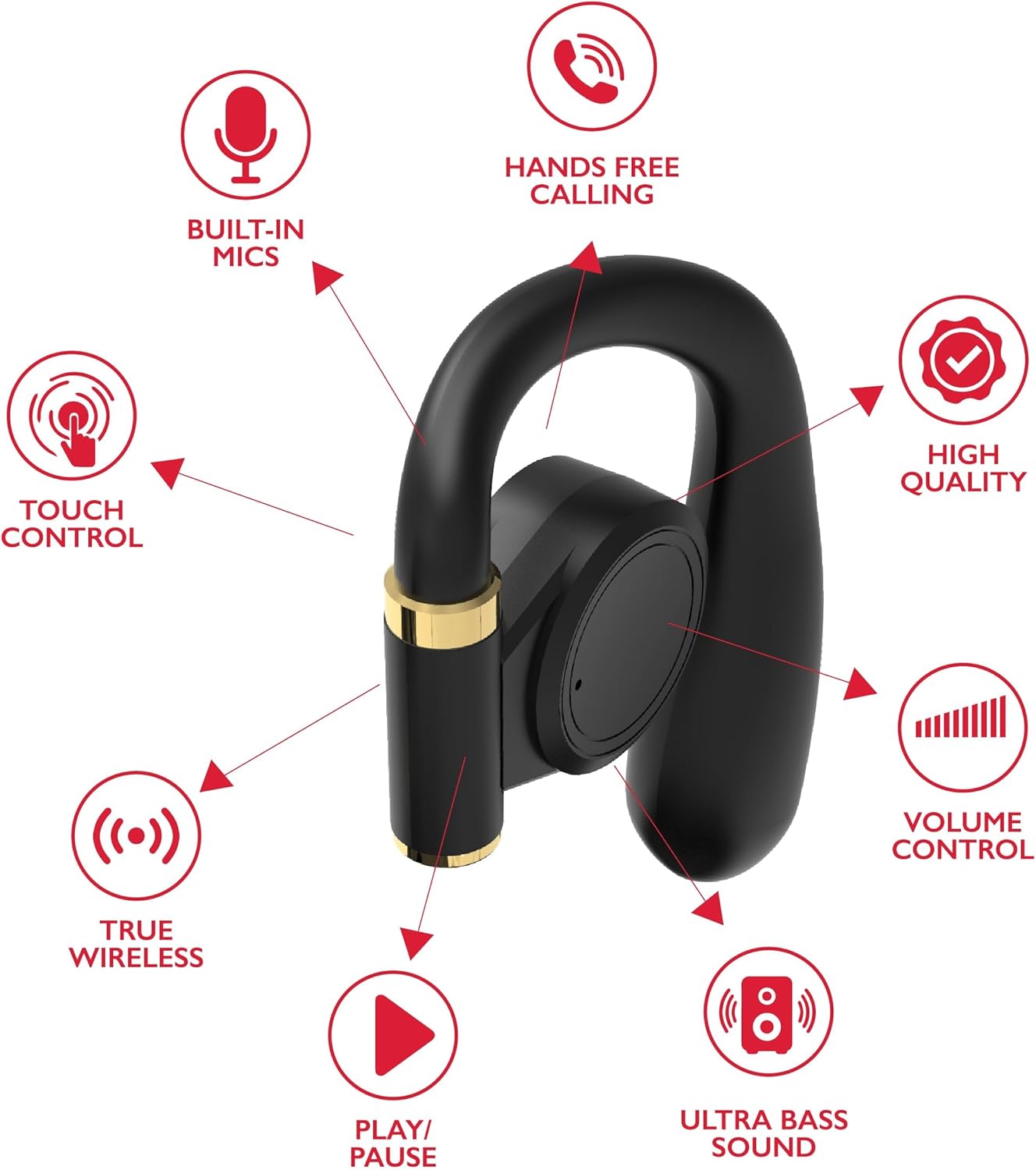
Afbeelding: A diagram highlights key features of a single RCA Wave-68 earbud, including built-in mics, hands-free calling, touch control, true wireless connectivity, play/pause function, ultra bass sound, volume control, and high-quality audio.
Instellen
1. De oordopjes en het doosje opladen
Before first use, fully charge the earbuds and charging case. Place the earbuds into the charging case. Connect the USB charging cable to the charging port on the case and to a power source. The digital display on the case will show the charging status. A full charge provides approximately 20 hours of total playtime with the charging case.
2. Bluetooth-koppeling
- Inschakelen: Open the charging case. The earbuds will automatically power on and enter pairing mode. You may see a blinking light indicator on the earbuds.
- Activeer Bluetooth: Schakel Bluetooth in op uw apparaat (smartphone, tablet, enz.).
- Selecteer apparaat: Zoeken naar "RCA Wave-68" in the list of available Bluetooth devices and select it to connect.
- Bevestiging: Once connected, the earbuds will indicate successful pairing, and the light indicator may stop blinking or turn off.
If pairing fails, ensure the earbuds are charged and within range of your device. Turn off Bluetooth on other nearby devices to avoid interference.
Gebruiksaanwijzing
Aan/uit
- Inschakelen: Open het oplaadhoesje en de oordopjes schakelen automatisch in. U kunt ze ook inschakelen door het aanraakgevoelige gedeelte op beide oordopjes 3 seconden ingedrukt te houden.
- Uitschakelen: Place the earbuds back into the charging case and close the lid. They will automatically power off. Alternatively, press and hold the touch control area on both earbuds for 5 seconds.
Aanraakbediening
De RCA Wave-68 oordopjes zijn voorzien van intuïtieve aanraakbediening voor het beheren van audioweergave, oproepen en spraakassistentfuncties.
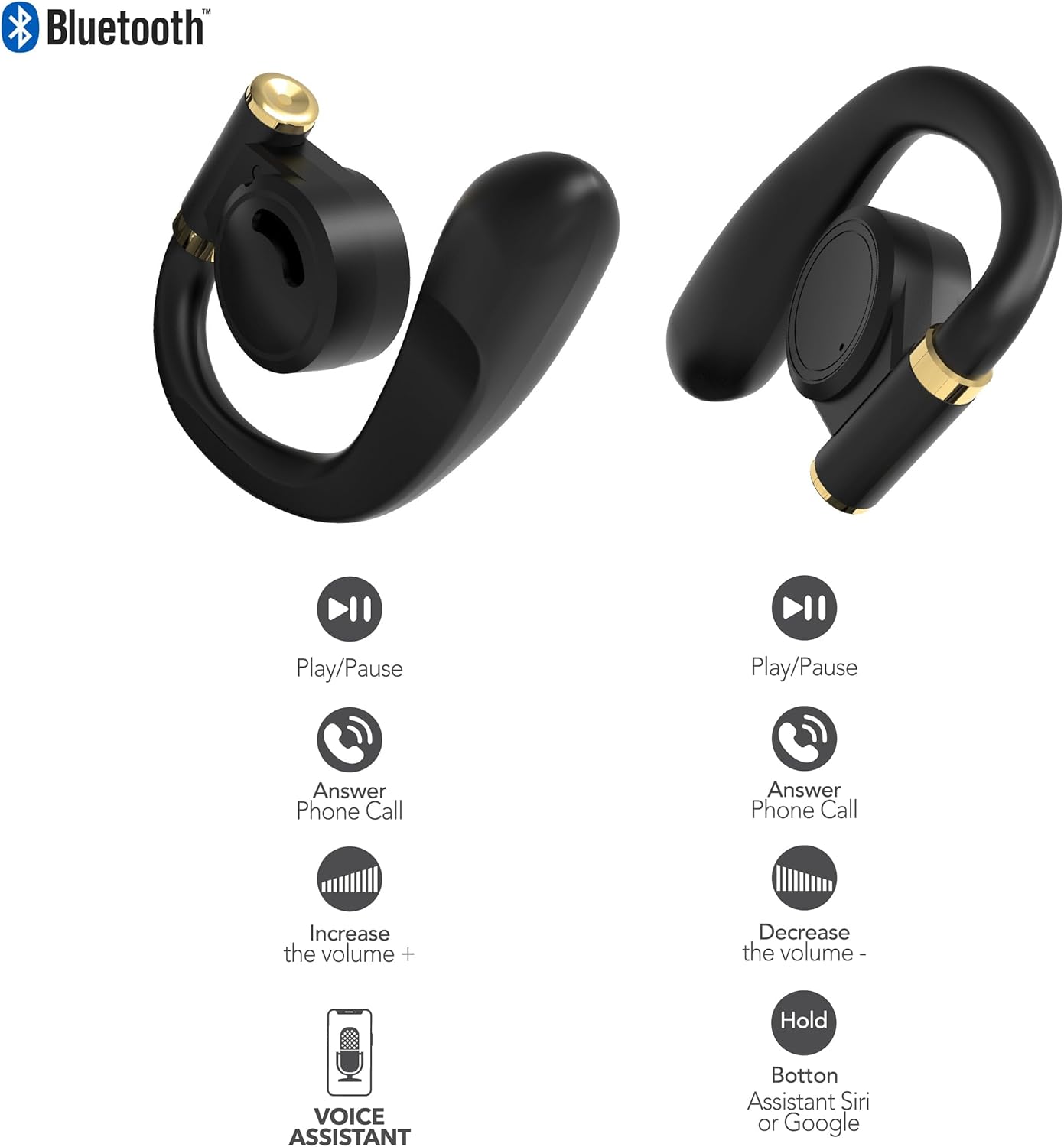
Afbeelding: This diagram illustrates the touch control functions for both the left and right RCA Wave-68 earbuds, including play/pause, answer phone call, volume increase/decrease, and activating the voice assistant.
- Afspelen/Pauzeren: Tik één keer op een van de oordopjes.
- Volgende nummer: Dubbeltik op het rechteroordopje.
- Vorig nummer: Dubbeltik op het linkeroordopje.
- Volume omhoog: Tik driemaal op het rechteroordopje.
- Volume verminderen: Tik driemaal op het linkeroordopje.
- Oproep beantwoorden/beëindigen: Tik één keer op een van de oordopjes tijdens een inkomende of actieve oproep.
- Oproep afwijzen: Houd een van de oordopjes 2 seconden ingedrukt tijdens een inkomende oproep.
- Activeer spraakassistent (Siri/Google Assistent): Houd een van beide oordopjes 3 seconden ingedrukt.
Transparantiemodus
The Transparency Mode allows you to hear your surroundings while still enjoying your audio. This feature is useful for awareness in environments like busy streets or public transport.
- Transparantiemodus in-/uitschakelen: Consult your device's Bluetooth settings or specific app if available, or refer to the product's quick start guide for a specific touch control gesture if not listed above.
Onderhoud
Schoonmaak
Regelmatig schoonmaken draagt bij aan het behoud van de geluidskwaliteit en hygiëne.
- Gebruik een zachte, droge, pluisvrije doek om de oordopjes en de oplaadcase schoon te vegen.
- Gebruik geen schuurmiddelen, alcohol of chemische oplosmiddelen.
- Gently remove any earwax or debris from the earbud tips and speaker mesh using a small, clean brush or cotton swab.
Opslag
Wanneer u de oordopjes niet gebruikt, kunt u ze in de oplaadcase opbergen om ze te beschermen tegen stof en beschadigingen.
- Bewaren op een koele, droge plaats, uit de buurt van extreme temperaturen.
- Vermijd langdurige blootstelling aan direct zonlicht of vocht.
Probleemoplossing
Als je problemen ondervindt met je RCA Wave-68 oordopjes, raadpleeg dan de volgende veelvoorkomende oplossingen:
- Earbuds not powering on automatically: Ensure the charging case is charged. Place earbuds back in the case, close the lid, then open it again. If issues persist, manually power on by pressing and holding the touch control area for 3 seconds.
- Oordopjes koppelen niet: Make sure both earbuds are fully charged. Turn off Bluetooth on your device, then turn it back on. Forget "RCA Wave-68" from your device's Bluetooth list and attempt to pair again. Ensure no other devices are actively connected to the earbuds.
- Geen geluid uit één oordopje: Place both earbuds back into the charging case, close the lid, and then take them out again. This often re-syncs them. Check your device's audio balance settings.
- Charging case not displaying battery info/not charging: Ensure the USB cable is securely connected to both the case and the power source. Try a different USB cable or power adapter. Clean the charging port on the case for any debris.
- Laag volume of slechte geluidskwaliteit: Adjust the volume on both your device and the earbuds. Ensure the earbuds are properly seated in your ears for a good seal. Clean any debris from the earbud speaker mesh.
- Oordopjes vallen eruit: Ensure you are using the correct ear tip size for a secure and comfortable fit.
Specificaties
| Functie | Detail |
|---|---|
| Modelnaam | Golf-68 |
| Merk | RCA |
| Connectiviteitstechnologie | Draadloos (Bluetooth) |
| Bluetooth-versie | 5.3 |
| Levensduur van de batterij | Tot 20 uur (met oplaadcase) |
| Controlemethode | Aanraken |
| Plaatsing van de oren | In het oor |
| Vormfactor | In het oor |
| Materiaal | Kunststof, siliconen |
| Speciale kenmerken | Built-In Voice Assistant, Transparency Mode |
| UPC | 850068964468 |
Veiligheidsinformatie
- Demonteer of wijzig de oordopjes of het oplaadhoesje niet.
- Avoid exposing the device to extreme temperatures, humidity, or liquids.
- Gebruik de oordopjes niet langdurig op een hoog volume om gehoorschade te voorkomen.
- Buiten bereik van kinderen en huisdieren houden.
- Voer het apparaat op verantwoorde wijze af volgens de plaatselijke voorschriften.
Garantie en ondersteuning
RCA products are designed for reliability and performance. For warranty information or technical support, please refer to the warranty card included in your package or visit the official RCA support webwebsite. Bewaar uw aankoopbewijs voor garantieclaims.


