1. Inleiding
Thank you for choosing the Duux Bora Smart Dehumidifier. This manual provides essential information for the safe and efficient operation of your device. Please read it thoroughly before use and retain it for future reference.
The Bora dehumidifier is designed to create a healthier indoor environment by effectively managing high humidity levels. It can remove up to 30 liters of moisture per day, helping to prevent mold and bacterial growth. Featuring an integrated hygrostat for automatic humidity regulation and an active carbon filter for odor removal, the Bora ensures cleaner air. Remote control is available via the Duux application.
2. Belangrijke veiligheidsinstructies
Volg altijd de basisveiligheidsmaatregelen bij het gebruik van elektrische apparaten om het risico op brand, elektrische schokken en letsel te beperken.
- Lees alle instructies voordat u het apparaat bedient.
- Zorg ervoor dat de voeding overeenkomt met de voltagzoals vermeld op het classificatielabel.
- Gebruik de luchtontvochtiger niet als het snoer of de stekker beschadigd is.
- Houd het apparaat uit de buurt van warmtebronnen, direct zonlicht en brandbare materialen.
- Blokkeer de luchtinlaten en -uitlaten niet.
- Plaats het apparaat altijd op een stabiele, vlakke ondergrond.
- Haal de stekker uit het stopcontact voordat u het apparaat schoonmaakt, onderhoudt of wanneer u het niet gebruikt.
- Dompel het apparaat, het netsnoer en de stekker niet onder in water of andere vloeistoffen.
- Dit apparaat is niet bedoeld voor gebruik door personen (inclusief kinderen) met beperkte fysieke, sensorische of mentale vermogens, of met een gebrek aan ervaring en kennis, tenzij zij onder toezicht staan of instructies hebben gekregen over het gebruik van het apparaat door een persoon die verantwoordelijk is voor hun veiligheid.
- Kinderen moeten onder toezicht staan om ervoor te zorgen dat ze niet met het apparaat spelen.
3. Product voorbijview
Familiarize yourself with the components of your Duux Bora Dehumidifier.

Figuur 3.1: Voorkant view of the Duux Bora Dehumidifier, showing its sleek design and a smartphone displaying the control app interface.

Figuur 3.2: Achterkant view of the dehumidifier, highlighting the removable air filter cover and the continuous drainage port.

Figuur 3.3: Top panel of the dehumidifier, displaying the digital screen and touch controls for various functions.
Belangrijkste componenten:
- Configuratiescherm: Located on the top, with digital display and touch buttons.
- Luchtinlaat/uitlaat: Voor het aanzuigen en uitstoten van lucht.
- Waterreservoir: 4-liter capacity, located at the bottom front.
- Actief koolstoffilter: Located behind the rear air inlet.
- Continue afvoerpoort: For connecting a hose for continuous operation.
- Wielen: Voor gemakkelijke mobiliteit.
4. Instellen
- Uitpakken: Haal de luchtontvochtiger voorzichtig uit de verpakking. Bewaar al het verpakkingsmateriaal voor toekomstig transport of opslag.
- Plaatsing:
- Plaats het apparaat op een stevige, vlakke ondergrond.
- Zorg ervoor dat er minstens 20 cm (8 inch) ruimte is rond de luchtinlaten en -uitlaten voor een goede luchtcirculatie.
- Plaats het apparaat niet in de buurt van warmtebronnen of in direct zonlicht.
- The dehumidifier is suitable for various rooms up to 50 square meters, including basements, laundry rooms, and living areas.
- Stroomaansluiting: Sluit het netsnoer aan op een geaard stopcontact. Zorg ervoor dat het volumetage voldoet aan de vereisten van het apparaat (240 Volt).
- Installatie watertank: Ensure the 4-liter water tank is correctly inserted into the unit.

Figuur 4.1: The 4-liter water tank being pulled out from the dehumidifier for emptying or inspection.
- Continue drainage (optioneel): For continuous operation without emptying the water tank, connect a suitable hose (not included) to the continuous drainage port at the back of the unit. Ensure the hose is sloped downwards to allow gravity drainage.
5. Gebruiksaanwijzing
5.1. Bediening via het bedieningspaneel
Figuur 5.1: Gedetailleerd view of the control panel with digital display and function buttons.
The control panel allows you to manage all functions of the dehumidifier. Refer to the icons on the panel for specific functions.
- Aan/uit-knop: Hiermee schakelt u het apparaat in of uit.
- Modusselectie: Cycle through various operating modes (e.g., Auto, Continuous, Laundry Drying).
- Vochtigheidsinstelling: Adjust the desired humidity level using the up/down arrows. The integrated hygrostat will maintain this level.
- Tijdklok: Stel een timer in voor automatische uitschakeling.
- Ventilatorsnelheid: Select between 2 fan speeds.
5.2. Smart Control via Duux App
The Duux Bora can be controlled remotely using the Duux application on your smartphone or tablet.

Figuur 5.2: The Duux mobile application displaying current humidity and control options for the Bora dehumidifier.
- Download the Duux app from your device's app store.
- Follow the in-app instructions to pair your Bora dehumidifier.
- Once connected, you can power the unit on/off, adjust settings, and receive notifications (e.g., when the water tank is full) from anywhere.
5.3. Laundry Drying Mode
The innovative Laundry Drying Mode is designed to efficiently dry clothes indoors.
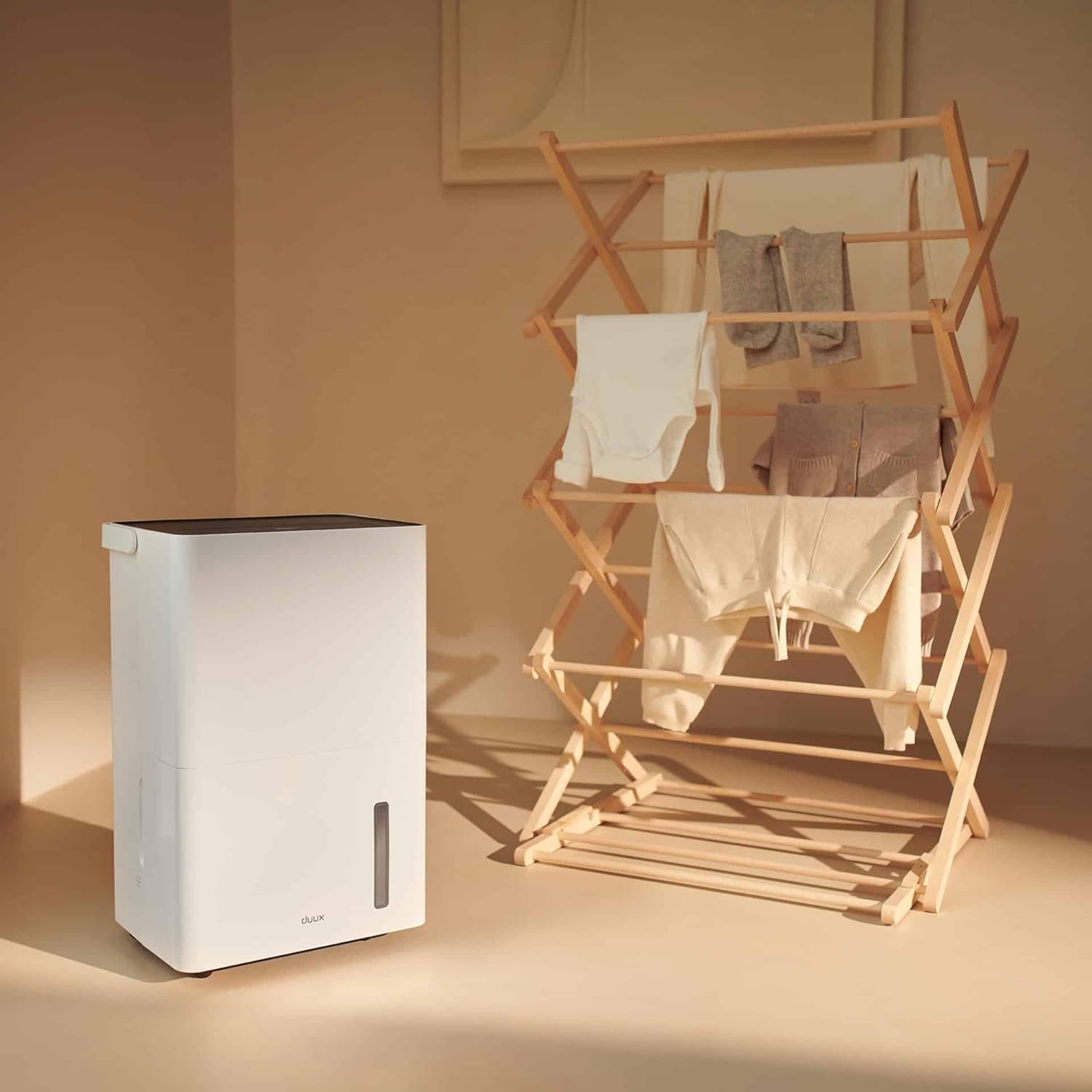
Figuur 5.3: The dehumidifier positioned near a laundry rack, demonstrating its use in drying clothes.
- Activate this mode via the control panel or the Duux app.
- This mode operates continuously to remove moisture from the air, accelerating the drying process of laundry.
- It can significantly reduce energy consumption compared to traditional tumble dryers.
6. Onderhoud
Regelmatig onderhoud zorgt ervoor dat uw luchtontvochtiger optimaal presteert en lang meegaat.
6.1. De watertank legen
- Wanneer het waterreservoir vol is, schakelt het apparaat automatisch uit en gaat een indicatielampje branden.
- Trek het waterreservoir voorzichtig uit de voorkant van het apparaat.
- Giet het verzamelde water in een gootsteen of afvoer.

Figuur 6.1: A user emptying the collected water from the dehumidifier's tank into a sink.
- Reinsert the empty water tank firmly into the unit until it clicks into place. The unit will resume operation.
6.2. Het luchtfilter reinigen
The active carbon filter should be cleaned regularly (e.g., every two weeks or as needed) to maintain air quality and dehumidifier efficiency.
- Haal de stekker van de luchtontvochtiger uit het stopcontact.
- Locate the filter cover at the back of the unit.
- Remove the filter cover and carefully pull out the active carbon filter.

Figuur 6.2: A user demonstrating the removal of the active carbon filter from the rear of the dehumidifier.
- Clean the filter with a vacuum cleaner or wash it gently with lukewarm water. Allow it to air dry completely before reinstallation.
- Reinsert the dry filter and replace the filter cover.
6.3. Algemene schoonmaak
- Veeg de buitenkant van het apparaat af met een zachte, damp doek. Gebruik geen schurende reinigingsmiddelen of oplosmiddelen.
- Zorg ervoor dat het apparaat is losgekoppeld voordat u het schoonmaakt.
7. Probleemoplossing
Voordat u contact opneemt met de klantenservice, raadpleeg dan de volgende veelvoorkomende problemen en oplossingen:
| Probleem | Mogelijke oorzaak | Oplossing |
|---|---|---|
| Het apparaat gaat niet aan. | No power supply; Power cord not plugged in; Water tank full or incorrectly inserted. | Controleer de stroomaansluiting. Leeg het waterreservoir en plaats het weer op de juiste manier terug. |
| Luchtontvochtiger verzamelt geen water. | Room temperature too low; Humidity level already low; Air filter clogged; Unit in fan-only mode. | Ensure room temperature is above 5°C (41°F); Check desired humidity setting; Clean air filter; Select dehumidification mode. |
| Eenheid maakt lawaai. | Het apparaat staat niet op een vlakke ondergrond; het luchtfilter is verstopt; interne onderdelen trillen. | Plaats het apparaat op een vlakke ondergrond; reinig het luchtfilter; neem contact op met de klantenservice als het geluid aanhoudt. |
| Problemen met app-verbinding. | Wi-Fi signal weak; Incorrect pairing procedure; App requires update. | Ensure strong Wi-Fi signal; Re-attempt pairing as per app instructions; Update Duux app. |
| Er komt een onaangename geur uit het apparaat. | Active carbon filter needs cleaning or replacement. | Reinig of vervang het actieve koolstoffilter. |
8. Specificaties
| Functie | Detail |
|---|---|
| Merk | Twee keer |
| Modelnummer | DXDH30 |
| Kleur | Wit |
| Ontvochtigingscapaciteit | Tot 30 liter per dag |
| Capaciteit watertank | 4 liter |
| Deeltage | 240 Volt |
| Productafmetingen (L x B x H) | 24.7x33.7x51cm |
| Artikelgewicht | 16.5 kilogram |
| Aantal snelheden | 2 |
| Automatische uitschakeling | Ja (wanneer de watertank vol is) |
| Speciale kenmerken | Integrated Hygrostat, Active Carbon Filter, Laundry Drying Mode, Smart App Control |
| Aanbevolen vloeroppervlak | Tot 50 vierkante meter |
| Meegeleverde componenten | 1 actief koolstoffilter |
9. Garantie en reserveonderdelen
Duux products are manufactured to high-quality standards. While specific warranty details are not provided in this manual, please refer to your purchase documentation or the official Duux website voor uitgebreide garantie-informatie.
Beschikbaarheid van reserveonderdelen: Spare parts for the Duux Bora Dehumidifier are available for up to 10 years from the date of purchase, ensuring long-term usability and repairability.
10. Klantenservice
If you encounter any issues not covered in the troubleshooting section or require further assistance, please contact Duux customer support.
- Visit the official Duux website voor veelgestelde vragen, ondersteuningsbronnen en contactgegevens.
- Utilize the Duux app for remote monitoring and potential in-app support features.


