1. Inleiding
This manual provides detailed instructions for the installation, operation, and maintenance of your WEILAILIFE 4K 8MP PoE Dome Security Camera System. Please read this manual thoroughly before use to ensure proper functionality and safety. This system is designed for reliable surveillance with high-resolution imaging and advanced features.
2. Inhoud van het pakket
Controleer of alle hieronder vermelde artikelen in uw pakket zitten. Als er artikelen ontbreken of beschadigd zijn, neem dan contact op met de klantenservice.
- 4K 8-Channel Network Video Recorder (NVR) with 1TB HDD (x1)
- 8MP Dome Cameras (x2)
- LAN Cables for Cameras (18.2 meters, x2)
- NVR Power Adapter (48V2A, x1)
- Camera Power Adapters (x2)
- USB-muis (x1)
- HDMI Cable (1 meter, x1)
- LAN Cable (1 meter, x1)
- Mounting Screw Packs for Cameras (x2)
- Warning Labels (x1)
- Gebruiksaanwijzing (x1)

Figuur 1: Overview of the WEILAILIFE 4K 8MP PoE Dome Security Camera System package contents.
Video 1: Product Introduction and Unboxing. This video demonstrates the contents of the package and initial setup steps.
3. Product voorbijview
The WEILAILIFE 4K 8MP PoE Dome Security Camera System offers advanced surveillance capabilities. Key features include:
- 4K 8MP ultra-hoge resolutie: Captures clear and detailed images (3264x2488 pixels).
- 130° ultragroothoeklens: Provides extensive coverage, minimizing blind spots.
- Tweerichtingsaudio: Maakt realtimecommunicatie via de camera mogelijk.
- PIR & Dual Detection: Advanced human detection algorithm combined with infrared sensors to reduce false alarms from non-human movements.
- PoE (Power over Ethernet): Simplifies installation by providing power and data through a single LAN cable.
- IP66 Weerbestendig: Suitable for both indoor and outdoor use, resistant to dust and water.
- Uitbreidbaar systeem: Ondersteunt tot 8 camera's.

Figure 2: WEILAILIFE 4K 8MP PoE Dome Camera, highlighting its IP66 weatherproof design for outdoor use.

Afbeelding 3: Gedetailleerd view of the multi-layered optical lens for enhanced image clarity.
4. Installatie-instructies
4.1 fysieke installatie
The dome cameras are designed for easy installation. Ensure the mounting surface is sturdy enough to support the camera's weight.
- Kies voor elke camera een geschikte locatie, zodat optimale prestaties gegarandeerd zijn. viewing angles and proximity to the NVR for cable connection.
- Use the provided mounting screws and anchors to securely attach the camera base to the wall or ceiling.
- Connect the LAN cable from the camera to an available PoE port on the NVR. The system supports PoE power, eliminating the need for separate power outlets at the camera location.
- Pas de hoek van de camera aan om het gewenste bewakingsgebied te bestrijken.
Video 2: Camera Installation Guide. This video provides a visual guide for mounting the cameras.
4.2 Systeemverbinding
Follow these steps to connect your NVR and cameras:
- Connect the NVR to a power source using the provided NVR power adapter.
- Connect the NVR to your router using the included LAN cable for network access and remote viewmogelijkheden.
- Sluit de NVR aan op een monitor of tv met behulp van de HDMI-kabel voor lokale viewing en configuratie.
- Sluit de USB-muis aan op de USB-poort van de NVR om te navigeren.
- Connect the cameras to the NVR's PoE ports using the LAN cables. The cameras will power on automatically.
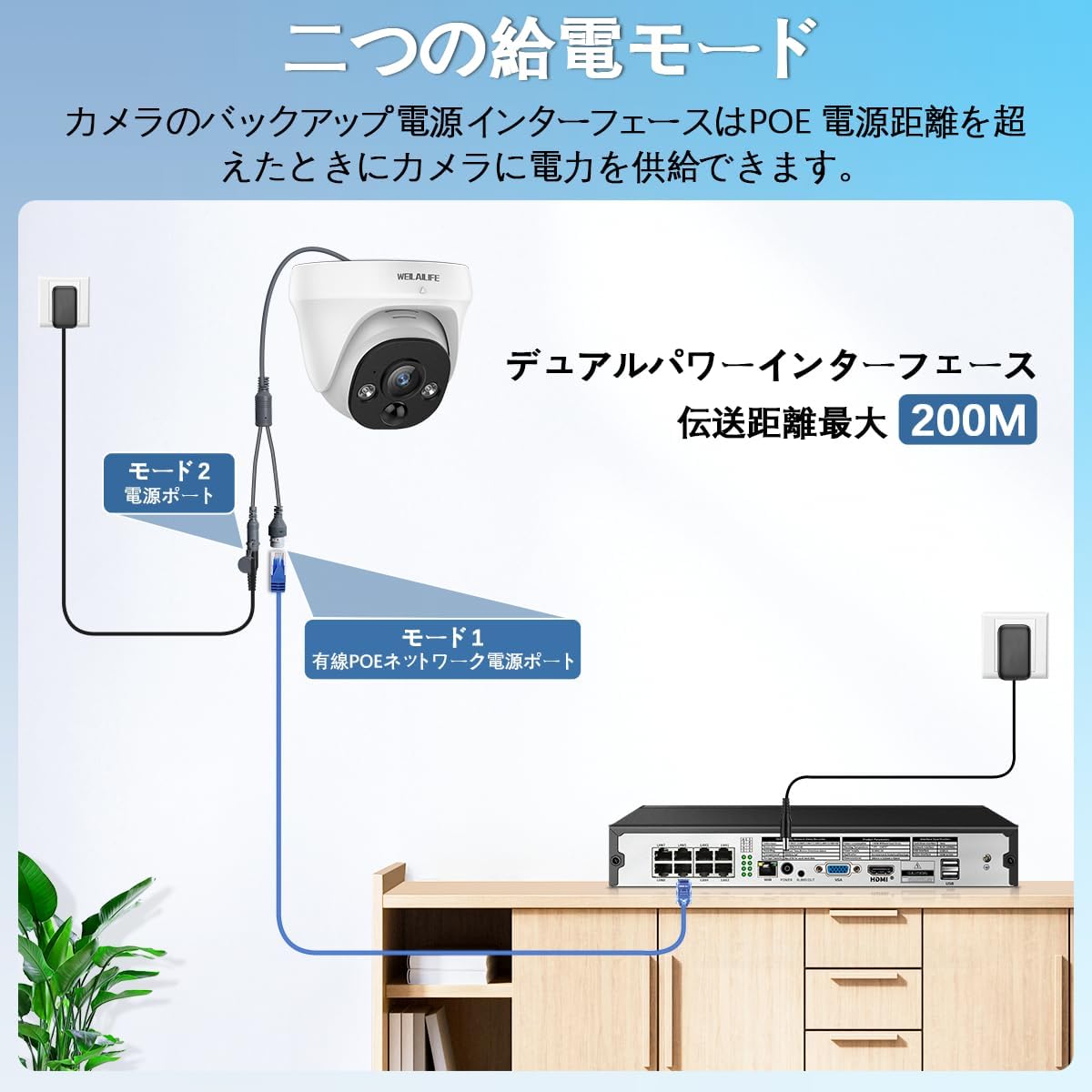
Figure 4: Illustration of the dual power interface for PoE cameras, allowing power supply even beyond standard PoE distance.

Figure 5: Diagram showing various connection ports on the NVR, including PoE ports for cameras, HDMI, VGA, USB, and network port.
4.3 Eerste configuratie
Once all components are connected, the NVR will boot up. Follow the on-screen prompts for initial setup:
- Select your preferred language (Japanese is pre-set).
- Configure network settings (wired LAN or Wi-Fi).
- Set the date and time zone.
- Create a strong password for your NVR system.
- The cameras should automatically connect and display live feeds.
5. Gebruiksaanwijzing
5.1 Levend View en opname
Access live camera feeds and manage recordings through the NVR connected to a monitor or via the mobile application.
- The NVR comes with a 1TB HDD for continuous recording.
- You can configure recording schedules and playback recorded footage directly from the NVR interface.

Figure 6: The system utilizes H.265+ video compression for efficient storage and bandwidth usage while maintaining 4K quality.
5.2 Motion Detection (PIR & Dual Detection)
The system features advanced PIR and dual detection technology to accurately identify human movement and minimize false alarms.
- Configure specific motion detection zones to focus on critical areas.
- Ontvang realtime meldingen op je smartphone wanneer beweging wordt gedetecteerd.

Figure 7: Illustration of PIR and AI dual detection, distinguishing human movement from other environmental factors like leaves or insects.

Afbeelding 8: Example of a real-time alarm notification sent to your smartphone upon detection of suspicious activity.

Figure 9: Customizable motion detection zones allow you to define specific areas for surveillance, reducing unnecessary alerts.
5.3 Tweerichtingsaudio
The cameras are equipped with a microphone and speaker for two-way communication.
- Speak through the camera to visitors or deter intruders using the mobile app.
- Luister naar de audio-opnamen van de cameralocatie.

Figure 10: The two-way audio feature allows communication with individuals near the camera, such as delivery personnel.

Figure 11: Clear two-way audio ensures effective communication through the camera system.
5.4 Toegang op afstand (mobiele app)
Monitor your property from anywhere using the dedicated mobile application.
- Download the free "Honestview" or "Eseecloud" app from the App Store (iOS) or Play Store (Android).
- Follow the in-app instructions to add your NVR system.
- View live feeds, playback recordings, and receive alerts directly on your smartphone.

Figuur 12: Afstandsbediening viewing is accessible on various devices, including smartphones, tablets, and computers, allowing you to monitor your property from anywhere.

Figure 13: Scan this QR code to access WEILAILIFE's LINE service for support and inquiries. Access LINE Service
5.5 Systeemuitbreidbaarheid
The NVR supports up to 8 cameras, allowing you to expand your surveillance coverage as needed.
- Additional WEILAILIFE PoE cameras can be purchased separately and easily integrated into your existing system.

Figure 14: The system is expandable, supporting up to 8 cameras for comprehensive coverage of your property.
Video 3: PTZ PoE Security Camera System Overview. This video demonstrates the features of a PTZ PoE system, which can be integrated into your NVR.
6. Onderhoud
To ensure the longevity and optimal performance of your security camera system, follow these maintenance guidelines:
- Maak de cameralenzen regelmatig schoon met een zachte, damp cloth to prevent dust and dirt buildup from affecting image quality.
- Zorg ervoor dat alle kabelverbindingen goed vastzitten en onbeschadigd zijn.
- Check for firmware updates periodically through the mobile app or NVR interface to benefit from new features and security enhancements.
- The IP66 weatherproof rating ensures durability in various outdoor conditions, from -10°C to 50°C.

Figure 15: The IP66 waterproof and dustproof design ensures reliable operation in various weather conditions.
7. Probleemoplossing
If you encounter any issues with your WEILAILIFE security camera system, please refer to the following common solutions:
- Geen beeld op monitor: Check all power connections for the NVR and cameras. Ensure the HDMI/VGA cable is securely connected to both the NVR and the monitor. Verify the monitor input source is correct.
- Geen netwerkverbinding: Ensure the NVR's LAN cable is properly connected to your router. Check your router's internet connection. If using Wi-Fi, verify the Wi-Fi settings on the NVR.
- Geen externe toegang: Confirm the NVR is connected to the internet. Ensure the mobile app is correctly configured and the device is added. Check your smartphone's internet connection.
- Alarmen voor valse beweging: Adjust the motion detection sensitivity settings in the NVR or app. Refine the motion detection zones to exclude areas with frequent non-human movement (e.g., trees swaying).
- Slechte beeldkwaliteit: Clean the camera lens. Ensure the camera is properly focused (if adjustable). Check for obstructions in the camera's field of view.
If the problem persists, please contact WEILAILIFE customer support.
8. Specificaties
| Functie | Specificatie |
|---|---|
| Merk | WEILAILIFE |
| Modelnummer | 日CSWL-03BP8MP02-PIR-2ch+3.5"1TB-W |
| Resolutie video-opname | 3264×2488 (4K) |
| Connectiviteitstechnologie | Bekabeld (PoE) |
| Speciale kenmerken | 130° Ultra-Wide Angle, 4K 8MP Ultra-High Resolution, PIR & Dual Detection, Two-Way Audio, Free APP & No Monthly Fees |
| Kanaaltelling | 8 (uitbreidbaar) |
| Energiebron | Stroomkabel |
| Deeltage | 110 volt (wisselstroom) |
| Wattage | 45 W |
| Productafmetingen | 32x16x28cm |
| Artikelgewicht | 2.9 kilogram |
9. Garantie en ondersteuning
WEILAILIFE is committed to providing high-quality products and excellent customer service.
- Garantie: This product comes with a 12-month quality guarantee.
- Klantenservice: For any questions, concerns, or malfunctions during consideration or use, please feel free to contact us. Our Japanese-speaking support team is available via email.
- E-mailadres: info-jp@weilailifetech.com (Responses within 24 hours)
- Kantooradres: 1F Rose Avenue Inage Tendai, 5-8-9 Tendai, Inage-ku, Chiba City, Chiba Prefecture, Japan.

Figure 16: WEILAILIFE offers a 12-month warranty and dedicated customer support.


