1. Inleiding
This manual provides essential information for the proper setup, operation, and maintenance of your POGOLAB 88 Keys Roll Up Keyboard Piano. Please read it thoroughly to ensure optimal performance and longevity of your instrument.
2. Inhoud van het pakket
- 1 x Roll Up Keyboard Piano
- 1 x Sustainpedaal
- 1 x USB-kabel (Type-C)
- 1 x Gebruikershandleiding
3. Product voorbijview
Figuur 3.1: Lay-out van het bedieningspaneel
This image displays the main control panel with buttons for various functions including Demo, Sustain, Tones, Rhythms, Record/Play, Transpose, Chord, Metronome, and Volume adjustment. A built-in speaker is also visible.
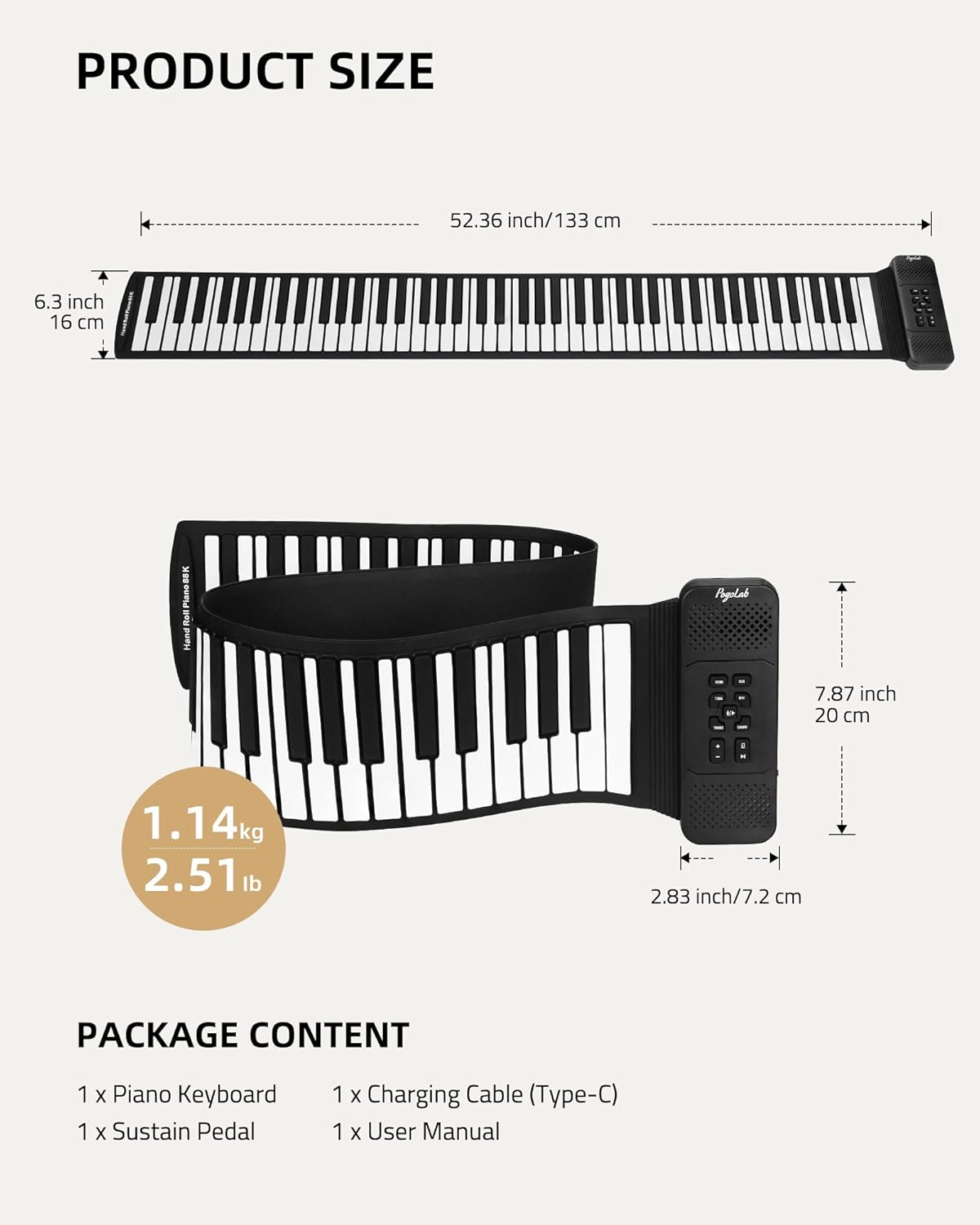
Figure 3.2: Side Ports and Connections
This image shows the side of the piano, detailing the Power Switch, Type-C Charging port, Sustain Pedal input, Speaker/Headphone (3.5mm) jack, MP3 input, and Microphone input. An indicator light is also present.
4. Instellen
- Eerste opladen: Before first use, fully charge the piano for 3 hours using the provided USB Type-C cable and a compatible power adapter. The indicator light will be red during charging and turn green when fully charged. A full charge provides up to 2 hours of use.
- Unroll the Piano: Gently unroll the silicone keyboard on a flat, stable surface. Ensure the control module is positioned securely.
- Sluit het sustainpedaal aan: Plug the sustain pedal into the designated 'PEDAL' port on the side of the control module.
- Headphones/External Speaker (Optional): For private practice or amplified sound, connect 3.5mm headphones or an external speaker to the 'SPEAKER/HEADPHONE' jack.

Figure 4.1: Unrolled Piano and Accessories
This image illustrates the complete setup of the roll-up piano, including the keyboard, control module, sustain pedal, USB charging cable, and the user manual, ready for use.
5. Gebruiksaanwijzing
- Aan/uit: Press the 'POWER' button on the control module to turn the piano on or off.
- Volumeregeling: Use the 'Vol+' and 'Vol-' buttons to adjust the master volume.
- Toon selectie: The piano features 128 tones. Press the 'TONE' button and then use the number keys (0-127) to select a desired instrument sound.
- Ritme selectie: The piano includes 128 rhythms. Press the 'RHY' button and then use the number keys (0-127) to select a rhythm. Press 'PLAY' to start/stop the rhythm.
- Demosongs: There are 14 built-in demo songs. Press the 'DEMO' button to cycle through and play the demo songs.
- Onderhoudsfunctie: Use the connected sustain pedal for sustained notes. Alternatively, press the 'SUS' button on the control panel to toggle the digital sustain effect.
- Transponeren: Use the 'TRANS+' and 'TRANS-' buttons to adjust the key up or down.
- Metronoom: Press the 'METRONOME' button to activate the metronome. Use the 'TEMPO+' and 'TEMPO-' buttons to adjust the tempo.
- Opnemen en afspelen: Press the 'REC' button to start recording your performance. Press 'PLAY' to stop recording and play back the recorded sequence.
- Dual Bluetooth Function:
- GZUT-MIDI: Connect your mobile phone or tablet to 'GZUT-MIDI' via Bluetooth to play piano games or use MIDI applications.
- GZUT-MUSIC: Connect your mobile phone or tablet to 'GZUT-MUSIC' via Bluetooth to play background music through the piano's speakers.
Video 5.1: Product Features and Sound Demonstration
This video provides a comprehensive demonstration of the POGOLAB 88 Keys Roll Up Keyboard Piano, showcasing its sound quality, various features, and connectivity options including Bluetooth, microphone, and headphones.
Video 5.2: Dual Bluetooth Functionality
This video demonstrates the dual Bluetooth capabilities of the piano, showing how to connect to a mobile app for interactive piano games and to stream background music.

Figure 5.3: Dual Bluetooth Connectivity
This image visually explains the two Bluetooth functions: 'GZUT-MIDI' for connecting to piano game apps on a tablet or phone, and 'GZUT-MUSIC' for playing background music from a phone.

Figure 5.4: User Engagement with the Piano
This image shows a child enjoying the roll-up piano, highlighting its accessibility and suitability for beginners and casual play.
6. Onderhoud en verzorging
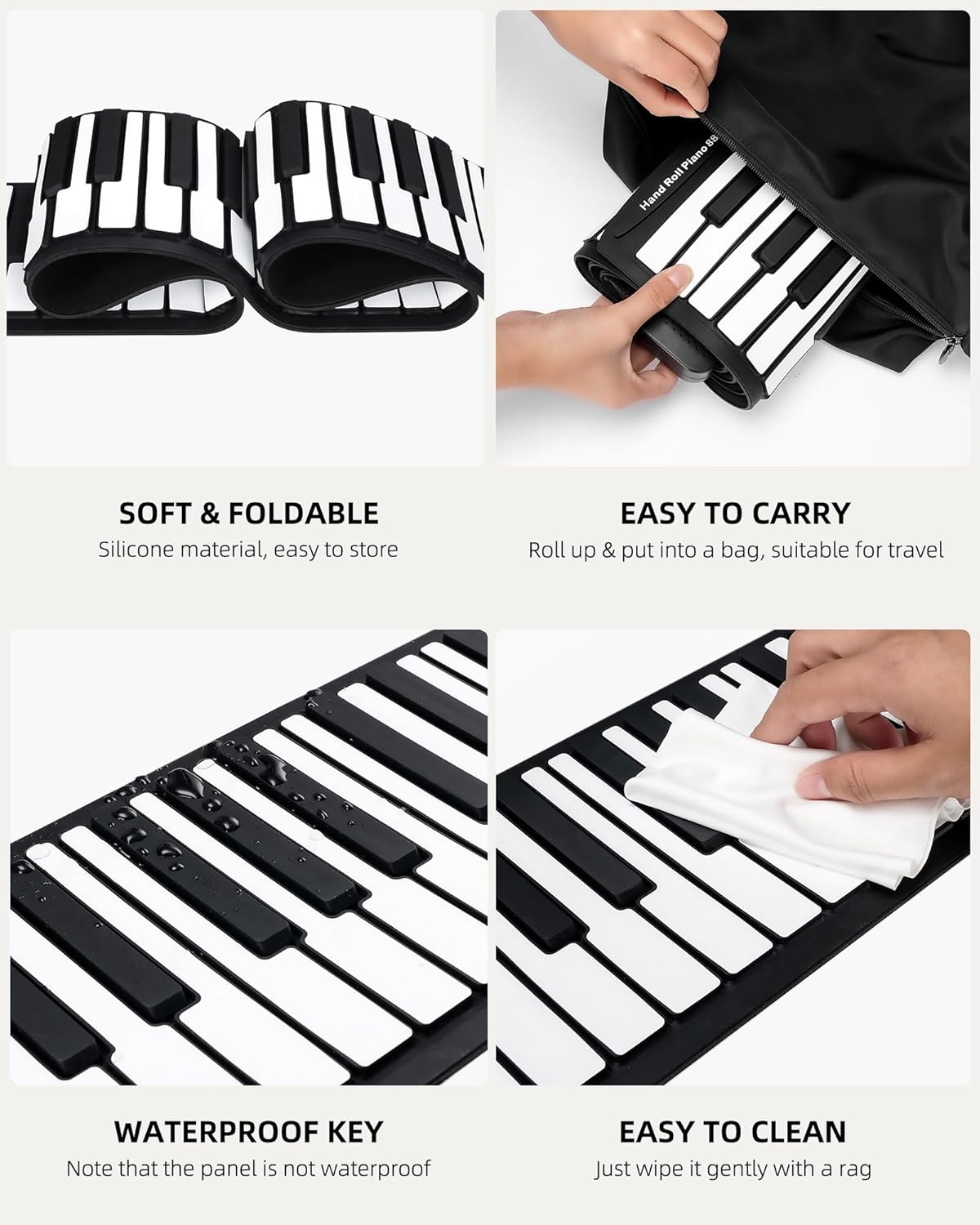
- Schoonmaak: Wipe the silicone keys gently with a soft, damp cloth. Avoid using harsh chemicals or abrasive materials. Note that while the keys are waterproof, the control panel is not.
- Opslag: After use, roll up the piano and store it in a dry, cool place away from direct sunlight and extreme temperatures. Its foldable design allows for easy storage in a backpack or box.
- batterij zorg: To prolong battery life, avoid fully discharging the battery frequently. Charge it regularly, especially if not used for extended periods.

Figure 6.1: Portability and Maintenance Features
This image highlights the piano's soft and foldable silicone material, making it easy to carry and store. It also demonstrates the waterproof nature of the keys (note: panel is not waterproof) and the simple cleaning process.

Figure 6.2: Charging Status and Battery Life
This image details the charging process, showing the USB-C connection and the indicator light's behavior (red for charging, green for full). It also notes a 2-hour charging time for the built-in rechargeable battery.
7. Probleemoplossing
- Geen geluid: Ensure the piano is powered on and the volume is not set to minimum. Check headphone/external speaker connections if applicable.
- Toetsen reageren niet: Ensure the piano is fully unrolled and lying flat on a stable surface. Avoid placing heavy objects on the keys.
- Problemen met Bluetooth-verbinding: Ensure the piano is in pairing mode and your device's Bluetooth is enabled. Try restarting both the piano and your device.
- Korte batterijduur: Ensure the piano is fully charged. If the issue persists, the battery may need replacement (contact customer support).
8. Specificaties
| Functie | Beschrijving |
|---|---|
| Modelnaam | BR2388 |
| Aantal sleutels | 88 |
| Tonen | 128 |
| Ritmes | 128 |
| Demosongs | 14 |
| Connectiviteit | Dual Bluetooth (GZUT-MIDI, GZUT-MUSIC), USB Type-C, 3.5mm Audio Jack (Headphones/Speaker/MP3/Microphone) |
| Energiebron | Oplaadbare lithium-polymeerbatterij |
| Oplaadtijd | Approx. 2 hours (3 hours for first use) |
| Materiaal | Kunststof, siliconen |
| Artikelgewicht | 3.12 pond |
| Afmetingen | 10.91 x 7.8 x 3.54 inch (verpakt) |
9. Garantie en ondersteuning
For warranty information and customer support, please refer to the documentation included with your purchase or contact POGOLAB customer service directly. Keep your proof of purchase for any warranty claims.


