Invoering
Thank you for choosing the Severin FILKA Automatic Filter Coffee Machine, Model KA 4852. This innovative appliance combines the convenience of a fully automatic machine with the enjoyment of classic filter coffee. It is designed to deliver freshly ground filter coffee in your desired quantity, suitable for carafes, cups, and travel mugs.
This manual provides essential information for the safe and efficient operation, maintenance, and troubleshooting of your new coffee machine. Please read it thoroughly before first use and keep it for future reference.
Belangrijke veiligheidsinstructies
Neem altijd de volgende veiligheidsmaatregelen in acht om ongelukken en schade aan het apparaat te voorkomen:
- Lees alle instructies zorgvuldig door voordat u het apparaat in gebruik neemt.
- Dompel het apparaat, het snoer of de stekker niet onder in water of een andere vloeistof.
- Houd het apparaat buiten bereik van kinderen.
- Zorg ervoor dat de voltagDe waarde die op het typeplaatje staat aangegeven, komt overeen met uw netspanning.
- Unplug the appliance from the mains socket when not in use, before cleaning, and in case of malfunction.
- Gebruik het apparaat niet als het snoer of de stekker beschadigd zijn, of nadat het apparaat defect is geraakt of op enige wijze beschadigd is.
- Plaats het apparaat op een stabiele, vlakke en hittebestendige ondergrond.
- Vermijd contact met hete oppervlakken. Gebruik handgrepen of knoppen.
- Gebruik uitsluitend door de fabrikant aanbevolen accessoires.
Productcomponenten
Familiarize yourself with the parts of your Severin FILKA coffee machine:

Figuur 1: Hoofd view of the Severin FILKA Automatic Filter Coffee Machine with coffee beans in the grinder and brewed coffee in the carafe.
- Geïntegreerde koffiemolen: For freshly ground coffee beans.
- Bonencontainer: Uitneembaar voor eenvoudig vullen en reinigen.
- Waterreservoir: Removable for convenient filling and cleaning.
- Digital Touchscreen Display: For intuitive control and settings adjustment.
- Brouweenheid: Houses the permanent filter.
- Permanent goudkleurig filter: Reusable and dishwasher-safe.
- Afdruiprek: Collects any drips.
- Glazen karaf: Included for brewing larger quantities of coffee.
Instellen
Follow these steps to set up your coffee machine for the first time:
- Uitpakken: Verwijder zorgvuldig al het verpakkingsmateriaal en controleer op beschadigingen. Bewaar de verpakking voor eventueel toekomstig transport.
- Eerste reiniging: Before first use, clean all removable parts (water tank, bean container, permanent filter, glass carafe) with warm soapy water. Rinse thoroughly and dry. Wipe the exterior of the machine with a damp lap.
- Positionering: Place the coffee machine on a stable, level, and heat-resistant surface, away from water sources and direct heat. Ensure adequate ventilation.
- Watertank vullen: Remove the water tank (zie figuur 2) and fill it with fresh, cold water up to the MAX mark. Reinsert the tank securely.
- Vul de bonencontainer: Open the lid of the bean container and fill it with whole coffee beans (zie figuur 3). Close the lid firmly.
- Eerste zetcyclus (zonder koffie): To clean the internal system, perform a brewing cycle with only water. Place the glass carafe under the coffee outlet. Select the maximum water quantity on the display and start the brewing process. Discard the water after completion. Repeat this process once or twice.

Figure 2: A hand removing the transparent water tank from the side of the Severin FILKA coffee machine.
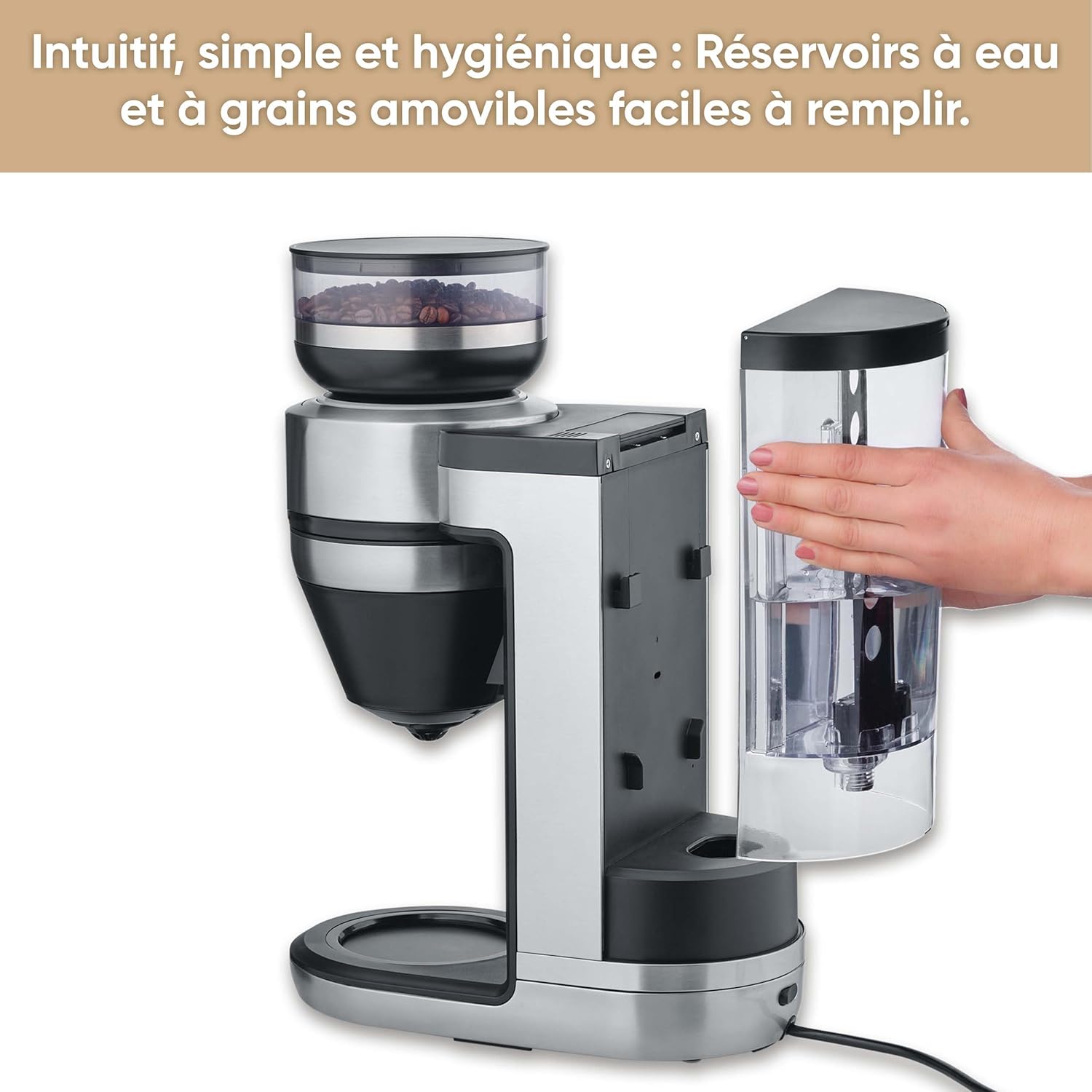
Figure 3: A hand holding the removable coffee bean container, lifted from the top of the Severin FILKA coffee machine.
Gebruiksaanwijzing
Basis brouwen
- Inschakelen: Plug the machine into a suitable power outlet. The display will illuminate.
- Fill Water and Beans: Ensure the water tank is filled with fresh water and the bean container has enough coffee beans.
- Plaatscontainer: Place your desired container (small cup, large cup, travel mug, or glass carafe) under the coffee outlet. The machine offers 5-in-1 compatibility.
- Selecteer aantal: Use the digital touchscreen display (zie figuur 4) to select the desired coffee quantity. The machine's "Cup Control" feature automatically draws the necessary water for quantities between 100 ml and 350 ml.
- Beginnen met brouwen: Press the 'Start/Stop' button on the display to begin the brewing process. The machine will grind the beans and brew the coffee.

Figure 4: Close-up of the digital touchscreen display on the Severin FILKA coffee machine, showing quantity and strength settings.

Figure 5: The Severin FILKA coffee machine brewing into a single cup, demonstrating the "Cup Control" feature.
Customizing Your Coffee
- Koffiesterkte: Adjust the coffee strength using the options on the touchscreen display. There are 5 adjustable intensity levels, from mild to strong, to suit individual preferences.
- Pre-infusiefunctie: Activate the pre-infusion function via the display for a more intense and aromatic coffee flavor. This feature ensures optimal extraction.
- Brouwtemperatuur: The machine brews at an optimal temperature of up to 96°C, ensuring a hot and full-bodied coffee.
- Timerfunctie: Utilize the integrated timer function to program your coffee machine to start brewing at a specific time.

Figure 6: Display showing brewing temperature and pre-infusion options for personalized coffee.
Onderhoud en reiniging
Regular cleaning and maintenance ensure the longevity and optimal performance of your Severin FILKA coffee machine.
Dagelijkse schoonmaak
- Glazen karaf: Wash the glass carafe and its lid with warm soapy water after each use.
- Permanent filter: Remove the gold-tone permanent filter (zie figuur 7) and rinse it under running water to remove all coffee grounds. It is also dishwasher-safe.
- Afdruiprek: Leeg en reinig de lekbak regelmatig.
- Buitenkant: Veeg de buitenkant van de machine af met een zachte, damp doek. Gebruik geen schurende schoonmaakmiddelen.

Figuur 7: Close-up view of the gold-tone permanent filter inside the Severin FILKA coffee machine.
Regelmatig onderhoud
- Bonencontainer: For thorough cleaning or changing bean types, the bean container can be easily removed by turning it. Clean it with a damp cloth and ensure it is completely dry before reattaching.
- Waterreservoir: The removable water tank facilitates easy refilling and cleaning. Clean it periodically to prevent mineral buildup.
- Ontkalken: The machine features an integrated descaling function. Follow the instructions on the display or in the full manual for the descaling process. Regular descaling is crucial, especially in areas with hard water, to maintain performance and extend the appliance's lifespan.
Probleemoplossing
Als u problemen ondervindt met uw koffiemachine, raadpleeg dan onderstaande tabel voor veelvoorkomende problemen en oplossingen:
| Probleem | Mogelijke oorzaak | Oplossing |
|---|---|---|
| Machine gaat niet aan. | Geen stroomvoorziening. | Controleer of het netsnoer goed in het stopcontact en het apparaat is gestoken. Test het stopcontact met een ander apparaat. |
| Er staat geen koffie. | Water tank empty; Bean container empty; Brewing unit clogged. | Fill water tank; Fill bean container; Clean the permanent filter and brewing unit. |
| Koffie smaakt zwak. | Incorrect coffee strength setting; Insufficient coffee beans. | Increase coffee strength setting on the display; Ensure adequate coffee beans are in the container. |
| Water Lek. | Water tank not properly seated; Internal component issue. | Ensure the water tank is correctly and firmly inserted. If leakage persists, contact customer support. |
| Foutmelding op het scherm. | Specifieke storing. | Refer to the full product manual for specific error codes or contact customer support. Try unplugging and re-plugging the machine. |
Technische specificaties
Here are the technical specifications for the Severin FILKA Automatic Filter Coffee Machine:
| Functie | Specificatie |
|---|---|
| Merk | Severijn |
| Modelnummer | KA4852 |
| Kleur | Geborsteld |
| Afmetingen (L x B x H) | 382x170x460cm |
| Deeltage | 230 Volt |
| Gewicht | 5750 kilogram |
| Capaciteit | 2 liter |
| Materiaal | Roestvrij staal |
| Speciale kenmerken | Integrated stainless steel grinder, adjustable coffee intensity, timer, LED touchscreen display, pre-infusion function, 5-in-1 compatibility. |
Garantie en klantenondersteuning
Voor informatie over de garantievoorwaarden kunt u de garantiekaart raadplegen die bij uw product is meegeleverd of de officiële Severin-website bezoeken. website. If you require technical assistance, spare parts, or have any questions not covered in this manual, please contact Severin customer support. Contact details can typically be found on the Severin webwebsite of in de productverpakking.


