1. Inleiding
This manual provides essential instructions for the safe and efficient use of your Meizu Note 21 Pro smartphone. Please read this manual thoroughly before operating the device and retain it for future reference.
2. Wat zit er in de doos?
- Meizu Note 21 Pro Smartphone
- Stroomadapter
- (Other accessories such as USB cable, SIM ejector tool, and documentation may vary by region.)
3. Apparaatindeling
Familiarize yourself with the physical components of your Meizu Note 21 Pro.
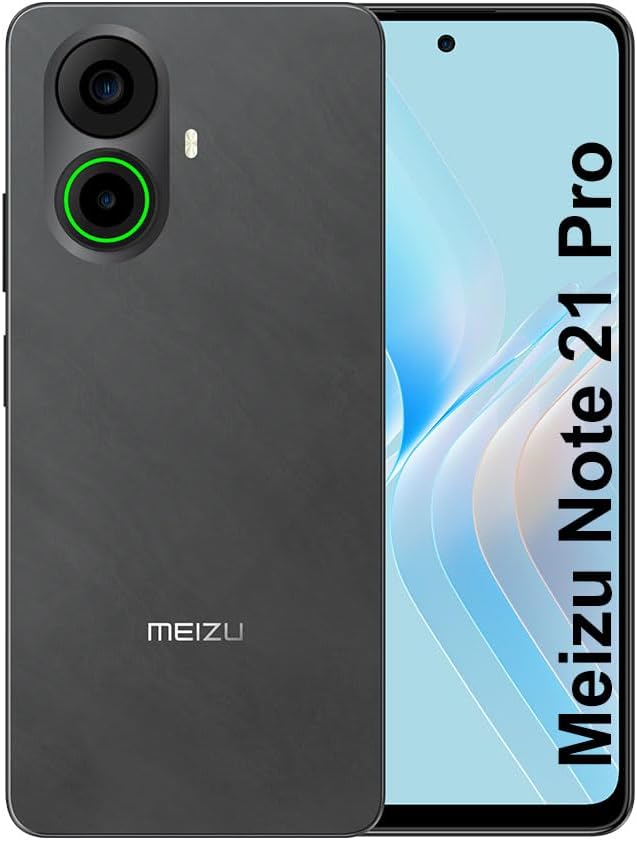
Afbeelding 3.1: Voor en achter view of the Meizu Note 21 Pro. The front displays the screen with a punch-hole camera. The rear shows the dual camera module with a green accent ring on one lens, a flash, and the "MEIZU" logo at the bottom.
- Voorzijde display: 6.78-inch FHD+ screen with a 120Hz refresh rate.
- Voorcamera: Bovenaan in het midden van het scherm.
- Achtercamera's: Dual camera system, including a 64MP main camera.
- Vingerafdruksensor aan de zijkant: Integrated for secure access.
- USB-poort: Voor opladen en gegevensoverdracht.
- 3.5 mm audio-aansluiting: Voor hoofdtelefoons.
- SIM/MicroSD-kaartlade: Supports Dual Nano SIM and MicroSD cards.
4. Instellen
4.1. SIM- en MicroSD-kaarten plaatsen
- Zoek de SIM-kaarthouder aan de zijkant van uw toestel.
- Plaats het SIM-uitwerpgereedschap in het kleine gaatje naast de lade en druk voorzichtig totdat de lade eruit springt.
- Place your Nano SIM card(s) and/or MicroSD card into the designated slots on the tray. Ensure the gold contacts face downwards.
- Plaats de lade voorzichtig terug in het apparaat totdat deze vastklikt.
4.2. Eerste keer inschakelen en instellen
- Press and hold the Power button until the Meizu logo appears.
- Volg de instructies op het scherm om uw taal te selecteren, verbinding te maken met een wifi-netwerk en uw Google-account in te stellen.
- During setup, you will be guided to configure security features such as a PIN, pattern, or password.
4.3. Instellen van vingerafdrukherkenning
- Navigeer naar Instellingen > Beveiliging en privacy > Vingerafdruk ontgrendelen.
- Follow the on-screen instructions to register your fingerprint by repeatedly touching the side-mounted sensor.
- Ensure your finger covers the entire sensor area during registration for optimal performance.
5. Uw apparaat bedienen
5.1. Weergave en navigatie
- The 6.78-inch FHD+ display operates at a 120Hz refresh rate for smooth visuals.
- Navigate the Android 14 operating system using touch gestures: tap, swipe, pinch-to-zoom.
- Je opent de snelle instellingen door vanaf de bovenkant van het scherm naar beneden te vegen.
5.2. Camerafuncties
- Open de Camera-app vanaf het startscherm of de app-lade.
- The rear camera system features a 64MP main sensor for high-resolution photos and a 2MP depth-of-field camera for portrait effects.
- The 13MP front-facing camera is suitable for selfies and video calls.
- Tap on the screen to focus, and use the on-screen shutter button to capture images. Explore various modes like Portrait, Night, and Pro within the camera app.
5.3. Prestaties en opslag
- The MediaTek G99 Octa Core processor ensures efficient performance for applications and multitasking.
- The device comes with 256GB of internal storage and 8GB of RAM.
- Storage can be expanded using a MicroSD card (sold separately).
5.4. Batterij en opladen
- The Meizu Note 21 Pro is equipped with a 5000mAh battery.
- Use the provided Power Adapter for 30W fast charging.
- To charge, connect the USB cable to the phone's USB port and the power adapter, then plug the adapter into a wall outlet.
5.5. Connectiviteit
- 4G LTE: Supports various LTE FDD and TDD bands for cellular data. Note: This international version works on T-Mobile in the USA and globally with other carriers.
- Wifi 5: Maak verbinding met draadloze netwerken voor internettoegang.
- Bluetooth: Combineer met draadloze accessoires zoals hoofdtelefoons en luidsprekers.
- NFC: Voor contactloos betalen en snel koppelen met compatibele apparaten.
- GPS-functie: Voor locatiebepaling en navigatie.
6. Onderhoud
- Schoonmaak: Gebruik een zachte, pluisvrije doek om het scherm en de behuizing van het apparaat schoon te maken. Vermijd agressieve chemicaliën of schurende materialen.
- batterij zorg: Avoid extreme temperatures. Do not fully discharge the battery frequently. For optimal battery longevity, keep the charge between 20% and 80%.
- Software-updates: Controleer regelmatig op systeemupdates en installeer deze om optimale prestaties en beveiliging te garanderen. Ga naar Instellingen > Systeem > Systeem update.
7. Probleemoplossing
| Probleem | Mogelijke oplossing |
|---|---|
| Apparaat gaat niet aan | Ensure the battery is charged. Connect the device to the power adapter and try again. If unresponsive, press and hold the Power button for 10-15 seconds to force a restart. |
| Slecht netwerksignaal | Check if the SIM card is correctly inserted. Move to an area with better network coverage. Restart the device. Verify with your carrier that your plan is active. |
| Apps zijn traag of crashen | Sluit achtergrondapplicaties. Wis de app-cache (Instellingen > Toepassingen > selecteer app > Opslag en cache > Cache wissen). Restart the device. Ensure sufficient storage space. |
| Vingerafdruksensor werkt niet | Ensure your finger and the sensor are clean and dry. Re-register your fingerprint in settings. |
8. Specificaties
- Model: Meizu Note 21 Pro
- Besturingssysteem: Androïde 14
- Verwerker: MediaTek G99 Octa Core (2.2GHz)
- Weergave: 6.78 inches FHD+ (1080 x 2160 resolution), 120Hz Refresh Rate
- RAM: 8GB
- Interne opslag: 256GB
- Achteruitrijcamera: 64 MP hoofdcamera + 2 MP dieptesensor
- Voorcamera: 13MP
- Batterij: 5000mAh, 30W snel opladen
- Connectiviteit: 4G LTE (FDD:1,2,3,4,5,7,8,12,17,18,19,20,26,28,66; TDD:38,40,41), 3G WCDMA, 2G Quad Band, Wi-Fi 5, Bluetooth, NFC, GPS
- Audio kabel: 3.5mm
- Afmetingen: 6.64 x 2.96 x 0.33 inch
- Gewicht: 1.1 pond
9. Garantie en ondersteuning
For warranty information and technical support, please refer to the warranty card included with your product or visit the official Meizu webwebsite. Bewaar uw aankoopbewijs voor garantieclaims.
For further assistance, you may contact Meizu customer service through their official channels.


