Invoering
This manual provides comprehensive instructions for the setup, operation, maintenance, and troubleshooting of your Logitech G915 X Lightspeed Wireless Mechanical Gaming Keyboard. Designed for high-performance gaming and versatile connectivity, this keyboard features LIGHTSPEED wireless technology, GL mechanical switches, customizable G-keys, and LIGHTSYNC RGB lighting. Please read this manual thoroughly to ensure optimal use and longevity of your device.

Afbeelding: Van boven naar beneden view of the Logitech G915 X Lightspeed Wireless Mechanical Gaming Keyboard, showcasing de volledige lay-out en RGB-achtergrondverlichting.
Wat zit er in de doos?
Upon unboxing your Logitech G915 X Lightspeed keyboard, verify that all the following components are present:
- Logitech G915 X Lightspeed Wireless Mechanical Gaming Keyboard
- LIGHTSPEED USB-ontvanger
- USB Extender
- USB-C data-/oplaadkabel
- Gebruikersdocumentatie (deze handleiding)

Image: All components included in the Logitech G915 X keyboard packaging, including the keyboard, USB-A to USB-C cable, USB extender, and USB wireless receiver.
Instellen
Initieel opladen
Voor het eerste gebruik wordt aangeraden het toetsenbord volledig op te laden.
- Connect the supplied USB-C data/charging cable to the USB-C port on the keyboard (located on the top edge).
- Connect the other end of the cable (USB-A) to a powered USB port on your computer or a USB wall adapter.
- The battery indicator light on the keyboard will show charging status. A full charge typically takes approximately 4 hours.
Het toetsenbord aansluiten
The G915 X offers three connectivity options: LIGHTSPEED Wireless, Bluetooth, and Wired USB.

Image: Close-up of the Logitech G915 X keyboard's connectivity buttons (LIGHTSPEED, Bluetooth, Wired) located above the F5-F8 keys.
LIGHTSPEED Wireless (Recommended for Gaming)
- Locate the LIGHTSPEED USB receiver. For optimal signal, use the USB extender to position the receiver closer to the keyboard.
- Plug the LIGHTSPEED USB receiver into an available USB-A port on your computer.
- On the keyboard, slide the power switch to the ON position (located on the top right).
- Press the LIGHTSPEED button (indicated by a wireless signal icon) on the keyboard. The indicator light above the button will turn solid cyan when connected.
Bluetooth-connectiviteit
- Zorg ervoor dat het toetsenbord is ingeschakeld.
- Press and hold the Bluetooth button (indicated by a Bluetooth icon) on the keyboard until the indicator light above it starts blinking blue rapidly. This indicates pairing mode.
- On your computer or device, navigate to Bluetooth settings and select "G915 X" from the list of available devices.
- The indicator light will turn solid blue when successfully paired.
Bedrade USB-modus
- Connect the USB-C data/charging cable to the keyboard and the USB-A end to your computer.
- Het toetsenbord schakelt automatisch over naar de bedrade modus en begint met opladen.
Gebruiksaanwijzing
Belangrijkste kenmerken voorbijview
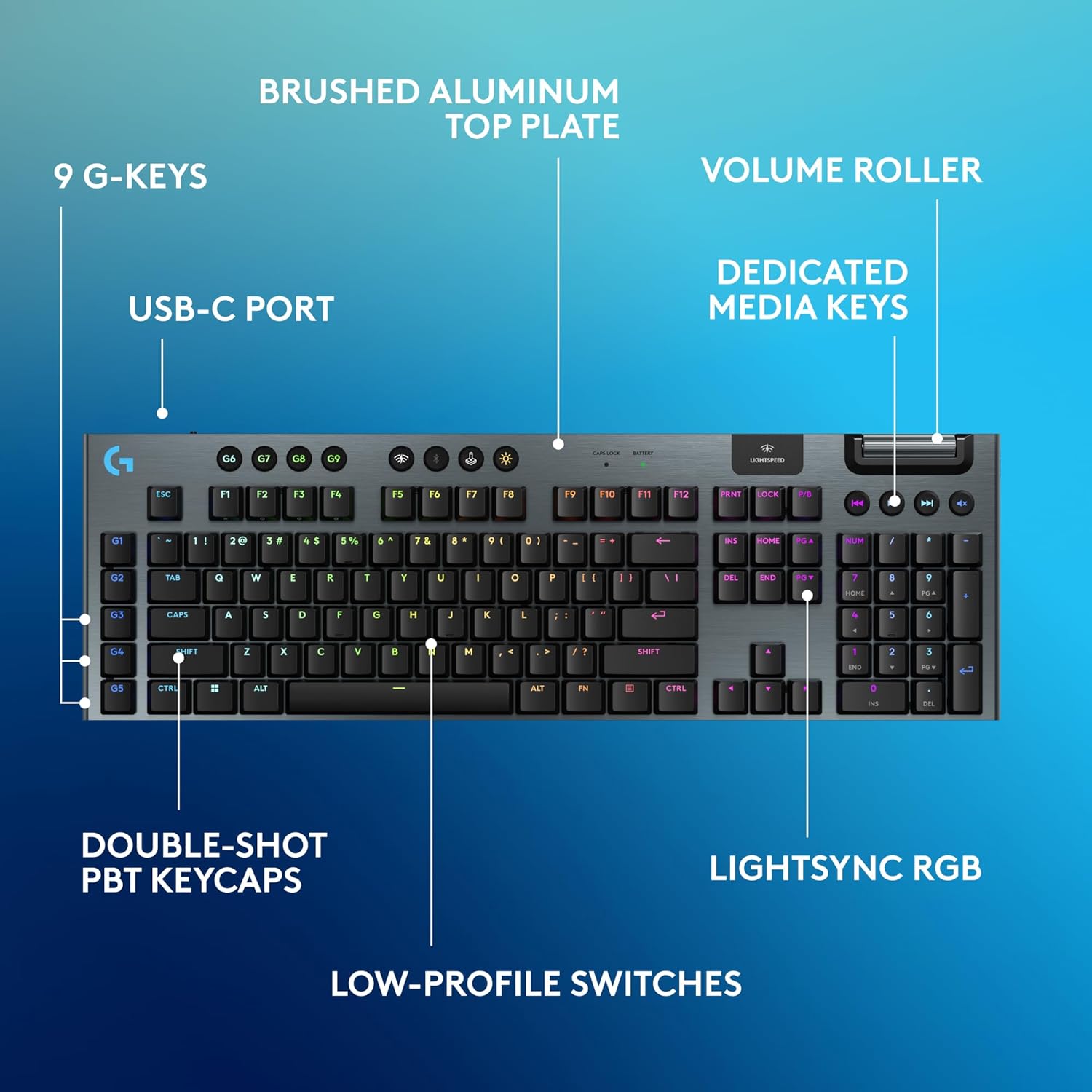
Image: Diagram highlighting key features of the Logitech G915 X keyboard, including G-keys, USB-C port, double-shot PBT keycaps, low-profile switches, brushed aluminum top plate, volume roller, dedicated media keys, and LIGHTSYNC RGB.
- GL Mechanical Switches: Low-proffile switches designed for speed, precision, and comfort with a 1.3mm actuation point.
- LIGHTSPEED Draadloos: Pro-grade wireless technology for ultra-fast and reliable connection.
- Bluetooth: For connecting to other devices that support Bluetooth.
- Toegewijde mediatoetsen: Control audio and video playback with ease.
- Volumerol: Smoothly adjust audio volume.
- LIGHTSYNC RGB: Customizable per-key RGB lighting with approximately 16.8 million colors.
- G-Keys (G1-G5): Five dedicated programmable macro keys on the left side of the keyboard.
- Double-Shot PBT-toetsen: Durable keycaps resistant to wear and shine.
Customizing with G HUB Software
To unlock the full potential of your G915 X keyboard, download and install the Logitech G HUB software from the official Logitech website. G HUB allows for extensive customization.
- G-Key Programming: Assign custom macros, commands, or system functions to the G1-G5 keys. You can create multiple profiles voor verschillende spellen of toepassingen.
- LIGHTSYNC RGB Customization: Personalize lighting effects, colors, and animations. Sync lighting with other Logitech G devices.
- Spelmodus: Disable specific keys (e.g., Windows key) during gaming to prevent accidental interruptions.
- KEYCONTROL: Set up to 15 functions per key for advanced control.

Image: Screenshot of the Logitech G HUB software interface showing options for customizing commands and assigning functions to G-keys on the G915 X keyboard.
Media Controls and Volume
Dedicated media controls and a volume roller are located on the top right of the keyboard for quick access.
- Volumerol: Roll up to increase volume, roll down to decrease.
- Mediaknoppen:
- Vorig nummer
- Afspelen/Pauzeren
- Volgende nummer
- Stom
Batterijbeheer
The Logitech G915 X keyboard provides up to 36 hours of continuous battery life with lighting enabled. Battery life may vary based on usage and lighting intensity.
- Batterij-indicator: A dedicated battery indicator light is located near the LIGHTSPEED logo on the top right. It changes color to indicate battery level.
- Opladen: Connect the USB-C cable to the keyboard and a powered USB port. You can continue to use the keyboard in wired mode while it charges.
- Energiebesparende: The keyboard will enter a low-power state after a period of inactivity to conserve battery.
Onderhoud
Goed onderhoud zorgt ervoor dat uw toetsenbord lang meegaat en goed presteert.
- Toetsenbordkappen schoonmaken: Gebruik een zachte, pluisvrije doek die lichtjes is schoongemaakt.ampReinig met water of een milde reinigingsoplossing. Vermijd agressieve chemicaliën.
- Removing Dust/Debris: Gebruik perslucht om stof en vuil tussen de toetsen en schakelaars te verwijderen.
- Oppervlaktereiniging: Wipe the aluminum top plate with a soft, dry cloth.
- Opslag: Bewaar het toetsenbord, wanneer het gedurende langere tijd niet wordt gebruikt, op een droge, koele plaats, uit de buurt van direct zonlicht.
Probleemoplossing
If you encounter issues with your Logitech G915 X keyboard, refer to the following common troubleshooting steps.
| Probleem | Mogelijke oplossing |
|---|---|
| Toetsenbord reageert niet (draadloos) |
|
| Problemen met Bluetooth-verbinding |
|
| Toetsen worden niet geregistreerd of er wordt dubbel getypt. |
|
| RGB-verlichting werkt niet of is onjuist |
|
| G-keys or macros not working |
|
Specificaties
| Functie | Detail |
|---|---|
| Modelnummer | 920-012670 |
| Connectiviteit | LIGHTSPEED Wireless (2.4 GHz RF), Bluetooth, Wired USB-C |
| Schakeltype | GL Tactile Mechanical Switches (Low-Profile) |
| Bedieningspunt | 1.3mm |
| Totale reisafstand | 3.2mm |
| keycaps | Dubbele PBT-shot |
| Verlichting | LIGHTSYNC RGB (per toets aanpasbaar) |
| Programmeerbare toetsen | 5 dedicated G-keys, up to 15 functions per key via KEYCONTROL |
| Levensduur van de batterij | Tot 36 uur (met verlichting) |
| Oplaadtijd | Ongeveer 4 uur |
| Afmetingen (LxBxH) | 18.7 x 5.91 x 0.87 cm (47.5 x 15 x 2.2 inch) |
| Gewicht | 2.38 pond (1.08 kg) |
| Materiaal | Aluminium bovenplaat |
| Compatibiliteit met besturingssystemen | PC, Mac OS |
Garantie en ondersteuning
Logitech products are designed for durability and performance. For information regarding warranty coverage, technical support, and frequently asked questions, please visit the official Logitech support webplaats.
Logitech-ondersteuning Webwebsite: https://support.logi.com/
For additional protection, consider purchasing an extended protection plan available at the time of purchase.


