1. Inleiding
Welcome to the user manual for your Jooeniok L81 Smart Watch. This guide provides detailed instructions on how to set up, operate, and maintain your device, ensuring you get the most out of its features. The Jooeniok L81 is designed to enhance your daily life with its communication, fitness tracking, and health monitoring capabilities.
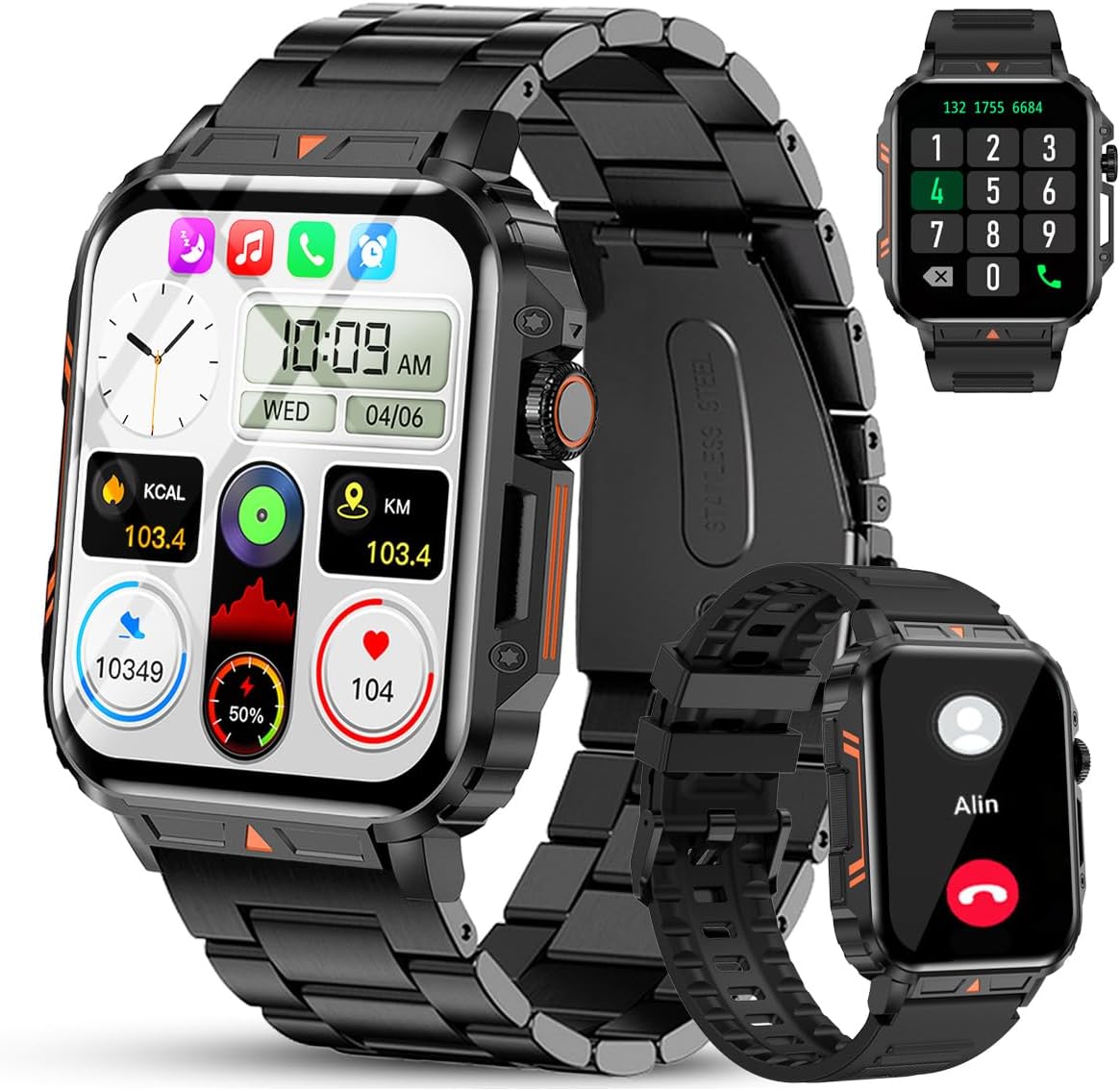
Image 1.1: The Jooeniok L81 Smart Watch, showcasing het hoofdscherm en de verwisselbare bandjes.
2. Belangrijkste kenmerken
- Bluetooth Calling & Message Alerts: Make and receive calls, read messages, and receive notifications from various apps directly on your watch.
- 1.95'' HD Touch Screen & DIY Dial: Enjoy a clear display and personalize your watch face.
- 112+ sportmodi: Track a wide range of activities including running, cycling, badminton, and hiking.
- IP68 waterdicht: Suitable for daily use, hand washing, and outdoor activities in rain. (Note: Not recommended for diving, showering, or sauna.)
- Gezondheidsmonitoring: Monitor heart rate, blood oxygen (SpO2), blood pressure, and sleep patterns.
- Batterij met lange levensduur: Uitgerust met een 340mAh-batterij voor langdurig gebruik.
- Multifunctioneel: Includes features like timer, alarm, stopwatch, weather, calendar, water reminder, sedentary reminder, and remote photo control.
3. Installatiehandleiding
3.1. Het slimme horloge opladen
Before initial use, fully charge your Jooeniok L81 Smart Watch. Connect the magnetic charging cable to the charging contacts on the back of the watch and plug the USB end into a standard USB power adapter (not included) or a computer's USB port. The watch display will indicate charging status.

Image 3.1: Illustration of the watch dimensions and the location of the charging contacts.
3.2. App-installatie en koppeling
- Download de app: Scan the QR code provided in the watch's quick start guide or search for the official companion app (e.g., "FitCloudPro" or similar, check packaging for exact name) in the Apple App Store (for iOS) or Google Play Store (for Android).
- Bluetooth inschakelen: Zorg ervoor dat Bluetooth is ingeschakeld op uw smartphone.
- Open de app: Start de geïnstalleerde app en volg de instructies op het scherm om een account aan te maken of in te loggen.
- Apparaat toevoegen: Within the app, navigate to the "Device" or "Add Device" section. The app will search for available Bluetooth devices. Select "L81" or the corresponding device name when it appears.
- Koppeling bevestigen: Er kan een koppelingsverzoek op uw horloge en telefoon verschijnen. Bevestig de koppeling op beide apparaten.
- Verlenen van toestemmingen: Geef de benodigde machtigingen (bijvoorbeeld voor meldingen, locatie en contacten) zodat de app correct functioneert.
The watch is compatible with Android 5.1 and above, and iOS 10.0 and above.
3.3. Initial Settings and Language
After successful pairing, the watch should automatically synchronize time and language settings with your phone. If the watch displays an incorrect language, navigate to the watch's settings menu (usually by swiping down from the main screen or pressing the side button to access the app list, then finding the 'Settings' icon). Look for 'Language' or 'System' settings to change it to English or your preferred language.
4. Gebruiksaanwijzing
4.1. Basisnavigatie
- Touchscreen: Veeg naar links/rechts, omhoog/omlaag om door menu's en functies te navigeren. Tik om te selecteren.
- Zijknop: Press to return to the main screen or access the app list. Long press for power options.
- Crown Button (if present): Rotate to scroll through lists or adjust settings, press to select.
4.2. Bellen en meldingen via Bluetooth
Once paired, your watch can handle calls and display notifications. Ensure Bluetooth is connected and the companion app has the necessary permissions.
- Telefoneren: Gebruik het toetsenblok of de contactenlijst op uw horloge om te bellen.
- Oproepen ontvangen: Wanneer er een oproep binnenkomt, kunt u deze direct vanaf het horloge beantwoorden of weigeren.
- Meldingen: Swipe down from the main screen or access the notification center to view incoming messages from SMS, WhatsApp, Facebook, and other apps.
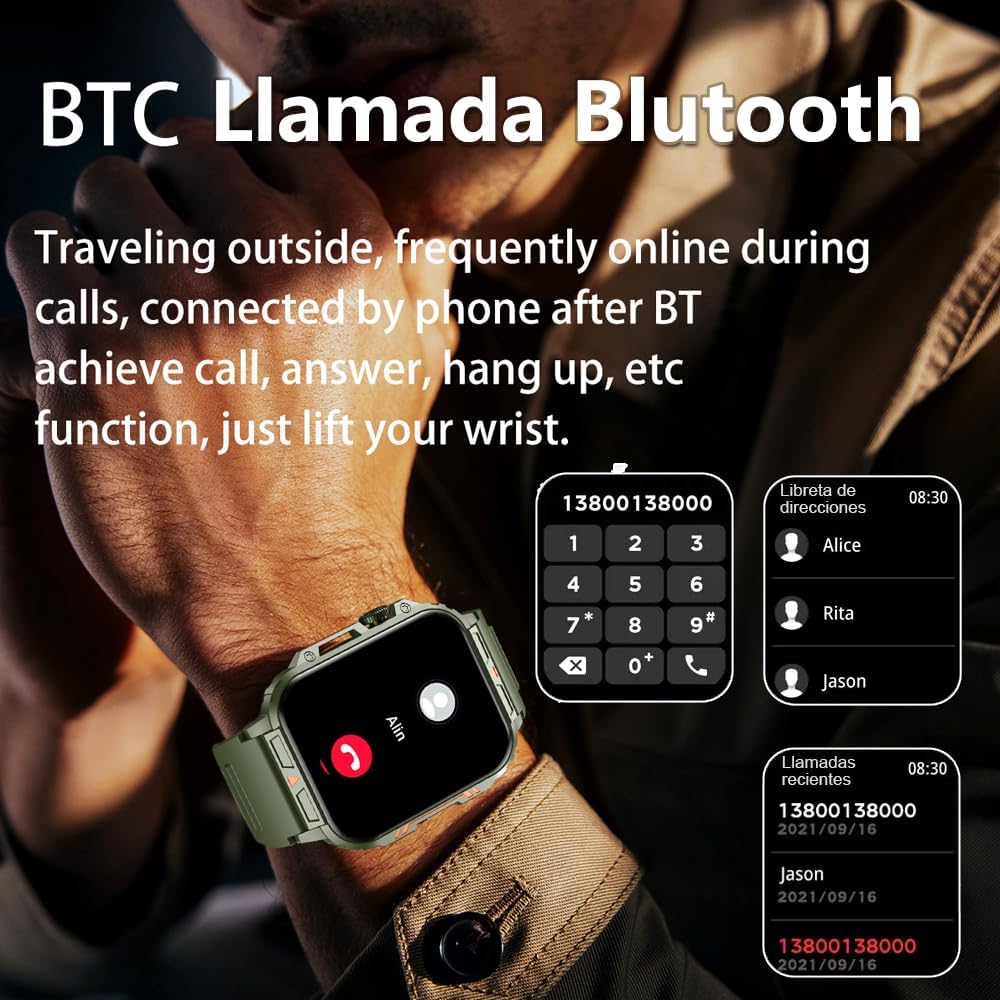
Image 4.1: The watch screen showing an incoming call and the dial pad for making calls.

Image 4.2: The watch displaying notifications from various social media and messaging applications.
4.3. Sportmodi
The watch supports over 112 sports modes. To access them, navigate to the 'Sports' or 'Workout' section on your watch. Select your desired activity to start tracking. The watch will record steps, distance, and calories.

Image 4.3: Icons representing various sports modes available on the watch.
4.4. Gezondheidsmonitoring
The Jooeniok L81 provides continuous monitoring of several health metrics. Access these features through the watch's menu or the companion app.
- Hartslag: The watch uses an optical sensor to monitor your heart rate. View realtime gegevens op het horloge of gedetailleerde trends in de app.
- Zuurstofgehalte in het bloed (SpO2) en bloeddruk: Initiate a measurement from the watch. Results are displayed on the screen and recorded in the app for historical analysis.
- Slaapbewaking: Wear the watch to bed for automatic sleep tracking. It analyzes deep sleep, light sleep, and awake times, providing a comprehensive sleep quality report in the app.
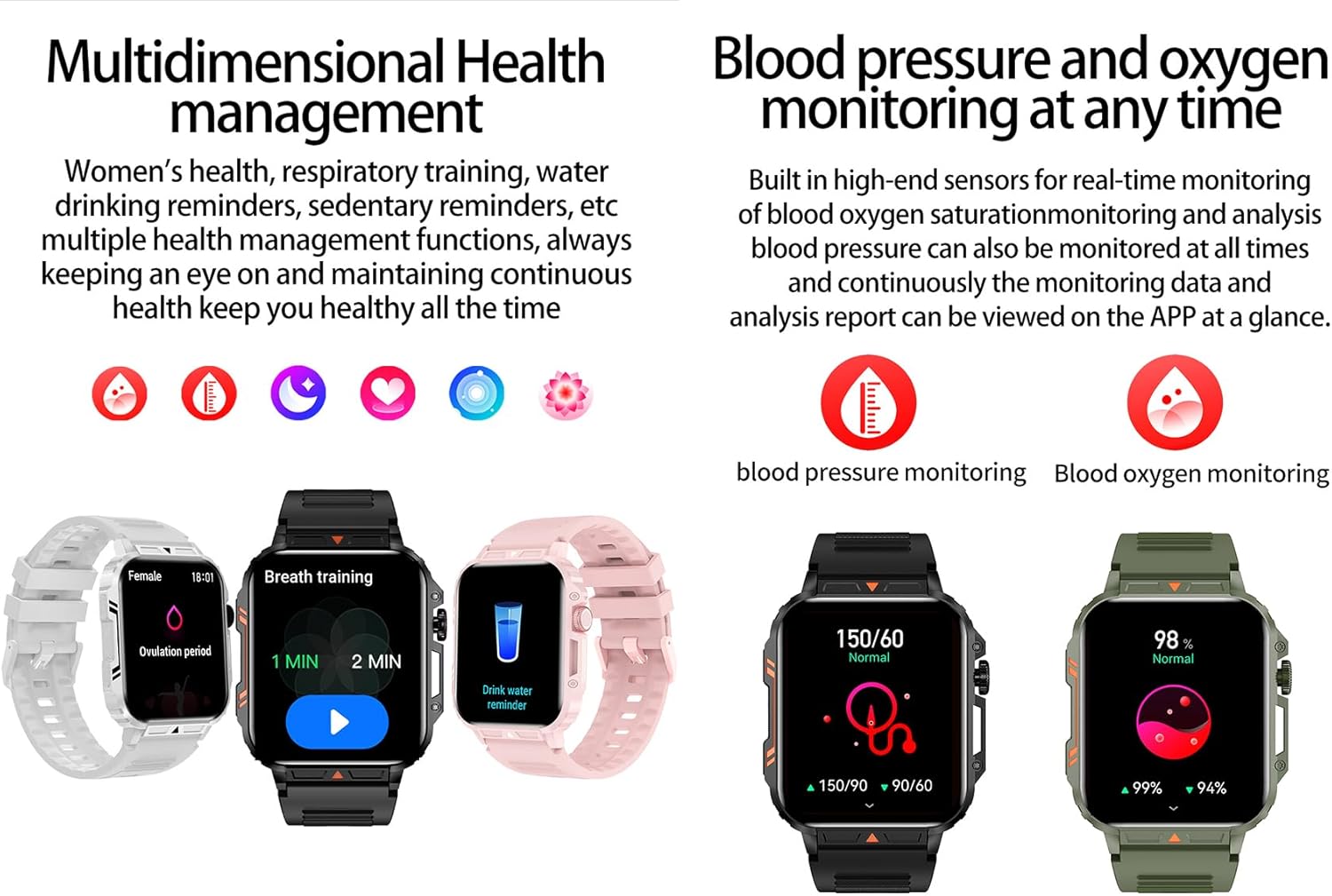
Image 4.4: Watch screens showing blood pressure and blood oxygen monitoring results.

Image 4.5: Watch screens showing real-time heart rate and a summary of sleep data.
4.5. AI Intelligent Voice Function
After connecting the watch to your phone via Bluetooth, activate the voice function on the watch. This allows you to use voice commands to open applications, check weather, make calls, or navigate, offering a hands-free experience.
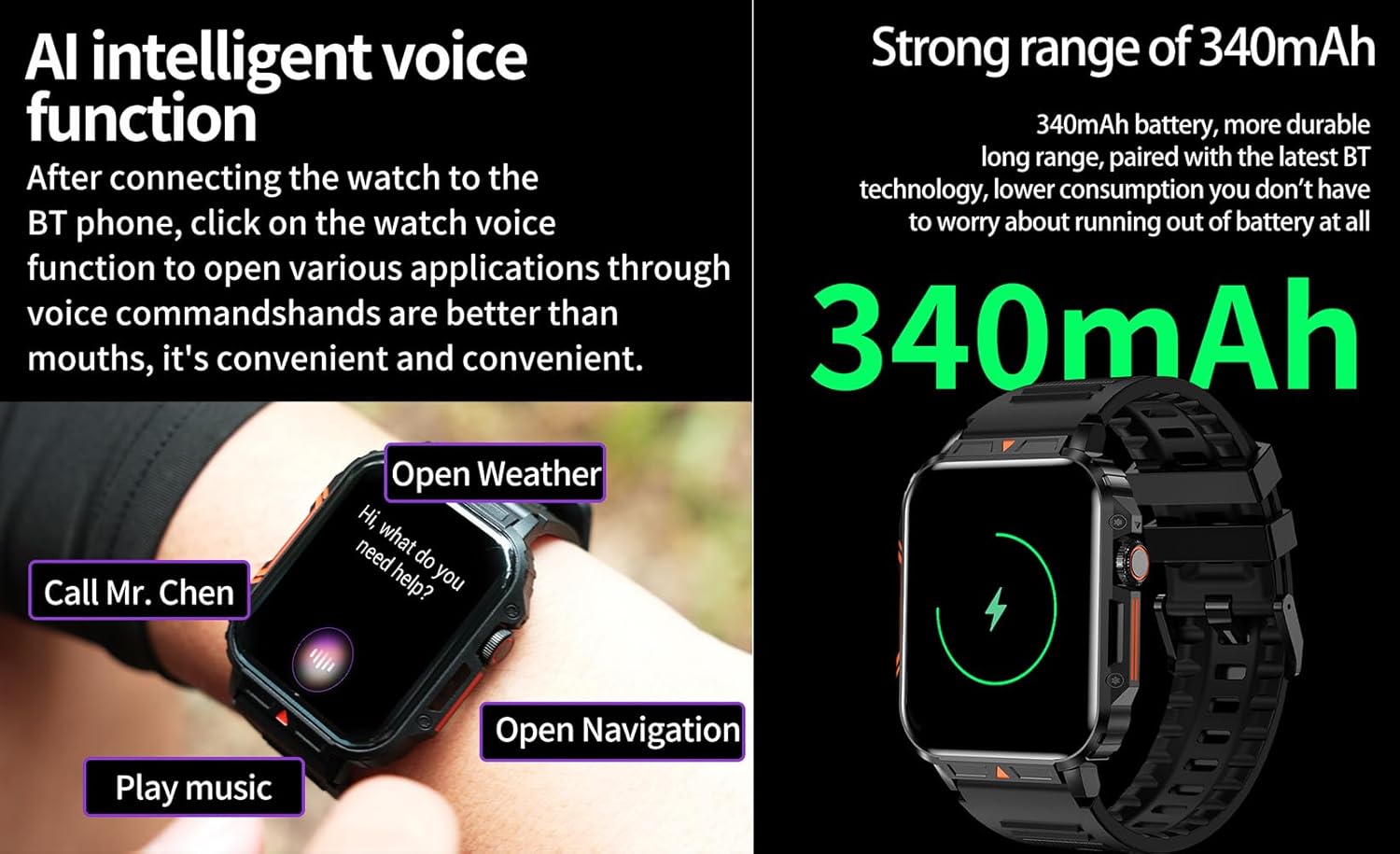
Image 4.6: The watch screen illustrating the AI voice assistant interface with exampde commando's.
4.6. Doe-het-zelf-wijzerplaat
Personalize your watch face by using the DIY dial feature within the companion app. You can often upload custom images or choose from a variety of pre-designed watch faces.
5. Onderhoud
5.1. Waterbestendigheid
The Jooeniok L81 Smart Watch is IP68 waterproof and dustproof. This means it is resistant to dust and can withstand immersion in water up to 1.5 meters for up to 30 minutes. It is suitable for daily use, hand washing, and light rain.
Belangrijk: Het horloge is niet recommended for diving, hot showers, or saunas, as steam and high water pressure can compromise the seals and cause damage.

Image 5.1: The watch shown with water splashes, indicating its water resistance.
5.2. Schoonmaken
Maak uw horloge en bandje regelmatig schoon om huidirritatie te voorkomen en de functionaliteit te behouden. Gebruik een zachte,amp cloth to wipe the screen and body. For the strap, follow the manufacturer's recommendations for the specific material (e.g., silicone, metal).
- Gebruik geen agressieve chemicaliën of schurende materialen.
- Zorg ervoor dat het horloge volledig droog is voordat u het oplaadt of langdurig gebruikt.
5.3. Batterijverzorging
Om de levensduur van de batterij te verlengen:
- Vermijd extreme temperaturen.
- Laat de batterij niet te vaak volledig leeglopen.
- Laad het horloge op met de meegeleverde kabel.
Image 5.2: The watch screen highlighting its 340mAh battery capacity.
6. Probleemoplossing
| Probleem | Mogelijke oplossing |
|---|---|
| Horloge gaat niet aan. | Zorg ervoor dat het horloge volledig is opgeladen. Sluit het minstens 30 minuten aan op de oplader. |
| Kan geen koppeling maken met smartphone. |
|
| De weergegeven taal is onjuist. | Navigate to the watch's settings menu, find 'Language' or 'System' settings, and select your preferred language. If paired, the app might also have a language setting. |
| Touch screen unresponsive or intermittent. |
|
| Meldingen niet ontvangen. |
|
| Health monitoring data seems inaccurate. |
|
7. Specificaties
| Functie | Detail |
|---|---|
| Modelnaam | L81 |
| Merk | Jooeniok |
| Schermgrootte | 1.95 inch |
| Connectiviteitstechnologie | Bluetooth |
| Draadloze communicatiestandaard Communication | Bluetooth |
| Besturingssysteem | Android (compatibel met Android 5.1+ en iOS 10.0+) |
| Geheugenopslagcapaciteit | 128 MB |
| Batterij | 1 lithium-polymeeraccu (340 mAh, meegeleverd) |
| Waterbestendigheid | IP68 |
| Speciale kenmerken | Activity Tracker, Notifications, Phone Call, Time Display, Heart Rate Monitor, Blood Oxygen Monitor, Sleep Monitor, 112+ Sports Modes, AI Voice Function |
| Afmetingen (ongeveer) | Watch face: 44mm (width) x 52mm (height); Thickness: 12mm; Strap length: 260mm |
8. Garantie en ondersteuning
The Jooeniok L81 Smart Watch is backed by a 365 dagen garantie vanaf de aankoopdatum. Deze garantie dekt fabricagefouten en storingen bij normaal gebruik.
For technical support, warranty claims, or any questions regarding your product, please contact Jooeniok customer service through the retailer's platform or the contact information provided on the product packaging or official webplaats.
Bewaar uw aankoopbewijs om de garantie te valideren.


