Invoering
The Roland GO:KEYS 3 is a 61-note music creation keyboard designed for ease of use and musical exploration. It features a ZEN-Core engine with a wide variety of sounds, auto-accompaniment functions, and connectivity options for modern music creation. This manual provides essential information for setting up, operating, and maintaining your instrument.
Instellen
Wat zit er in de doos?
- Roland GO:KEYS 3 Unit
- AC-adapter
- 8 x AA Batteries (for portable use)
Controleer of alle componenten aanwezig zijn voordat u met de installatie begint.
Het instrument van stroom voorzien
The GO:KEYS 3 can be powered using the included AC adapter or 8 AA batteries.
- Wisselstroomadapter: Connect the AC adapter to the DC IN port on the rear panel and then to a power outlet.
- Batterijen: Open the battery compartment on the underside of the unit and insert 8 AA batteries, ensuring correct polarity.
Press the power button located on the top panel to turn the instrument on or off.
Basisverbindingen
- Koptelefoon: Connect headphones to the Phones jack for private practice.
- Externe audio-ingang: Use the Aux In port to connect an external audio device (e.g., smartphone, tablet) and play along with your favorite music.
- Pedaal: Connect a sustain pedal (sold separately) to the Pedal jack for enhanced piano performance.
- USB-connectiviteit:
- USB-A port: For connecting a USB memory device for audio file playback, backup, and Roland Cloud Connect adapter.
- USB-C port: For connecting to a computer or mobile device for USB audio/MIDI functionality.
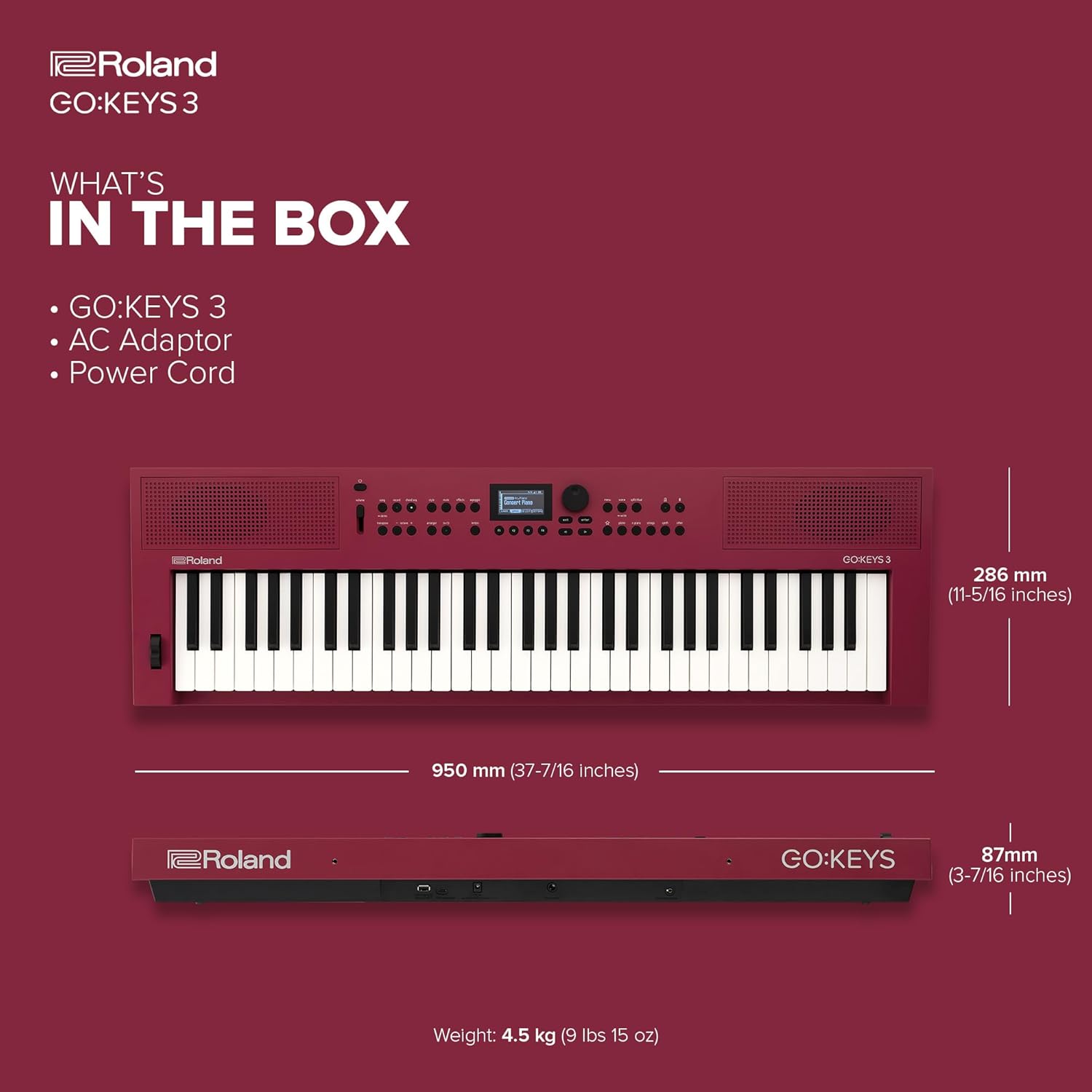
Image: Rear panel of the Roland GO:KEYS 3, showing the power input, pedal input, auxiliary input, phones/output, USB-A, and USB-C ports.
Belangrijkste kenmerken
- 61-Note Keyboard with Expressive Touch Sensitivity: Provides a responsive playing experience suitable for various musical styles.
- ZEN-Core Engine: Access over 1000 high-quality Roland sounds, offering a diverse palette for music creation.
- Automatische begeleiding: Features over 200 onboard music styles to provide backing tracks for your playing.
- Chord Sequencer: Includes user editing features and over 300 ready-to-play presets for creating chord progressions.
- Ingebouwde stereoluidsprekers: Allows for immediate playback and practice without external amplificatie.
- Bluetooth Audio/MIDI Support: Enables wireless music streaming from mobile devices and MIDI communication for song creation.
- USB Audio/MIDI Interface: Facilitates connection to computers and mobile devices for integration with music software.
- USB Memory/WC-1 Port: Supports backup, audio file playback, and connection of the optional WC-1 adapter for Roland Cloud Connect.

Afbeelding: Van boven naar beneden view of the Roland GO:KEYS 3, highlighting the 61-note keyboard and control panel.
Gebruiksaanwijzing
Geluiden (tonen) selecteren
The GO:KEYS 3 offers a vast library of sounds. Use the dedicated sound category buttons and the data entry knob to browse and select your desired instrument tones.

Image: Close-up of the Roland GO:KEYS 3 control panel, showing the display and various buttons for sound selection and functions.
Using Auto-Accompaniment
Engage the auto-accompaniment feature to play along with various musical styles. Select a style, then play chords with your left hand while playing melodies with your right. The keyboard will automatically generate a full backing band.
Bluetooth-connectiviteit
To stream audio or use MIDI over Bluetooth:
- Activeer Bluetooth op uw mobiele apparaat.
- On the GO:KEYS 3, navigate to the Bluetooth settings (refer to the on-screen display for menu options).
- Select the GO:KEYS 3 from your device's Bluetooth list to pair.
- Once connected, you can stream audio through the keyboard's speakers or use it as a MIDI controller wirelessly.

Image: A person interacting with a smartphone while playing the Roland GO:KEYS 3, demonstrating Bluetooth connectivity for music streaming or app integration.
Recording and Performance Effects
The GO:KEYS 3 includes features for recording your performances and applying various effects. Consult the on-screen display and dedicated buttons for recording functions, and explore the available digital effects to enhance your sound.
Video: Official Roland US video demonstrating the features and sounds of the Roland GO:KEYS 3.
Onderhoud
Proper care will ensure the longevity and optimal performance of your Roland GO:KEYS 3.
- Schoonmaak: Use a soft, dry cloth to wipe the surface of the instrument. Avoid abrasive cleaners, waxes, or solvents. For stubborn dirt, lightly dampen the cloth with water and a mild, neutral detergent, then wipe dry immediately.
- Opslag: Store the instrument in a cool, dry place away from direct sunlight, extreme temperatures, and humidity. If storing for an extended period, remove the batteries to prevent leakage.
- Behandeling: Avoid dropping the instrument or subjecting it to strong impacts. Do not place heavy objects on the keyboard.
Probleemoplossing
If you encounter issues with your GO:KEYS 3, try the following basic troubleshooting steps:
- Geen stroom:
- Ensure the AC adapter is securely connected to both the instrument and a working power outlet.
- If using batteries, check that they are inserted correctly and are not depleted.
- Geen geluid:
- Controleer de hoofdvolumeknop en zorg ervoor dat deze volledig open staat.
- If using headphones, ensure they are fully plugged in and functioning correctly.
- Verify that a sound (tone) is selected and not muted.
- Problemen met Bluetooth-verbinding:
- Ensure Bluetooth is enabled on both the GO:KEYS 3 and your mobile device.
- Probeer de apparaten te ontkoppelen en opnieuw te koppelen.
- Zorg ervoor dat geen andere apparaten het Bluetooth-signaal verstoren.
- Onverwacht gedrag:
- Try turning the power off and on again.
- If the issue persists, consult the full owner's manual for a factory reset procedure.
Specificaties
| Functie | Detail |
|---|---|
| Merk | Roland |
| Modelnaam | GA: SLEUTELS 3 |
| Artikelmodelnummer | GOKEYS3-RD |
| Aantal sleutels | 61 |
| Besturingssysteem | ZEN-kern |
| Energiebron | Werkt op batterijen of met snoer. |
| Connectiviteitstechnologie | Bluetooth, USB |
| Aansluitingstype | USB-A, USB-C, 3.5mm |
| Speciale kenmerken | Built-In Speaker, Digital Display, Digital Effects, Microphone Input, Preset Tones & Rhythms |
| Artikelgewicht | 15.85 pond |
| Productafmetingen | 11.26 x 37.4 x 3.43 inch |
Garantie en ondersteuning
For warranty information and technical support, please refer to the documentation included with your product or visit the official Roland webwebsite. Bewaar uw aankoopbewijs voor eventuele garantieclaims.


