Rigol DG902 Pro

RIGOL DG902 Pro Waveform Generator User Manual

Model: DG902 Pro

Merk: Rigol

1. Product voorbijview

The RIGOL DG902 Pro is a high-performance waveform generator designed for a wide range of applications requiring precise signal generation. It features a 16-bit vertical resolution, a maximum sample rate of 1.25 GSa/s, and a 70 MHz output frequency. This device is capable of generating various waveforms and offers advanced modulation capabilities.

Belangrijkste kenmerken zijn:

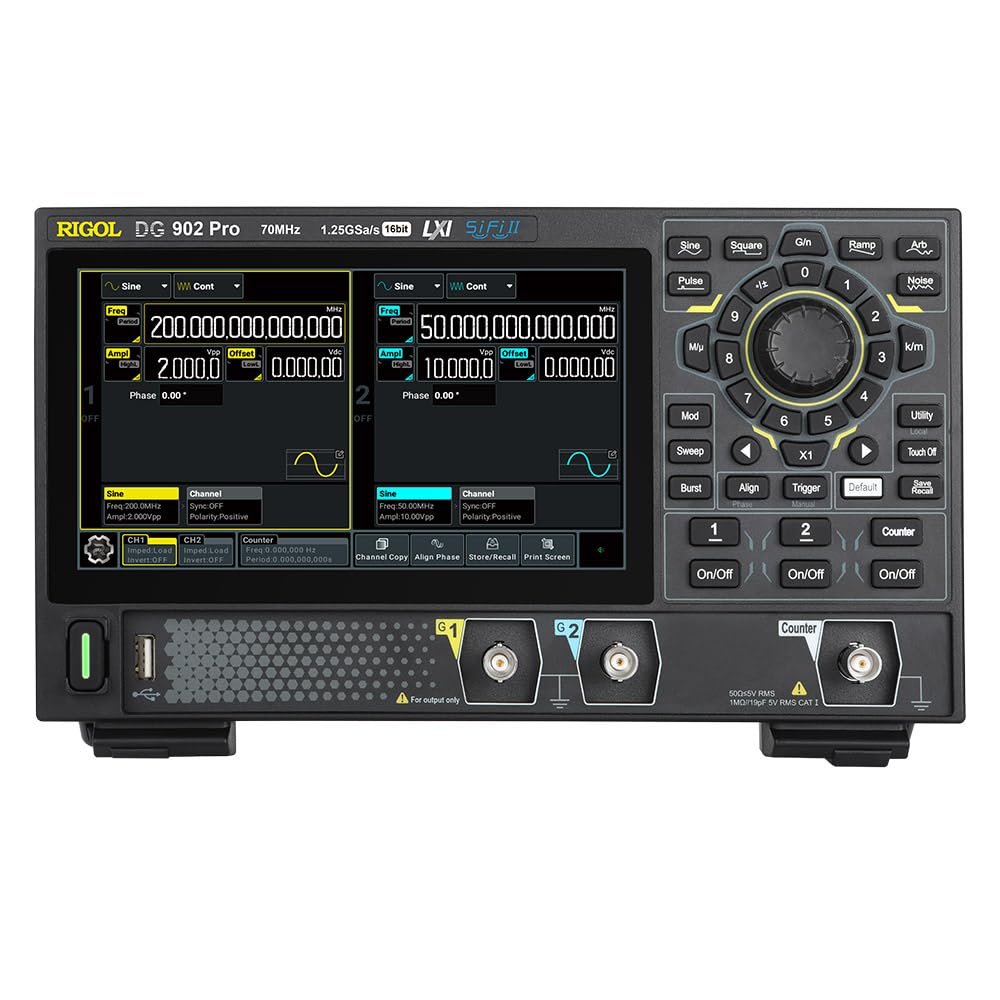
Voorkant view of the RIGOL DG902 Pro Waveform Generator

Figuur 1.1: Voorzijde view of the RIGOL DG902 Pro Waveform Generator, showing the display, control panel, and output channels.

2. Installatie en verbindingen

2.1 Uitpakken en inspectie

Carefully unpack the DG902 Pro waveform generator and all accessories from the shipping carton. Inspect the instrument for any signs of damage that may have occurred during transit. If any damage is found, contact your supplier immediately.

2.2 Stroomaansluiting

Connect the provided power adapter to the DC input port on the rear panel of the instrument. Plug the power adapter into a suitable AC power outlet. The DG902 Pro can also be operated via a USB-C power bank for portable use.

RIGOL DG902 Pro connected to a USB-C power bank

Figure 2.1: The DG902 Pro connected to an external USB-C power bank, demonstrating its portable power capability.

2.3 Invoer-/uitvoeraansluitingen

The rear panel of the DG902 Pro provides various input and output ports for signal generation and external synchronization.

Achterkant view of the RIGOL DG902 Pro Waveform Generator showing connection ports

Afbeelding 2.2: Achter view of the DG902 Pro, highlighting the 10MHz REF IN/OUT, AUX IN/OUT, LAN, USB DEVICE, and USB-C ports.

  • Channel Outputs (CH1, CH2): Located on the front panel, these BNC connectors provide the main waveform outputs.
  • 10MHz REF IN/OUT: Used for external reference clock synchronization.
  • AUX IN/UIT: Auxiliary input/output ports for additional signal routing.
  • LAN-poort: Voor netwerkverbinding en bediening op afstand.
  • USB DEVICE Port: For connecting to a computer for data transfer and control.

3. Gebruiksaanwijzing

3.1 Gebruikersinterface en weergave

The DG902 Pro features a 7.0-inch color display with a resolution of 1024x600 pixels, providing a clear and intuitive interface for operation. Navigation is primarily done through the rotary knob, directional buttons, and dedicated function keys.

Close-up of the RIGOL DG902 Pro's 7.0-inch display

Figuur 3.1: Een close-up view of the DG902 Pro's 7.0-inch display, highlighting its size and resolution.

RIGOL DG902 Pro screen showing channel 1 and channel 2 settings

Figure 3.2: The DG902 Pro display showing detailed settings for Channel 1 and Channel 2, including frequency, ampbreedtegraad en offset.

3.2 Basisgolfvormgeneratie

  1. Inschakelen: Druk op de aan/uit-knop op het voorpaneel om het instrument in te schakelen.
  2. Selecteer kanaal: Use the CH1 or CH2 buttons to select the desired output channel.
  3. Select Waveform Type: Druk op de Golfvorm button (e.g., Sine, Square, Pulse, Ramp, Arb, Noise) to choose the desired waveform.
  4. Parameters instellen: Use the rotary knob and numeric keypad to adjust parameters such as frequency, amplitude, and offset. The display will show the current settings.
  5. Uitvoer inschakelen: Druk op de Aan/Uit button for the selected channel to enable the waveform output.

3.3 Advanced Modulation Functions

The DG902 Pro supports various modulation types to meet complex signal generation requirements. These include Amplitude Modulation (AM), Frequency Modulation (FM), Phase Modulation (PM), Amplitude Shift Keying (ASK), Frequency Shift Keying (FSK), Pulse Width Modulation (PWM), and Sum modulation.

RIGOL DG902 Pro with various modulation types illustrated around it

Figure 3.3: An illustration showing the DG902 Pro's support for various modulation types, including AM, FM, PM, ASK, FSK, PWM, and SUM.

To access modulation settings, press the Mod button and navigate through the options using the display and control knob.

4. Onderhoud

4.1 Het instrument reinigen

To maintain the performance and appearance of your DG902 Pro, regularly clean its exterior. Use a soft, damp cloth with a mild detergent to wipe down the casing. Avoid using abrasive cleaners or solvents that could damage the plastic components or screen.

  • Haal altijd de stekker uit het stopcontact voordat u het apparaat schoonmaakt.
  • Do not allow any liquids to enter the instrument.
  • Clean the display screen gently with a soft, lint-free cloth.

4.2 Opslag

When not in use for extended periods, store the DG902 Pro in a dry, dust-free environment, away from direct sunlight and extreme temperatures. It is recommended to store the instrument in its original packaging or a protective case to prevent damage.

5. Probleemoplossing

This section provides solutions to common issues you might encounter with your DG902 Pro Waveform Generator. If the problem persists after trying these steps, please contact Rigol customer support.

ProbleemMogelijke oorzaakOplossing
Het apparaat gaat niet aan.Power cable not connected properly; power outlet issue; power adapter fault.Check power cable connection. Try a different power outlet. Ensure power adapter is functioning correctly.
Geen golfvormuitvoer.Output channel not enabled; amplitude set to zero; incorrect cable connection.Druk op de Aan/Uit button for the channel. Increase amplitude. Verify BNC cable connections.
Het scherm is leeg of bevroren.Software error; temporary glitch.Restart the instrument by powering it off and on again. If the issue persists, contact support.

6. Specificaties

The following table outlines the key technical specifications of the RIGOL DG902 Pro Waveform Generator.

ParameterWaarde
ModelnummerDG902 pro
Maximaal Sample tarief1.25 GSa/s
UitgangsfrequentieTot 70 MHz
Kanalen2
Verticale resolutie16 stukje
Arb Length16 Mpts/CH (32 Mpts/CH optional)
StijgtijdAs low as 3 ns
Waveform JitterAs low as 200 ps
Counter Bandwidth1 GHz
Productafmetingen10.47 x 6.5 x 3.15 inch
Gewicht3.92 pond
FabrikantDOEL

7. Garantie en ondersteuning

7.1 Garantie-informatie

RIGOL provides a standard warranty for its products, covering defects in materials and workmanship under normal use. For specific warranty terms and duration, please refer to the warranty card included with your product or visit the official RIGOL webwebsite. Bewaar uw aankoopbewijs als aankoopbewijs voor garantieclaims.

7.2 Klantenservice

For technical assistance, troubleshooting, or service requests, please contact RIGOL customer support. You can find contact information, including phone numbers and email addresses, on the official RIGOL website (www.rigol.com). When contacting support, please have your product model number (DG902 Pro) and serial number ready.

Gerelateerde documenten - DG902 pro

Preview RIGOL DG800 Pro/DG900 Pro-serie programmeerhandleiding
Deze programmeerhandleiding biedt gedetailleerde informatie over het gebruik van SCPI-opdrachten om RIGOL DG800 Pro- en DG900 Pro-serie functie-/willekeurige golfvormgeneratoren te bedienen via externe interfaces zoals USB en LAN.
Preview RIGOL DG5000 Pro-serie Functie-/willekeurige golfvormgenerator Snelle handleiding
Beknopte handleiding voor de RIGOL DG5000 Pro Series functie-/arbitraire golfvormgenerator, met informatie over veiligheid, installatie, bediening, parameterinstellingen, probleemoplossing en afstandsbediening.
Preview RIGOL DG800 Pro-serie Functie-/willekeurige golfvormgenerator Snelle handleiding
A quick guide to the RIGOL DG800 Pro Series Function/Arbitrary Waveform Generator, covering safety requirements, product overview, preparation, operation, remote control, and troubleshooting.
Preview RIGOL DG5000 Pro Series Functie-/willekeurige golfvormgenerator Gebruikershandleiding
Uitgebreide gebruikershandleiding voor de RIGOL DG5000 Pro Series Functie-/Arbitraire Golfvormgenerator. Deze handleiding beschrijft productkenmerken, veiligheidsinstructies, snelstartinstructies en geavanceerde functies zoals modulatie, sweep, burst en patroongeneratie. De handleiding behandelt modellen zoals de DG5508 Pro, DG5252 Pro en andere, en biedt essentiële informatie voor effectief gebruik en installatie.
Preview RIGOL DG5000 Pro-serie Functie-/willekeurige golfvormgenerator Snelle handleiding
Deze snelle handleiding biedt essentiële informatie over de RIGOL DG5000 Pro Series Functie/willekeurige golfvormgenerator, met inbegrip van veiligheidseisen, productinformatie en meer.view, voorbereiding op gebruik, bediening en probleemoplossing.
Preview Prestatieverificatie van de DG5000 Pro-serie functie-/willekeurige golfvormgenerator
Dit document bevat gedetailleerde procedures voor prestatieverificatie van de RIGOL DG5000 Pro Series Functie/willekeurige golfvormgenerator, met inbegrip van frequentienauwkeurigheid, ampnauwkeurigheid van de breedtegraad, nauwkeurigheid van de DC-offset, vlakheid van de AC, harmonische vervorming, storende signalen en overshoot-tests.