1. Inleiding
Bedankt voor uw aankoopasing the Salange HY350 Smart Projector. This manual provides essential information for setting up, operating, and maintaining your projector. Please read it thoroughly before use to ensure optimal performance and safety.

Figuur 1.1: Voorkant view of the Salange HY350 Projector, showcasindankzij het compacte ontwerp en de lens.
2. Inhoud van het pakket
Controleer of alle artikelen in het pakket aanwezig zijn:
- Salange HY350 Projector (without built-in battery)
- HDMI-kabel
- Stroomkabel (Amerikaanse stekker)
- Bluetooth Voice Remote Control
- Gebruiksaanwijzing
3. Product voorbijview
3.1. Belangrijkste kenmerken
- Geïntegreerd Android 11.0-systeem: 2GB RAM + 32GB ROM for app downloads and streaming.
- Native 1080P Resolution with 4K Decoding Support: High brightness (15000LM) and 10000:1 contrast ratio for clear images.
- Dual-band WiFi 6 & Bluetooth 5.2: Supports 5G/2.4G WiFi for smooth streaming and Bluetooth for external audio devices.
- Automatic Keystone Correction & Electronic Focus: Front projection auto-correction and 4-point keystone adjustment (±50°). Focus controlled via remote.
- Meerdere connectiviteitsopties: HDMI, USB, 3.5mm audio port for various devices.
- Built-in HI-FI Stereo Speakers: 5W speakers for immersive audio.
3.2. Interfaces en bedieningselementen
Familiarize yourself with the projector's ports and buttons.

Figuur 3.1: Achterkant en zijkant view of the Salange HY350 Projector, showing HDMI, USB, and audio ports.
- HDMI-poort: Connect to laptops, gaming consoles, TV sticks.
- USB-poort: Connect USB flash drives for media playback or office documents.
- 3.5 mm audio-aansluiting: Sluit een externe hoofdtelefoon of luidsprekers aan.
- Stroomverbruik: Sluit de stroomkabel aan.
4. Installatiehandleiding
4.1. Plaatsing
Choose a suitable location for your projector. The HY350 supports various mounting options:
- Statiefbevestiging
- Muurbevestiging
- Vloermontage
- Plafondmontage
- Tafelblad plaatsing
For optimal image quality, ensure the projector is placed on a stable, flat surface or securely mounted.

Figuur 4.1: Illustration of different projection sizes (50", 100", 250") achievable with the Salange HY350 Projector, demonstrating its versatility in various room sizes.
4.2. Stroomaansluiting
- Sluit het netsnoer aan op de stroomaansluiting van de projector.
- Sluit het andere uiteinde van de stroomkabel aan op een stopcontact.
- Druk op de aan/uit-knop op de projector of afstandsbediening om deze in te schakelen.
4.3. Eerste installatie
Upon first power-on, the projector will guide you through initial setup steps, including language selection and network connection.
Figuur 4.2: The Android TV interface of the Salange HY350 Projector, showing various streaming app icons like Netflix, YouTube, Disney+, and Prime Video, indicating its smart capabilities.
- Netwerkverbinding: Navigate to Settings > Network & Internet to connect to your Wi-Fi network (supports 5G/2.4G WiFi 6).
- Bluetooth koppelen: To connect the Bluetooth voice remote control or external Bluetooth speakers/headphones, go to Settings > Connected Devices > Pair new device.
5. Gebruiksaanwijzing
5.1. Beeldaanpassing
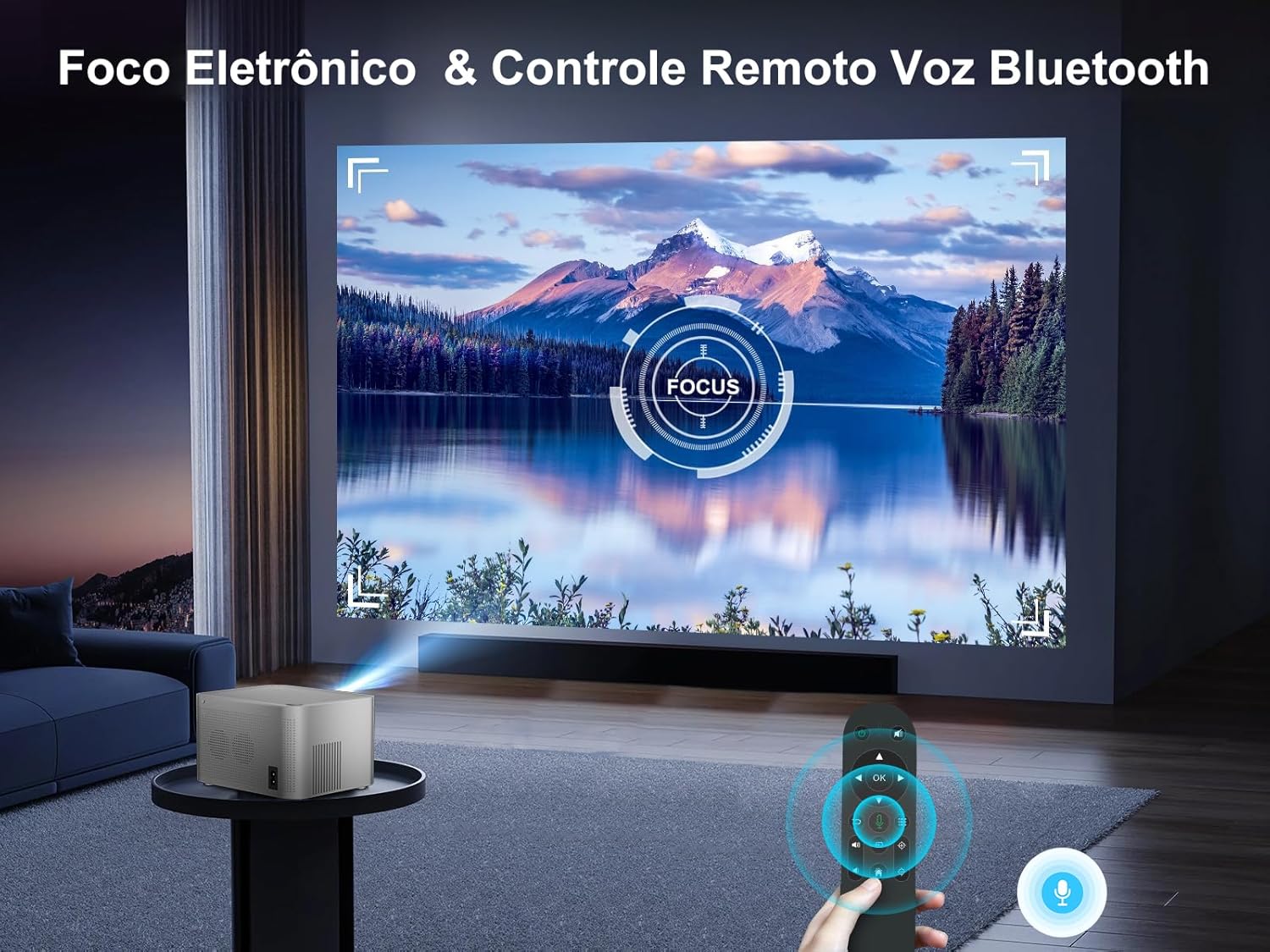
The HY350 features automatic keystone correction and electronic focus for a clear image.

Figuur 5.1: A hand holding the remote control, adjusting the electronic focus on the Salange HY350 Projector, with a clear image projected onto a screen.
- Automatische keystone-correctie: For front projection, the image will automatically correct its shape.
- Manual Keystone Adjustment (4-point): If needed, you can fine-tune the image corners by navigating to Settings > Projection Settings > Keystone Correction. This allows individual adjustment of the four corners up to ±50°.
- Elektronische focus: Use the remote control to adjust the focus for a sharp image.

Figuur 5.2: Visual representation of the Salange HY350 Projector's automatic keystone correction, showing how distorted images are automatically squared and corrected for optimal viewind.
5.2. Externe apparaten aansluiten
De projector ondersteunt diverse ingangsbronnen:
- HDMI: Connect your laptop, game console (e.g., Switch), or TV stick to the HDMI port. Select the HDMI input source from the main menu.
- USB-poort: Insert a USB flash drive into the USB port to play videos, view photos, or present office documents (Word, PPT, PDF, Excel).
- Draadloze schermspiegeling: Supports iOS and Android wireless display. Navigate to the screen mirroring app on the projector and follow the on-screen instructions to connect your smartphone or tablet.

Figuur 5.3: An illustration highlighting the advanced WiFi 6 and Bluetooth 5.2 technology of the Salange HY350 Projector, showing seamless connectivity for gaming and audio.
5.3. Using Smart Features (Android 11.0)
The integrated Android 11.0 system allows you to access a wide range of applications.
- App Store: Download over 8,000 applications from the integrated APP Store.
- Streamingdiensten: Access popular streaming platforms like Prime Video, Netflix, YouTube, Disney+, etc.
- Stembesturing: Use the Bluetooth voice remote control for convenient navigation and search.

Figuur 5.4: The Salange HY350 Projector's smart interface, showcasing a variety of pre-installed and downloadable streaming applications, emphasizing its entertainment capabilities.
6. Onderhoud
6.1. Schoonmaken
- Lens: Gebruik een zachte, pluisvrije doek die speciaal is ontworpen voor optische lenzen. Gebruik geen schuurmiddelen of oplosmiddelen.
- Buitenkant: Veeg de buitenkant van de projector schoon met een zachte, droge doek. Voor hardnekkige vlekken kunt u een licht damp Je kunt een doek gebruiken, gevolgd door een droge doek.
- Ventilatiepoorten: Ensure ventilation ports are clear of dust and debris to prevent overheating. Use a soft brush or compressed air to gently clean them.
6.2. Opslag
Bewaar de projector, wanneer deze gedurende langere tijd niet wordt gebruikt, op een koele, droge plaats, uit de buurt van direct zonlicht en extreme temperaturen. Gebruik de originele verpakking of een beschermhoes om stofophoping en beschadiging te voorkomen.
7. Probleemoplossing
| Probleem | Mogelijke oorzaak | Oplossing |
|---|---|---|
| Geen afbeelding geprojecteerd | Power cable not connected; Projector not turned on; Incorrect input source selected. | Check power connection; Press power button; Select correct HDMI/USB input. |
| Onscherpe afbeelding | Focus not adjusted; Projector too close/far from screen; Keystone not corrected. | Adjust electronic focus via remote; Adjust projection distance; Use auto or manual keystone correction. |
| Geen geluid | Volume too low; Muted; External audio device not connected properly; Bluetooth not paired. | Increase volume; Unmute; Check external audio connections; Re-pair Bluetooth device. |
| Problemen met de wifi-verbinding | Onjuist wachtwoord; Router te ver weg; Netwerkstoring. | Verify password; Move projector closer to router; Try connecting to 2.4Ghz band if 5Ghz is unstable. |
| Afstandsbediening werkt niet | Batteries low/dead; Not paired (for Bluetooth remote); Obstruction between remote and projector. | Replace batteries; Re-pair Bluetooth remote; Ensure clear line of sight. |
8. Specificaties
| Functie | Specificatie |
|---|---|
| Model | HY350-US |
| Besturingssysteem | Androïde 11.0 |
| RAM + ROM | 2 GB RAM + 32 GB ROM |
| Oorspronkelijke resolutie | 1920x1080P |
| Ondersteunde resolutie | Up to 4K decoding |
| Helderheid | 15000 Lumen |
| Contrastverhouding | 10000:1 |
| Beeldverhouding | 16:9 |
| Wi-Fi | Dual-band 5G / 2.4G WiFi 6 |
| Bluetooth | BT 5.2 (bidirectional) |
| Keystone Correctie | Automatic (front projection), 4-point (±50°) |
| Focus | Electronic Focus (via remote) |
| Spreker | 5W HI-FI Stereo |
| Interfaces | HDMI, USB, 3.5 mm audio |
| Productafmetingen | 16x12x19cm |
| Productgewicht | 1.32 kg |
| Stroomverbruik | 5 watts (speaker power) |
| Vernieuwingsfrequentie | 60Hz |
9. Garantie en ondersteuning
Salange provides comprehensive support for your HY350 Projector:
- Garantie: 2 jaar fabrieksgarantie.
- Onderhoud: 3 years of maintenance support.
- Technische ondersteuning: Levenslange technische ondersteuning.
- Contact: For any issues or inquiries, please feel free to contact Salange customer service.


Figuur 9.1: Salange customer support commitments, including 24-hour response, 7-day return, 24-month warranty, and lifetime technical support.


