1. Inleiding
Bedankt voor uw aankoopasing the Zenwire A10 Mini Portable Projector. This device is designed to provide a versatile and convenient projection experience, allowing you to display content from various sources, including smartphones, tablets, and computers. Please read this manual carefully before using the projector to ensure proper operation and to maximize its lifespan.
2. Belangrijke veiligheidsinstructies
- Kijk niet rechtstreeks in de projectorlens als de lamp staat aan.
- Zorg voor voldoende ventilatie rond de projector om oververhitting te voorkomen. Blokkeer de ventilatieopeningen niet.
- Gebruik uitsluitend de stroomadapter die bij de projector is geleverd.
- Houd de projector uit de buurt van water, vocht en brandbare materialen.
- Probeer de projector niet zelf te demonteren of te repareren. Neem contact op met gekwalificeerd servicepersoneel voor hulp.
- Plaats de projector op een stabiele, vlakke ondergrond.
- Haal de stekker van de projector uit het stopcontact tijdens onweer of wanneer deze gedurende langere tijd niet wordt gebruikt.
3. Inhoud van het pakket
Controleer de inhoud van de verpakking bij het uitpakken. Neem contact op met uw verkoper als er artikelen ontbreken of beschadigd zijn.
- Zenwire A10 Mini Portable Projector
- Afstandsbediening
- Stroomadapter
- Gebruiksaanwijzing
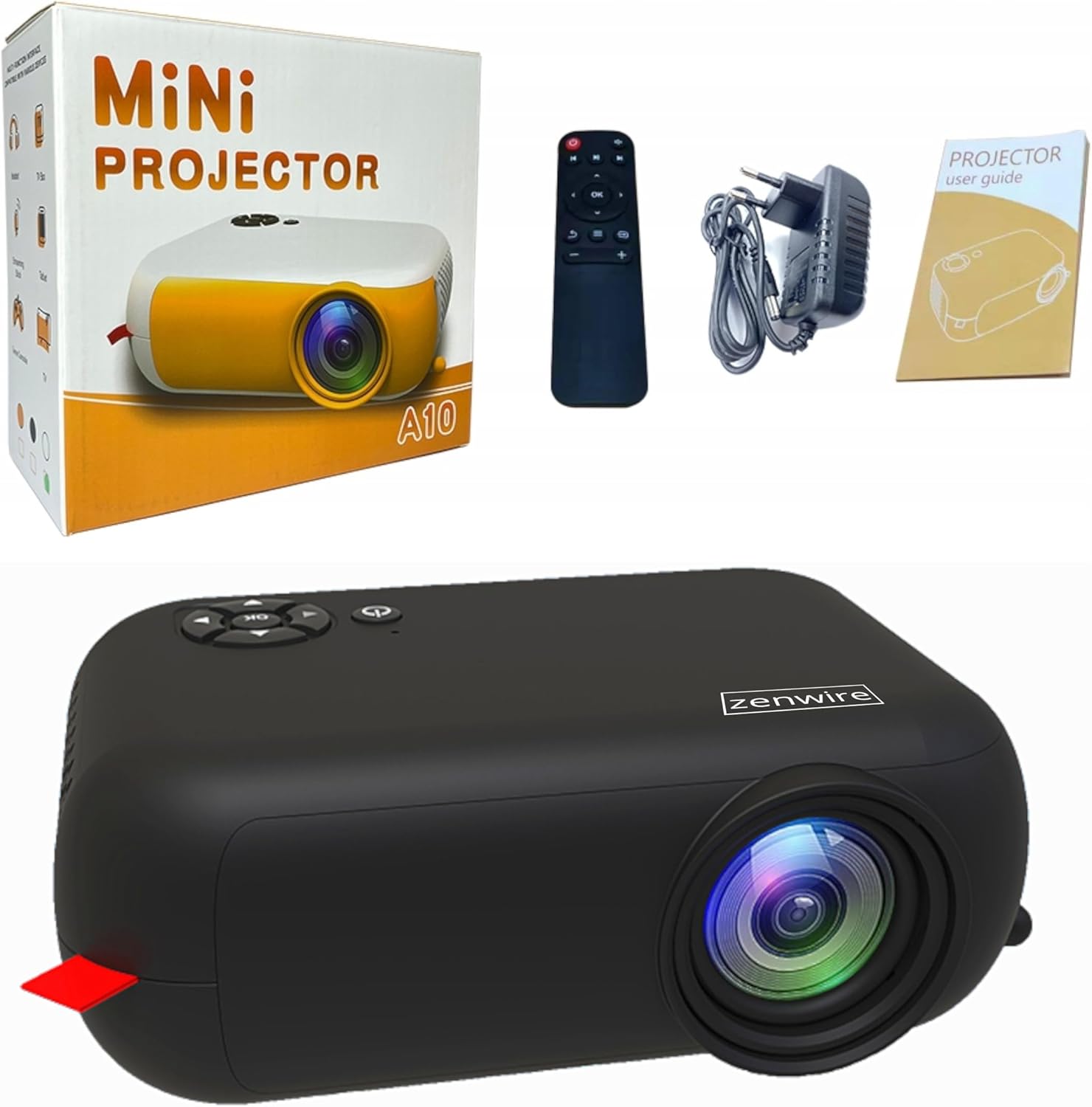
Image: Contents of the Zenwire A10 Mini Projector package, including the projector, remote control, power adapter, and user manual.
4. Product voorbijview
4.1 Projector Dimensions and Design
The Zenwire A10 is designed for portability, featuring a compact and lightweight form factor. Its dimensions are approximately 14cm x 10cm x 5.5cm, making it easy to carry and set up in various locations.

Image: The Zenwire A10 Mini Projector held in a hand, illustrating its compact size and portability.
4.2 Poorten en bedieningselementen
The projector features a range of input and output ports for versatile connectivity, along with intuitive controls.

Image: Rear panel of the Zenwire A10 Mini Projector, showing the 5V-IN DC power input, IR receiver, USB port, 3.5mm audio jack, HDMI port, and SD card slot.
- 5V-IN DC: Stroomaansluiting voor de projector.
- IR: Infraroodontvanger voor de afstandsbediening.
- USB-poort: Sluit USB-opslagapparaten aan om media af te spelen.
- Koptelefoonaansluiting (3.5 mm): Sluit externe luidsprekers of een hoofdtelefoon aan.
- HDMI: Connect devices such as laptops, gaming consoles, or streaming sticks.
- SD: Insert Micro SD cards for media playback.
- Focuswiel: Adjust image sharpness (located on the side).
- Configuratiescherm: Buttons on top for navigation and selection.
5. Instellen
5.1 Stroomaansluiting
- Sluit de meegeleverde stroomadapter aan op de 5V-IN DC poort op de projector.
- Sluit de stroomadapter aan op een stopcontact.
- Druk op de aan/uit-knop op de projector of afstandsbediening om deze in te schakelen.
5.2 Placement and Focus Adjustment
- Place the projector on a stable surface or mount it according to your preference. Ensure the projector lens is facing the projection surface (wall or screen).
- Adjust the distance between the projector and the screen to achieve your desired image size. The projector supports screen sizes up to 100 inches.
- Rotate the focus wheel (typically located near the lens) until the projected image appears clear and sharp.

Image: Diagram illustrating the Zenwire A10 Mini Projector's capability to project various screen sizes, from 13 inches up to 100 inches, depending on the projection distance.
6. De projector bedienen
6.1 Wireless Connection (Miracast & Airplay)
The Zenwire A10 supports wireless screen mirroring via 2.4/5GHz WiFi, compatible with Android (Miracast) and iOS (Airplay) devices.
- Zorg ervoor dat uw projector en mobiele apparaat met hetzelfde wifi-netwerk zijn verbonden.
- On the projector's main menu, select the 'Screen Mirroring' or 'Wireless Display' option.
- Voor Android: On your Android phone/tablet, enable 'Wireless Display', 'Screen Mirroring', 'Smart View', or similar function (names may vary by device). Select the projector from the list of available devices.
- Voor iOS: On your iPhone/iPad, open Control Center and tap 'Screen Mirroring'. Select the projector from the list of available devices.
- The content from your mobile device should now be mirrored on the projector screen.
6.2 Bekabelde verbindingen
The projector offers multiple wired input options for various devices.

Image: The Zenwire A10 Mini Projector connected to various devices such as smartphones, tablets, laptops, desktop computers, gaming consoles, and media players, highlighting its versatile connectivity.
- HDMI: Connect a laptop, PC, gaming console (e.g., Xbox, PlayStation), or streaming device (e.g., Amazon Fire TV Stick, Google Chromecast) using an HDMI cable. Select the HDMI input source on the projector.
- USB-poort: Insert a USB flash drive or external hard drive into the USB port. The projector's media player will allow you to browse and play supported video, audio, and image files.
- Micro SD: Insert a Micro SD card into the SD card slot. Similar to USB, you can access media files through the projector's interface.
- Audio-uitgang (3.5 mm jack): Connect external speakers or headphones to enhance the audio experience.
6.3 Menunavigatie
Use the remote control or the buttons on the projector to navigate through the on-screen menu. Select input sources, adjust picture settings (brightness, contrast, color), sound settings, and other system preferences.
7. Onderhoud
- Lensreiniging: Gebruik een zachte, pluisvrije doek die speciaal is ontworpen voor optische lenzen om de projectorlens voorzichtig schoon te vegen. Vermijd het gebruik van schurende reinigingsmiddelen of overmatige kracht.
- Stofverwijdering: Regularly clean the projector's exterior with a soft, dry cloth. Use a small brush or compressed air to clear dust from the ventilation openings to ensure proper airflow.
- Opslag: Bewaar de projector, wanneer deze niet in gebruik is, op een koele, droge plaats, uit de buurt van direct zonlicht en extreme temperaturen. Gebruik de originele verpakking of een beschermhoes om stofophoping en beschadiging te voorkomen.
8. Probleemoplossing
If you encounter issues with your Zenwire A10 projector, refer to the following common problems and solutions:
| Probleem | Mogelijke oorzaak | Oplossing |
|---|---|---|
| Geen beeld op het scherm | Power not connected; Incorrect input source; Device not connected properly. | Check power cable; Select correct input source (HDMI, USB, etc.); Reconnect source device. |
| Afbeelding is wazig | Focus niet aangepast. Projector te dichtbij/te ver van het scherm. | Adjust the focus wheel; Adjust projection distance. |
| Geen geluid | Volume te laag; Gedempt; Extern audioapparaat niet aangesloten/geselecteerd. | Increase volume; Unmute; Check external speaker connection or select internal speaker. |
| Problemen met draadloze verbinding | Not on same Wi-Fi network; Device not compatible; Interference. | Ensure both devices are on the same Wi-Fi; Verify device compatibility; Try moving closer to Wi-Fi router. |
9. Specificaties
| Functie | Detail |
|---|---|
| Merk | Zendraad |
| Modelnummer | A10 |
| Producttype | Compact and Portable Projector |
| Oorspronkelijke resolutie | 480x360p |
| Maximale schermresolutie | 1920 x 1080 (volledig HD) |
| Helderheid | 1800lm / 60 ANSI |
| Contrastverhouding | 2000:1 |
| Weergavetype | LED |
| Connectiviteitstechnologie | Wi-Fi (2.4/5GHz), HDMI, USB, Micro SD, 3.5mm Audio Jack |
| Draadloze functies | Miracast, Airplay |
| Compatibele apparaten | Smartphones (Android, iOS), Tablets, Laptops, PCs, Gaming Consoles |
| Aanbevolen toepassingen | Thuisbioscoop |
| Afmetingen (ongeveer) | 14cm x 10cm x 5.5cm |
10. Garantie en ondersteuning
The Zenwire A10 Mini Portable Projector comes with a standard manufacturer's warranty. For specific warranty terms and conditions, please refer to the documentation provided at the time of purchase or contact your retailer. For technical support or service inquiries, please reach out to Zenwire customer service through their official webwebsite of de contactgegevens die bij uw product zijn verstrekt.


