1. Inleiding
Thank you for choosing the RORRY D2 Portable Charger. This compact and versatile power bank is designed to keep your Apple Watch, iPhone, AirPods, and other compatible devices charged while you are on the go. Please read this manual carefully to ensure safe and optimal use of your device.
Wat zit er in de doos:
- RORRY Portable Charger (1 unit)
- 1M USB-C to USB-C Charging Cable (1 unit)
- Gebruikershandleiding (1 eenheid)
2. Belangrijkste kenmerken
- Universele compatibiliteit: Designed for Apple Watch Ultra/11/10/9/8/7/6/SE, iPhone 17/16/15/14/13/12/11/Pro/Pro Max, AirPods, and Android devices.
- 5000mAh grote capaciteit: Provides approximately 7-10 charges for Apple Watch, 1 full charge for iPhone 15, and 6-8 charges for AirPods.
- Gelijktijdig opladen: Capable of charging multiple devices concurrently, including Apple Watch, iPhone, AirPods, and other Android devices.
- Draagbaar ontwerp: Features a compact and lightweight keychain design for easy portability in pockets or attached to backpacks.
- Superieure veiligheid: Equipped with built-in protection against over-temperature, over-current, over-voltage, en kortsluiting.
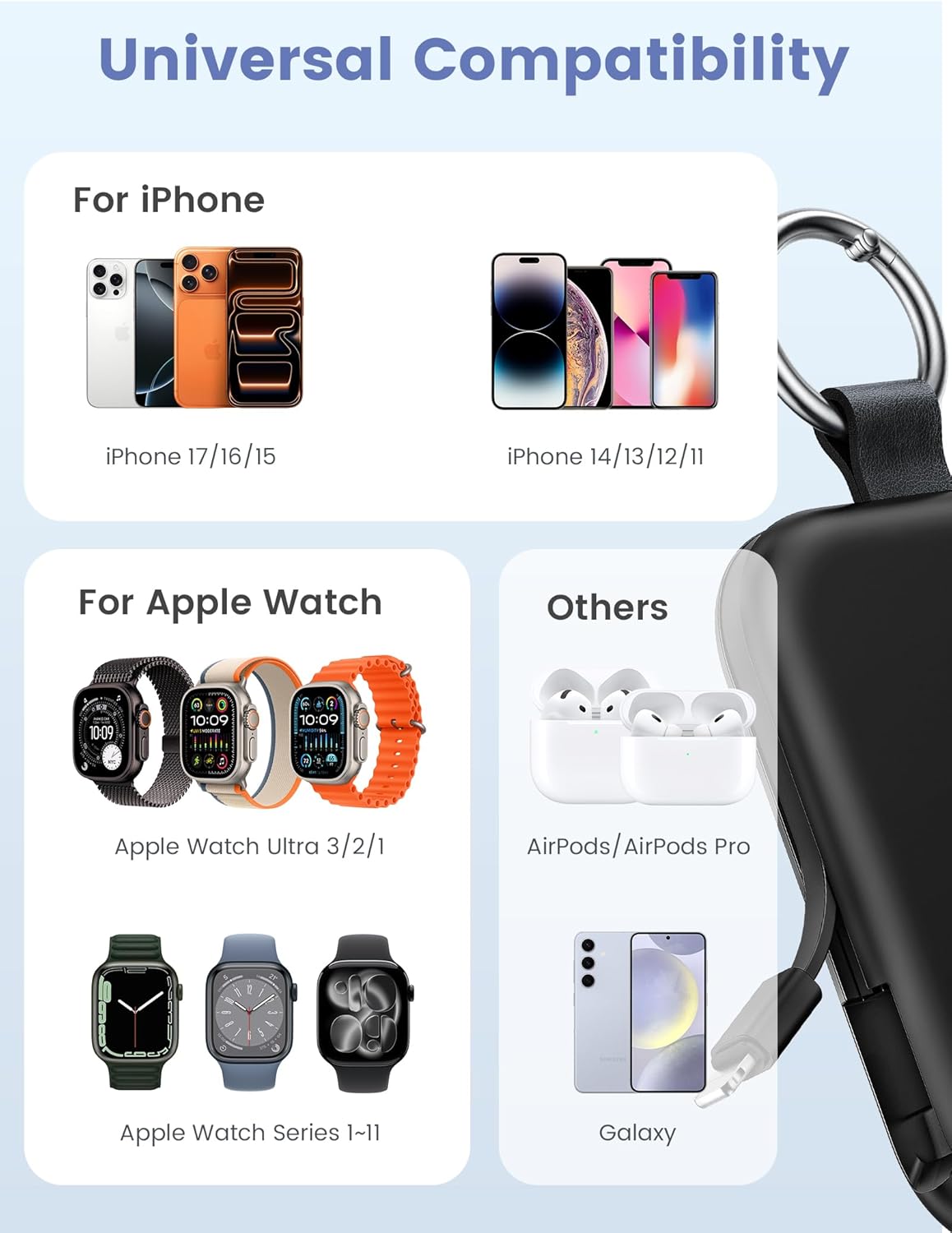
Image: Universal compatibility of the RORRY portable charger with various devices.
3. Instellen en eerste keer opladen
3.1 De powerbank opladen
- Connect the provided USB-C to USB-C charging cable to the USB-C input port on the RORRY D2 Portable Charger.
- Sluit het andere uiteinde van de kabel aan op een compatibele USB-C-wandadapter (niet meegeleverd).
- The LED indicator lights on the power bank will illuminate to show the charging status. A full charge typically takes approximately 2.5 hours.
- Once fully charged, all LED indicators will be solid. Disconnect the power bank from the charger.

Image: Charging the RORRY D2 Portable Charger using the included USB-C cable.
4. Gebruiksaanwijzing
4.1 Apple Watch opladen
- Press the power button on the side of the RORRY D2 Portable Charger to activate the wireless charging pad.
- Place your Apple Watch onto the magnetic charging pad located on the top surface of the power bank.
- Zorg ervoor dat het horloge goed is uitgelijnd voor optimaal opladen. Het scherm van het horloge geeft de laadstatus weer.
4.2 Charging iPhone and USB-C Devices
- Locate the built-in Lightning cable (for iPhone) or USB-C cable (for Android/other USB-C devices) on the sides of the power bank.
- Gently pull out the appropriate cable.
- Connect the cable to your device's charging port. The device should begin charging automatically.
- To charge multiple devices simultaneously, use the wireless charging pad for Apple Watch and the built-in cables for other devices.

Image: RORRY D2 Portable Charger actively charging an Apple Watch and an iPhone.

Afbeelding: Overview of charging times and capacities for various devices with the RORRY D2.
4.3 Stroomindicator
The LED lights on the front of the power bank indicate the remaining battery level. Press the power button once to check the current battery status.
Video: Demonstration of the RORRY Portable Apple Watch Charger's features and usage.
5. Specificaties
| Modelnummer | D2 |
| Batterijcapaciteit | 5000 milliamp Uren |
| Productafmetingen | 3.86 x 2.82 x 0.65 inch |
| Artikelgewicht | 4.4 ons |
| Aansluitingstype | Built-in Cable L+C, USB-C Port |
| Speciale kenmerken | Compact, Built-in Cables, All-in-one, Keychain Design |
6. Veiligheidsvoorzieningen en voorzorgsmaatregelen
The RORRY D2 Portable Charger is equipped with multiple safety features to protect your devices and the power bank itself:
- Overtemperatuurbeveiliging: Voorkomt oververhitting tijdens het opladen en ontladen.
- Overstroombeveiliging: Bescherming tegen overmatige stroomdoorvoer.
- Overvoltage Bescherming: Beschermt tegen voltage stijgt.
- Kortsluitingsbeveiliging: Schakelt automatisch uit in geval van kortsluiting.
Algemene veiligheidsmaatregelen:
- Do not disassemble, squeeze, or hit the device.
- Keep away from fire, water, and heat sources.
- Buiten bereik van kinderen houden.
- Do not use the power bank in extremely high or low temperatures.
- Laat het apparaat niet vallen en stel het niet bloot aan sterke schokken.
7. Verzorging en onderhoud
- Maak de powerbank schoon met een zachte, droge doek. Gebruik geen agressieve chemicaliën of schurende materialen.
- Bewaar het apparaat op een koele, droge plaats wanneer het niet in gebruik is.
- If the power bank will not be used for an extended period, charge it fully at least once every three months to maintain battery health.
8. Probleemoplossing
Apparaat laadt niet op:
- Zorg ervoor dat de powerbank voldoende is opgeladen. Controleer de LED-indicatoren.
- Verify that the charging cables are securely connected to both the power bank and your device.
- For Apple Watch, ensure it is correctly placed on the magnetic charging pad and the power button has been pressed.
- Try using a different charging cable or wall adapter to charge the power bank itself.
Langzaam opladen:
- Ensure you are using a compatible wall adapter for optimal charging speed.
- Als u meerdere apparaten tegelijk oplaadt, kan de oplaadsnelheid van afzonderlijke apparaten afnemen.
De powerbank gaat niet aan:
- Charge the power bank fully. If the battery is completely depleted, it may take a few minutes for the LED indicators to light up.
9. Garantie en ondersteuning
RORRY products are designed and manufactured to the highest quality standards. For warranty information, after-sales service, or technical support, please refer to the contact details provided in the packaging or visit the official RORRY webplaats.
Contactgegevens:
- Fabrikant: Shenzhen Xianyang Innovatie Technologie Co., Ltd.
- Webwebsite: www.rorry.com (Let op: dit is een tijdelijke aanduiding URL, refer to actual product for correct webplaats)


