Invoering
This manual provides detailed instructions for the setup, operation, and maintenance of your Zenwire USB-C Hub 10-in-1 Adapter. Please read this manual thoroughly before using the device to ensure optimal performance and longevity.

Image: The Zenwire USB-C Hub, a compact gray device, is shown connected to various cables and accessories, including HDMI, USB, Ethernet, and SD cards, illustrating its multi-functionality.
Product voorbijview
The Zenwire USB-C Hub is a versatile 10-in-1 adapter designed to expand the connectivity of your USB-C enabled devices. It features a durable aluminum alloy shell for efficient heat dissipation.
Belangrijkste kenmerken en poorten:
- HDMI 2.1-poort: Supports resolutions up to 8K@30Hz or 4K@120Hz, with backward compatibility for lower resolutions.
- DisplayPort 1.4: Supports resolutions up to 8K@30Hz or 4K@120Hz, with backward compatibility for lower resolutions.
- USB-C Power Delivery (PD) 100W-poort: Allows fast charging of your host device while using the hub, providing up to 100W power.
- 2x USB 3.0-poorten: Offers data transfer speeds up to 5 Gbps, 10 times faster than USB 2.0.
- SD-kaartlezer: Supports SD cards up to 2TB.
- MicroSD-kaartlezer: Supports MicroSD cards up to 2TB.
- RJ-45 Gigabit Ethernet Port: Provides a stable wired internet connection with speeds up to 1000 Mbps.
- 3.5 mm audio-aansluiting: For connecting headphones, microphones, or external speakers.
- USB-C 3.1 / Thunderbolt 3.0 Host Connection: Connects the hub to your laptop or compatible device.

Afbeelding: Een gedetailleerde view of the Zenwire USB-C Hub, highlighting its 10 ports including 3.5mm audio, Type-C PD100W, DP1.6, HDMI2.1, Gigabit Ethernet, USB3.0 5Gbps, SD, and MicroSD slots.

Image: A close-up of the Zenwire USB-C Hub, emphasizing its aluminum alloy shell designed for effective heat dissipation, ensuring the device remains cool during operation.
Instellen
- Verbinding maken met hostapparaat: Plug the integrated USB-C cable of the Zenwire Hub into a compatible USB-C or Thunderbolt 3.0/4.0 port on your laptop, tablet, or smartphone. The hub is Plug & Play and typically requires no driver installation.
- Stroomvoorziening (optioneel): If your host device requires charging or if you are connecting power-intensive peripherals, connect your original USB-C power adapter to the USB-C PD 100W port on the hub.
- Randapparatuur aansluiten: Connect your desired devices (monitors, USB drives, Ethernet cable, SD/MicroSD cards, audio devices) to the corresponding ports on the hub.
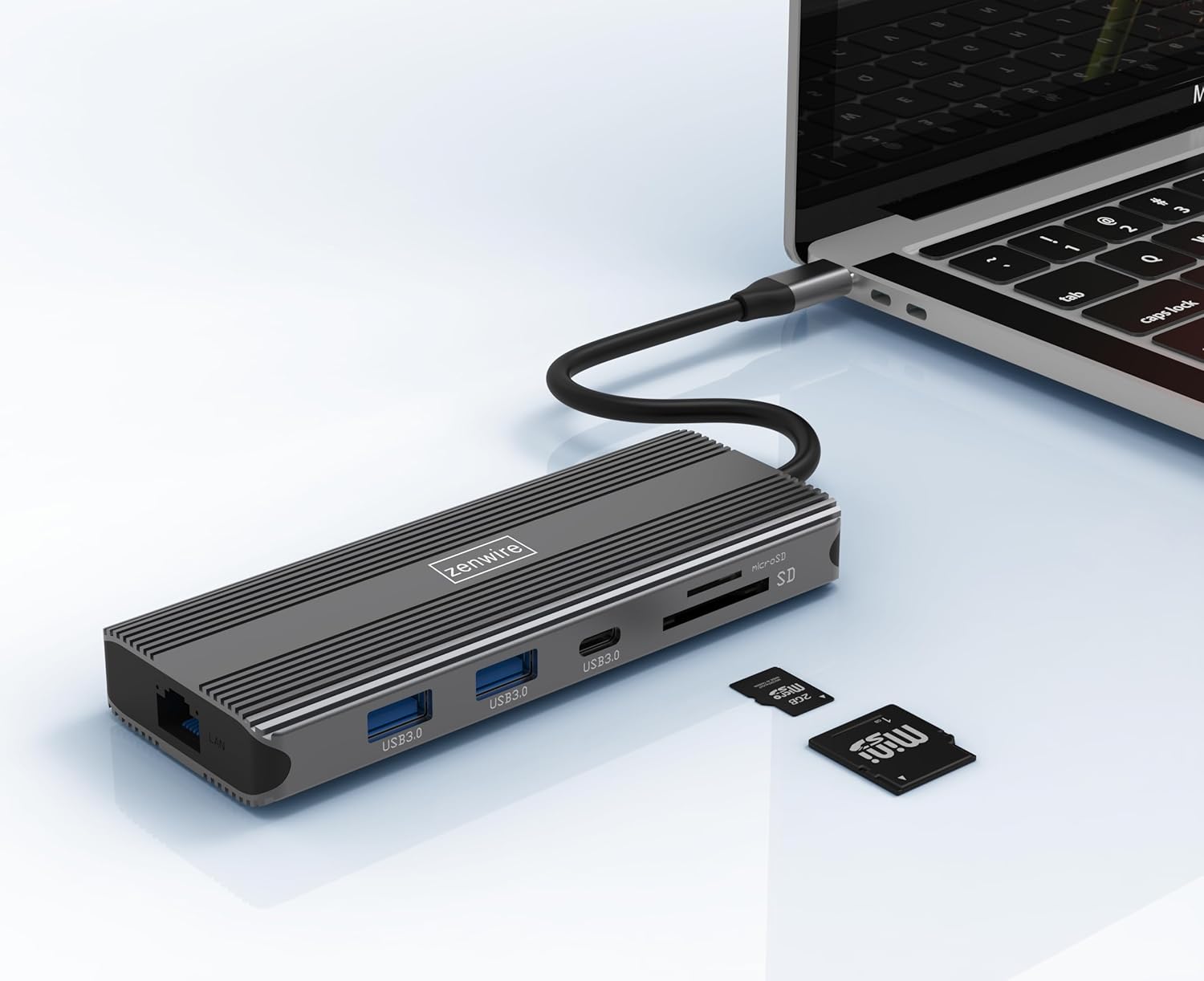
Image: The Zenwire USB-C Hub is shown connected to a laptop via its integrated USB-C cable, with SD and MicroSD cards placed nearby, illustrating a typical setup scenario.
Gebruiksaanwijzing
Schermaansluiting:
The hub supports connecting up to two external monitors simultaneously via its HDMI 2.1 and DisplayPort 1.4 interfaces. Both can display video in 4K@60Hz concurrently.
- Enkele monitor: Connect your monitor to either the HDMI or DisplayPort.
- Dubbele monitoren: Connect one monitor to the HDMI port and another to the DisplayPort.

Image: A laptop is displayed connected to two larger external monitors, demonstrating the multi-display capability of the Zenwire USB-C Hub.
Multi-Display Modes (MacOS vs. Windows):
The behavior of multiple external displays can vary between operating systems.
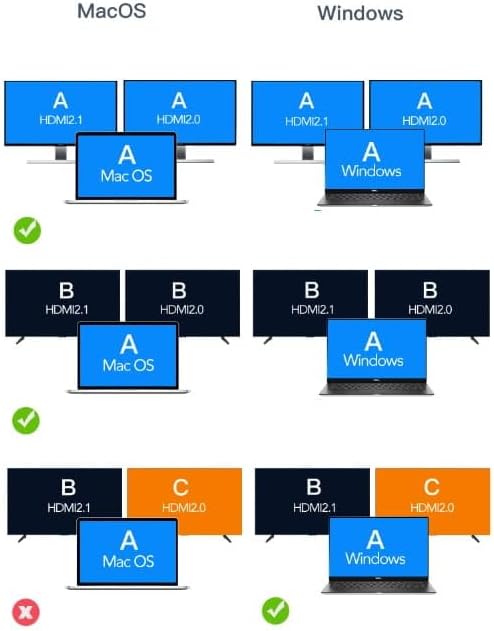
Image: A diagram illustrating different multi-display configurations for MacOS and Windows. It shows that MacOS typically supports extended desktop across two external monitors (A, B) and the laptop screen (A), while Windows can support extended desktop across three screens (A, B, C) or mirrored displays.
- Mac OS: Typically supports extended desktop across two external monitors (A, B) and the laptop screen (A). Mirroring is also supported.
- Ramen: Supports extended desktop across three screens (A, B, C) or mirrored displays, offering more flexibility for multi-monitor setups.
HDMI 2.1 and DisplayPort 1.4 Advanced Features:
These ports offer higher refresh rates and advanced features for an enhanced visual experience:
- Hoge overdrachtssnelheden: Up to 48 Gbps for HDMI 2.1, ensuring high data throughput.
- eARC (Enhanced Audio Return Channel): For higher audio quality and support for object-based audio formats like Dolby Atmos and DTS-X.
- VRR (variabele vernieuwingsfrequentie): Useful for gaming, where refresh rates are not constant.
- ALLM (Automatische lage latentiemodus): Automatically detects content like games and switches the device to a low-latency mode.
- QMS (Quick Media Switching): The image on the screen changes immediately when switching between content.
- QFT (Quick Frame Transport): Reduces input lag further.
- Dynamische HDR: Adjusts the image parameters during content transmission for higher quality visuals. Supports HDR 10 and 10+.
Audio-connectiviteit:
The 3.5mm audio jack allows connection of various audio devices:
- Microfoons
- Koptelefoon
- Headphones with integrated microphone
- Externe luidsprekers
Onderhoud
- Schoonmaak: Gebruik een zachte, droge doek om de naaf schoon te maken. Vermijd vloeibare reinigingsmiddelen of schurende materialen.
- Opslag: Bewaar de hub op een koele, droge plaats, uit de buurt van direct zonlicht en extreme temperaturen.
- Behandeling: Laat het apparaat niet vallen en stel het niet bloot aan sterke schokken.
- Warmteafvoer: The aluminum alloy shell is designed for effective heat dissipation. Ensure the hub is placed in a well-ventilated area during prolonged use.
Probleemoplossing
- Geen weergave-uitvoer:
- Zorg ervoor dat de USB-C-kabel van de hub stevig is aangesloten op uw hostapparaat.
- Verify that the HDMI/DisplayPort cable is firmly connected to both the hub and the monitor.
- Controleer de weergave-instellingen van uw hostapparaat om er zeker van te zijn dat de externe monitor wordt gedetecteerd en correct is geconfigureerd (bijv. uitgebreid, gespiegeld).
- Try a different HDMI/DisplayPort cable or monitor to rule out cable/monitor issues.
- Geen stroomvoorziening:
- Zorg ervoor dat uw USB-C-stroomadapter is aangesloten op de PD-poort van de hub en correct functioneert.
- Controleer of uw hostapparaat USB-C Power Delivery ondersteunt.
- USB-apparaten niet herkend:
- Reconnect the USB device to a different USB 3.0 port on the hub.
- Ensure the USB device is functioning correctly by connecting it directly to your host device.
- Some high-power USB devices may require external power if the hub's PD port is not utilized.
- Problemen met Ethernet-verbinding:
- Controleer of de Ethernetkabel goed is aangesloten op zowel de hub als uw router/modem.
- Controleer de netwerkinstellingen op uw hostapparaat.
- Ensure your router/modem is working correctly.
- SD/MicroSD-kaart niet gedetecteerd:
- Zorg ervoor dat de kaart volledig in de juiste sleuf is geplaatst.
- Check if the card is formatted correctly and readable by your operating system.
- Try a different card to rule out card issues.
Specificaties
| Merk | Zendraad |
| Model | Zenwire USB-C Hub |
| Connectiviteit | USB-C 3.1 / Thunderbolt 3.0 (Host) |
| Havens |
|
| Gegevensoverdrachtsnelheid | USB 3.0: 5 Gbps; Ethernet: 1000 Mbps |
| Vermogensafgifte | Tot 100W |
| Materiaal | Aluminiumlegering |
| Afmetingen (L x B x H) | 118x48x15mm |
| Gewicht | 109 gram |
| Kabellengte | Ongeveer 15 cm |
| Compatibiliteit met besturingssystemen | Windows 11/10/8/7, Apple macOS, Linux, Android, iPad Pro iOS (USB-C models) |

Afbeelding: Een hoekige view of the Zenwire USB-C Hub, showcasing its compact design and the integrated USB-C host cable.
Garantie en ondersteuning
Zenwire products are designed for reliability and performance. For warranty information and technical support, please refer to the official Zenwire webwebsite of neem contact op met uw verkoper. Bewaar uw aankoopbewijs voor garantieclaims.
For the latest software updates or driver information (if applicable), please visit the Zenwire support page. This device is designed to be Plug & Play, generally not requiring additional drivers.


