1. Inleiding
Thank you for choosing the Jectse Wireless TV Headphones. This product is designed to provide a clear and comfortable audio experience for television viewing, especially beneficial for seniors and individuals with hearing impairments. Featuring 2.4GHz wireless technology, these headphones offer a stable connection up to 100 feet, eliminating the need for long cables. They provide clear, HiFi sound with adjustable left/right channel balance and tone controls, ensuring a personalized listening experience. The integrated microphone allows for an ear return function, facilitating communication while wearing the headphones. With versatile 3.5mm auxiliary and RCA connectivity, these headphones are compatible with a wide range of devices.
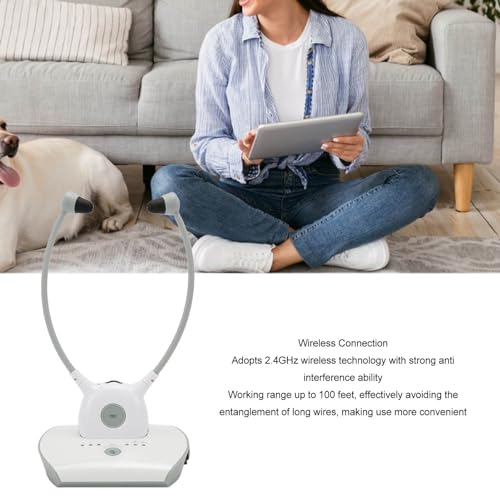
Figure 1.1: Jectse Wireless TV Headphones in use, demonstrating wireless connectivity to a television.
2. Product voorbijview
2.1 Pakketinhoud
Zorg ervoor dat alle artikelen in uw pakket aanwezig zijn:
- Draadloze tv-koptelefoon
- Transmitter Base Station
- 3.5 mm audiokabel
- RCA-audiokabel
- Stroomadapter
- Additional Earbuds (if included)

Figure 2.1: Complete package contents of the Jectse Wireless TV Headphones.
2.2 Headphone and Transmitter Features
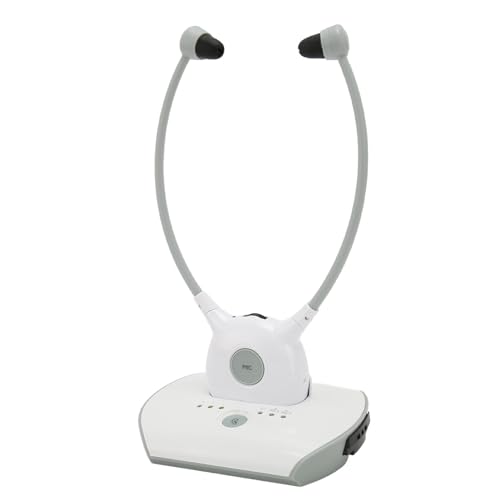
Figure 2.2: The Jectse Wireless TV Headphones and Transmitter.
The Jectse Wireless TV Headphones are designed for comfort and ease of use. Key features include:
- Gestroomlijnd ontwerp: Ergonomically shaped for comfortable wear.
- Zachte oordopjes: Provide stable wearing and help to keep noise out.
- Anti-breaking Handle: Features wide adjustment for various head sizes.
- Integrated Microphone (MIC button): For the ear return function, allowing communication without removing headphones.
- Left/Right Channel Adjustment: Fine-tune audio balance.
- Toonaanpassing: Pas het geluid aanfile (bass/treble).
- Volumeregeling: Independent volume adjustment.
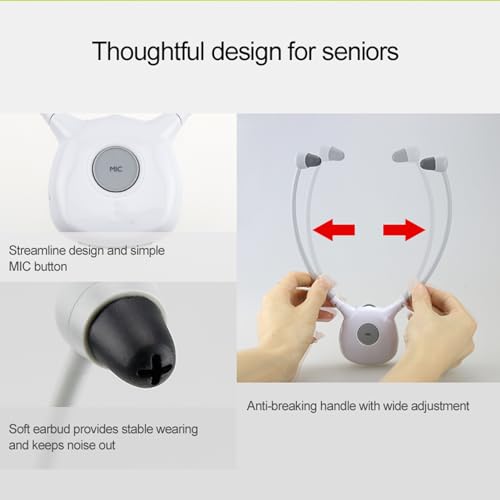
Afbeelding 2.3: Gedetailleerd view of headphone design features.
3. Instellen
3.1 De hoofdtelefoon opladen
Before first use, fully charge the headphones. Place the headphones onto the transmitter base station. The charging status is indicated by the LEDs on the transmitter.
- Rode LED: Geeft aan dat het opladen bezig is.
- Groene LED: Indicates fully charged.
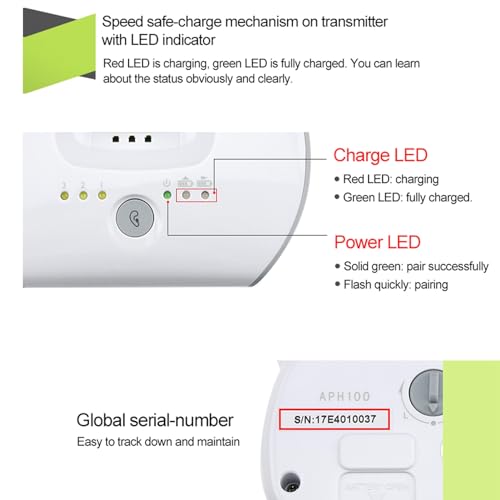
Figure 3.1: Transmitter LEDs indicating charging and power status.
3.2 Connecting the Transmitter to Your Audio Source
The transmitter supports both 3.5mm auxiliary and RCA audio connections. Choose the appropriate cable for your device (TV, DVD player, computer, etc.).
- Connect one end of the audio cable (3.5mm or RCA) to the corresponding audio output port on your TV or audio source.
- Connect the other end of the audio cable to the input port on the Jectse transmitter base station.
- Connect the power adapter to the transmitter and plug it into a power outlet.
- Ensure the transmitter's power LED is solid green, indicating successful pairing with the headphones. If it flashes quickly, it is in pairing mode.
4. Gebruiksaanwijzing
4.1 In-/uitschakelen en volumeregeling
To power on the headphones, simply take them off the charging base. They will automatically connect to the transmitter. To power off, place them back on the charging base. Adjust the volume using the dedicated volume controls on the headphones.
4.2 Adjusting Left/Right Channel Balance
The headphones feature a control to adjust the balance between the left and right audio channels. This allows users to fine-tune the sound distribution to their preference, which can be particularly helpful for individuals with varying hearing levels in each ear.
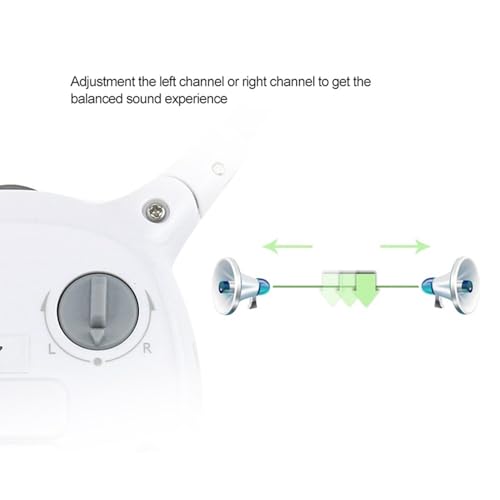
Figure 4.1: Adjusting the left or right channel for balanced sound.
4.3 Tone Adjustment
The headphones offer various tone adjustment modes to enhance your listening experience. Use the tone adjustment buttons on the headphones to cycle through the modes. The corresponding LEDs will indicate the active mode.
- Press the button to enhance bass only (LED 3 solid green).
- Press the button to enhance treble only (LED 2 solid green).
- Press the button to enhance treble and bass (LED 1 solid green).
- All LEDs OFF indicates no adjustment mode (Normal flat).
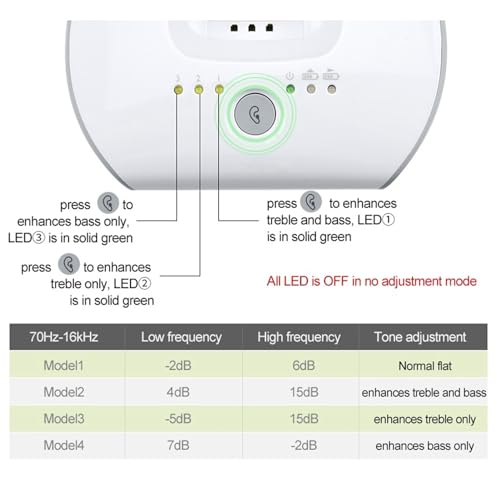
Figure 4.2: Tone adjustment controls and modes.
| Model | Lage frequentie | Hoge frequentie | Toonaanpassing |
|---|---|---|---|
| Model1 | -2dB | 6dB | Normal flat |
| Model2 | 4dB | 15dB | enhances treble and bass |
| -5dB | 15dB | enhances treble only | |
| Model4 | 7dB | -2dB | enhances bass only |
4.4 Ear Return Function
The built-in microphone on the headphones enables an ear return function. Press the MIC button to activate this feature, allowing you to hear your own voice and surroundings through the headphones. This is useful for communicating with others without removing the headphones.
5. Onderhoud
Proper maintenance ensures the longevity and optimal performance of your Jectse Wireless TV Headphones.
- Schoonmaak: Use a soft, dry cloth to clean the headphones and transmitter. Do not use abrasive cleaners or immerse in water.
- Opslag: When not in use, store the headphones on the transmitter base station to keep them charged and ready. Store in a cool, dry place away from direct sunlight and extreme temperatures.
- batterij zorg: Om de batterijduur te verlengen, moet u voorkomen dat u de hoofdtelefoon regelmatig volledig ontlaadt. Laad hem regelmatig op, zelfs als u hem langere tijd niet gebruikt.
6. Probleemoplossing
If you encounter any issues with your Jectse Wireless TV Headphones, please refer to the following common problems and solutions:
| Probleem | Mogelijke oorzaak | Oplossing |
|---|---|---|
| Er komt geen geluid uit de koptelefoon. | Headphones not powered on or not paired. Audio cable not connected correctly. TV/audio source volume too low or muted. | Ensure headphones are on the charging base to power on and pair. Check all cable connections. Increase volume on TV/audio source and headphones. |
| Slechte geluidskwaliteit of ruis. | Interferentie van andere draadloze apparaten. Buiten bereik. Batterij bijna leeg. | Move away from other 2.4GHz devices. Ensure you are within 100 feet of the transmitter. Recharge the headphones. |
| Koptelefoon laadt niet op. | Headphones not properly seated on base. De voedingsadapter is niet aangesloten. | Ensure headphones are correctly placed on the charging pins. Check power adapter connection to transmitter and outlet. Verify red charging LED is on. |
| Ear return function not working. | MIC button not pressed. Microfoon geblokkeerd. | Press the MIC button to activate. Ensure the microphone opening is clear. |
7. Specificaties
- Modelnummer: Jectse47ot56mxqs-11
- Merk: Jekt
- Draadloze technologie: 2.4 GHz
- Draadloos bereik: Tot 100 voet (ongeveer 30 meter)
- Signaal-ruisverhouding (SNR): 75dB
- Vervorming: Minder dan 0.5%
- Frequentiebereik: 70Hz-16kHz
- Connectiviteit: 3.5mm Auxiliary, RCA
- Materiaal: Plastic
- Oplaadbare batterij: Ja
- Pakket afmetingen: 24.7 x 18 x 5.7 cm (9.7 x 7.1 x 2.2 inch)
- Productgewicht: 430 gram (0.95 lbs)

Figure 7.1: Product dimensions of the headphones and transmitter.
8. Garantie en ondersteuning
For warranty information and customer support, please refer to the documentation provided with your purchase or contact Jectse customer service directly. Details regarding warranty periods and service procedures are typically outlined in a separate warranty card or on the manufacturer's official webplaats.
For further assistance or technical inquiries, please visit the official Jectse store page on Amazon or contact their support channels.
Let op: Productspecificaties en -functies kunnen zonder voorafgaande kennisgeving worden gewijzigd.


