1. Inleiding
Thank you for choosing the POGOLAB MK1 37 Keys Kids Keyboard Piano. This compact and versatile instrument is designed for beginners, offering a rich array of sounds and features to inspire musical creativity. Please read this manual carefully to ensure proper use and maintenance of your new keyboard.
2. Producteigenschappen
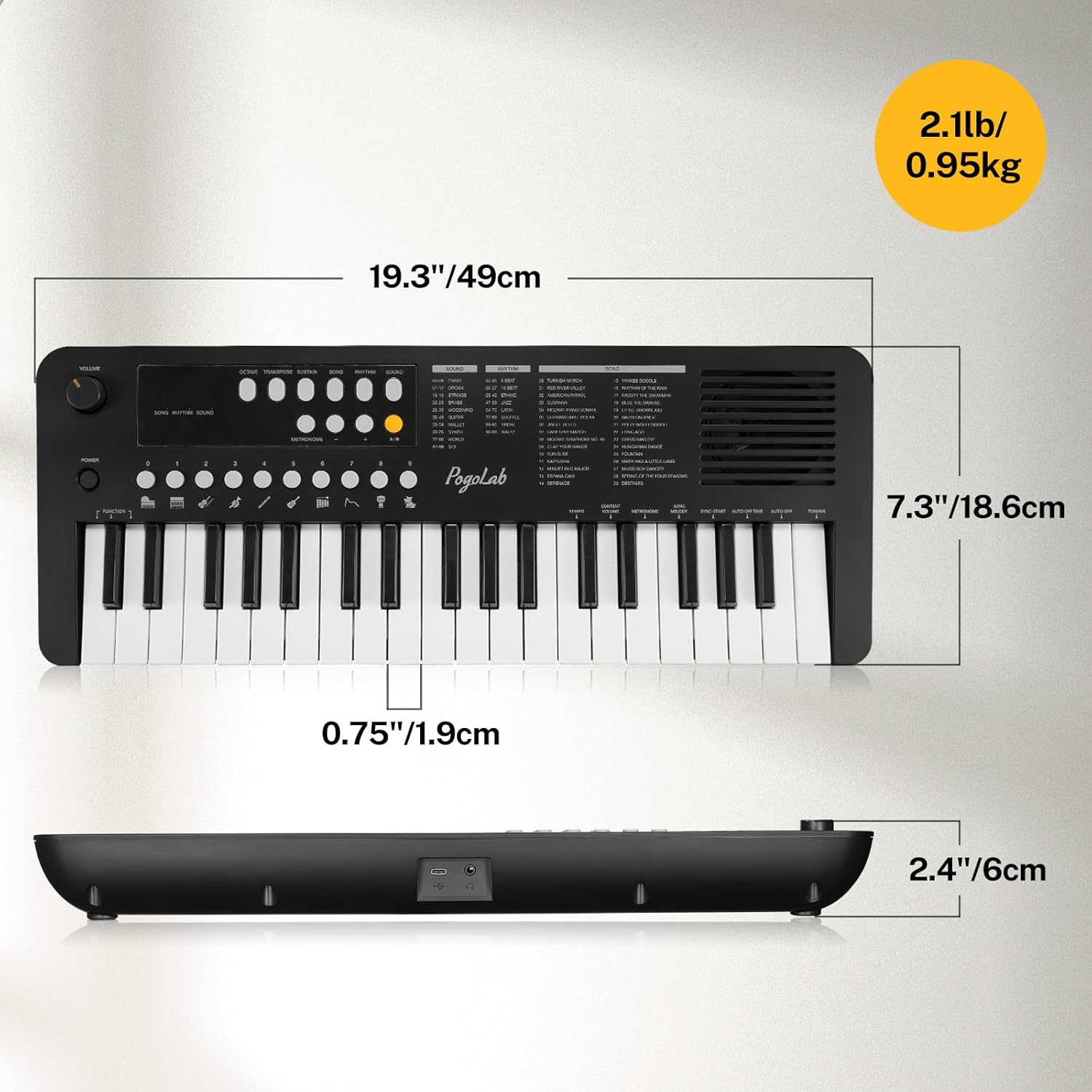
- Compact en draagbaar ontwerp: Features 37 mini keys, ideal for children's fingers. Measures 19.3" x 7.3" x 2.4" and weighs 2.1 pounds, making it easy to store and transport for various occasions.
- Rich Sounds & Styles: Includes 30 demo songs, 32 polyphony, 100 instrument sounds, and 100 rhythms. Also features interesting animal sounds (e.g., dog, cat, cow). Equipped with a unique built-in speaker for high-quality sound output.
- Led scherm: An integrated LED display panel shows real-time data for selected sounds, rhythms, and songs, aiding beginners in learning and navigation.
- Dual Power Supply Methods: Can be powered by 4 x AA batteries (not included) for portability or via a USB cable (included) for plug-and-play convenience with laptops, desktops, or adapters.
- Ondersteuning hoofdtelefoon: Features a 3.5mm headphone jack, allowing for private practice without disturbing others.
3. Inhoud van het pakket
- POGOLAB MK1 37 Keys Kids Keyboard Piano
- USB-voedingskabel
- Gebruiksaanwijzing
4. Bedieningselementen en functies
Familiarize yourself with the keyboard's control panel to effectively utilize all its features.
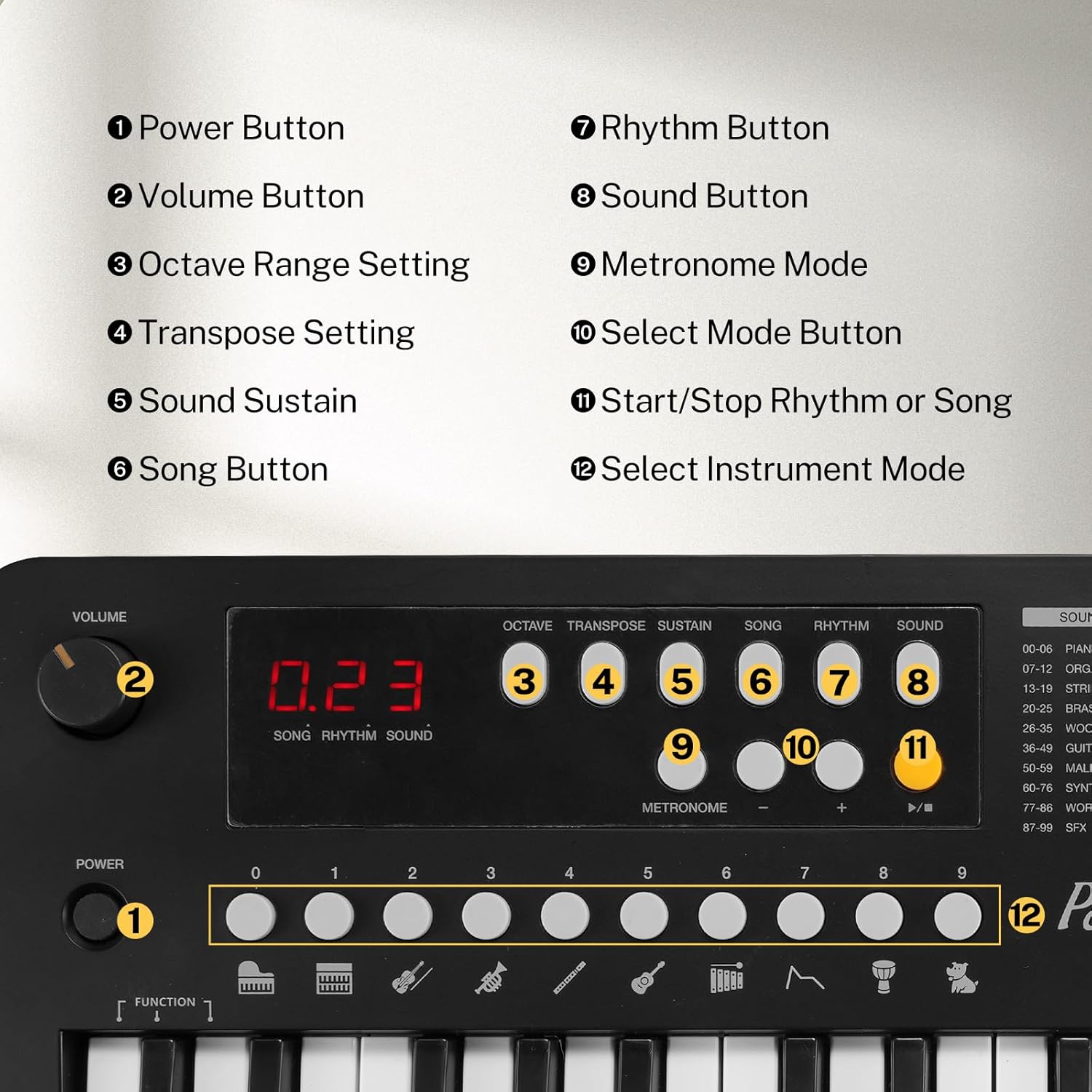
Figuur 4.1: Lay-out van het bedieningspaneel
- Aan/uit-knop: Hiermee wordt het toetsenbord in- of uitgeschakeld.
- Volumeknop: Past het algehele uitgangsvolume aan.
- Octave Range Setting: Shifts the keyboard's pitch up or down by octaves.
- Transpose Setting: Changes the key of the music without changing the fingering.
- Sound Sustain: Adds a decaying effect to notes, making them ring out longer.
- Song-knop: Activates the demo song playback mode.
- Ritmeknop: Activates the rhythm playback mode.
- Geluidsknop: Activates the instrument sound selection mode.
- Metronoommodus: Turns the metronome on or off for timing practice.
- Select Mode Button: Used in conjunction with number keys to select specific sounds, rhythms, or songs.
- Start/Stop Rhythm or Song: Initiates or halts playback of selected rhythm or song.
- Select Instrument Mode: Buttons 0-9 and Function key are used to select different instrument sounds.

Figure 4.2: Transpose and Octave Functionality
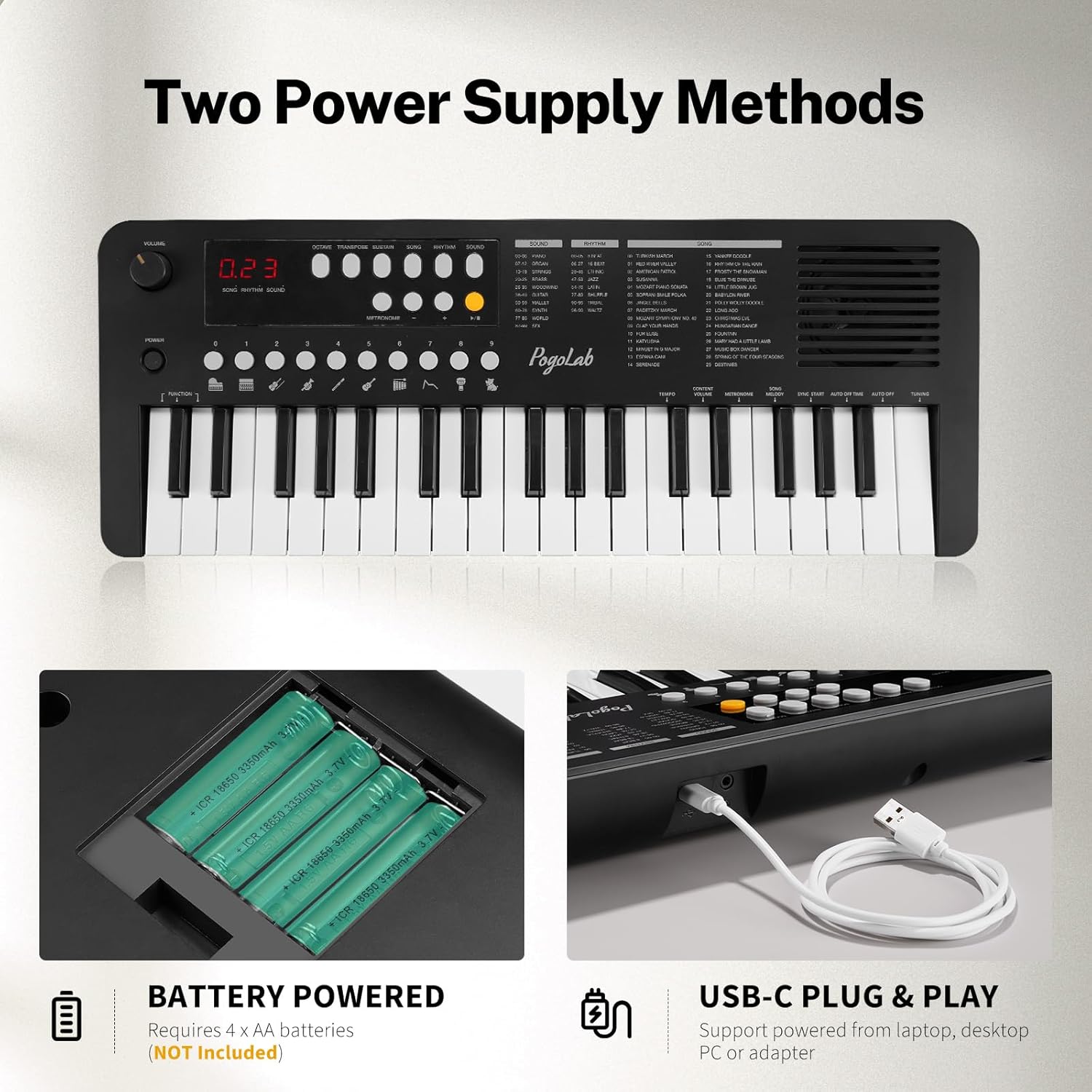
Figure 4.3: LED Display
5. Instellen
5.1 Het toetsenbord van stroom voorzien
The POGOLAB MK1 keyboard offers two power options:
- Batterijvermogen: Insert 4 x AA batteries (not included) into the battery compartment located on the underside of the keyboard. Ensure correct polarity.
- Usb vermogen: Connect the included USB cable to the USB-C port on the keyboard and the other end to a USB power source (e.g., laptop, desktop PC, or a USB power adapter).
Figuur 5.1: Dubbele voedingsmethoden
5.2 Een hoofdtelefoon aansluiten
To practice privately, plug standard 3.5mm headphones into the headphone jack located on the keyboard. The internal speaker will automatically mute when headphones are connected.
6. Gebruiksaanwijzing
6.1 Basisbediening
- Druk op de Aan/uit-knop to turn on the keyboard.
- Pas het totale volume aan met behulp van de Volumeknop.
6.2 Selecting Sounds (Tones)
- Druk op de Geluidsknop.
- Use the number keys (0-9) to enter the two-digit code for the desired sound (e.g., 01 for Piano, 26 for Sax). The LED display will show the selected sound number.
6.3 Selecting Rhythms
- Druk op de Ritme knop.
- Use the number keys (0-9) to enter the two-digit code for the desired rhythm (e.g., 01 for 8 Beat, 70 for Latin). The LED display will show the selected rhythm number.
- Druk op de Start/Stop Rhythm or Song Button om het afspelen van het ritme te starten of te beëindigen.
6.4 Demo-nummers afspelen
- Druk op de Song-knop.
- Use the number keys (0-9) to enter the two-digit code for the desired song (e.g., 09 for Song No.9, 17 for Song No.17). The LED display will show the selected song number.
- Druk op de Start/Stop Rhythm or Song Button to begin or end the song playback.
6.5 Using Octave and Transpose Functions
- Octaaf: Druk op de Octave Range Setting Button to shift the keyboard's pitch up or down. This allows you to play notes outside the physical 37-key range.
- Transponeren: Druk op de Transpose Setting Button to change the musical key of the keyboard. This is useful for playing along with other instruments or vocalists.
6.6 Metronoom
Druk op de Metronome Mode Button to activate or deactivate the metronome, which provides a steady beat for practice.
6.7 Volhouden
Druk op de Sound Sustain Button to apply a sustain effect to the notes you play, allowing them to ring out longer after the key is released.
Video 6.1: Demonstration of POGOLAB Mini Keyboard Piano Sounds, Rhythms, and Songs. This video showcases the variety of built-in sounds, rhythms, and demo songs available on the keyboard, illustrating how to select and play them.
7. Onderhoud
7.1 Reinigen
To clean the keyboard, use a soft, dry cloth. For stubborn dirt, slightly dampen the cloth with water and a mild soap solution, then wipe dry immediately. Do not use abrasive cleaners, solvents, or waxes, as these can damage the surface.
7.2 Opslag
Store the keyboard in a cool, dry place away from direct sunlight, extreme temperatures, and high humidity. If storing for an extended period, remove the batteries to prevent leakage.
7.3 Batterijonderhoud
Always use the correct type of batteries (4 x AA). Do not mix old and new batteries, or different types of batteries. Remove exhausted batteries promptly. If the keyboard will not be used for a long time, remove the batteries to prevent potential damage from battery leakage.
8. Probleemoplossing
8.1 Geen stroom
- Zorg ervoor dat de aan/uit-knop is ingedrukt.
- Als u batterijen gebruikt, controleer dan of ze correct geplaatst zijn en niet leeg zijn. Vervang ze indien nodig.
- If using USB power, ensure the USB cable is securely connected to both the keyboard and a working power source. Try a different USB port or adapter.
8.2 Geen geluid
- Controleer het volume en verhoog het indien nodig.
- If headphones are connected, disconnect them to enable the internal speaker.
- Ensure a sound (tone) is selected and not set to a silent or very low volume instrument.
8.3 Toetsen reageren niet
- Zorg ervoor dat het toetsenbord is ingeschakeld.
- Check power supply as described in 'No Power' section.
- If only some keys are not responding, contact customer support.
9. Specificaties
| Functie | Detail |
|---|---|
| Modelnaam | MK1 |
| Aantal sleutels | 37 |
| Productafmetingen | 6 cm D x 49 cm B x 6 cm H |
| Artikelgewicht | 2.1 pond (0.95 kg) |
| Energiebron | Battery Powered (4 x AA), USB Powered |
| Connectiviteitstechnologie | USB |
| Koptelefoonaansluiting | 3.5 mm-aansluiting |
| Polyfonie | 32 |
| Ingebouwde geluiden | 100 |
| Ingebouwde ritmes | 100 |
| Ingebouwde liedjes | 30 |
| Vaardigheidsniveau | Beginner |

Figuur 9.1: Productafmetingen
10. Garantie en ondersteuning
POGOLAB is committed to providing high-quality products. For any questions, concerns, or technical support regarding your MK1 Keyboard Piano, please refer to the contact information provided with your purchase or visit the official POGOLAB brand store on Amazon. Please retain your proof of purchase for warranty claims.


