1. Inleiding
Welcome to the user manual for your new SOYES XS16 Mini Smartphone. This compact and powerful device runs on Android 10.0, offering a full smartphone experience in a handheld size. Designed for portability and convenience, it features 4G network support, a 3.0-inch HD display, and essential functionalities for daily communication and entertainment. This manual will guide you through the setup, operation, maintenance, and troubleshooting of your device.
2. Wat zit er in de doos?
- SOYES XS16 Mini Smartphone
- USB Type-C kabel
- SIM-lade-uitwerper
- Telefoonhoesje
- Schermbeschermer
3. Product voorbijview
The SOYES XS16 is engineered for portability without compromising on features. Its small form factor makes it ideal for easy carrying, fitting comfortably in your hand or pocket.

Figure 3.1: The SOYES XS16 Mini Smartphone, showcasing vanwege het compacte formaat wanneer het in de hand wordt gehouden.
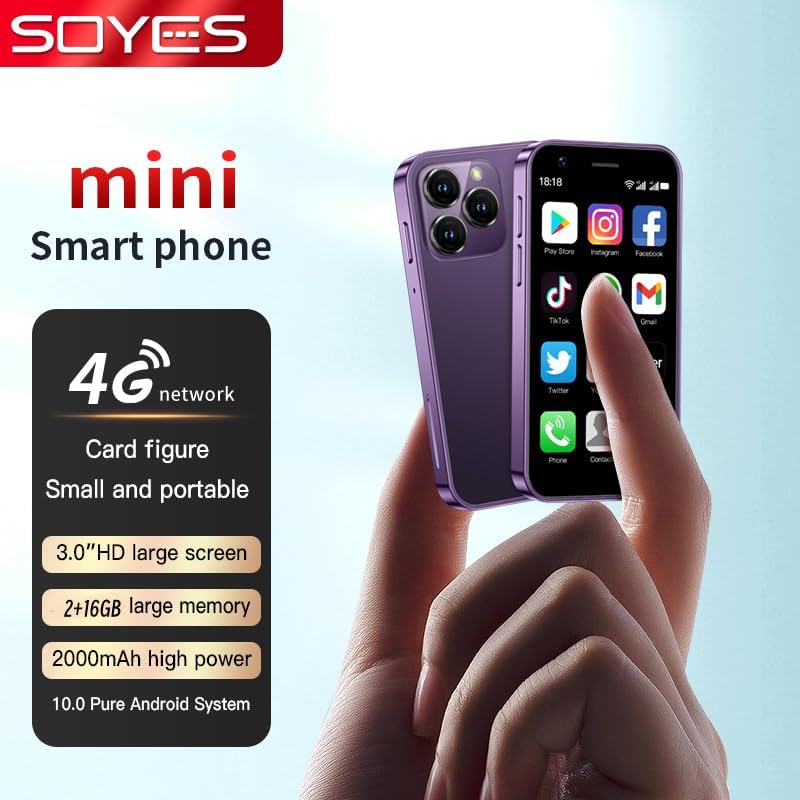
Figuur 3.2: Overview of the SOYES XS16, highlighting its 4G network capability, 3.0-inch HD screen, memory options, 2000mAh battery, and Android 10.0 system.

Figure 3.3: The SOYES XS16 is available in various colors, offering a sleek and modern design.

Figure 3.4: An illustration of the phone's advanced features, including its compact body, large HD screen, high-definition camera, flagship multi-core processor, and 2000mAh battery.

Figure 3.5: The phone offers ample storage space and features a convenient Type-C charging port for efficient power delivery.

Figure 3.6: Demonstrating the phone's small and portable design, comparable to the size of a credit card.

Figure 3.7: The SOYES XS16 runs on a pure Android Native System, ensuring compatibility with mainstream applications and smooth multitasking.

Figure 3.8: The phone's thin and light profile allows it to be easily carried in small bags or pockets.

Figure 3.9: A summary of the phone's flagship configuration and basic parameters.
Productvideo
Video 3.1: Een officiële productvideo die het product demonstreertasing the SOYES XS16 Mini Smartphone's design, features, and compact size.
4. Instellen
4.1. SIM-kaartinstallatie
- Zoek de SIM-kaarthouder aan de zijkant van de telefoon.
- Plaats het uitwerpgereedschap voor de SIM-lade in het kleine gaatje naast de lade en druk zachtjes totdat de lade eruit springt.
- Place your Nano-SIM card(s) into the designated slots on the tray. Ensure the gold contacts face downwards. The SOYES XS16 supports dual SIM cards.
- Duw de lade voorzichtig terug in de telefoon totdat deze vastklikt.
4.2. Initial Power On & Language Selection
- Houd de aan/uit-knop (aan de zijkant) ingedrukt totdat het scherm oplicht.
- Follow the on-screen prompts to select your preferred language. The phone supports English, French, Spanish, Portuguese (Brazil), Italian, German, Dutch, Hungarian, Russian, Arabic, Greek, Romanian, Bulgarian, Vietnamese, Czech, Persian, Indonesian, Malay, Thai, Portuguese, Philippine, Hebrew, Korean, and Japanese.
- Complete the initial setup steps, including connecting to Wi-Fi and setting up your Google account.
4.3. Netwerkconnectiviteit
The SOYES XS16 supports 4G, 3G, and 2G networks. Ensure your SIM card supports the following frequencies for optimal performance:
- 4G FDD: B1/B3/B5/B7/B8/B20 (2100/1800/850/2600/900/800MHz)
- 4G TDD: B39/B40 (2600/1900/2300MHz)
- 3G WCDMA: B1/B5/B8 (2100/850/900MHz)
- 2G GSM: B3/B5/B8 (1800/850/900MHz)
If you do not intend to use a SIM card, you can still use the phone by connecting to Wi-Fi.
5. Uw apparaat bedienen
5.1. Basisnavigatie
The SOYES XS16 features a 3.0-inch IPS touchscreen. Navigate by tapping, swiping, and pinching. The Android 10.0 OS provides an intuitive user interface.
5.2. Bellen en berichten
Use the Phone app to make calls and the Messaging app to send and receive SMS/MMS messages. The dual SIM support allows you to manage two numbers simultaneously.
5.3. Cameragebruik
The phone is equipped with a 5MP rear camera and a 2MP front camera. Open the Camera app to capture photos and videos. Tap the screen to focus and press the shutter button to take a picture.
5.4. App-beheer
Download and install applications from the Google Play Store. You can manage installed apps through the Settings menu, including permissions and storage usage.
5.5. Connectiviteitsfuncties
- Wifi: Maak verbinding met draadloze netwerken voor internettoegang.
- Bluetooth: Koppelen met Bluetooth-apparaten zoals hoofdtelefoons of luidsprekers.
- Mobiele hotspot: Deel de mobiele dataverbinding van uw telefoon met andere apparaten.
6. Onderhoud
6.1. Opladen
Charge your SOYES XS16 using the provided USB Type-C cable and a compatible power adapter. The 2000mAh battery provides sufficient power for its compact size. Avoid using damaged cables or chargers.
6.2. Software-updates
Periodically check for system updates in the Settings menu to ensure your phone has the latest features and security patches.
6.3. Schoonmaken
Gebruik een zachte, pluisvrije doek om het scherm en de behuizing van de telefoon schoon te maken. Vermijd het gebruik van agressieve chemicaliën of schurende materialen.
6.4. Bescherming
Utilize the included screen protector and phone case to safeguard your device from scratches and minor impacts.
7. Probleemoplossing
If you encounter issues with your SOYES XS16, refer to the following common problems and solutions:
- Telefoon gaat niet aan: Zorg ervoor dat de batterij is opgeladen. Sluit de telefoon minimaal 15 minuten aan op de oplader voordat u hem opnieuw probeert aan te zetten.
- Problemen met netwerkconnectiviteit:
- Verify that your SIM card is correctly inserted and active.
- Check if your SIM card supports the phone's frequency bands (refer to Section 4.3).
- Start de telefoon opnieuw op.
- Go to Settings > Network & internet > Mobile network > Advanced > Access Point Names (APN) and ensure the correct APN settings for your carrier are selected or configured.
- If issues persist, contact your mobile carrier for assistance.
- Freezing or Glitching:
- Start de telefoon opnieuw op.
- Sluit achtergrondtoepassingen.
- Clear cache for problematic apps (Settings > Apps & notifications > [App Name] > Storage & cache > Clear cache).
- Zorg ervoor dat er voldoende opbergruimte beschikbaar is.
- Language Changed Unexpectedly: If the phone's language changes to an unfamiliar one, navigate to Settings (usually represented by a gear icon) > System > Languages & input > Languages, and select your desired language.
- Slechte geluidskwaliteit: Ensure the speaker is not obstructed. Adjust volume settings.
- Difficulty Typing on Small Screen: Utilize predictive text features or consider using a stylus for more precise input if available.
If these steps do not resolve the issue, a factory reset may be necessary (Settings > System > Reset options > Erase all data (factory reset)). Waarschuwing: A factory reset will erase all data on your phone. Back up important information before proceeding.
8. Specificaties
| Productafmetingen | 3.52 x 1.79 x 0.45 inch |
| Artikelgewicht | 5.6 ons |
| Artikelmodelnummer | XS16 |
| Besturingssysteem | Androïde 10.0 |
| Verwerker | MTK6737 |
| RAM | 2GB |
| Geheugenopslagcapaciteit | 16 GB (also available in 3GB+64GB variant) |
| Schermgrootte | 3.0 inch HD |
| Schermresolutie | 480x854 |
| Achteruitrijcamera | 5MP |
| Voorcamera | 2MP |
| Batterijcapaciteit | 2000 mAh lithium-polymeer |
| I/O-interface | Type-C |
| Draadloze communicatietechnologieën | Mobiel, Wi-Fi |
| Connectiviteitstechnologieën | Bluetooth, wifi, USB |
| Draadloze provider | Ontgrendeld voor alle providers |
| Phone Unlocking Method | Afbeeldingen + wachtwoord |
9. Garantie en ondersteuning
For any questions or support regarding your SOYES XS16 Mini Smartphone, please contact the seller or manufacturer. Please refer to your purchase documentation for specific warranty details and contact information.


