1. Product voorbijview
The CATLINK W03 Wireless Cat Water Fountain is designed to provide fresh, filtered water for your cat, promoting hydration and health. Featuring a wireless design with a long-lasting battery, app control for remote monitoring, and a multi-stage filtration system, this fountain offers convenience and peace of mind.

Image 1.1: The CATLINK W03 Wireless Cat Water Fountain, showing its sleek design and a mobile app interface displaying water status and filter information.
2. Belangrijkste kenmerken
- Draadloze bediening: Equipped with a built-in 5000mAh battery, offering up to 150 days of operation on a single charge, allowing flexible placement without power cords.
- App-connectiviteit: Connect to the CATLINK app for remote control, monitoring of water intake, detailed health reports, and timely notifications.
- Grote capaciteit: A 2.3-liter water reservoir ensures up to 8 days of water supply for a single cat.
- Geavanceerde filtratie: A fine filter cartridge removes impurities, providing clean and healthy drinking water.
- Stille werking: Engineered to operate at less than 30dB, ensuring minimal disturbance.

Image 2.1: Multiple cats drinking from CATLINK W03 fountains placed in different areas of a home, highlighting the wireless functionality.

Image 2.2: A cat drinking from the fountain, with a clear indication of the 2.3-liter water capacity on the reservoir.
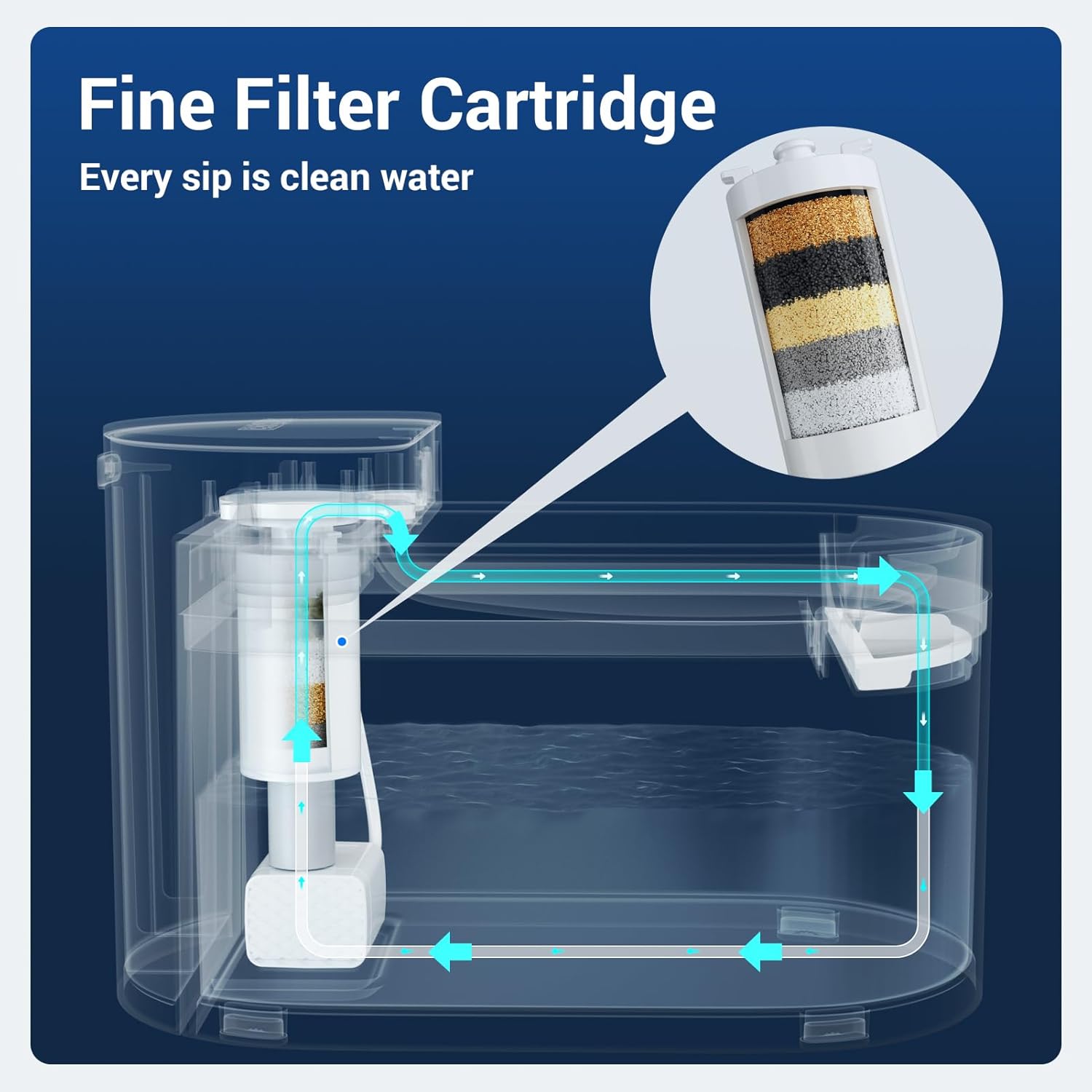
Image 2.3: A diagram illustrating the internal water flow and the multi-layer fine filter cartridge within the CATLINK W03 fountain.

Image 2.4: A cat drinking from the fountain, accompanied by a graphic indicating a sound level below 30 decibels, emphasizing quiet operation.
3. Installatie-instructies
- Componenten uitpakken: Carefully remove all parts from the packaging. Ensure you have the main unit, water reservoir, drinking tray, filter, and charging cable.
- Laad de batterij op: Before first use, fully charge the built-in 5000mAh battery using the provided charging cable. The indicator light will show charging status.
- Filter installeren: Rinse the new filter under running water for a few minutes. Insert the filter into its designated slot in the pump assembly.
- Fontein monteren: Place the pump assembly with the filter into the water reservoir. Ensure it is securely seated.
- Waterreservoir vullen: Fill the reservoir with clean water up to the 'MAX' line. Avoid overfilling.
- Plaats het dienblad: Position the drinking tray on top of the reservoir, ensuring it aligns correctly with the water outlet.
- Inschakelen: Press the power button to turn on the fountain. The indicator light will illuminate.
- App-verbinding (optioneel): Download the CATLINK app from your device's app store. Follow the in-app instructions to connect your fountain to your Wi-Fi network for remote monitoring and control.
4. Gebruiksaanwijzing
- Automatische bediening: The fountain is designed to operate automatically, dispensing water when your pet approaches (if motion sensor mode is enabled via the app) or on a scheduled basis.
- Manual Water Dispense: You can manually dispense water by pressing a button on the unit or through the CATLINK app.
- App-bediening: Use the CATLINK app to:
- Monitor your cat's daily water intake.
- Receive notifications for low water levels or filter replacement.
- Adjust fountain modes (e.g., continuous flow, intermittent, motion-activated).
- View health reports based on drinking patterns.
- Low Water Reminder: The fountain will notify you via the app and/or an indicator light when the water level is low. Refill promptly to ensure continuous operation.

Image 4.1: The CATLINK W03 fountain alongside a smartphone displaying app notifications for low water levels and a filter replacement reminder.
5. Onderhoud
Regelmatig schoonmaken en het vervangen van het filter zijn essentieel voor het behoud van de waterkwaliteit en de levensduur van uw fontein.
5.1. De fontein reinigen
- Demonteren: Turn off the fountain and unplug it if connected to power. Disassemble all removable parts: drinking tray, water reservoir, and pump assembly.
- Wascomponenten: Wash the drinking tray and water reservoir with mild soap and water. Rinse thoroughly to remove all soap residue.
- Schone pomp: Carefully open the pump to clean any debris or hair that may have accumulated. Use a small brush if necessary.
- Drogen en weer in elkaar zetten: Zorg ervoor dat alle onderdelen volledig droog zijn voordat u de fontein weer in elkaar zet.

Image 5.1: All components of the CATLINK W03 fountain laid out, demonstrating its easy disassembly for thorough cleaning.
5.2. Filtervervanging
The filter should be replaced approximately every 1-2 months, or as indicated by the CATLINK app, depending on usage and water quality.
- Oude filter verwijderen: Disassemble the fountain as described above and remove the used filter from the pump assembly.
- Nieuw filter voorbereiden: Rinse the new filter under running water for several minutes to remove any loose carbon particles.
- Nieuw filter installeren: Insert the new filter into the pump assembly, ensuring a snug fit.
- Opnieuw monteren: Reassemble the fountain, refill with water, and power it on. Reset the filter life counter in the CATLINK app if applicable.
6. Probleemoplossing
| Probleem | Mogelijke oorzaak | Oplossing |
|---|---|---|
| Fontein geeft geen water | Low water level, clogged pump, dead battery, power off. | Refill water, clean pump and filter, charge battery, ensure power is on. |
| App not connecting to fountain | Incorrect Wi-Fi password, fountain too far from router, app issues. | Verify Wi-Fi credentials, move fountain closer to router, restart app/fountain, ensure 2.4GHz Wi-Fi. |
| De waterstroom is zwak | Clogged filter, dirty pump impeller. | Replace filter, clean pump thoroughly. |
| De fontein maakt veel lawaai. | Low water level, pump not properly seated, debris in pump. | Refill water, ensure pump is correctly installed, clean pump. |
7. Specificaties
| Functie | Detail |
|---|---|
| Modelnummer | W03 |
| Merk | KATLINK |
| Capaciteit | 2.3 liter (2300 milliliter) |
| Energiebron | Battery Powered (5000mAh built-in battery) |
| Levensduur van de batterij | Tot 150 dagen |
| Geluidsniveau | Minder dan 30dB |
| Materiaal | Plastic |
| Artikelgewicht | 3.76 pond |
| Afmetingen (L x B x H) | 12.48 x 9.72 x 7.64 inch (pakket) |
| Meegeleverde componenten | Cat water fountain unit, filter, charging cable |
| Specifieke toepassingen | Binnen |
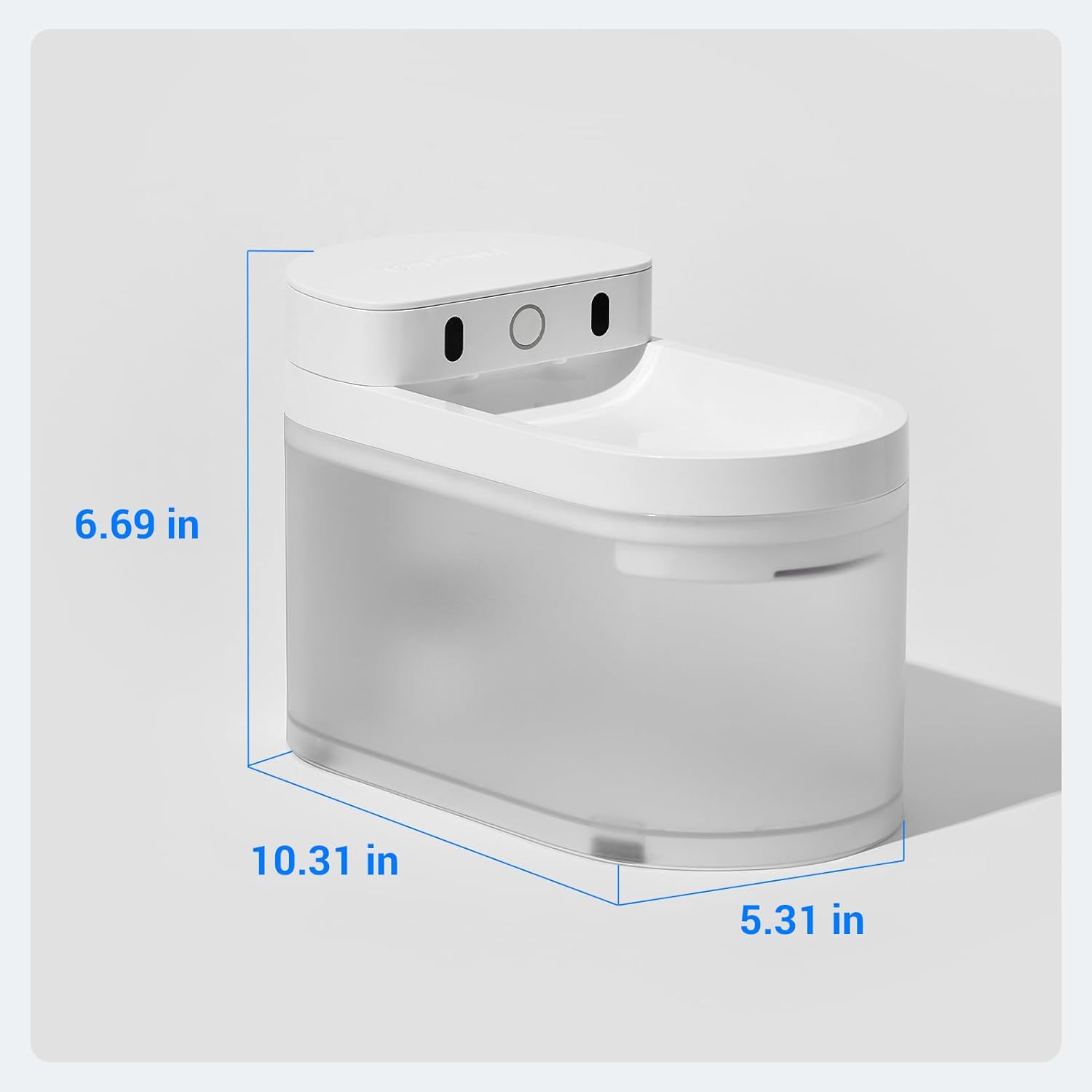
Image 7.1: A diagram illustrating the physical dimensions (length, width, height) of the CATLINK W03 Wireless Cat Water Fountain.
8. Garantie en ondersteuning
The CATLINK W03 Wireless Cat Water Fountain comes with a 1 jaar garantie vanaf de aankoopdatum. Deze garantie dekt fabricagefouten en storingen bij normaal gebruik.
For warranty claims, technical support, or any inquiries, please contact CATLINK customer service through the following channels:
- CATLINK Official Webwebsite: Visit the official CATLINK website voor ondersteuningsbronnen, veelgestelde vragen en contactinformatie.
- CATLINK App: Access support directly through the help section of the CATLINK mobile application.
- E-mailondersteuning: Refer to your product packaging or the CATLINK website voor het speciale e-mailadres voor klantenondersteuning.
Bewaar uw aankoopbewijs om de garantie te valideren.


