1. Veiligheidsinformatie
Lees deze handleiding aandachtig door vóór installatie en gebruik. Bewaar deze handleiding voor toekomstig gebruik.
- Ensure the wall structure can safely support the weight of the mount and the monitor.
- Use a stud finder to locate wood studs for secure mounting. Avoid drilling into electrical wires or pipes.
- Overschrijd het maximale draagvermogen van 8 kg niet.
- Zorg ervoor dat alle schroeven goed vastzitten, maar draai ze niet te vast aan.
- Houd kinderen en huisdieren uit de buurt tijdens de installatie.
- Handle the gas spring arm with care as it is under tension. Follow instructions for tension adjustment.
2. Inhoud van het pakket
Verify all parts are present before beginning installation. If any parts are missing or damaged, contact customer support.
- Monitor Wall Mount Arm Assembly
- VESA-montageplaat
- Muurplaat
- Hardware Kit (various screws, washers, anchors for different wall types)
- Allen Key / Hex Wrench for adjustments
- Gebruiksaanwijzing
3. Specificaties
| Functie | Detail |
|---|---|
| Merk | suptek |
| Model | WM01A |
| Compatibiliteit met schermgrootte | 17 tot 32 inch |
| VESA-compatibiliteit | 75x75mm, 100x100mm |
| Draagvermogen | 4.4 - 17.6 lbs (2 - 8 kg) |
| Kantelhoek | ±80° |
| Zwenkhoek | ±90° |
| Rotatie | 360° |
| Maximale extensie | 20.39 inch |
| Hoogteverstelling | 310 mm |
| Materiaal | Gelegeerd staal |
| Compatibele wandtypen | Concrete Wall, Brick Wall, Wood Studs |
4. Installatie-instructies
4.1. Mounting the VESA Plate to Your Monitor
- Leg uw monitor voorzichtig met het scherm naar beneden op een zacht, schoon oppervlak.
- Identify the VESA mounting holes on the back of your monitor. These are typically in a square pattern (75x75mm or 100x100mm).
- Select the appropriate screws (M4 or M5) and washers from the hardware kit that fit your monitor's VESA holes. Ensure screws are not too long to avoid damaging internal components.
- Attach the VESA mounting plate to the back of your monitor using the selected screws and washers. Tighten securely.

Image: VESA plate securely attached to the back of a monitor, showing the screw points.
Video: Demonstrates the installation process of the Suptek Gas Spring Single Monitor Wall Mount, including attaching the VESA plate to the monitor.
4.2. Mounting the Arm to the Wall
- Determine the desired mounting location on your wall. Use a stud finder to locate a wood stud for optimal support. For concrete or brick walls, use appropriate anchors (provided in the hardware kit).
- Hold the wall plate against the wall at the desired height and mark the drill holes.
- Drill pilot holes according to the recommended drill bit size for your wall type.
- Secure the wall plate to the wall using the lag bolts and washers. Ensure it is firmly attached and level.

Image: Illustration of compatible wall types for mounting: concrete, brick, and wood studs.
Video: Demonstrates the installation process of the Suptek Gas Spring Single Monitor Wall Mount, including securing the wall plate.
4.3. Attaching the Monitor to the Arm
- Carefully lift the monitor (with the VESA plate attached) and align it with the arm's mounting head.
- Slide the VESA plate onto the arm's mounting head until it clicks into place or is securely seated.
- Install any safety screws or locking mechanisms as indicated in the manual to prevent accidental detachment.
Video: Shows the process of attaching a monitor to the wall mount arm.
4.4. Spanningsaanpassing
The gas spring tension needs to be adjusted according to your monitor's weight to ensure smooth and stable movement.
- Use the provided Allen key to adjust the tension screw located on the arm.
- Turn clockwise for lighter monitors (to increase tension).
- Turn counter-clockwise for heavier monitors (to decrease tension).
- Adjust until the monitor stays in position when moved and can be adjusted with minimal effort.

Image: Visual guide for adjusting the gas spring tension: clockwise for lighter monitors, counter-clockwise for heavier monitors.
5. Gebruiksaanwijzing
The suptek WM01A monitor arm offers full motion adjustability for optimal viewcomfort.
- Kantelen: Adjust the monitor screen up or down by ±80° to reduce glare and find your preferred viewhoek.
- Draaibaar: Rotate the monitor left or right by ±90° to share your screen with others or change your viewpositie.
- Rotatie: Draai de monitor 360° om te wisselen tussen liggende en staande weergave.
- Uitbreiding/intrekking: Extend the arm up to 20.39 inches or retract it to save space, folding to 3.15 inches from the wall.
- Hoogteverstelling: The gas spring allows for smooth vertical height adjustments of up to 310mm.

Image: Visual representation of the monitor arm's full motion capabilities, including 360° rotation, tilt, and swivel.
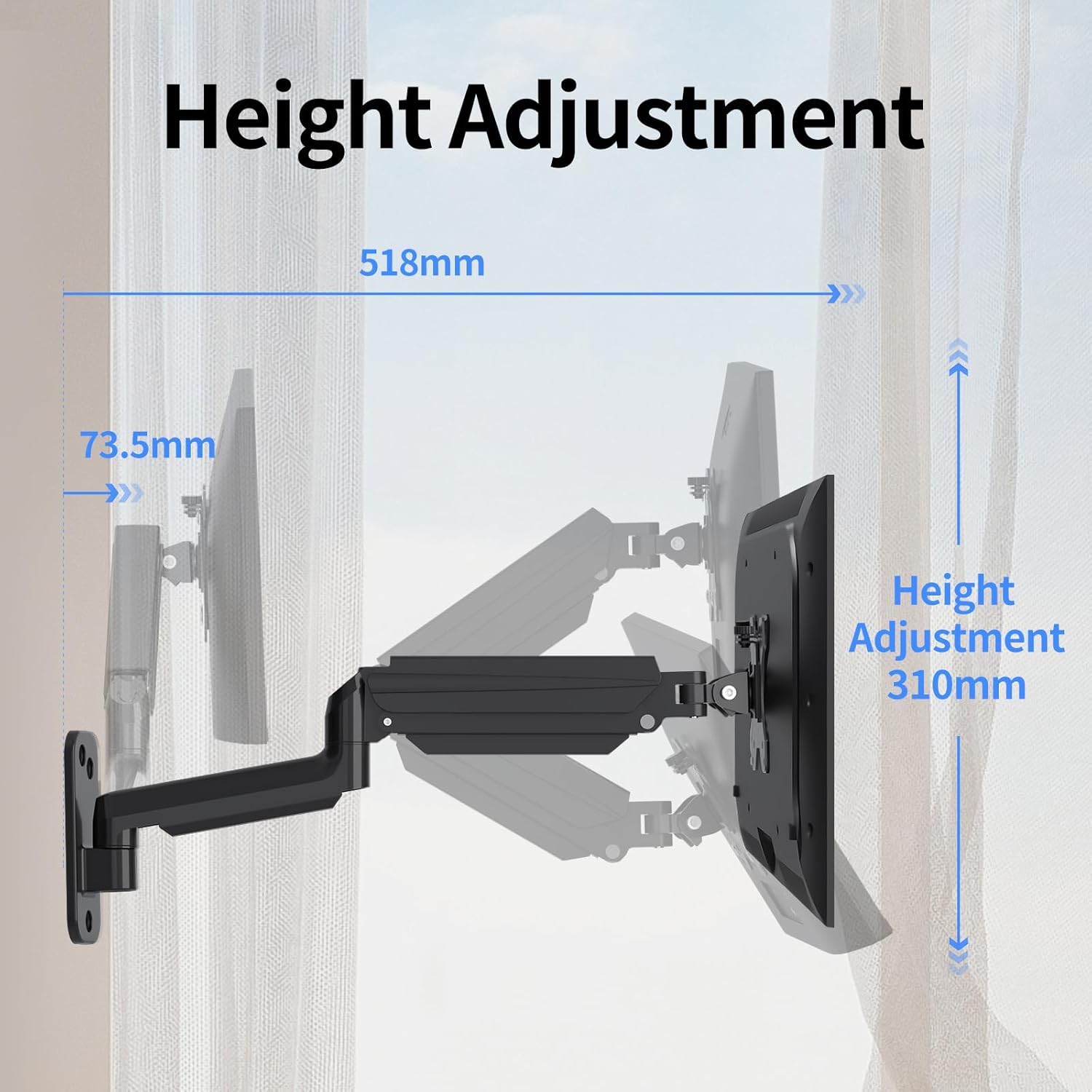
Image: Illustration detailing the height adjustment range of 310mm and the maximum extension of the arm.
Video: Demonstrates the various movements and adjustments possible with the Suptek Wall Monitor Mount (WM01A).
6. Kabelbeheer
Het geïntegreerde kabelbeheersysteem zorgt ervoor dat uw werkplek netjes en georganiseerd blijft.
- Route your monitor's power and video cables through the clips or channels provided along the arm.
- Ensure cables have enough slack to allow for full range of motion without tension.
- Secure cables to prevent them from snagging or interfering with arm movement.

Image: Close-up of the monitor arm demonstrating how cables are neatly managed through the integrated system.
7. Onderhoud
- Controleer regelmatig alle schroeven en verbindingen om er zeker van te zijn dat ze nog goed vastzitten.
- Maak de houder schoon met een zachte, damp lap. Vermijd schurende reinigingsmiddelen.
- Do not lubricate the gas spring mechanism unless specifically instructed by the manufacturer.
8. Probleemoplossing
- Monitor sags or does not hold position: The gas spring tension may be too low for your monitor's weight. Increase tension by turning the adjustment screw clockwise with the provided Allen key.
- Monitor is difficult to move or too stiff: The gas spring tension may be too high. Decrease tension by turning the adjustment screw counter-clockwise.
- De berg voelt onstabiel aan: Recheck all wall mounting screws and VESA plate screws to ensure they are securely tightened. Confirm the wall type is appropriate for the installation method used.
9. Garantie en ondersteuning
Voor garantie-informatie of technische ondersteuning kunt u terecht bij de officiële website van de fabrikant. webwebsite of neem rechtstreeks contact op met hun klantenservice. Bewaar uw aankoopbewijs voor garantieclaims.
Manufacturer: suptek
Contact: Visit the suptek Store on Amazon


