1. Inleiding
This manual provides instructions for the installation, operation, and maintenance of your STRONG SW8000M 8-Port Gigabit Desktop Switch. This device is designed to expand your network connectivity with high-speed Gigabit Ethernet ports, suitable for home and office environments.
2. Producteigenschappen
- Gigabit-snelheid: Provides 10/100/1000 Mbps for fast network connections.
- 8-Port Connectivity: Expands network with 8 Gigabit Ethernet ports.
- Plug en Play: No software or configuration required for basic operation.
- Robust Metal Design: Durable metal housing for longevity.
- Flexibele montage: Supports desktop placement or wall mounting.
- Ventilatorloze werking: Ensures quiet performance, ideal for noise-sensitive areas.
- Optimized Data Traffic: Supports QoS, IGMP, and VLAN functions.
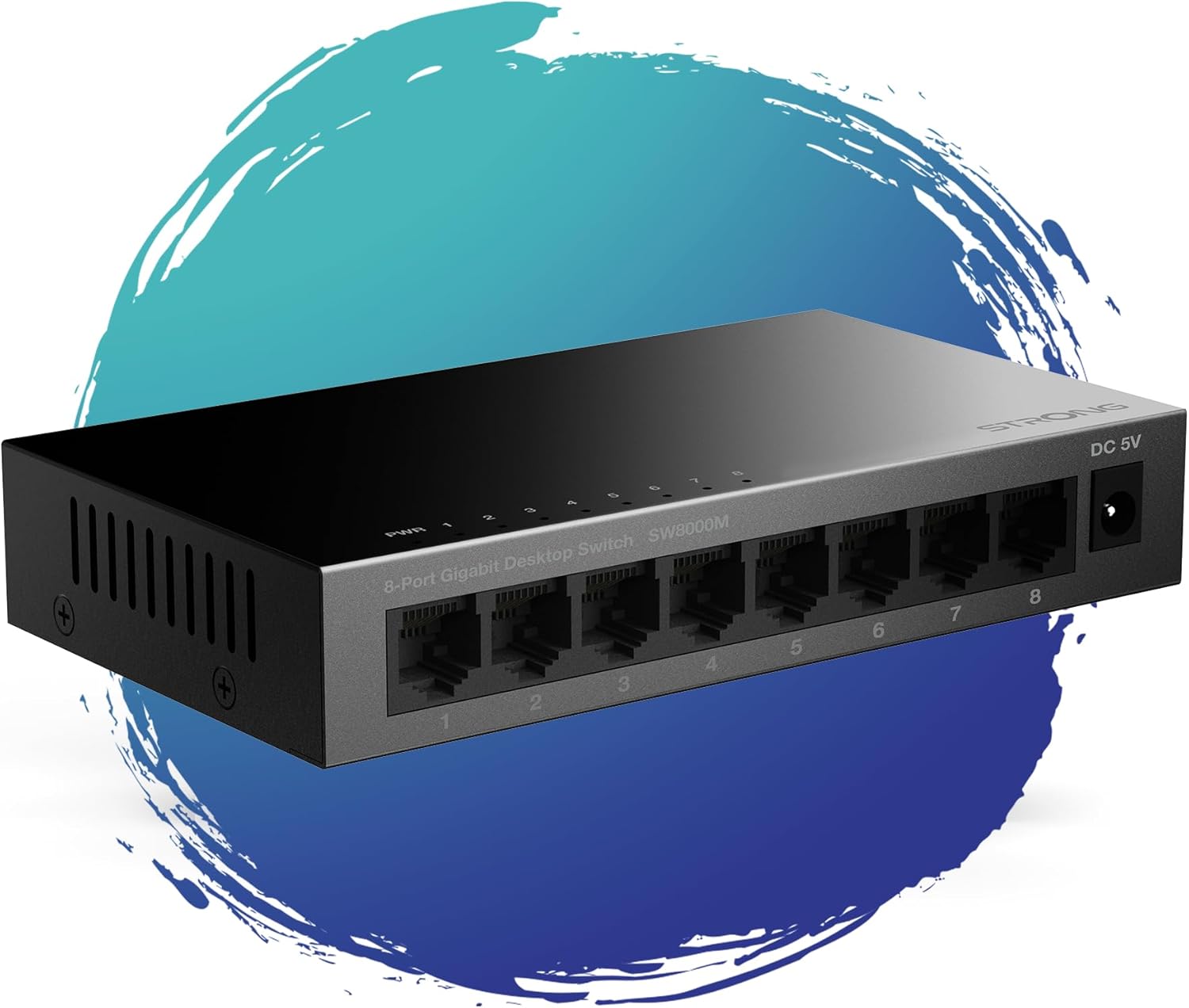
Figuur 1: Voorzijde view of the STRONG SW8000M 8-Port Gigabit Desktop Switch, highlighting its compact design and 8 RJ45 ports.
3. Inhoud van het pakket
Controleer of alle artikelen in het pakket aanwezig zijn:
- STRONG SW8000M 8-Port Gigabit Desktop Switch
- Power Adapter (Mains plug)
- Installatie-instructies (deze handleiding)
- Garantiekaart
4. Installatie en installatie
4.1 Fysieke plaatsing
The SW8000M switch can be placed on a desktop or mounted on a wall. Ensure the location is well-ventilated and away from direct heat sources or moisture.
- Desktopplaatsing: Plaats de schakelaar op een vlakke, stabiele ondergrond.
- Wandmontage: Use the provided mounting options (if applicable) to secure the switch to a wall.

Figure 2: Illustrates the switch's advanced features like QoS, traffic optimization, and IEEE 802.3x flow control.
4.2 De schakelaar aansluiten
- Connect the power adapter to the DC 5V port on the switch and then plug it into a power outlet. The Power LED (PWR) on the switch will illuminate.
- Connect your network devices (e.g., computers, printers, network-attached storage, routers) to any of the 8 Gigabit RJ45 ports using standard Ethernet cables.
- The corresponding LED indicator for each connected port will light up, indicating an active connection. A blinking LED indicates data activity.

Afbeelding 3: Achter view of the switch, detailing the 8 Gigabit RJ45 ports and the DC 5V power input.
5. De schakelaar bedienen
The STRONG SW8000M is a plug-and-play device. Once connected, it automatically detects the speed and duplex mode of connected devices, providing optimal performance without manual configuration.
- LED-indicatoren: Each port has an LED indicator. A solid light indicates a link, and a blinking light indicates data transmission. The PWR LED indicates the device is powered on.
- Gegevensstroom: The switch intelligently manages data traffic to ensure smooth and efficient communication between all connected devices.
6. Onderhoud
- Schoonmaak: Gebruik een zachte, droge doek om de buitenkant van de schakelaar schoon te maken. Gebruik geen vloeibare reinigingsmiddelen of spuitbussen.
- Ventilatie: Ensure that the ventilation openings on the sides of the switch are not blocked to prevent overheating.
- Ontwerp zonder ventilator: The fanless design reduces dust accumulation and eliminates operational noise, requiring minimal internal maintenance.
7. Probleemoplossing
- Geen stroom: Ensure the power adapter is securely connected to the switch and a working power outlet. Check if the PWR LED is illuminated.
- Geen linklampje: Verify that the Ethernet cables are properly connected to both the switch and the network device. Try a different port or cable. Ensure the connected device is powered on.
- Trage verbinding: Ensure all connected devices and cables support Gigabit Ethernet for optimal speed. Check for excessive network traffic or faulty cables.
- Onderbroken verbinding: Check cable connections. Ensure the switch is placed in a stable environment, free from strong electromagnetic interference.
8. Specificaties
| Functie | Beschrijving |
|---|---|
| Model | SW8000M |
| Aantal poorten | 8 x RJ45 Gigabit-ethernet |
| Gegevensoverdrachtssnelheid | 10/100/1000 Mbps |
| Interfacetype | RJ45 |
| Stroomverbruik | 5 Volt, 1 Amp |
| Materiaal van de behuizing | Metaal |
| Productafmetingen (L x B x H) | 3.07" x 0.98" x 5.43" |
| Artikelgewicht | 240 gram (8.5 ounces) |
| Bedrijfstemperatuur | Tot 50 graden Celsius |
| Meegeleverde componenten | Switch, Power Adapter, Manual, Warranty Card |
9. Garantie en ondersteuning
The STRONG SW8000M switch comes with a manufacturer's warranty. Please refer to the included Warranty Card for specific terms and conditions. For technical support or further assistance, please visit the official Strong website of neem contact op met hun klantenservice.
Beschikbaarheidsduur reserveonderdelen EU: 2 jaar


