1. Inleiding
This manual provides instructions for the safe and effective operation of your iJoy Stitch Speaker. Please read this manual thoroughly before using the device and retain it for future reference.

Image 1.1: The iJoy Stitch Speaker, showcasing the Stitch Hula Dancing design. This portable Bluetooth speaker is designed for wireless audio playback and features a silicone loop for portability.
2. Inhoud van het pakket
Controleer of alle artikelen in het pakket aanwezig zijn:
- iJoy Stitch Speaker
- Gebruikershandleiding (dit document)
- Oplaadkabel (Micro USB)

Image 2.1: The iJoy Stitch Speaker alongside its retail packaging, illustrating the product and its box.
3. Productkenmerken en componenten
The iJoy Stitch Speaker is equipped with various features for versatile audio playback and portability.
3.1 bedieningsknoppen
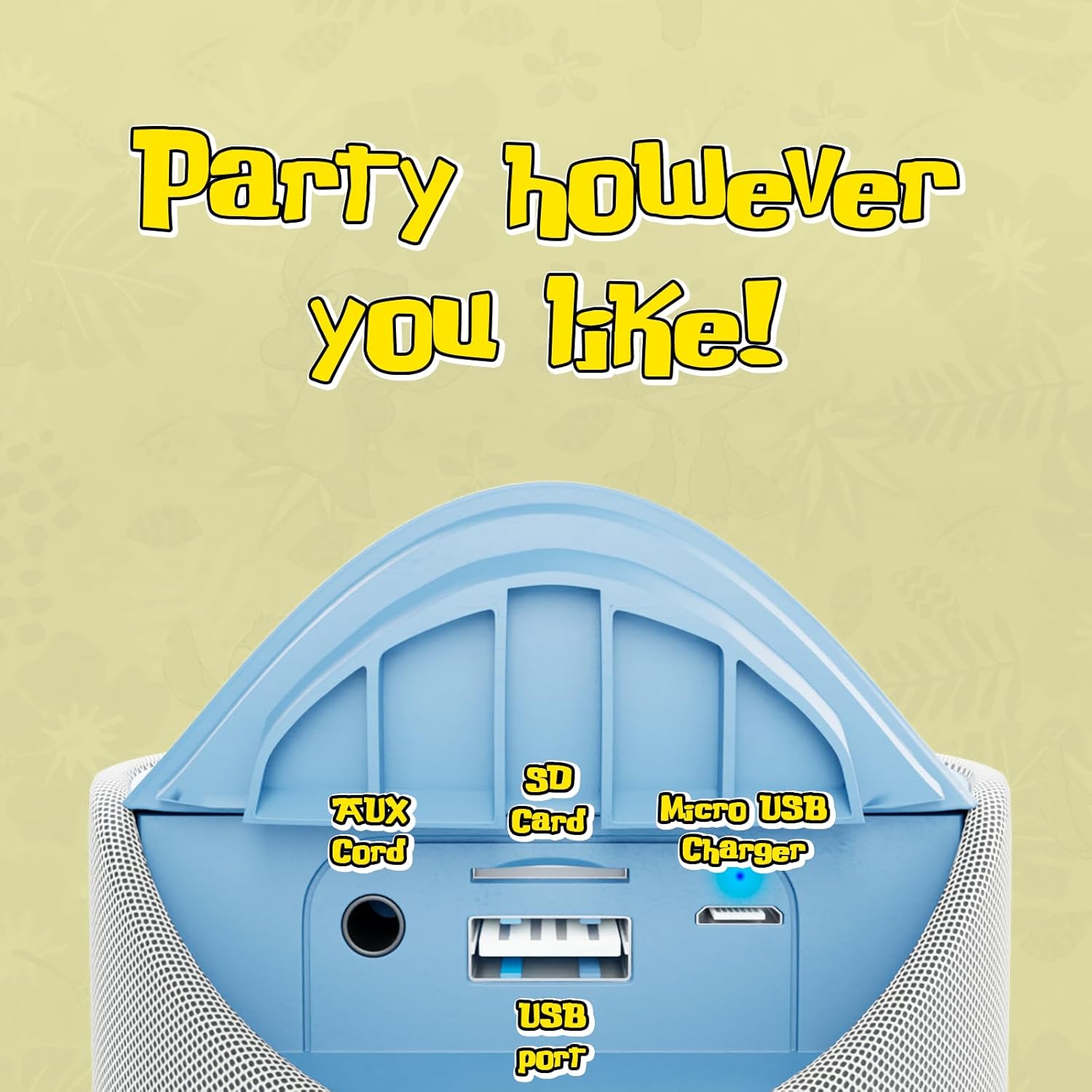
Image 3.1: Top panel of the speaker displaying the control buttons. These include Volume Down (-), Volume Up (+), Play/Pause/Call Answer, Mode Switch (M), and Power On/Off.
- Aanknop (⏻): Houd de knop ingedrukt om de luidspreker in of uit te schakelen.
- Afspeel-/pauze-/belknop (⏸): Press to play or pause audio. Press to answer or end a phone call.
- Volume omlaag-knop (−): Druk op om het volume te verlagen.
- Volume omhoog-knop (+): Druk op om het volume te verhogen.
- Modusschakelaar (M): Press to cycle through available modes (Bluetooth, FM Radio, SD Card, AUX).
3.2 Havens en indicatoren

Image 3.2: Rear panel of the speaker revealing the various input ports. These include the AUX port, SD Card slot, USB port, and Micro USB charging port.
- AUX-poort: Voor het aansluiten van externe audioapparaten via een 3.5 mm audiokabel.
- SD-kaartsleuf: Voor het afspelen van audio files directly from an SD memory card.
- USB-poort: Voor het afspelen van audio filerechtstreeks vanaf een USB-stick.
- Micro-USB-oplaadpoort: Voor het opladen van de interne batterij van de luidspreker.
- LED-indicator: Geeft de laadstatus en de Bluetooth-koppelingsstatus weer.
4. Instellen en opladen
4.1 De luidspreker opladen
- Sluit het Micro USB-uiteinde van de oplaadkabel aan op de Micro USB-oplaadpoort van de luidspreker.
- Sluit het USB-A-uiteinde van de oplaadkabel aan op een USB-voedingsadapter (niet meegeleverd) of een USB-poort van een computer.
- The LED indicator will illuminate to show charging is in progress.
- Charging typically takes approximately 2 hours. The LED indicator will change or turn off once fully charged.
Met een volledige lading kunt u tot 3 uur lang luisteren.
4.2 In-/uitschakelen
- Om het apparaat in te schakelen: Houd de aan/uit-knop (⏻) until the speaker indicates it is on (e.g., a sound prompt or LED illumination).
- Uitschakelen: Houd de aan/uit-knop ingedrukt (⏻) again until the speaker indicates it is off.
5. Gebruiksaanwijzing
5.1 Bluetooth-koppeling
- Ensure the speaker is powered on and in Bluetooth mode. If not, press the Mode Switch (M) button until the speaker enters Bluetooth pairing mode (indicated by a flashing LED).
- Schakel Bluetooth op uw apparaat (bijvoorbeeld smartphone, tablet) in en zoek naar beschikbare apparaten.
- Select "iJoy Stitch Speaker" from the list of found devices.
- Once paired, the speaker will indicate a successful connection (e.g., a sound prompt or solid LED).
- The Bluetooth range is approximately 30 feet (9 meters).
5.2 SD-kaart / USB-weergave
- Insert a formatted SD card or USB flash drive containing audio filein de daarvoor bestemde gleuf op de luidspreker.
- Press the Mode Switch (M) button to select SD Card mode or USB mode.
- De luidspreker begint automatisch met het afspelen van audio files van de ingevoegde media.
5.3 FM-radio
- Press the Mode Switch (M) button to select FM Radio mode.
- In FM mode, press the Play/Pause button (⏸) om automatisch beschikbare radiostations te scannen en op te slaan.
- Gebruik de knop Volume omhoog (+) en Volume omlaag (−) knoppen om te navigeren tussen opgeslagen stations.
5.4 AUX-ingang
- Sluit één uiteinde van een 3.5 mm audiokabel (niet meegeleverd) aan op de AUX-ingang van de luidspreker.
- Sluit het andere uiteinde van de audiokabel aan op de hoofdtelefoonaansluiting of de audio-uitgang van uw externe apparaat.
- Press the Mode Switch (M) button to select AUX mode.
- Het geluid wordt nu via de luidspreker van uw aangesloten apparaat afgespeeld.
5.5 Oproepfuncties
- When a call is incoming while connected via Bluetooth, press the Play/Pause button (⏸) om de oproep te beantwoorden.
- Druk op de Play / Pause-knop (⏸) again to end the call.
- To reject an incoming call, press and hold the Play/Pause button (⏸).
6. Onderhoud
6.1 Reinigen
Veeg de speaker af met een zachte, droge doek. Gebruik geen schuurmiddelen of oplosmiddelen.
6.2 Waterbestendigheid
The speaker has an IPX4 water resistance rating, meaning it is protected against splashing water from any direction. It is not designed for submersion in water.
7. Probleemoplossing
| Probleem | Oplossing |
|---|---|
| De luidspreker gaat niet aan. | Zorg ervoor dat de batterij is opgeladen. Sluit de luidspreker aan op een stroombron met behulp van de micro-USB-kabel. |
| Er komt geen geluid uit de luidspreker. | Check the volume level on both the speaker and your connected device. Ensure the correct mode (Bluetooth, SD, FM, AUX) is selected. |
| Koppelen via Bluetooth is niet mogelijk. | Ensure the speaker is in Bluetooth pairing mode (flashing LED). Make sure your device's Bluetooth is enabled and within 30 feet of the speaker. Try restarting both devices. |
| Slechte FM-radio-ontvangst. | Relocate the speaker to an area with better signal. Ensure automatic station scanning has been performed. |
8. Specificaties

Image 8.1: Visual representation of the speaker's dimensions, indicating it is approximately 6.3 inches tall and 2.9 inches across.
| Functie | Detail |
|---|---|
| Modelnaam | Stitch Speaker |
| Merk | ikJoy |
| Connectiviteitstechnologie | Bluetooth |
| Draadloze communicatietechnologie | Bluetooth |
| Bluetooth-bereik | 30 voet (9 meter) |
| Luidsprekertype | Draagbare Bluetooth-luidspreker |
| Maximale uitgangsvermogen luidspreker | 5 Watt |
| Audio-uitvoermodus | Stereo |
| Energiebron | Op batterijen |
| Batterijcapaciteit | 800 milliamp Uren |
| Oplaadtijd | 2 uur |
| Speeltijd | Tot 3 uur |
| Waterbestendigheidsniveau | IPX4 (waterbestendig) |
| Productafmetingen | 3"D x 3"B x 6"H (ongeveer 7.6 cm D x 7.6 cm B x 15.2 cm H) |
| Artikelgewicht | 8 ounces (ongeveer 227 gram) |
| Materiaal | Siliconen |
| Controlemethode | Touch (Button Controls) |
| UPC | 810116713943 |
9. Garantie en ondersteuning
The iJoy Stitch Speaker comes with a 90-Day Manufacturer Warranty. For warranty claims or technical support, please contact the manufacturer, Quest USA Corp, or refer to the contact information provided with your purchase documentation.
Voor verdere hulp kunt u terecht op de iJoy Store on Amazon.


