Invoering
Thank you for choosing the Datamax S30B Wireless 1D/2D Barcode Scanner. This manual provides detailed instructions on how to set up, operate, and maintain your device, ensuring optimal performance and longevity. The S30B is a versatile scanner designed for various applications, including retail, logistics, libraries, offices, and manufacturing systems, offering multiple connection options and robust scanning capabilities for both 1D and 2D barcodes.
Inhoud van het pakket
Controleer voordat u begint of alle artikelen in het pakket aanwezig zijn:
- Datamax S30B Barcode Scanner
- USB-oplaad-/datakabel
- 2.4 GHz draadloze USB-dongle
- Gebruikershandleiding (dit document)

Image: Contents of the Datamax S30B package, showing the scanner, USB cable, 2.4GHz wireless dongle, and the user manual.
Instellen
1. De scanner opladen
The S30B scanner is equipped with a rechargeable battery. Before first use, it is recommended to fully charge the device. Connect the provided USB cable to the scanner's charging port and plug the other end into a USB power source (e.g., computer USB port, USB wall adapter). The charging indicator light will show the charging status.
2. Verbindingsmethoden
The Datamax S30B offers three versatile connection options:
2.1. Bluetooth-verbinding
The scanner supports Bluetooth HID and SPP modes, compatible with Windows, Mac OS, Android, and other Bluetooth-enabled systems. To connect via Bluetooth:
- Zorg ervoor dat de scanner is ingeschakeld.
- Scan the "Bluetooth HID Mode" barcode from the instruction manual (or the "One-Click Pairing" barcode if available).
- On your device (computer, tablet, smartphone), enable Bluetooth and search for "BT Scanner HID_971A" (or similar).
- Select the scanner to pair. A beep from the scanner and a steady blue light indicate successful pairing.
Video: Demonstrates the Bluetooth pairing process for the Datamax S30B barcode scanner, showing how to scan the pairing barcode and connect to a mobile device.

Image: Visual representation of the scanner connecting via Bluetooth to Android, iOS, iPad, laptop, and desktop computers.
2.2. 2.4GHz draadloze verbinding
For a stable wireless connection, use the provided 2.4GHz USB dongle:
- Plug the 2.4GHz USB dongle into an available USB port on your computer.
- The scanner will automatically pair with the dongle. No driver installation is required.
- A successful connection is indicated by a specific sound or light on the scanner.

Image: The Datamax S30B scanner demonstrating its wireless capability and USB charging feature. Visit barcoder.jp voor meer informatie.
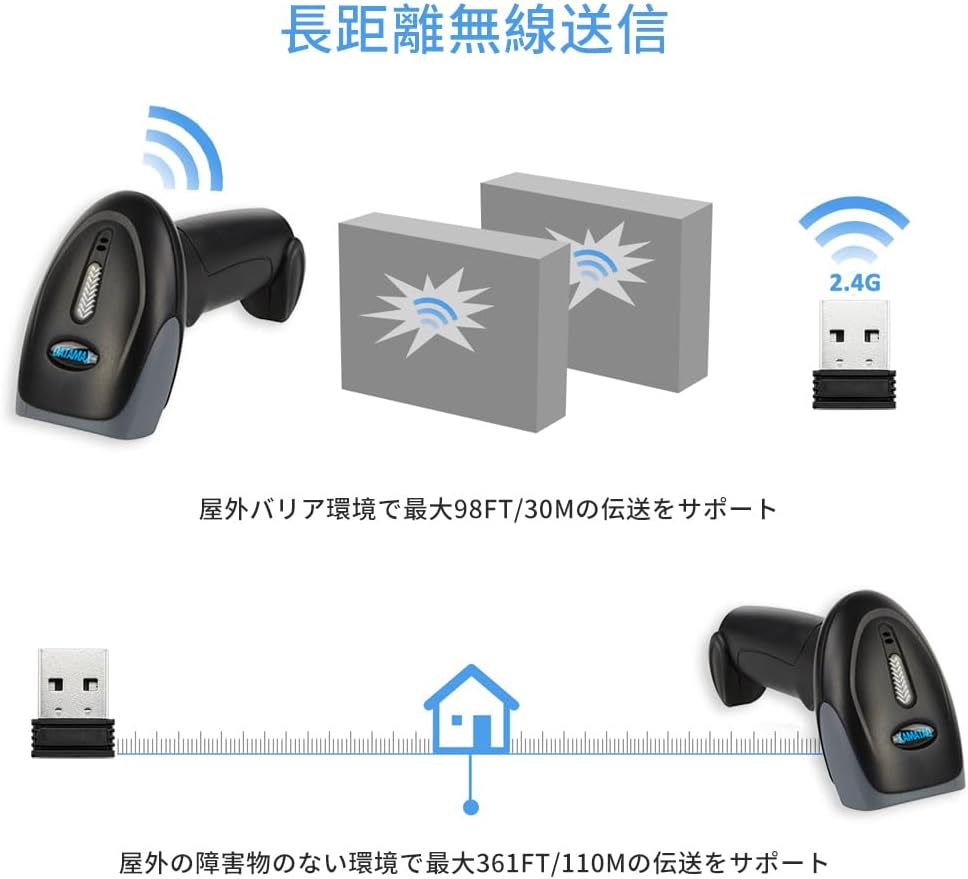
Image: This diagram shows the effective wireless range of the scanner, capable of transmitting up to 30 meters (98 feet) with obstacles and up to 110 meters (361 feet) in open environments.
2.3. Bedrade USB-verbinding
For direct and reliable data transfer, connect the scanner via USB cable:
- Connect one end of the USB cable to the scanner's port.
- Sluit het andere uiteinde aan op een USB-poort op uw computer.
- De scanner werkt als een plug-and-play-apparaat en vereist geen extra stuurprogramma's.

Image: The Datamax S30B barcode scanner, showcasing its primary components including the scanner unit, 2.4GHz wireless USB dongle, and the USB cable for wired connection and charging.
Bediening van de scanner
1. Scanmodi
The S30B offers two primary scanning modes:
- Handmatige scanmodus: Press the scan button to trigger each scan. This mode is ideal for precise, controlled scanning.
- Automatische scanmodus: The scanner automatically detects and scans barcodes when they are presented within its reading range, without needing to press the button. This mode is efficient for high-volume scanning.
You can switch between these modes by scanning specific configuration barcodes found in the full instruction manual.

Image: Illustrates the difference between manual scanning (requiring a button press) and automatic scanning (auto-trigger, high-speed motion reading). Configuration barcodes for these modes are typically found in the detailed manual.
2. Ondersteunde barcodetypen
The S30B is equipped with advanced CMOS technology, allowing it to read a wide range of 1D and 2D barcodes from both paper and digital screens:
- 2D-streepjescodes: QR-code, datamatrix, PDF417, enz.
- 1D-streepjescodes: EAN, UPC, Code 39, Code 93, Code 128, UCC/EAN 128, Codabar, Interleaved 2 of 5, ITF-6, ITF-14, ISBN, ISSN, MSI-Plessey, GS1 Databar, Code 11, Industrial 25, Matrix 2 of 5, enz.

Image: The scanner's powerful decoding function is shown, capable of reading standard 1D barcodes, incomplete barcodes, folded barcodes, and 2D QR codes from various surfaces.
3. Modi voor het uploaden van gegevens
De scanner ondersteunt twee gegevensuploadmodi:
- Directe modus: Barcodes are uploaded to the computer immediately after scanning.
- Offline opslagmodus: The scanner can store up to 80,000 13-digit barcodes (or 16Mbit of internal storage) when out of range or disconnected. Data can be uploaded later by scanning a specific "Upload Data" barcode.

Image: Depicts the two upload modes: Instant Mode, where barcodes are immediately uploaded to the computer, and Offline Storage Mode, which allows for large-capacity offline storage of up to 80,000 13-digit barcodes in 16Mbit internal memory.
Onderhoud
Goed onderhoud garandeert de levensduur en optimale prestaties van uw scanner:
- Schoonmaak: Gebruik een zachte, droge doek om de buitenkant van de scanner schoon te maken. Gebruik voor het scanvenster een lensreinigingsdoekje om krassen te voorkomen. Gebruik geen schuurmiddelen of oplosmiddelen.
- batterij zorg: Avoid fully discharging the battery frequently. For long-term storage, charge the battery to about 50% and store in a cool, dry place.
- Opslag: Store the scanner in a clean, dry environment, away from extreme temperatures, direct sunlight, and corrosive materials.
- Duurzaamheid: The S30B features a shock-resistant silicone design, protecting it from drops and vibrations, with a drop resistance of up to 1.5 meters.

Image: Demonstrates the scanner's strong drop prevention performance, highlighting its IP42 rating and 1.5-meter drop resistance, along with a 10 million button press durability.
Probleemoplossing
If you encounter issues with your Datamax S30B scanner, please refer to the following common problems and solutions:
| Probleem | Mogelijke oorzaak / oplossing |
|---|---|
| Scanner gaat niet aan. | Battery is low or depleted. Connect the scanner to a power source using the USB cable and charge it. |
| Kan geen verbinding maken via Bluetooth. |
|
| Cannot connect via 2.4GHz wireless. |
|
| De scanner leest geen barcodes. |
|
| De gescande gegevens zijn onjuist of onvolledig. |
|
Specificaties
| Functie | Detail |
|---|---|
| Model | S30B |
| Scansnelheid | 300 beelden per seconde |
| Verbindingstechnologie | Bluetooth, 2.4GHz Wireless, USB Cable |
| Energiebron | Op batterijen |
| Batterijtype | 1 lithium-polymeerbatterij (meegeleverd) |
| Pakket afmetingen | 20.7 x 10.5 x 7.2 cm; 300 g (approx. 8.15 x 4.13 x 2.83 inches; 0.66 lbs) |
| Valweerstand | 1.5 meter (ongeveer 4.9 voet) |
| Offline opslag | Up to 80,000 13-digit barcodes (16Mbit) |

Image: Detailed product dimensions of the S30B scanner: 2.6 inches (6.7 cm) width, 3.5 inches (9 cm) depth, and 6.4 inches (16.5 cm) height.
Garantie en ondersteuning
Datamax is committed to providing high-quality products and customer satisfaction. For any warranty claims, technical support, or inquiries regarding your S30B barcode scanner, please refer to the contact information provided with your purchase or visit the official Datamax webwebsite. Bewaar uw aankoopbewijs als aankoopbewijs voor garantiedoeleinden.
Voor aanvullende bronnen en productinformatie kunt u terecht op de Datamax Brand Store on Amazon.


