1. Inleiding
Thank you for choosing the SPLITSKY NZFS Kids Alarm Clock. This device combines an alarm clock, white noise sleep aid, and an 8-mode RGB night light, designed to assist with sleep and wake-up routines for children and adults. Please read this manual thoroughly to understand its features and ensure proper operation.
Veiligheidsinformatie:
- Houd het apparaat uit de buurt van water en omgevingen met een hoge luchtvochtigheid.
- Probeer het apparaat niet zelf te demonteren of te repareren.
- Use only the provided USB-C power cable or a certified equivalent.
- Zorg voor voldoende ventilatie rond het apparaat.
2. Inhoud van het pakket
Controleer of alle artikelen in uw pakket aanwezig zijn:
- SPLITSKY NZFS Kids Alarm Clock
- 1.2M (4.7 inch) USB-C Power Cable
- Gebruikershandleiding (dit document)
- 1 x CR2032 Lithium Ion Battery (pre-installed for memory backup)
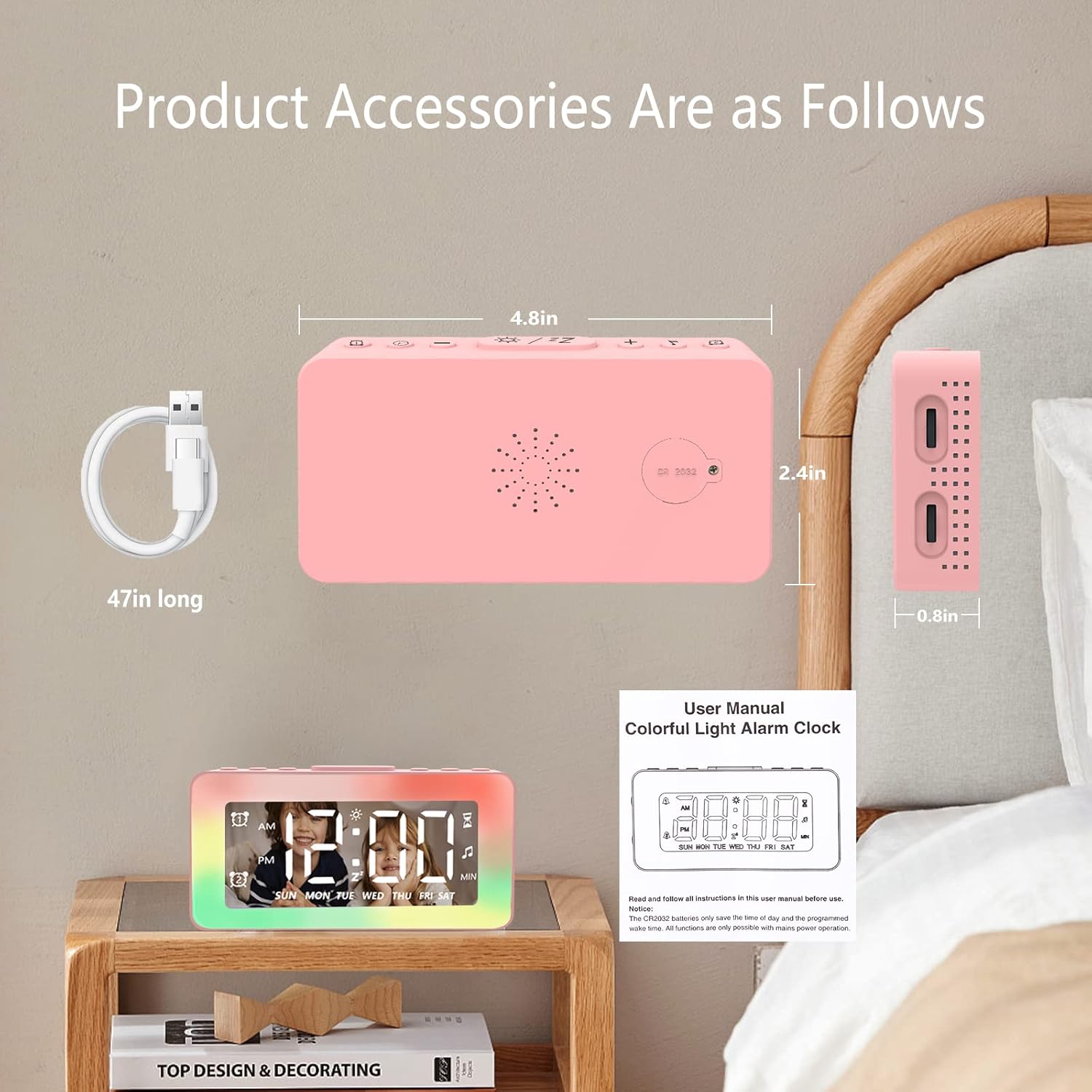
Image: The SPLITSKY NZFS Kids Alarm Clock, a USB-C power cable, and the user manual are included in the package.
3. Product voorbijview
Familiarize yourself with the buttons and ports on your alarm clock:

Afbeelding: Gedetailleerd view of the alarm clock's top buttons and side ports, including Alarm 1, Time Setting, Light Minus/Settings, Snooze/Light Mode Switch, Light Plus/Setup, Music Switch, Alarm 2, Volume Setting, Time Brightness Setting, USB Output Charging Port, and Type-C Input Interface.
- Alarmknop 1: Set and activate Alarm 1.
- Knop voor tijdinstelling: Pas de huidige tijd aan.
- Light Minus / Settings Button: Decrease light brightness or navigate settings.
- Snooze / Light Mode Switch Button: Activate snooze, or cycle through light modes.
- Light Plus / Setup Button: Increase light brightness or confirm settings.
- Music Switch Button: Cycle through white noise sounds.
- Alarmknop 2: Set and activate Alarm 2.
- Volume Setting Wheel (Side): Adjust alarm and white noise volume.
- Time Brightness Setting Wheel (Side): Pas de helderheid van het scherm aan.
- USB Output Charging Port (Side): Charge external devices.
- Type-C Input Interface (Side): Connect power cable to the alarm clock.
4. Instellen
4.1 Stroomaansluiting
- Connect the provided USB-C power cable to the Type-C Input Interface on the side of the alarm clock.
- Sluit het andere uiteinde van de USB-C-kabel aan op een compatibele USB-voedingsadapter (niet meegeleverd) of een USB-poort.
- The display will illuminate, indicating the clock is powered on.

Image: The SPLITSKY NZFS Kids Alarm Clock is shown powered on and connected via its USB-C port, also demonstrating its capability to charge a smartphone.
4.2 Batterijinstallatie (geheugenback-up)
The alarm clock includes a pre-installed CR2032 battery. This battery serves as a memory backup to retain time and alarm settings during a power outage or when the main power is disconnected. It does not power the clock for regular operation.
- If the battery needs replacement, locate the battery compartment on the back of the unit.
- Gebruik een kleine schroevendraaier om het compartiment te openen.
- Vervang de batterij door een nieuwe CR2032-batterij en let daarbij op de juiste polariteit.
- Sluit het compartiment veilig af.
5. Gebruiksaanwijzing
5.1 Setting the Time (12H/24H Format)
- Houd de Knop voor tijdinstelling until the hour digits begin to flash.
- Gebruik de Light Minus / Settings Button (naar beneden) of Light Plus / Setup Button (up) to adjust the hour.
- Druk op de Knop voor tijdinstelling again to move to minute adjustment. Adjust minutes using the Light Minus/Plus buttons.
- Druk op de Knop voor tijdinstelling a third time to select 12-hour or 24-hour format. Adjust using the Light Minus/Plus buttons.
- Druk op de Knop voor tijdinstelling nogmaals om te bevestigen en de tijdinstellingsmodus te verlaten.
5.2 Setting Alarms (Dual Alarm, Daily/Weekday/Weekend Mode)
De klok ondersteunt twee onafhankelijke alarmen (Alarm 1 en Alarm 2).
- Houd de Alarm 1 knop (voor Alarm 1) of Alarm 2 knop (for Alarm 2) until the alarm hour digits flash.
- Gebruik de Light Minus / Settings Button or Light Plus / Setup Button om het uur aan te passen.
- Press the respective Alarm Button again to move to minute adjustment. Adjust minutes using the Light Minus/Plus buttons.
- Press the respective Alarm Button again to select the alarm mode:
- Dagelijkse modus: Het alarm gaat elke dag af.
- Weekday Mode: Het alarm gaat af van maandag tot en met vrijdag.
- Weekendmodus: Zaterdag en zondag gaat het alarm af.
- Press the respective Alarm Button once more to confirm and exit alarm setting mode.
- To enable/disable an alarm, short press the Alarm 1 knop or Alarm 2 knopEr verschijnt/verdwijnt een alarmicoon op het display.
5.3 Snooze-functie
When an alarm sounds, tap the Snooze / Light Mode Switch Button on top to activate snooze. The alarm will pause for 9 minutes and then sound again. This can be repeated multiple times.
5.4 Night Light (8 Modes RGB, 10-level dimming)
The alarm clock features 6 solid color lights and 2 ambient colorful lights.
- Druk kort op de Snooze / Light Mode Switch Button to turn on the night light and cycle through the 8 color modes.
- To adjust the brightness (10 levels), use the Light Minus / Settings Button or Light Plus / Setup Button while the night light is active.
- To turn off the night light, continue pressing the Snooze / Light Mode Switch Button totdat het licht uitgaat.

Image: Multiple SPLITSKY NZFS Kids Alarm Clocks are shown, each displaying a different color from the 8 available RGB night light modes.
5.5 White Noise Sleep Aid (8 Sounds)
The clock offers 8 soothing sounds to aid sleep.
- Druk kort op de Muziek schakelknop to turn on the white noise and cycle through the available sounds.
- To adjust the volume (16 levels), use the Volume Setting Wheel on the side of the clock.
- To turn off the white noise, continue pressing the Muziek schakelknop until the sound stops.

Image: The SPLITSKY NZFS Kids Alarm Clock is displayed on a bedside table, with icons illustrating the various white noise options such as rain, cicadas, piano, bonfire, waves, birdsong, and church bells.
5.6 Sleep Timer (10-120 minutes)
The sleep timer allows you to set a duration for the white noise and/or night light to play before automatically turning off.
- While white noise or night light is active, press and hold the Muziek schakelknop (for white noise timer) or Snooze / Light Mode Switch Button (for light timer).
- Gebruik de Light Minus / Settings Button or Light Plus / Setup Button to select the desired timer duration (10, 20, 30, 60, 90, 120 minutes).
- Press the respective button again to confirm the timer setting. The timer icon will appear on the display.
5.7 Aanpassing van de helderheid van het display
Pas de helderheid van de LED-tijdweergave aan met behulp van de Time Brightness Setting Wheel on the side of the clock.
5.8 USB-oplaadpoort
The USB output charging port on the side of the alarm clock can be used to charge other small electronic devices, such as smartphones. Connect your device's charging cable to this port.
6. Onderhoud
6.1 Reinigen
- Zorg ervoor dat het apparaat is losgekoppeld voordat u het schoonmaakt.
- Veeg het oppervlak af met een zachte, droge doek.
- Gebruik geen schurende reinigingsmiddelen, oplosmiddelen of chemische sprays.
6.2 Opslag
When not in use for extended periods, store the alarm clock in a cool, dry place, away from direct sunlight and extreme temperatures.
7. Probleemoplossing
If you encounter issues with your SPLITSKY NZFS Kids Alarm Clock, refer to the table below for common problems and solutions.
| Probleem | Mogelijke oorzaak | Oplossing |
|---|---|---|
| De klokweergave is uit of gedimd. | Not connected to power; Time brightness set too low. | Ensure USB-C cable is securely connected to a power source. Adjust the Time Brightness Setting Wheel. |
| Het alarm gaat niet af. | Alarm niet geactiveerd. Alarmvolume te laag. | Check if the alarm icon is displayed. If not, short press the respective Alarm Button to activate. Adjust the Volume Setting Wheel. |
| Time/settings reset after power disconnection. | De CR2032-reservebatterij is leeg of ontbreekt. | Replace the CR2032 battery in the battery compartment. |
| Night light or white noise not working. | Function not activated; Sleep timer active. | Druk kort op de Snooze / Light Mode Switch Button or Muziek schakelknop to activate. Check if a sleep timer is set. |
8. Specificaties
| Functie | Detail |
|---|---|
| Merk | SPLITSKY |
| Modelnummer | NZFS |
| Weergavetype | Digitale LED |
| Productafmetingen | 3.17"W x 3.17"H (approximately 8.05 cm W x 8.05 cm H) |
| Artikelgewicht | 8.1 ounce (ongeveer 230 gram) |
| Energiebron | Corded Electric (USB-C), Battery Powered (CR2032 for memory) |
| Nachtlichtmodi | 8 (6 solid colors, 2 ambient colorful) with 10-level dimming |
| Witte ruisgeluiden | 8 rustgevende geluiden |
| Alarmtonen | 7 wake-up alarm tones with 16-level volume control |
| Alarmfuncties | Dual Alarm, Daily/Weekday/Weekend modes, 9-minute Snooze |
| Timerfunctie | 10-120 minute sleep timer for sounds and lights |
| Connectiviteit | USB-C Input, USB-A Output (for charging external devices) |
| Materiaal | Acrylonitrilbutadieenstyreen |
9. Garantie en ondersteuning
9.1 Garantie-informatie
Please refer to the warranty information provided at the time of purchase or contact your retailer for details regarding the product warranty. Keep your proof of purchase for any warranty claims.
9.2 Klantenservice
For technical assistance, troubleshooting beyond this manual, or general inquiries, please contact the seller through the platform where you purchased the product. Provide your order number and a detailed description of the issue for prompt support.


