Belangrijke veiligheidsinformatie
Lees alle veiligheidswaarschuwingen en instructies zorgvuldig door voordat u dit product gebruikt. Het niet opvolgen van deze instructies kan leiden tot een elektrische schok, brand of ernstig letsel.
- Houd het apparaat uit de buurt van water en vocht.
- Probeer het apparaat niet zelf te demonteren of te repareren. Laat alle onderhoudswerkzaamheden over aan gekwalificeerd personeel.
- Gebruik uitsluitend het aangegeven laadvolume.tage (DC 5V) and Type-C cable.
- Vermijd blootstelling van het apparaat aan extreme temperaturen (heet of koud) of direct zonlicht.
- Do not block the microphone hole or lens during operation.
- Gooi de batterij en het apparaat weg volgens de plaatselijke voorschriften.
Product voorbijview
The Jectse HD 1080P WiFi Body Camera is a compact and versatile video recorder designed for personal security and documentation. It features a 1080P HD image sensor, 180-degree rotatable lens, built-in WiFi hotspot for real-time viewing, and one-button operation for ease of use. Its compact design with a back clip allows for convenient portability.

Image: The Jectse HD 1080P WiFi Body Camera shown alongside its USB Type-C charging cable.
Belangrijkste kenmerken
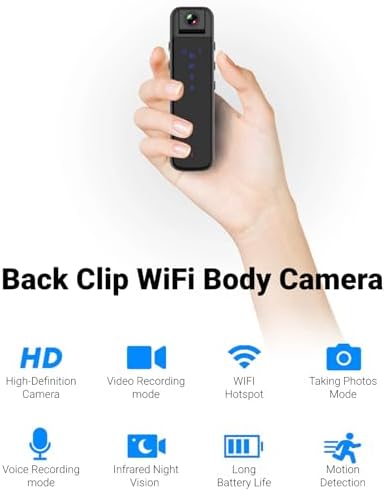
Image: Visual representation of the camera's main features including HD recording, video mode, WiFi hotspot, photo mode, voice recording, infrared night vision, long battery life, and motion detection.
- HD 1080P Image Sensor: Equipped with a high-definition sensor for clear image quality.
- Built-in WiFi Hotspot: Connect to a mobile app for real-time video playback and control.
- Compact Back Clip Design: Easily attach to clothing for portable use.
- 180 graden draaibare lens: Adjust the lens angle for flexible recording.
- Bediening met één knop: Simple controls for recording video, taking photos, and voice recording.
- HD Noise Cancelling: Advanced microphone technology for clearer audio.
- Infrarood Night Vision: Capable of recording in low-light conditions without auxiliary lights.
- Verlengde batterijduur: Approximately 5 hours of continuous recording.
- Uitbreidbare opslag: Supports up to 256GB small memory card (TF card, not included).
Componenten en bedieningselementen
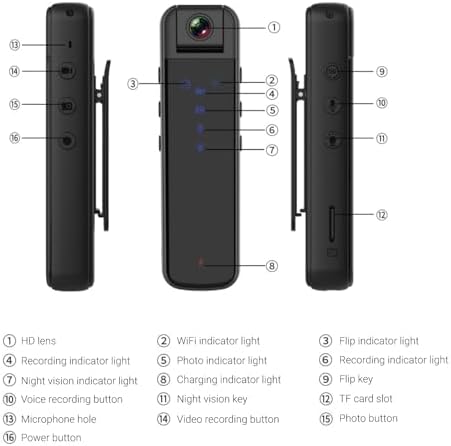
Image: Detailed diagram illustrating the various parts and controls of the body camera, including the lens, indicators, buttons, and ports.
| Nee. | Component/Control |
|---|---|
| 1 | HD-lens |
| 2 | WiFi-indicatielampje |
| 3 | Flip indicator light |
| 4 | Opname-indicatielampje |
| 5 | Photo indicator light |
| 6 | Opname-indicatielampje |
| 7 | Nachtzicht-indicatielampje |
| 8 | Oplaadindicatielampje |
| 9 | Flip sleutel |
| 10 | Knop voor spraakopname |
| 11 | Nachtzicht sleutel |
| 12 | TF-kaartsleuf |
| 13 | Microfoon gat |
| 14 | Video-opnameknop |
| 15 | Fotoknop |
| 16 | Aan/uit-knop |
Instellen
1. Het apparaat opladen
Before first use, fully charge the body camera. Connect the provided Type-C USB cable to the camera's Type-C interface and the other end to a DC 5V power source (e.g., computer USB port, USB wall adapter). The charging indicator light (8) will illuminate during charging and turn off when fully charged. A full charge provides approximately 5 hours of continuous recording.
2. Geheugenkaart plaatsen/verwijderen
The camera supports small memory cards (TF cards) up to 256GB (not included). Locate the TF card slot (12) on the side of the camera. Gently insert the memory card with the gold contacts facing down until it clicks into place. To remove, push the card in slightly until it springs out.
Note: Ensure the device is powered off before inserting or removing the memory card to prevent data loss or damage.
3. Initial Setup and App Connection (WiFi)
The camera features a built-in WiFi hotspot for real-time viewing and control via a mobile application. Follow these steps to connect:
- Power on the camera by pressing and holding the Power button (16).
- On your phone or tablet, go to your WiFi settings.
- Zoeken naar a WiFi network named "CS05" (e.g., CS05 CE01) and connect to it.
- Once connected, open the "Sports Camera" application on your mobile device.
- From the main interface of the app, enter the real-time preview interface. You can now view leef fotage and control recording/photo functions from the app, or continue to use the physical buttons on the camera.
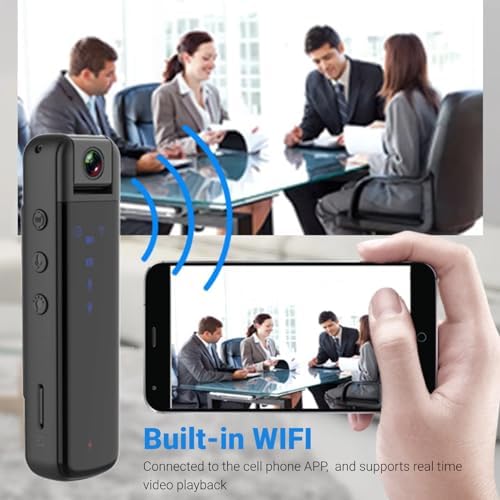
Image: Illustration of the camera's built-in WiFi functionality, allowing connection to a smartphone app for real-time video playback.
Gebruiksaanwijzing
1. Aan/uit
- Inschakelen: Press and hold the Power button (16) until the indicator lights illuminate.
- Uitschakelen: Press and hold the Power button (16) again until the indicator lights turn off.
2. Video-opname
The camera supports 1080P video recording.
- Start opname: Press the Video recording button (14) once. The recording indicator light (4) will flash to indicate recording is in progress.
- Stop met opnemen: Press the Video recording button (14) again. The recording indicator light will stop flashing.
3. Foto vastleggen
Capture still images with a single press.
- Foto maken: Press the Photo button (15) once. The photo indicator light (5) will flash briefly.
4. Spraakopname
Record audio only using the dedicated voice recording function.
- Spraakopname starten: Press the Voice recording button (10) once. The recording indicator light (6) will illuminate.
- Stop Voice Recording: Press the Voice recording button (10) again. The recording indicator light will turn off.

Image: Visual guide to the camera's one-key control system, highlighting the buttons for starting video recording, taking photos, and voice recording.
5. 180-Degree Lens Rotation
The camera lens can be manually rotated up to 180 degrees to capture footage from various angles (forward, backward, upward). Adjust the lens (1) to your desired orientation before recording.
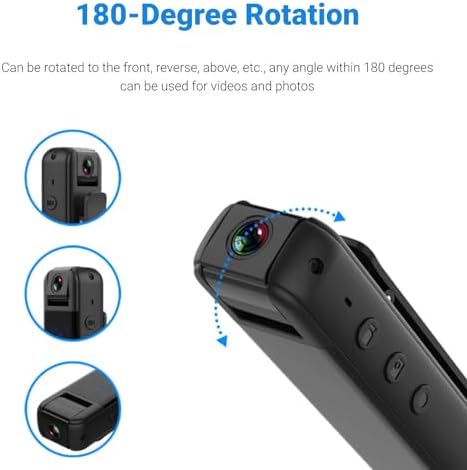
Image: Diagram demonstrating the camera's 180-degree rotatable lens, showing how it can be adjusted for different recording perspectives.
6. Nachtzicht
The camera is equipped with infrared night vision for recording in low-light or dark environments without the need for external illumination.
- Nachtzicht inschakelen: Press the Night vision key (11) once. The night vision indicator light (7) will illuminate.
- Nachtzicht uitschakelen: Press the Night vision key (11) again. The night vision indicator light will turn off.

Image: A split image demonstrating the effectiveness of HD infrared night vision, showing a scene in normal light and the same scene clearly visible in darkness.
7. Using the Back Clip
The integrated back clip allows for convenient attachment to clothing, such as a jacket pocket, making it easy to carry and record discreetly.
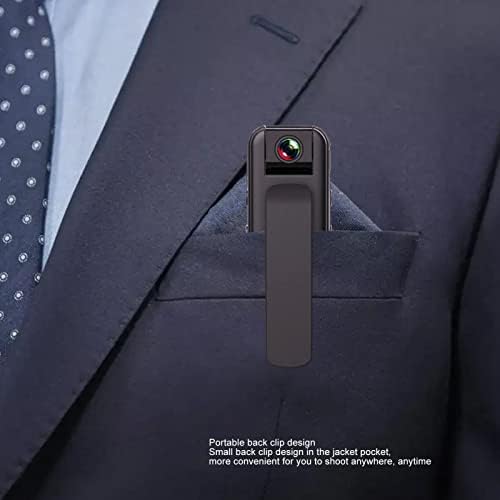
Image: The compact body camera shown clipped into the breast pocket of a suit jacket, demonstrating its portable and discreet design.
Onderhoud
Schoonmaak
To maintain the performance and appearance of your camera:
- Veeg de camerabehuizing schoon met een zachte, droge doek.
- Gebruik voor de lens een speciaal lensreinigingsdoekje en -vloeistof om krassen te voorkomen.
- Gebruik geen agressieve chemicaliën, oplosmiddelen of sterke reinigingsmiddelen.
Opslag
When not in use, store the camera in a cool, dry place, away from direct sunlight and extreme temperatures. Ensure the battery is partially charged (around 50%) if storing for extended periods to prolong battery life.
Probleemoplossing
| Probleem | Mogelijke oorzaak | Oplossing |
|---|---|---|
| De camera gaat niet aan. | Batterij bijna leeg. | Laad de camera volledig op. |
| Cannot connect to WiFi hotspot. | Incorrect WiFi name selected; camera WiFi not active. | Ensure the camera is powered on and its WiFi hotspot is active. Select the correct "CS05" network. |
| De opname stopt onverwacht. | Memory card full; low battery. | Check memory card storage and delete unnecessary files or replace card. Charge the camera. |
| Video playback issues. | Corrupt file; incompatible playback software. | Try playing on a different device or using standard video playback software. Ensure memory card is not corrupted. |
| Slechte beeld-/videokwaliteit. | Dirty lens; insufficient lighting (if night vision is off). | Clean the lens. Activate night vision in low-light conditions. |
Specificaties
| Functie | Specificatie |
|---|---|
| Producttype | WiFi-lichaamscamera |
| Materiaal | Plastic |
| Videoresolutie | 1920x1080P |
| Videocodering | M-JPEG |
| Videoformaat | AVI |
| Beeldverhouding | 16:9 |
| Opnameformaat | WAV |
| Batterijcapaciteit | 3.7V 1000mAh Lithium Battery (Built-in) |
| Werktijd | Approx. 5 hours continuous recording |
| Lensaanpassing | 180 graden rotatie |
| Opslagondersteuning | Up to 256GB small memory card (TF card, not included) |
| Interfacetype | Type-C |
| Oplaadvolumetage | DC 5V |
| Playback Software | System comes with conventional sound and video playback software |
| Afmetingen (pakket) | 13x9x5cm |
| Gewicht (pakket) | 165 gram |
| Modelnummer | Jectse6eao57zprw |
Garantie en ondersteuning
Jectse is committed to providing high-quality products and customer service. While specific warranty details are not provided in this manual, please retain your proof of purchase for any warranty claims.
For further assistance, technical support, or inquiries, please visit the official Jectse brand store or contact their customer service through the platform where you purchased the product.
You can visit the Jectse store here: Jectse Official Store