Invoering
This manual provides essential instructions for the safe operation, maintenance, and troubleshooting of your Hisense RVCG144AB Robot Vacuum Mop. Please read this manual thoroughly before using the product and retain it for future reference.
Veiligheidsinstructies
Om het risico op letsel of schade te verminderen, dient u de volgende veiligheidsmaatregelen in acht te nemen:
- Zorg ervoor dat de robot volledig is opgeladen vóór het eerste gebruik.
- Gebruik de robot niet in de buurt van open vuur of brandbare materialen.
- Houd haar, losse kleding, vingers en alle lichaamsdelen uit de buurt van openingen en bewegende delen.
- Laat kinderen de robot niet bedienen. Houd toezicht op kinderen en huisdieren wanneer de robot in werking is.
- Use only the original charging adapter and dock provided by Hisense.
- Verwijder stroomkabels, kleine voorwerpen en breekbare spullen van de vloer voordat u begint met schoonmaken om te voorkomen dat ze erin verstrikt raken of beschadigd raken.
- Gebruik de robot niet om groot vuil, vloeistoffen of brandende voorwerpen op te zuigen.
- Maak de borstels en filters regelmatig schoon om optimale prestaties te behouden.
Product voorbijview
The Hisense RVCG144AB is a versatile robot vacuum mop designed for efficient floor cleaning. It features gyroscopic mapping for systematic navigation, adjustable power and water levels, and convenient control via a mobile application.
Inhoud van het pakket
Controleer bij het uitpakken of alle onderdelen aanwezig zijn:
- Hisense RVCG144AB Robot Vacuum Mop
- laadstation
- Oplaadkabel
- Afstandsbediening
- HEPA Filter (1 piece)
- Cleaning Pad (Mop Cloth)
- Zijborstels (2 stuks)
- Gebruiksaanwijzing (deze handleiding)
Robotcomponenten
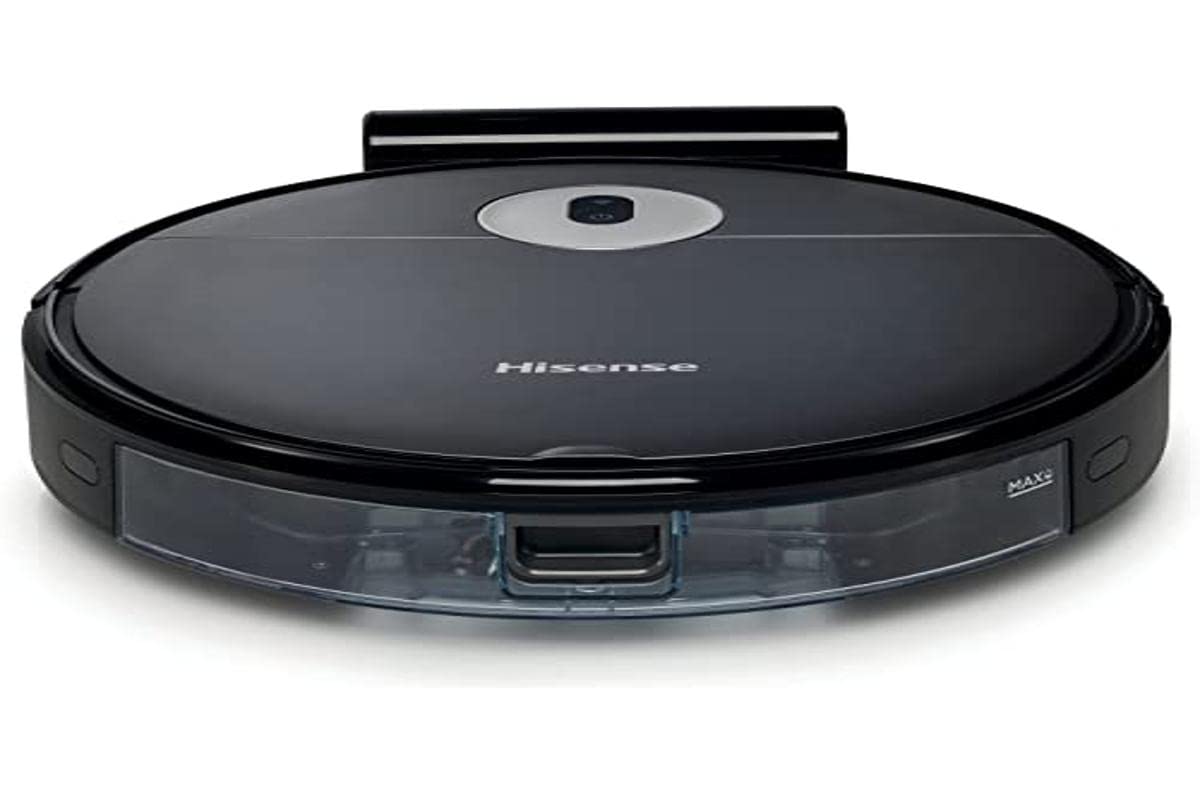
Image: The Hisense RVCG144AB Robot Vacuum Mop, showcasindoor het strakke, zwarte design en de compacte vormfactor.
The robot includes a floating roller brush for adapting to different floor conditions and dual-sided brushes for edge cleaning and preventing hair entanglement.
Instellen
1. Plaatsing van het laadstation
Place the charging station against a wall in an open area, ensuring there are no obstacles within 1 meter (3 feet) to the sides and 2 meters (6 feet) in front of the station. Connect the charging cable to the station and plug it into a power outlet.

Image: Illustration of the charging station, showing its power connection and recommended clear space around it.
2. Eerste keer opladen
Place the robot onto the charging station. Ensure the charging contacts on the robot align with those on the station. The robot will begin charging automatically. For first use, allow the robot to charge completely, which typically takes several hours.
3. Installeer zijborstels
Druk de zijborstels op de palen aan de onderkant van de robot totdat ze vastklikken.
4. App-verbinding (wifi)
- Download the Hisense ConnectLife app from your smartphone's app store.
- Registreer een account en log in.
- Follow the in-app instructions to add your RVCG144AB robot vacuum. This typically involves connecting the robot to your home Wi-Fi network.
- Ensure your Wi-Fi network is 2.4GHz for optimal connectivity.
Gebruiksaanwijzing
1. Reinigen starten en stoppen
- Handmatige start: Druk één keer op de aan/uit-knop van de robot om te beginnen met schoonmaken. Druk nogmaals om te pauzeren.
- App-bediening: Use the Hisense ConnectLife app to start, pause, or stop cleaning from anywhere.
- Afstandsbediening: Use the provided remote control to initiate or stop cleaning.
2. Reinigingsmodi
De robot biedt verschillende reinigingsmodi om aan verschillende behoeften te voldoen:
- Automatische reiniging: De robot navigeert intelligent en reinigt het gehele toegankelijke gebied.
- Selective Room/Zone Cleaning: Use the app to define specific rooms or areas for cleaning.
- Grondige reiniging: For thorough cleaning of a specific area.
- Zigzagreiniging: A systematic cleaning pattern to cover large areas efficiently.
- Randreiniging: De robot reinigt langs muren en meubelranden.
3. De zuigkracht en waterstroom aanpassen
The robot features 3 levels of suction power and water flow. These can be adjusted via the mobile app to match your cleaning requirements and floor type.
4. Schoonmaakbeurten inplannen
Set up cleaning schedules through the Hisense ConnectLife app. This allows the robot to automatically clean at preferred times and days.
Onderhoud
Regelmatig onderhoud zorgt voor optimale prestaties en verlengt de levensduur van uw robotstofzuiger.
1. De prullenbak legen
Open the top cover of the robot and remove the dustbin. Empty its contents into a trash bin. It is recommended to empty the dustbin after each cleaning cycle.

Afbeelding: Een close-up view of the robot's dustbin being removed for emptying, highlighting its capacity.
2. Het HEPA-filter reinigen
Remove the HEPA filter from the dustbin. Tap it gently to remove dust. Do not wash the HEPA filter with water; replace it every 3-6 months depending on usage.
3. De hoofdborstel reinigen
Remove the main brush cover and then the main brush. Use the cleaning tool to remove hair and debris tangled around the brush. Reinstall the brush and cover.
4. Zijborstels schoonmaken
Periodically check the side brushes for tangled hair or debris. Remove them by pulling gently and clean as needed. Replace if damaged.
5. Het waterreservoir en de dweilpad schoonmaken
Detach the water tank and empty any remaining water. Clean the mop pad by hand or machine wash. Allow all components to dry completely before reassembly.

Image: The water tank and mop pad assembly, illustrating how to detach and clean them.
6. Sensoren en oplaadcontacten reinigen
Veeg de klifsensoren, muursensoren en laadcontacten van zowel de robot als het laadstation schoon met een schone, droge doek om een goede werking te garanderen.
Probleemoplossing
Raadpleeg dit gedeelte voor veelvoorkomende problemen en hun oplossingen.
| Probleem | Mogelijke oorzaak | Oplossing |
|---|---|---|
| Robot gaat niet aan en laadt niet op. | Battery depleted; charging contacts dirty; charging station not powered. | Ensure robot is on charging station; clean charging contacts; check power to charging station. |
| Robot loopt vaak vast. | Obstacles on floor; robot caught on wires or rugs. | Clear floor of obstacles, wires, and thick rugs before cleaning. |
| Slechte reinigingsprestaties. | Vuilnisbak vol; borstels in de knoop; filter verstopt. | Empty dustbin; clean main and side brushes; clean or replace HEPA filter. |
| App cannot connect to robot. | Incorrect Wi-Fi password; robot out of Wi-Fi range; 5GHz Wi-Fi network. | Controleer het wifi-wachtwoord; plaats de robot dichter bij de router; zorg ervoor dat 2.4 GHz wifi wordt gebruikt. |
Specificaties
Technical specifications for the Hisense RVCG144AB Robot Vacuum Mop:
| Functie | Detail |
|---|---|
| Merk | Hisense |
| Modelnummer | RVCG144AB |
| Kleur | Zwart |
| Stroom | 55 Watt |
| Zuigkracht | 4000 jaar |
| Number of Speeds/Levels | 3 (Power and Wash) |
| Batterijtype | Lithium-ion |
| Batterijcapaciteit | 2600mAh |
| Looptijd | Tot 90 minuten |
| Capaciteit van de afvalbak | 500 ml |
| Capaciteit watertank | 250 ml |
| Filtertype | HEPA |
| Navigatie | Gyroscopic Mapping |
| Controletype | App Control (Wi-Fi), Remote Control |
| Productafmetingen | 35L x 35B x 4H cm |
| Artikelgewicht | 5.4 kilogram |
| Aanbevolen oppervlak | Marble, laminate, linoleum, carpet, wood |
Garantie en ondersteuning
For warranty information, please refer to the warranty card included with your product packaging or visit the official Hisense webVoor technische ondersteuning of servicevragen kunt u contact opnemen met de klantenservice van Hisense via hun officiële kanalen.
Meer informatie en ondersteuningsbronnen vindt u op de Hisense official webplaats.


