1. Inleiding en voorbijview
This manual provides detailed instructions for the installation, operation, and maintenance of your Yansoo 3-Channel Dash Cam. Please read this manual thoroughly before using the device to ensure proper functionality and safety.
Producteigenschappen:
- 3-kanaals opname: Simultaneously captures video from the front (170° wide-angle), rear (165°), and inside (140°) of your vehicle.
- Video in hoge resolutie: Supports 1080P Front video + AHD-720P Rear video + AHD-720P Inside video.
- Verbeterd nachtzicht: Features 4 unique infrared LED fill lights, F1.8 aperture, and WDR technology for optimal performance in low light.
- Noodvergrendeling (G-sensor): Automatically detects sudden shocks or collisions and locks the current video footage om overschrijven te voorkomen.
- Loop-opname: Continuously records and automatically overwrites the oldest unlocked video files wanneer de geheugenkaart vol is.
- Parkeermonitor: Activates recording when motion or shocking is detected while parked (requires separate hardwire kit for 24/7 monitoring).
- Verstelbare interieurcamera: The interior lens can be rotated 60° for flexible positioning.
Inhoud van het pakket:
- Yansoo 3-Channel Dash Cam Unit
- Achteruitrijcamera met kabel
- Zuignapbevestiging
- Car Charger (Type-C)
- USB-gegevenskabel
- Gebruiksaanwijzing
- Mounting Hardware for Rear Camera
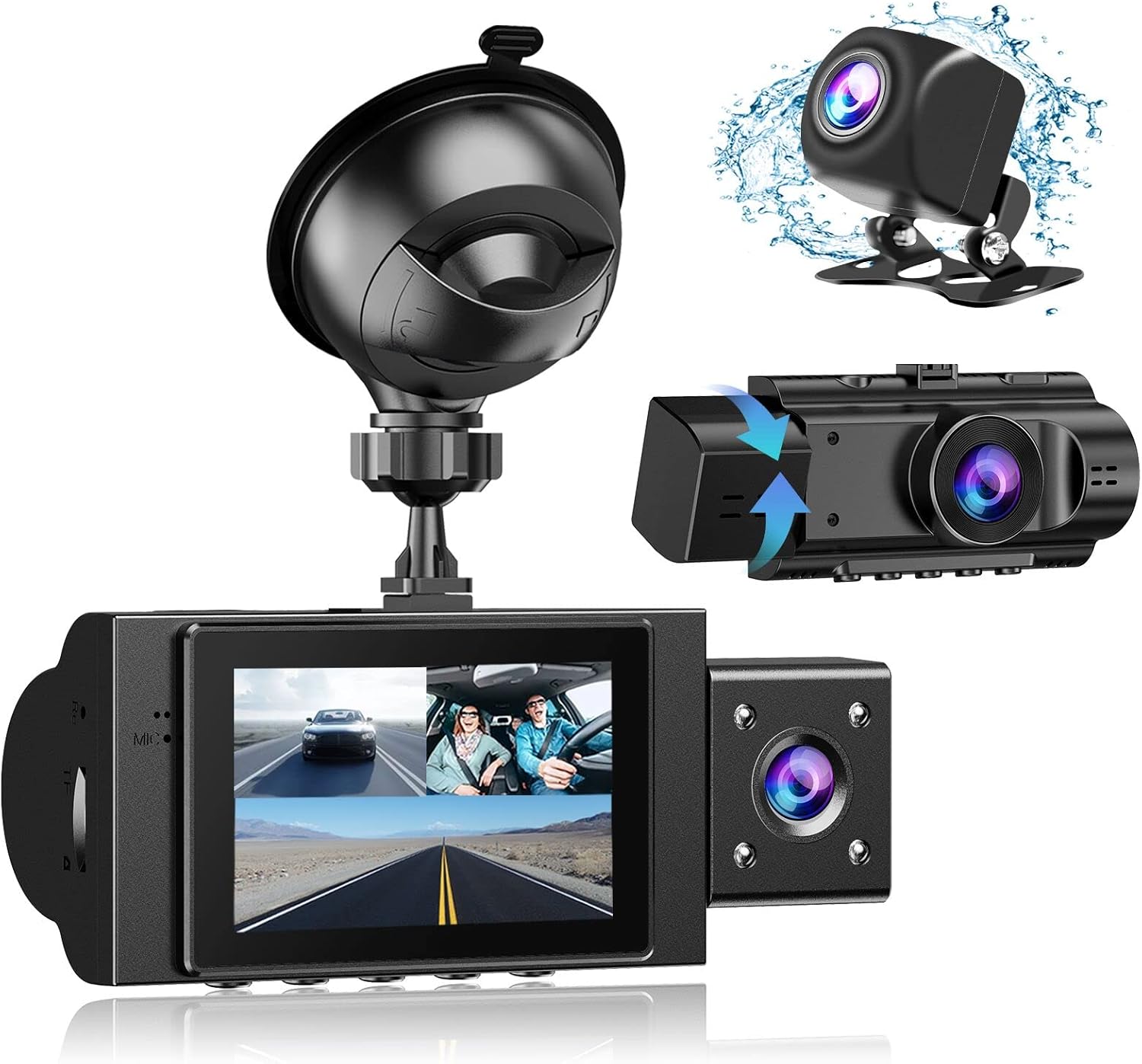
Image: The Yansoo 3-Channel Dash Cam unit with its suction cup mount and the separate rear camera, illustrating the complete package.
2. Instellen
2.1 De geheugenkaart plaatsen
The dash cam supports Micro Memory cards up to 64GB (Class 10 or above recommended, not included). Please format the card in the camera menu before first use.
- Zoek de geheugenkaartsleuf aan de zijkant van de dashcam.
- Insert the Micro Memory card into the slot until it clicks into place.
- Om de kaart te verwijderen, duwt u voorzichtig op de kaart totdat deze eruit springt.

Image: A four-panel illustration showing the steps to insert a Micro SD card into the dash cam's slot.
2.2 De dashcam monteren
Mount the main dash cam unit to your windshield using the provided suction cup mount. Choose a location that does not obstruct your view tijdens het rijden.
- Maak het gekozen gedeelte van uw voorruit grondig schoon.
- Bevestig de zuignaphouder aan de dashcam.
- Druk de zuignap stevig tegen de voorruit en trek aan de hendel om hem vast te zetten.
- Pas de camerahoek aan om een duidelijk beeld te garanderen view van de weg voor ons.

Image: The Yansoo 3-Channel Dash Cam mounted on a car's windshield, showing its position relative to the driver's view.
2.3 De achteruitrijcamera installeren
The rear camera provides a view of the vehicle's rear. It can be installed inside the rear window or externally above the license plate.
- Sluit de kabel van de achteruitrijcamera aan op de hoofddashcam.
- Route the cable neatly along the vehicle's interior trim to the rear.
- Monteer de achtercamera op de gewenste plek en zorg voor een vrij zicht. view.

Image: A diagram illustrating the recommended cable routing path for the dash cam and rear camera within a car's interior.
2.4 Stroomaansluiting
Connect the dash cam to your vehicle's cigarette lighter socket using the provided car charger. The camera will automatically power on and begin recording when the vehicle starts.

Image: The Yansoo 3-Channel Dash Cam connected to a power source, indicating its readiness for operation.
3. Gebruiksaanwijzing
3.1 Basisbediening
- Aan/uit: The camera powers on/off automatically with your vehicle's ignition. You can also manually power on/off by pressing and holding the power button.
- Opname starten/stoppen: Recording starts automatically when the camera powers on. Press the "OK" button to manually stop or start recording.
- Schakelen tussen weergave Views: Press the "Up" button to cycle through different display modes (Front, Inside, Rear, Picture-in-Picture combinations).
Video: Demonstration of the Yansoo X88 Dash Cam's recording capabilities, showcasing het vermogen om heldere video vast te leggen footage.
Video: Footage from the Yansoo X88 Dash Cam demonstrating its clear day and night recording capabilities.
Video: A demonstration of the Yansoo X88 Dash Cam's 1080P Full HD recording quality.
3.2 Menu-instellingen
To access the menu settings, stop recording (if active) by pressing the "OK" button, then press the "M" button twice.
- Oplossing: Adjust video resolution for front, inside, and rear cameras.
- Loop-opname: Stel de duur van de videosegmenten in (bijvoorbeeld 1, 3, 5 minuten).
- Gevoeligheid G-sensor: Adjust the sensitivity of the emergency lock feature.
- Parkeermonitor: Schakel de parkeerbewakingsfunctie in of uit.
- Datum/Tijd: Stel de juiste datum en tijd in voor nauwkeurige tijdenamps op opnames.
- Taal: Selecteer de gewenste taal voor het menu.
Video: A step-by-step guide on how to set the date and time on the Yansoo Dash Cam.
4. Onderhoud
- Standaardopmaak: Format the memory card regularly (e.g., once a month) to prevent data corruption and ensure optimal recording performance.
- Lensreiniging: Houd de cameralenzen schoon met een zachte, pluisvrije doek. Vermijd schurende materialen die krassen op de lens kunnen veroorzaken.
- Firmware-updates: Check the official Yansoo webOp deze site vindt u beschikbare firmware-updates om de prestaties te verbeteren en nieuwe functies toe te voegen.
- Temperatuuroverwegingen: Vermijd het blootstellen van de dashcam aan extreme temperaturen gedurende langere perioden.
5. Probleemoplossing
| Probleem | Mogelijke oorzaak | Oplossing |
|---|---|---|
| De camera gaat niet aan. | Geen stroom via de sigarettenaansteker; losse verbinding. | Check car charger connection; ensure vehicle ignition is on. |
| De opname stopt onverwacht. | Memory card full or corrupted; G-Sensor triggered. | Format memory card; adjust G-Sensor sensitivity. |
| Video footage is wazig. | Protective film on lens; dirty lens. | Remove protective film; clean lenses with a soft cloth. |
| De datum/tijd klopt niet. | Date/Time not set or battery low. | Set Date/Time in menu; ensure continuous power supply. |
| De camera loopt vast of functioneert niet goed. | Softwarefout. | Use a needle to press the "RE" (Reset) button. |
6. Specificaties
| Functie | Detail |
|---|---|
| Productafmetingen | 4.13 x 1.57 x 1.77 inch |
| Artikelgewicht | 1.23 pond |
| Resolutie video-opname | 1080p (Front), 720p (Inside & Rear) |
| Gebied van View | 170° (Front), 140° (Inside), 165° (Rear) |
| Connectiviteitstechnologie | USB |
| Speciale functie | G-Sensor, Loop Recording, Parking Monitor, Night Vision |
| Montagetype | Zuignap |
| Fabrikant | Yansoo |
7. Garantie en ondersteuning
Yansoo offers comprehensive after-sales support for your dash cam.
- Garantie: 1-YEAR warranty from the date of purchase.
- Technische service: 7*24 hours technical service is available.
- Contact: For any questions or issues, please contact our customer service team via Amazon or the after-sales email provided in the original product packaging.
- Gebruiksaanwijzing (PDF): Een digitale versie van de gebruikershandleiding is beschikbaar om te downloaden. hier.


