Invoering
Thank you for choosing the sonoro Primus Internet Radio with Bluetooth. This manual provides essential information for setting up, operating, and maintaining your device to ensure optimal performance and longevity. Please read it thoroughly before use.
Belangrijke veiligheidsinstructies
- Energiebron: Gebruik alleen de aangegeven stroomadapter. Zorg ervoor dat het volumetage overeenkomt met uw lokale stroomvoorziening.
- Ventilatie: Blokkeer geen ventilatieopeningen. Zorg voor voldoende ruimte rondom het apparaat voor een goede luchtcirculatie.
- Water en vocht: Do not expose the unit to rain, moisture, dripping, or splashing. Keep liquids away from the device.
- Warmte: Installeer het apparaat niet in de buurt van warmtebronnen zoals radiatoren, warmteroosters, kachels of andere apparaten (inclusief ampwarmtebronnen) die warmte produceren.
- Schoonmaak: Haal de stekker uit het stopcontact voordat u het apparaat schoonmaakt. Gebruik alleen een droge doek.
- Onderhoud: Probeer dit product niet zelf te onderhouden. Laat al het onderhoud over aan gekwalificeerd onderhoudspersoneel.
- Laserproduct: This product contains a Class 1 laser. Do not open the casing.
Inhoud van het pakket
Controleer of alle items aanwezig zijn:
- sonoro Primus Internet Radio Unit
- Stroomadapter
- Afstandsbediening (met batterijen)
- Gebruikershandleiding (dit document)
Instellen
1. Uitpakken en plaatsen
Carefully remove the unit from its packaging. Place the sonoro Primus on a stable, flat surface, ensuring adequate ventilation around the device. Avoid placing it near strong magnetic fields or direct sunlight.
2. Stroom aansluiten
Connect the provided power adapter to the AC IN port on the rear of the unit. Plug the other end into a suitable wall outlet. The unit will enter standby mode.
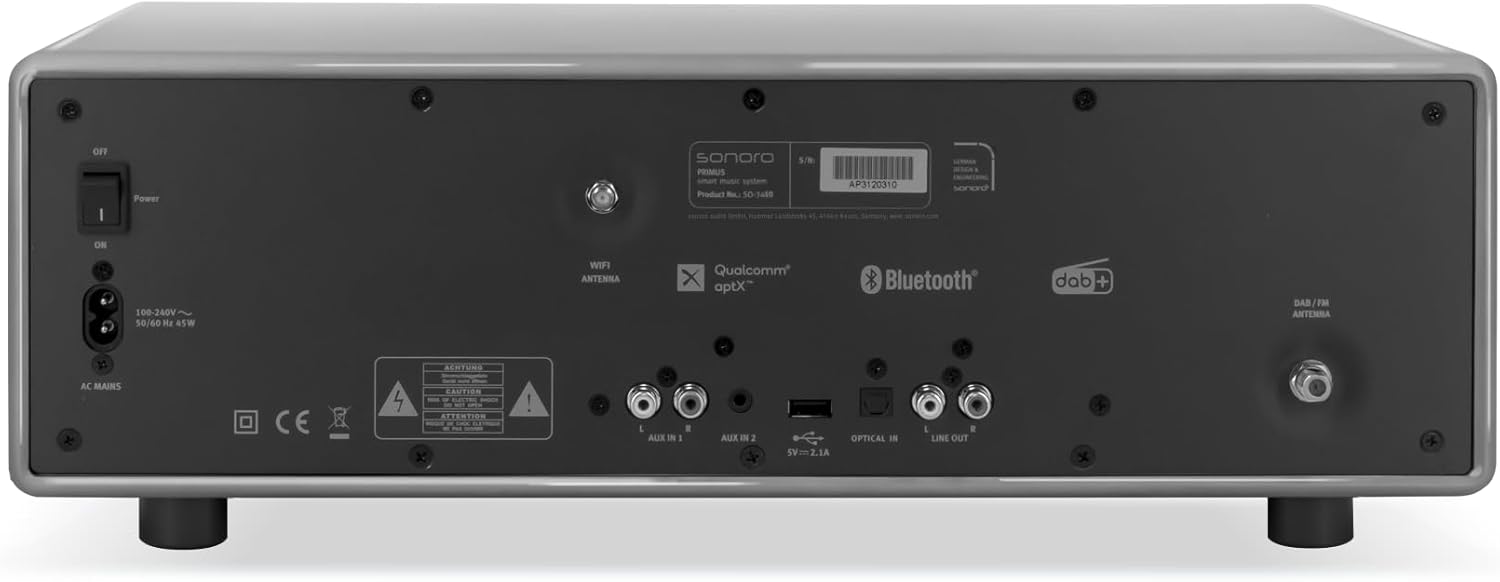
Afbeelding: Rear panel of the sonoro Primus, highlighting the power input and other connectivity options like AUX-in, Optical-in, and antenna connections.
3. Antenneverbinding
For optimal FM and DAB+ reception, connect the included antenna to the appropriate antenna input on the rear panel. Extend the antenna fully for best signal quality.
4. Eerste keer inschakelen
Press the Power button on the front panel or the remote control to turn on the unit. Follow the on-screen instructions for initial setup, including language selection and network configuration.

Afbeelding: Voorkant view of the sonoro Primus, displaying the central screen, control knobs, and various buttons for media playback and source selection.
Gebruiksaanwijzing
Basisbedieningen
The sonoro Primus features intuitive controls on the front panel and a comprehensive remote control. Key controls include:
- Aan/uit-knop: Hiermee schakelt u het apparaat in/uit of zet u het in de stand-bymodus.
- Volumeknop: Past het hoofdvolume aan.
- Afstem-/Selecteerknop: Navigeert door menu's en selecteert opties.
- Bronknoppen: Selects input sources (Internet Radio, DAB+, FM, Bluetooth, CD, AUX-in, Optical-in).
- Afspeelbediening: Play/Pause, Skip Forward/Backward for CD and streaming.
Internet Radio and Podcasts
Access over 25,000 internet radio stations and numerous podcasts worldwide. Ensure your device is connected to a stable Wi-Fi network. Navigate through the menu using the Tune/Select knob to find and save your favorite stations.
DAB+ and FM Radio
Switch to DAB+ or FM mode using the source buttons. The unit will automatically scan for available stations. You can manually tune or save presets for quick access to your preferred channels.
Bluetooth-connectiviteit
To connect a Bluetooth device (smartphone, tablet, laptop):
- Select the Bluetooth source on the sonoro Primus.
- Schakel Bluetooth in op uw externe apparaat.
- Zoeken naar "sonoro Primus" in your device's Bluetooth settings and pair.
- Zodra u verbinding hebt gemaakt, kunt u draadloos audio naar het apparaat streamen.
CD afspelen
Insert an audio CD into the CD slot. The unit will automatically detect and begin playback. Use the playback controls to manage your music.
Streaming Services (Spotify Connect, Amazon Music, Deezer)
The sonoro Primus supports various streaming services. To use Spotify Connect, Amazon Music, or Deezer, ensure your device is connected to Wi-Fi and you have an active subscription to the respective service. Follow the instructions within the service's app to connect to your sonoro Primus.
AUX-in and Optical-in
Connect external audio devices using the AUX-in (3.5mm jack) or Optical-in ports on the rear panel. Select the corresponding source on the unit to play audio from these inputs.
Onderhoud
Het apparaat schoonmaken
To clean the exterior of the unit, unplug it from the power source. Use a soft, dry, lint-free cloth. Do not use abrasive cleaners, waxes, or solvents as they may damage the finish.
Onderhoud van de cd-speler
Handle CDs by their edges to avoid fingerprints. If a CD is dirty, wipe it gently with a soft, dry cloth from the center outwards. Do not use solvents or abrasive cleaners on CDs.
Software-updates
Periodically check for software updates via the unit's menu (if available). Updates can improve performance and add new features. Ensure a stable internet connection during updates.
Probleemoplossing
| Probleem | Mogelijke oorzaak | Oplossing |
|---|---|---|
| Geen stroom | Stroomkabel niet aangesloten; stopcontact defect. | Controleer de aansluiting van het netsnoer. Probeer een ander stopcontact. |
| Geen geluid | Volume too low; wrong input source selected; mute activated. | Increase volume; select correct input source; deactivate mute. |
| Slechte radio-ontvangst | Antenne niet goed aangesloten of uitgeschoven; storing. | Pas de antennepositie aan; plaats het apparaat verder weg van andere elektronische apparaten. |
| Bluetooth-koppeling mislukt | Apparaat te ver weg; Bluetooth is niet ingeschakeld op extern apparaat; apparaat bevindt zich niet in de koppelingsmodus. | Ensure devices are close; enable Bluetooth; put sonoro Primus in pairing mode. |
| CD speelt niet af | De cd is verkeerd geplaatst; de cd is vuil of beschadigd; het schijfformaat wordt niet ondersteund. | Plaats de cd op de juiste manier terug, maak de cd schoon of vervang hem en zorg ervoor dat het een audio-cd is. |
| Problemen met de wifi-verbinding | Incorrect password; router too far; network interference. | Verify Wi-Fi password; move unit closer to router; restart router. |
Als het probleem zich blijft voordoen, neem dan contact op met de klantenservice.
Specificaties
- Merk: geluid
- Model: e60a53a9-4d44-4a55-b129-3386e8f3e186
- Tuner-technologie: FM, DAB+
- Audio-uitgangsmodus: Stereo
- Ondersteunde audioformaten: MP3, AAC, WAV
- Luidsprekerconfiguratie: 2.1 (Two coaxial speakers and a powerful 5.25 inch subwoofer)
- Connectiviteit: Optical, Auxiliary, Bluetooth, WLAN
- Compatibele apparaten: Laptop, MP3 player, Smartphone, Tablet
- Energiebron: Elektrische kabel
- Weergavetype: LCD of LED
- Meegeleverde componenten: Power adapter, Remote control (with Lithium-metal batteries)
- Afmetingen (pakket): 52.6x33.2x27.4cm
- Gewicht (verpakking): 9.45 kg
- Kleur: Chalk Grey (Note: Other colors may be available for different models)
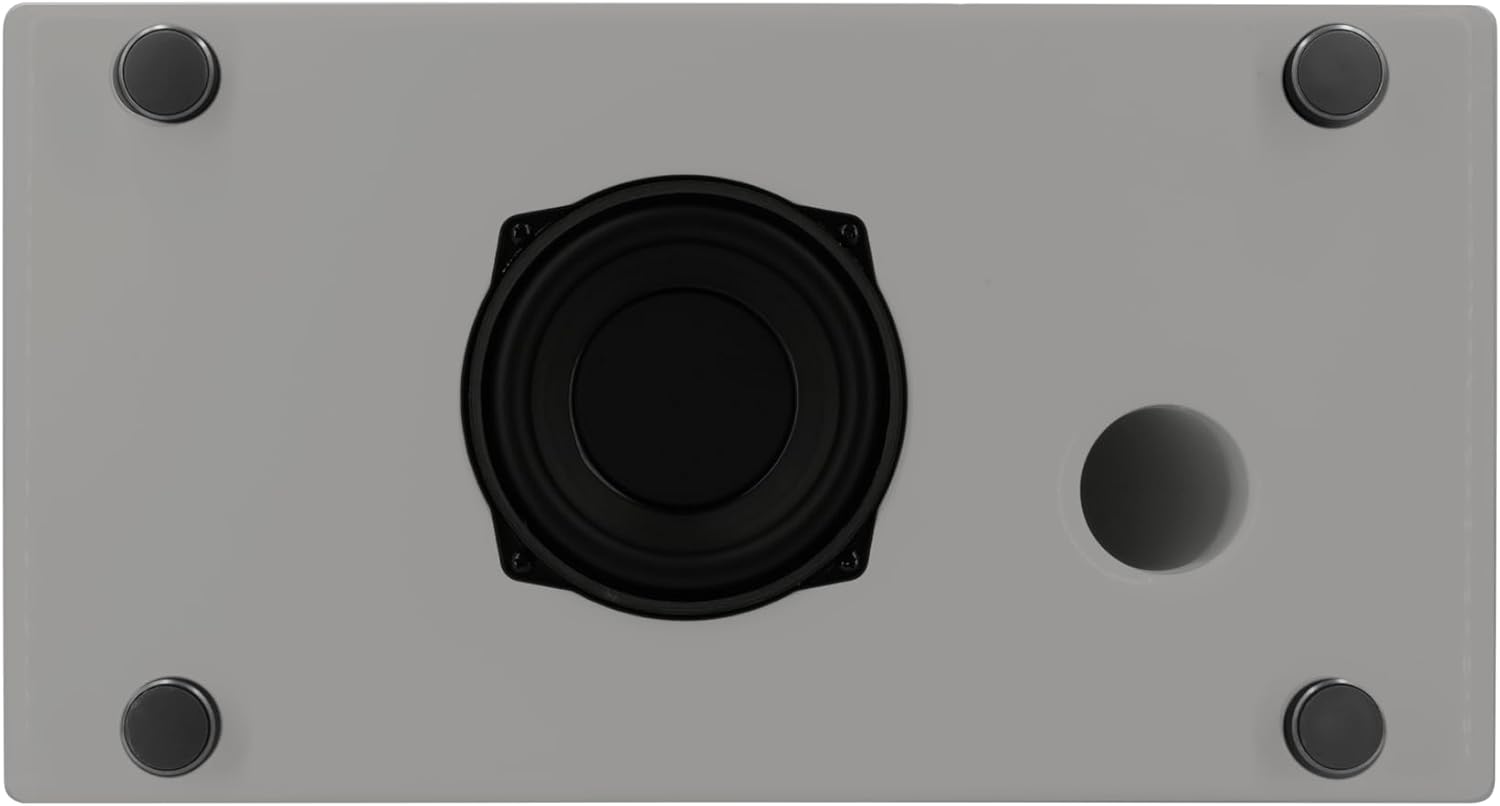
Afbeelding: Underside of the sonoro Primus, revealing the integrated 5.25-inch subwoofer for enhanced bass performance.
Garantie en ondersteuning
The sonoro Primus comes with a standard manufacturer's warranty. Please refer to the warranty card included in your package for specific terms and conditions. For technical support, service, or warranty claims, please contact sonoro audio GmbH customer service through their official website of de contactgegevens die bij uw aankoop zijn verstrekt.
Fabrikant: sonoro audio GmbH
Eerste beschikbare datum: 2 januari 2023


