1. Inleiding
This manual provides essential information for the installation, operation, and maintenance of your Montech Titan Gold 850W ATX 3.0 Power Supply. This high-end power supply is designed for gaming systems, featuring 80 Plus Gold and Cybenetics Gold certifications, fully modular cabling, and readiness for PCIe 5.0 with a new 12VHPWR connector. Please read this manual thoroughly before installation and use to ensure proper functionality and safety.

Figure 1: Montech Titan Gold 850W Power Supply and its retail packaging.
2. Veiligheidsinformatie
Always observe the following safety precautions to prevent injury or damage to your power supply and system components:
- Zorg ervoor dat de stroomtoevoer is losgekoppeld van het stopcontact voordat u het apparaat installeert of gebruikt.
- Open de voedingseenheid niet.asing. Hoog volumetagEr zijn interne componenten aanwezig en er zijn geen onderdelen die door de gebruiker kunnen worden onderhouden.
- Installeer de voeding op een goed geventileerde plaats, uit de buurt van warmtebronnen, direct zonlicht en vocht.
- Use only the modular cables provided with this power supply. Using incompatible cables may cause damage.
- Ensure all connectors are securely seated before powering on the system.
3. Inhoud van het pakket
Controleer of alle artikelen in het pakket aanwezig zijn:
- Montech Titan Gold 850W Power Supply Unit
- Modulaire kabelset (inclusief 12VHPWR-kabel)
- AC-netsnoer
- Montageschroeven
- Kabelbinders/klittenbandsluitingen
- Gebruikershandleiding (dit document)

Figure 2: Included modular cables and accessories for the power supply.
4. Installatie en installatie
Volg deze stappen om uw voeding te installeren:
- Bereid je pc-behuizing voor: Ensure your PC case is compatible with ATX power supplies.
- Monteer de voeding: Secure the power supply into the designated PSU bay in your PC case using the provided mounting screws. Ensure the fan is oriented correctly for optimal airflow (typically facing downwards if your case has a bottom vent).
- Modulaire kabels aansluiten: Identify the necessary cables for your motherboard, CPU, graphics card(s), and storage devices. Connect these cables to the corresponding ports on the power supply. The fully modular design allows you to connect only the cables you need, reducing clutter.
- Verbinding maken met componenten: Route the connected cables through your case's cable management channels and connect them to your motherboard (24-pin ATX, 8-pin EPS/CPU), graphics card(s) (PCIe, including the 12VHPWR for compatible GPUs), and storage drives (SATA, Molex).
- Beveiligde verbindingen: Double-check all connections to ensure they are firm and properly seated.

Figuur 3: Overview of the modular cable connection ports on the power supply.
5. Gebruiksaanwijzing
After installation, follow these steps to operate your power supply:
- Wisselstroom aansluiten: Plug the AC power cord into the power supply's AC inlet and then into a wall outlet or surge protector.
- Aan / uit schakelaar: Locate the main power switch on the rear of the power supply and flip it to the 'ON' (I) position.
- Systeem inschakelen: Press the power button on your PC case to start your computer.
- Smart Zero Fan Feature: This power supply includes a 'Smart Zero Fan' switch. When enabled (ON), the fan will remain off under low load conditions for silent operation. The fan will automatically activate when the load increases to maintain optimal temperatures. If disabled (OFF), the fan will operate continuously.

Figure 4: Rear panel with main power switch and Smart Zero Fan control.
6. Onderhoud
To ensure the longevity and optimal performance of your power supply, periodic maintenance is recommended:
- Stofvrij maken: Regularly clean dust from the power supply's fan intake and exhaust vents using compressed air. Ensure the power supply is turned off and unplugged before cleaning.
- Kabelinspectie: Periodically check all modular cable connections for looseness or damage. Re-seat any loose cables.
- Omgevingsomstandigheden: Maintain a clean, dry, and cool environment for your PC to prevent excessive heat and dust buildup.

Figuur 5: Boven view of the power supply, highlighting the fan grill for cleaning.
7. Probleemoplossing
Als u problemen ondervindt met uw voeding, raadpleeg dan de volgende veelvoorkomende problemen en oplossingen:
- Geen stroom:
- Ensure the AC power cord is securely plugged into both the power supply and the wall outlet.
- Verify the main power switch on the PSU is in the 'ON' (I) position.
- Check all modular cable connections, especially the 24-pin ATX and 8-pin EPS/CPU cables, for secure seating.
- Test het stopcontact met een ander apparaat om er zeker van te zijn dat er stroom op staat.
- Systeem wordt onverwachts uitgeschakeld:
- This could indicate an overload or overheating. Ensure your system's power consumption does not exceed the PSU's 850W capacity.
- Check for proper ventilation around the PSU and inside the PC case. Clean any dust buildup.
- Ensure the 'Smart Zero Fan' is functioning correctly or try disabling it to force continuous fan operation.
- Fan Not Spinning (under low load):
- If the 'Smart Zero Fan' feature is enabled, the fan will not spin under low loads. This is normal operation. The fan will activate when the system load increases.
- If the fan never spins even under high load with 'Smart Zero Fan' disabled, contact customer support.
8. Specificaties
Detailed technical specifications for the Montech Titan Gold 850W Power Supply:
| Functie | Specificatie |
|---|---|
| Merk | Montech |
| Modelnaam | Titan Gold 850W (TIS0124) |
| Wattage | 850 Watt |
| Uitgang Wattage | 750 Watts (Note: Product title states 850W, specifications list 750W. Please verify with manufacturer if discrepancy is critical.) |
| Efficiëntiecertificering | 80 Plus Gold, Cybenetics Gold |
| Vormfactor | ATX |
| Ontwerp van de voeding | Volledig modulair |
| Aansluitingstype | ATX, PCIe 5.0 (12VHPWR) |
| Koelmethode | Air (1 Fan) |
| Artikelgewicht | 7.52 pond |
| Datum eerste beschikbaarheid | 13 december 2022 |
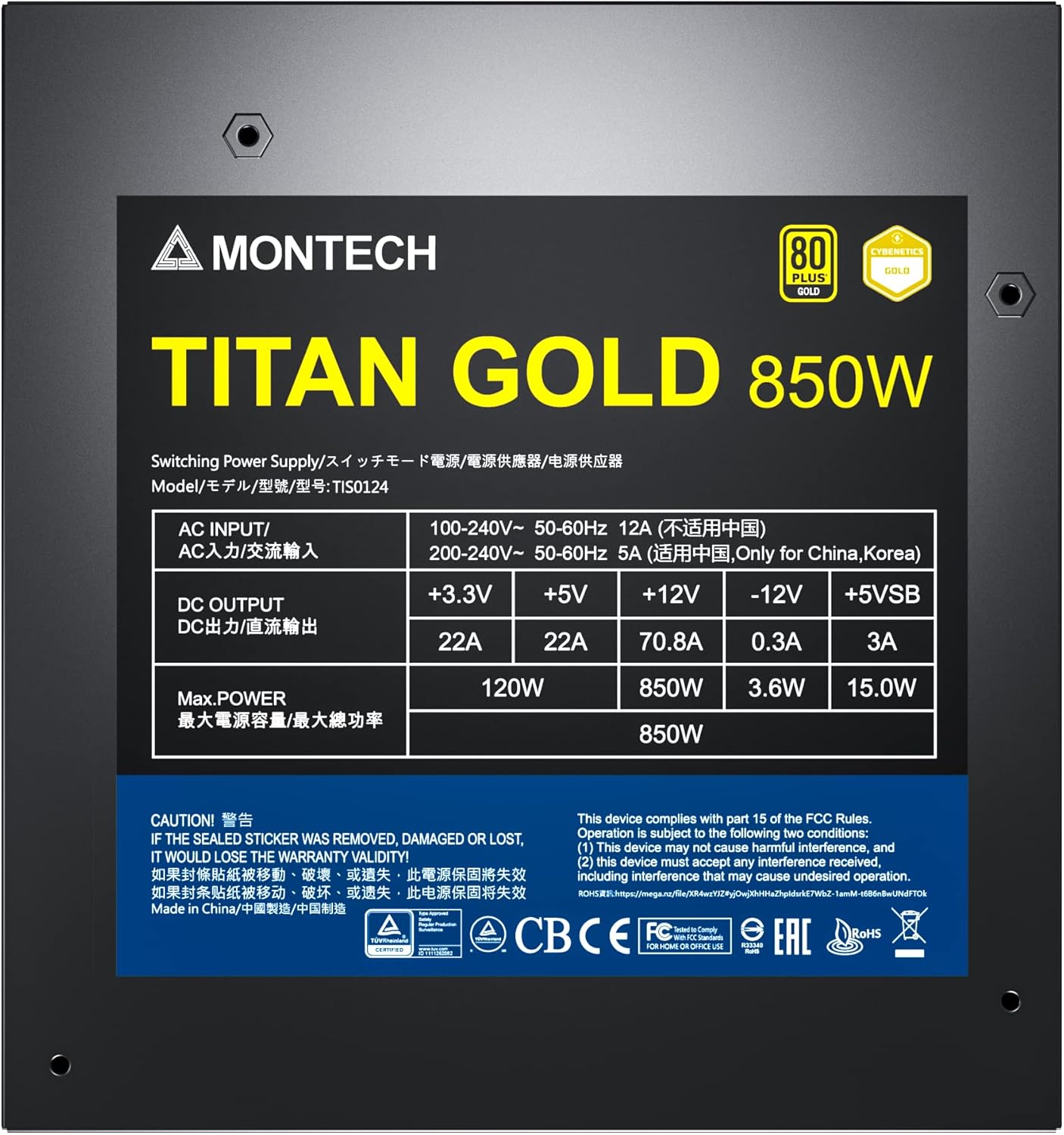
Figure 6: Product label displaying electrical specifications and certifications.
9. Garantie en ondersteuning
The Montech Titan Gold 850W Power Supply comes with a 10 jaar garantie, ensuring long-term reliability and peace of mind. For technical support, warranty claims, or further assistance, please visit the official Montech website of neem contact op met de klantenservice.
Bewaar uw aankoopbewijs om de garantie te valideren.


