Gebruikershandleiding voor de REAL-EL X-770 draagbare luidspreker
Model: EL121600004
1. Inleiding
Thank you for choosing the REAL-EL X-770 Portable Speaker. This manual provides essential information for the safe and efficient operation of your device. Please read it thoroughly before use and retain it for future reference.
2. Veiligheidsinformatie
Om een veilige werking te garanderen en schade aan uw apparaat te voorkomen, dient u de volgende voorzorgsmaatregelen in acht te nemen:
- Stel de luidspreker niet bloot aan water, vocht of extreme temperaturen.
- Laat de luidspreker niet vallen en stel hem niet bloot aan harde stoten.
- Probeer de luidspreker niet zelf te demonteren, repareren of aanpassen. Neem contact op met gekwalificeerd servicepersoneel voor hulp.
- Houd de luidspreker uit de buurt van warmtebronnen, direct zonlicht en brandbare materialen.
- Gebruik uitsluitend de aangegeven oplaadkabel en voedingsadapter (indien meegeleverd) om het apparaat op te laden.
- Langdurig luisteren op een hoog volume kan gehoorbeschadiging veroorzaken.
3. Inhoud van het pakket
Pak de doos voorzichtig uit en controleer of alle items aanwezig zijn:
- REAL-EL X-770 Portable Speaker Unit
- Charging Cable (USB-A to USB-C, or similar, specific type not provided)
- Gebruikershandleiding (dit document)
Note: The product data mentioned "Camera Body" as an included component. This is likely an error. The actual included components for a portable speaker typically include the speaker unit and a charging cable.
4. Product voorbijview
Familiarize yourself with the main components of your REAL-EL X-770 Portable Speaker:
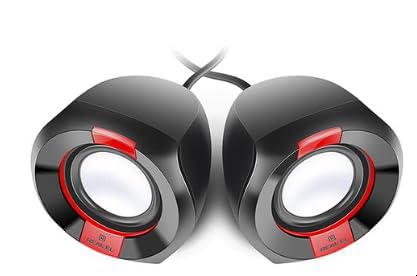
Afbeelding 1: Voorkant view of the REAL-EL X-770 Portable Speaker. This image displays the speaker's compact design, the main speaker grille, and typical control buttons for power, volume, and playback.
- Aan/uit-knop: Houd de knop ingedrukt om de luidspreker AAN/UIT te schakelen.
- Knop Volume omhoog/Volgend nummer: Kort indrukken om het volume te verhogen, lang indrukken om het volgende nummer te volgen.
- Knop voor volume omlaag/vorige nummer: Kort indrukken om het volume te verlagen, lang indrukken om het vorige nummer te halen.
- Afspelen/Pauzeren-knop: Druk op om audio af te spelen of te pauzeren.
- Modusknop: Press to switch between input modes (e.g., Bluetooth, HDMI, AUX).
- Oplaadpoort: Voor het aansluiten van de laadkabel.
- HDMI-poort: Voor audio-input van compatibele apparaten.
5. Instellen
5.1 De luidspreker opladen
- Sluit de oplaadkabel aan op de oplaadpoort van de luidspreker.
- Sluit het andere uiteinde van de oplaadkabel aan op een USB-voedingsadapter (niet meegeleverd) of een USB-poort met voeding.
- Het oplaadindicatielampje gaat branden (de kleur kan variëren) om aan te geven dat de speaker wordt opgeladen.
- Once fully charged, the indicator light may change color or turn off. Disconnect the speaker from the charger.
5.2 In-/uitschakelen
- To power ON: Press and hold the Aan/uit-knop for approximately 3 seconds. An indicator light will turn on, and you may hear an audible prompt.
- To power OFF: Press and hold the Aan/uit-knop for approximately 3 seconds. The indicator light will turn off, and you may hear an audible prompt.
6. De luidspreker bedienen
6.1 Bluetooth-koppeling
- Ensure the speaker is powered ON and in Bluetooth pairing mode (usually indicated by a flashing blue LED). If not, press the Modusknop until Bluetooth mode is active.
- Schakel Bluetooth in op uw mobiele apparaat (smartphone, tablet, computer) en zoek naar beschikbare apparaten.
- Select "REAL-EL X-770" from the list of found devices.
- Zodra de koppeling tot stand is gebracht, geeft de luidspreker een bevestigingsgeluid en stopt het Bluetooth-indicatielampje met knipperen en blijft het continu branden.
- U kunt nu audio van uw apparaat via de luidspreker afspelen.
6.2 HDMI Audio Input
The REAL-EL X-770 supports audio input via HDMI. This allows connection to devices such as TVs, gaming consoles, or media players that output audio through HDMI.
- Connect an HDMI cable (not included) from the audio output port of your source device to the HDMI input port on the REAL-EL X-770 speaker.
- Power on both the speaker and the source device.
- Druk op de Modusknop on the speaker until the HDMI input mode is selected.
- Ensure the audio output settings on your source device are configured to send audio via HDMI.
- Adjust the volume on both the speaker and the source device as needed.
6.3 Volumeregeling
- Om het volume te verhogen: druk kort op de knop Knop Volume omhoog/Volgende track.
- Om het volume te verlagen: druk kort op de knop. Knop Volume omlaag/Vorige track.
6.4 Afspeelbediening
- To play/pause: Press the Afspelen/Pauze-knop.
- To skip to the next track: Long press the Knop Volume omhoog/Volgende track.
- To go to the previous track: Long press the Knop Volume omlaag/Vorige track.
7. Onderhoud
7.1 Reinigen
- Veeg de buitenkant van de luidspreker af met een zachte, droge, pluisvrije doek.
- Do not use abrasive cleaners, alcohol, benzene, or other chemical solvents, as these may damage the surface.
- Zorg ervoor dat er geen vocht in de openingen terechtkomt.
7.2 Opslag
- Wanneer u de luidspreker gedurende langere tijd niet gebruikt, bergt u deze op op een koele, droge plaats, uit de buurt van direct zonlicht en extreme temperaturen.
- It is recommended to charge the speaker at least once every three months to maintain battery health.
8. Probleemoplossing
| Probleem | Mogelijke oorzaak | Oplossing |
|---|---|---|
| De luidspreker gaat niet aan. | Batterij is leeg. | Laad de luidspreker volledig op. |
| Geen geluid uit de luidspreker. | Volume is too low or muted. Incorrect input mode selected. Device not paired (Bluetooth). | Increase volume on both speaker and source device. Ensure correct input mode (Bluetooth/HDMI). Re-pair Bluetooth device. |
| Koppelen via Bluetooth is niet mogelijk. | Luidspreker niet in koppelingsmodus. Apparaat te ver weg. Interferentie. | Ensure speaker is in Bluetooth pairing mode. Move devices closer. Turn off other Bluetooth devices. |
| HDMI audio not working. | Incorrect mode. Cable issue. Source device settings. | Ensure speaker is in HDMI mode. Check HDMI cable connection. Verify source device audio output settings. |
9. Specificaties
| Functie | Detail |
|---|---|
| Merk | REAL-EL |
| Modelnaam | X-770 |
| Modelnummer | EL121600004 |
| Connectiviteitstechnologie | HDMI, Bluetooth (assumed for portable speaker) |
| Productafmetingen | 25.4x5.08x6.86cm |
| Artikelgewicht | 5.29 kilogram |
| Kleur | veelkleurig |
| Batterijen inbegrepen | Nee |
| Batterijen vereist | Nee |
Note: While the product data indicates no batteries are included or required, portable speakers typically feature an internal rechargeable battery for wireless operation. This specification might refer to the absence of user-replaceable or external batteries. The speaker is designed to be charged via its charging port. Specifications are subject to change without prior notice. For the most up-to-date information, please refer to the manufacturer's official webplaats.
10. Garantie en ondersteuning
The REAL-EL X-770 Portable Speaker comes with a manufacturer's warranty. Please refer to the warranty card included with your purchase or visit the official REAL-EL website voor gedetailleerde garantievoorwaarden.
For technical support, service inquiries, or further assistance, please contact REAL-EL customer service through their official channels. Contact information can typically be found on the product packaging or the manufacturer's webplaats.


