1. Inleiding
This manual provides essential information for setting up, operating, and maintaining your realme C30 smartphone. Please read it carefully to ensure optimal performance and longevity of your device.

Image: realme C30 smartphone in Lake Blue, showcasing its rear design and camera.
2. Wat zit er in de doos?
Controleer of alle artikelen in het pakket aanwezig zijn:
- realme C30-smartphone
- Adapter
- USB-kabel
- SIM-lade-uitwerper
- Snelle autolader
3. Apparaat voorbijview
Fysieke kenmerken
- Afmetingen: 1.97 x 3.31 x 6.65 inch
- Artikelgewicht: 6 ons
- Kleur: Meerblauw
Belangrijkste kenmerken
- Weergave: 6.5" HD+ Fullscreen with 88.7% Screen-to-body Ratio, 120Hz Touch Sampling Rate, 16.7M Screen Colors
- Verwerker: Unisoc T612 Octa-core, 12nm, up to 1.82GHz, ARM Mali-G57 GPU
- RAM: 2 GB (Let op: sommige varianten hebben mogelijk 4 GB RAM)
- Opslag: 32GB
- Achteruitrijcamera: 8MP AI Camera with f/2.0 aperture, 4P lens
- Voorcamera: 5MP
- Batterij: 5000mAh (Typical) Massive Battery, 4890mAh (Minimum)
- Besturingssysteem: realme UI R Edition Based on Android 11
Apparaatindeling
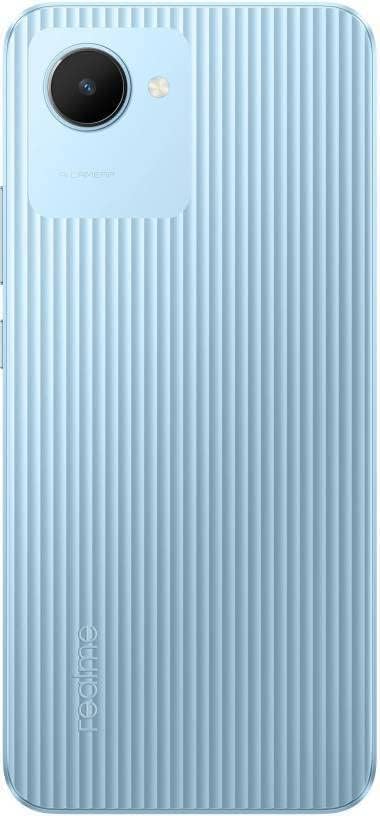
Afbeelding: Achterkant view of the realme C30, highlighting the single camera and textured back panel.

Image: Top and bottom edges of the realme C30, showing the 3.5mm headset jack, Micro USB port, and speaker grille.

Afbeelding: Zijkant views of the realme C30, illustrating the power button, volume rockers, and SIM tray slot.
4. Instellen
4.1. Installatie van de simkaart en microSD-kaart
- Zoek de SIM-kaartsleuf aan de zijkant van uw apparaat.
- Steek het SIM-kaartlade-uitwerpgereedschap in het kleine gaatje naast de lade.
- Duw voorzichtig totdat de lade eruit springt.
- Place your Nano SIM cards (supports Dual SIM) and Micro SD card into the designated slots on the tray.
- Plaats de lade voorzichtig terug in het apparaat.
4.2. Eerste keer inschakelen en configuratie
- Houd de aan/uit-knop ingedrukt totdat het realme-logo verschijnt.
- Volg de instructies op het scherm om uw voorkeurstaal en -regio te selecteren.
- Connect to a Wi-Fi network to proceed with setup and download necessary updates.
- Review en ga akkoord met de licentieovereenkomst voor eindgebruikers en het privacybeleid.
- Meld u aan met uw Google-account of maak een nieuw account.
- Set up your preferred screen lock method (PIN, Password, Pattern, Face recognition, or Fingerprints).
- Choose your display mode (Light or Dark).
- Complete the remaining setup steps to access your device's home screen.
5. Uw apparaat bedienen
5.1. Basisnavigatie
Navigate your device using intuitive touch gestures. Swipe up, down, left, or right to move between screens and menus. Tap to select items, and long-press for additional options.
5.2. Batterijbeheer
Your realme C30 is equipped with a 5000mAh massive battery for extended usage. To optimize battery life:
- Inschakelen Ultra Saving Mode from the Quick Settings panel for prolonged standby time at low power levels.
- Pas de schermhelderheid en de schermtime-outinstellingen aan.
- Close background applications when not in use.
5.3. Cameragebruik
Launch the Camera app to capture photos and videos. The 8MP AI rear camera and 5MP front camera offer various modes and features.
- Tik op de ontspanknop om een foto te maken.
- Schakel tussen de foto- en videomodus.
- Gebruik AI-functies voor een verbeterde beeldkwaliteit.
5.4. Connectiviteit
Uw apparaat ondersteunt verschillende connectiviteitsopties:
- 4G LTE: Enjoy fast mobile data speeds. (Note: Not for USA Market. Supports Latin Europe bands.)
- Wifi: Maak verbinding met draadloze netwerken voor internettoegang.
- Bluetooth: Pair with compatible accessories like headphones or speakers.
- GPS/GLONASS/GALILEO: Voor nauwkeurige locatiebepaling.
- Micro-USB: Voor opladen en gegevensoverdracht.
- 3.5 mm hoofdtelefoonaansluiting: Voor bedrade audioaccessoires.
6. Onderhoud
6.1. Opladen
Use the provided 10W charging adapter and USB cable to charge your device. Connect the Micro USB end to your phone and the adapter to a power outlet.
6.2. Software-updates
Houd de software van uw apparaat up-to-date voor optimale prestaties en beveiliging. Ga naar Settings > About phone > realme UI version Om te controleren op updates en deze te installeren.
6.3. Schoonmaken
Gently wipe your device with a soft, lint-free cloth. Avoid using harsh chemicals or abrasive materials that could damage the screen or body.
7. Probleemoplossing
7.1. Apparaat start niet op
- Zorg ervoor dat de batterij is opgeladen. Sluit het apparaat minimaal 15 minuten aan op de oplader voordat u het probeert in te schakelen.
- Houd de aan/uit-knop 10-15 seconden ingedrukt om een geforceerde herstart uit te voeren.
7.2. Apps Freezing or Crashing
- Sluit de problematische app en open deze opnieuw.
- Wis de cache en gegevens van de app via Instellingen > Apps > [App-naam] > Opslag.
- Ensure your device's software and all apps are updated to their latest versions.
7.3. Slechte batterijduur
- Verlaag de schermhelderheid en stel een kortere schermtime-out in.
- Schakel Wi-Fi, Bluetooth en GPS uit wanneer u ze niet gebruikt.
- Identify and close power-consuming background apps.
- Enable Ultra Saving Mode for critical situations.
8. Specificaties
| Functie | Specificatie |
|---|---|
| Modelnaam | RMX3511 |
| Productafmetingen | 1.97 x 3.31 x 6.65 inch |
| Artikelgewicht | 6 ons |
| Besturingssysteem | realme UI R Edition Based on Android 11 |
| CPU-snelheid | 1820 MHz (1.82 GHz) |
| RAM | 2 GB (Note: Some variants may have 4GB) |
| Geheugenopslagcapaciteit | 32GB |
| Schermgrootte | 6.5 inch |
| Oplossing | 1280 x 720 (HD+) |
| Batterijcapaciteit | 5000 milliampEre Uur (mAh) |
| Telefoongesprekstijd | 45.3 uur |
| Achteruitrijcamera | 8MP AI-camera |
| Voorcamera | 5MP |
| Speciale kenmerken | 4K Video Recording, Dual SIM, Fast Charging Support |
| Connectiviteitstechnologieën | USB, Cellular (LTE) |
| Audio-aansluiting | 3.5mm |
9. Garantie en ondersteuning
For warranty information and customer support, please refer to the documentation included with your product or visit the official realme webplaats. U kunt ook een bezoek brengen aan de realme Store op Amazon Voor meer productdetails en ondersteuningsbronnen.


