1. Inleiding
This manual provides detailed instructions for the proper use and maintenance of your Obbug Bluetooth Headset, Model YYK-530. Please read this manual thoroughly before using the product to ensure optimal performance and longevity.
2. Inhoud van het pakket
Controleer of alle artikelen in uw pakket aanwezig zijn:
- 1 x Obbug Bluetooth Headset
- 1 x oplaadcase
- 1 x USB Type-C oplaadkabel
- 1 x Ear Hat (replacement ear tip)
- 1 x Gebruikershandleiding
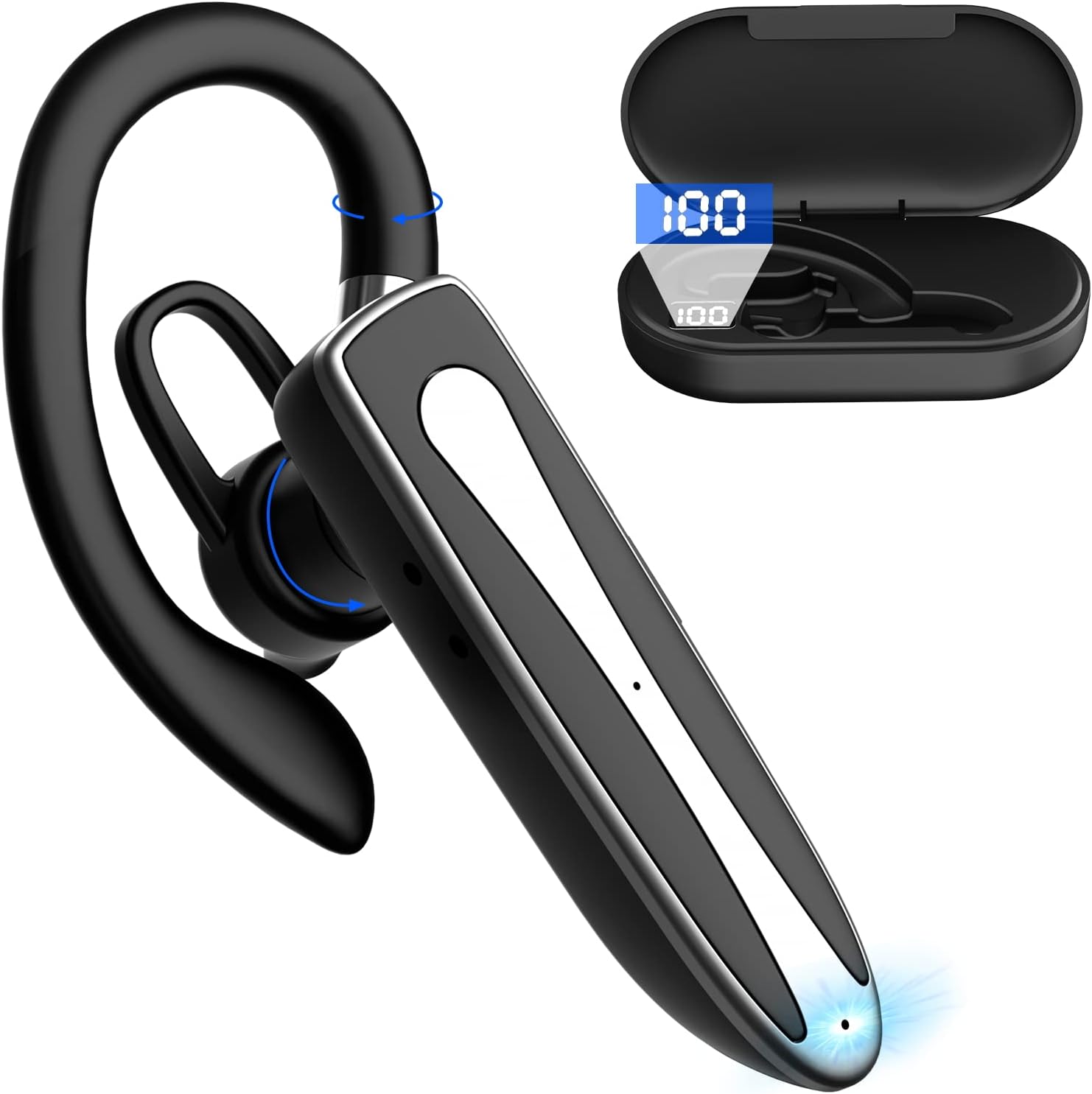
Image 2.1: Obbug Bluetooth Headset YYK-530 and its charging case.
3. Producteigenschappen
- Bluetooth 5.1-technologie: Provides stable connection and clear audio.
- Verlengde batterijduur: Up to 80 hours of continuous use with the charging case.
- Comfortabel en verstelbaar ontwerp: Flexible earhook and rotatable boom mic for left or right ear wear.
- CVC8.0 Noise Reduction: Verbetert de helderheid van gesprekken door achtergrondgeluiden te verminderen.
- Brede compatibiliteit: Connects with most Bluetooth-enabled devices including smartphones, tablets, and computers.
- Handsfree bellen: Integrated microphone for convenient communication.

Image 3.1: Illustration of CVC8.0 Noise Reduction for clear audio.
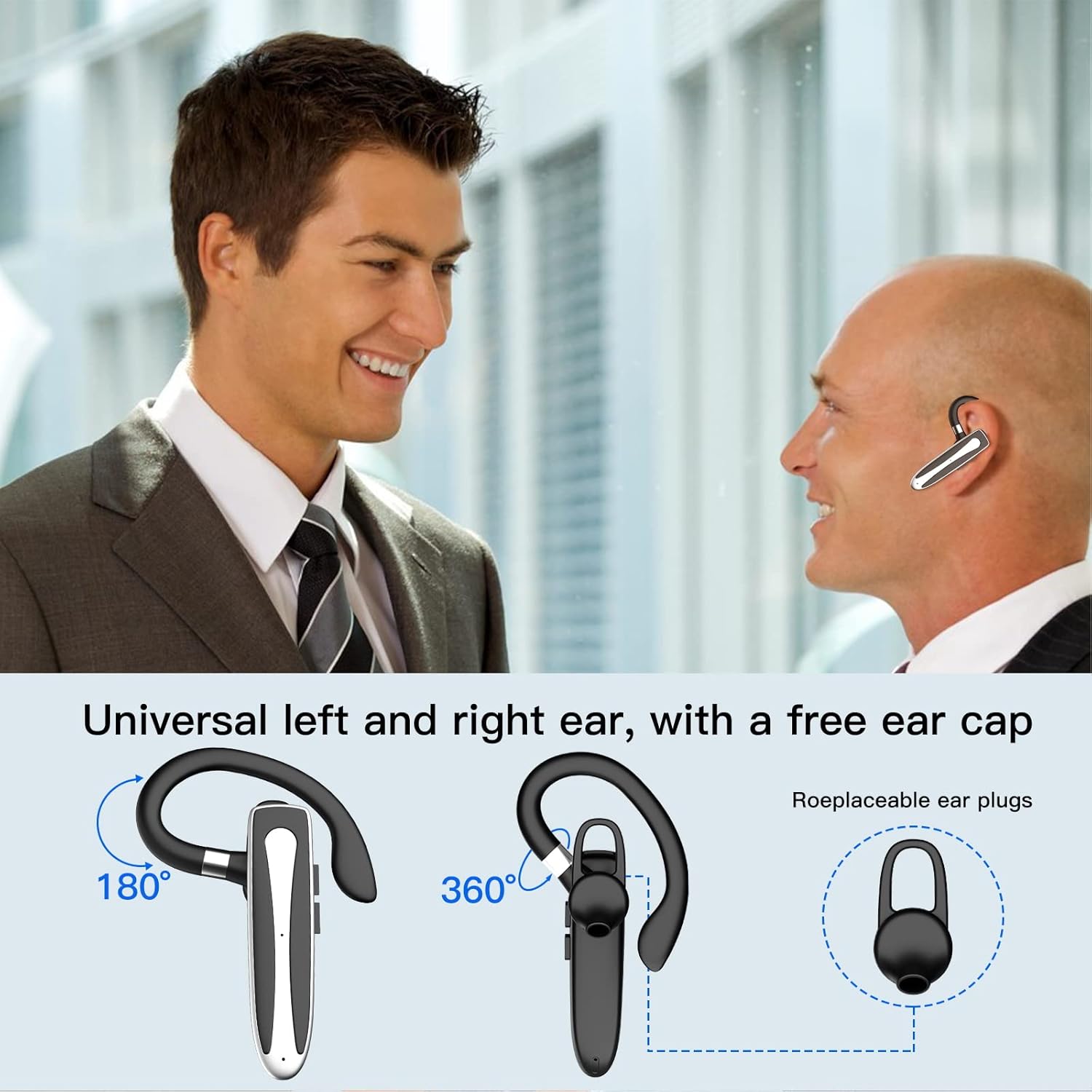
Image 3.2: Diagram illustrating the dual microphone noise reduction processing.
4. Instellen
4.1 De headset en de oplaadcase opladen
Before first use, fully charge the headset and its charging case.
- Plaats de headset in het oplaadhoesje.
- Sluit de USB Type-C-kabel aan op de oplaadpoort van de behuizing en op een stroombron (bijvoorbeeld een USB-wandadapter of een USB-poort van een computer).
- The charging indicator on the case will show charging status. A full charge typically takes 1.5 hours.

Image 4.1: The Type-C charging port on the charging case.

Image 4.2: Battery life and charging time information for the headset and case.
4.2 Koppelen met een apparaat
De headset maakt gebruik van Bluetooth 5.1 voor de draadloze verbinding.
- Inschakelen: Take the headset out of the charging case, or press and hold the Multi-function Button until the indicator light flashes blue and red, indicating pairing mode.
- Activeer Bluetooth: Ga op uw apparaat (smartphone, tablet, enz.) naar de Bluetooth-instellingen en schakel Bluetooth in.
- Selecteer apparaat: In the list of available devices, select "YYK-530".
- Bevestig verbinding: Once connected, the headset indicator light will flash blue slowly, and your device will show "Connected".

Image 4.3: Illustration of optimal Bluetooth connection distance (within 10 meters).
4.3 Connecting to Two Devices Simultaneously
The headset supports connecting to two Bluetooth devices at the same time.
- Connect the headset to the first device (e.g., Phone A) as described in Section 4.2.
- Turn off Bluetooth on the first device. The headset will re-enter pairing mode.
- Connect the headset to the second device (e.g., Phone B) as described in Section 4.2.
- Turn on Bluetooth on the first device. The headset should automatically reconnect to both devices.
You can now answer calls or play music from either connected device.

Image 4.4: Step-by-step guide for connecting the headset to two devices.
4.4 De headset dragen
The headset is designed for comfortable wear on either the left or right ear.
- The earhook can rotate 360° vertically and 360° horizontally to fit your preferred angle.
- The retractable earhook can be adjusted to fit the shape of your ear.

Image 4.5: The headset's adjustable design for left or right ear wearing.
5. Gebruiksaanwijzing
5.1 In-/uitschakelen
- Inschakelen: Take the headset out of the charging case, or press and hold the Multi-function Button for approximately 3 seconds until the indicator light flashes blue.
- Uitschakelen: Place the headset back into the charging case, or press and hold the Multi-function Button for approximately 5 seconds until the indicator light flashes red and then turns off.
5.2 Oproepbeheer
- Oproep beantwoorden/beëindigen: Druk eenmaal op de multifunctionele knop.
- Oproep afwijzen: Houd de multifunctionele knop ongeveer 2 seconden ingedrukt.
- Laatste nummer opnieuw kiezen: Druk tweemaal op de multifunctionele knop.
5.3 Muziek afspelen
- Afspelen/Pauzeren: Druk eenmaal op de multifunctionele knop.
- Volgende nummer: Houd de knop Volume omhoog ingedrukt.
- Vorig nummer: Houd de knop Volume omlaag ingedrukt.
5.4 Volumeregeling
- Verhoog het volume: Druk op de knop Volume omhoog.
- Volume verlagen: Druk op de knop Volume omlaag.
5.5 Activering van de spraakassistent
Activate your device's voice assistant (Siri, Google Assistant) directly from the headset.
- Activeer Voice Assistant: Triple-press the Multi-function Button.

Image 5.1: The headset supports activation of Siri and Google Assistant.
6. Onderhoud
- Clean the headset and charging case regularly with a soft, dry cloth.
- Vermijd blootstelling van het apparaat aan extreme temperaturen, vochtigheid of bijtende stoffen.
- Bewaar de headset in de oplaadcase wanneer u deze niet gebruikt om hem te beschermen en opgeladen te houden.
- Probeer het apparaat niet zelf te demonteren of te repareren. Neem contact op met de klantenservice voor hulp.
7. Probleemoplossing
7.1 Headset gaat niet aan
- Zorg ervoor dat de headset volledig is opgeladen. Plaats hem in de oplaadcase en sluit de case aan op een stroombron.
- Press and hold the Multi-function Button for 3-5 seconds to power on.
7.2 Kan niet koppelen met het apparaat
- Ensure the headset is in pairing mode (indicator flashes blue and red).
- Schakel Bluetooth op uw apparaat uit en weer in.
- Ensure the headset is within 10 meters of your device and there are no significant obstacles.
- Wis de lijst met Bluetooth-koppelingen op uw apparaat en probeer opnieuw te koppelen.
7.3 Geen geluid of slechte geluidskwaliteit
- Pas het volume aan op zowel de headset als het aangesloten apparaat.
- Zorg ervoor dat de headset goed op uw apparaat is aangesloten.
- Ga dichter bij uw apparaat staan om er zeker van te zijn dat u zich binnen het Bluetooth-bereik bevindt.
- Controleer of er sprake is van interferentie van andere draadloze apparaten.
8. Specificaties
| Functie | Specificatie |
|---|---|
| Modelnaam | YYK-530 |
| Merk | Obbug |
| Connectiviteitstechnologie | Draadloos (Bluetooth) |
| Bluetooth-versie | 5.1 |
| Bluetooth-bereik | Tot 33 voet (10 meter) |
| Geluidsbeheersing | Sound Isolation (CVC8.0 Noise Reduction) |
| Oordopjesvorm | Oorhaak |
| Batterijduur (headset) | 5 uur (ongeveer) |
| Batterijduur (met oplaadcase) | Tot 80 uur (ongeveer) |
| Oplaadtijd | 1.5 uur |
| Oplaadpoort | USB Type-C |
| Waterbestendigheidsniveau | Waterdicht |
| Artikelgewicht | 4.9 ons (0.14 kilogram) |
| Frequentiebereik | 20Hz - 20,000Hz |
| Compatibele apparaten | Cellphones, Desktops, Laptops, Telephones |

Image 8.1: The headset is compatible with a wide range of Bluetooth-enabled devices.
9. Garantie en klantenondersteuning
The Obbug Bluetooth Headset comes with a 1-month replacement warranty.
For any questions, issues, or support needs, please contact our customer service. We offer 24-hour customer service to assist you.
Raadpleeg uw aankoopdocumentatie voor de specifieke contactgegevens.


