1. Product voorbijview
The Baseus Metal Gleam Series 8-in-1 USB-C Hub is a versatile docking station designed to expand the connectivity of your USB-C enabled devices. It integrates multiple essential ports, including USB 3.0, HDMI, USB-C Power Delivery (PD), and microSD/SD card readers, into a single compact unit. This hub is ideal for enhancing productivity by connecting various peripherals, external displays, and charging your device simultaneously.

The Baseus Metal Gleam Series 8-in-1 USB-C Hub is presented in its retail box, showcasing the product and its key features on the packaging.
2. Belangrijkste kenmerken
- 8-in-1 connectiviteit: Provides comprehensive port expansion for modern USB-C devices.
- Triple USB 3.0 Ports: Offers high-speed data transfer up to 5Gbps for peripherals like external hard drives, keyboards, and mice.
- Dubbele HDMI-uitgangen: Supports dual-display ultra-clear expansion, enabling connection to two external monitors for enhanced multitasking.
- USB-C-voeding (PD): Allows for fast charging of your host device with up to 100W power pass-through.
- MicroSD/SD Card Readers: Facilitates quick access to photos and videos from memory cards.
- Compact en draagbaar ontwerp: Metal gleam series design ensures durability and easy portability.
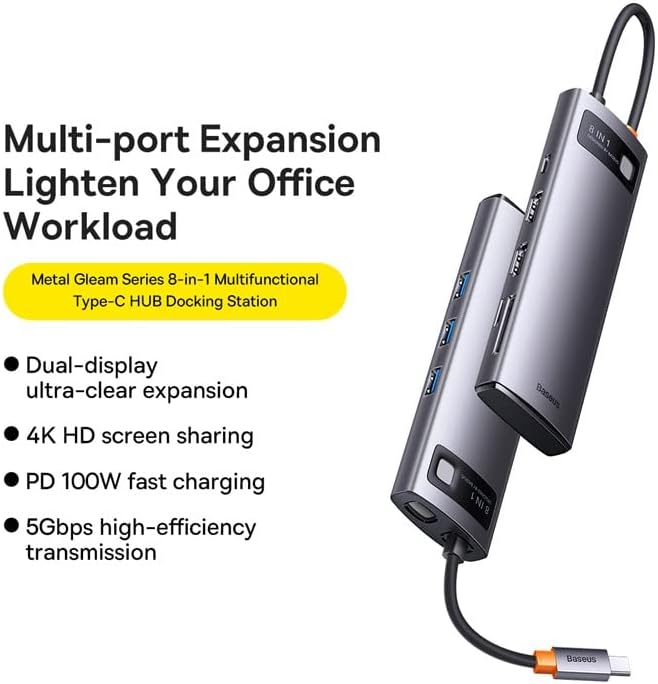
This graphic highlights the multi-port expansion capabilities of the Baseus Metal Gleam Series 8-in-1 USB-C Hub, emphasizing its ability to lighten office workload with features like dual-display, 4K HD screen sharing, PD 100W fast charging, and 5Gbps high-efficiency transmission.
3. Inhoud van het pakket
- 1 x Baseus Metal Gleam Series 8-in-1 USB-C Hub
- 1 x Gebruikershandleiding
4. Installatie-instructies
- Verbinding maken met hostapparaat: Plug the USB-C connector of the hub into the USB-C port of your laptop, tablet, or smartphone. Ensure the connection is secure.
- Randapparatuur aansluiten: Connect your USB devices (e.g., mouse, keyboard, external hard drive) to the USB 3.0 ports on the hub.
- Beeldschermen aansluiten: Use HDMI cables to connect your external monitors to the HDMI ports on the hub.
- Stroomvoorziening (optioneel): If your host device requires charging, connect your original USB-C power adapter to the USB-C PD port on the hub. This will charge your device while using the hub.
- Geheugenkaarten plaatsen: Insert your microSD or SD cards into the corresponding slots for data access.

This image provides an angled perspective of the Baseus Metal Gleam Series 8-in-1 USB-C Hub, highlighting its sleek design and the three accessible USB 3.0 ports on its side.
5. Gebruiksaanwijzing
5.1. USB 3.0-gegevensoverdracht
Connect USB devices such as flash drives, external hard drives, or other USB peripherals to the USB 3.0 ports. The hub supports data transfer speeds of up to 5Gbps.
5.2. HDMI-weergave-uitgang
Connect your monitors using HDMI cables. The hub supports dual HDMI output. For optimal performance, ensure your display settings on your computer are configured correctly for extended or mirrored displays.
- Windows-systemen: Supports triple-display (A+B+C) at 1080P@60Hz in expansion mode, and (A+A+A) at 1080P@60Hz in mirroring mode.
- Apple OS Systems: Supports dual-display (A+B+B) at 4K@30Hz in expansion mode, and (A+A+A) at 4K@30Hz in mirroring mode.

This visual guide demonstrates the dual-display functionality of the Baseus Metal Gleam Series 8-in-1 USB-C Hub, showing both expansion and mirroring modes for Windows systems (1080P@60Hz) and Apple OS systems (4K@30Hz).
5.3. USB-C Power Delivery
The USB-C PD port allows you to charge your host device (laptop, tablet) while simultaneously using the hub's other functions. Connect your device's original USB-C power adapter to this port. The hub supports up to 100W power pass-through.
5.4. SD/MicroSD Card Reader
Insert your SD or microSD cards into the designated slots. The hub will allow your device to read and write data to these cards.
6. Onderhoud
- Schoonmaak: Use a soft, dry cloth to clean the surface of the hub. Avoid using liquid cleaners or abrasive materials.
- Opslag: Bewaar de hub op een koele, droge plaats, uit de buurt van direct zonlicht en extreme temperaturen.
- Behandeling: Laat de hub niet vallen en stel hem niet bloot aan harde stoten. Probeer het apparaat niet te demonteren.

An exploded diagram of the Baseus Metal Gleam Series 8-in-1 USB-C Hub illustrates its internal electronic components and sophisticated circuit board design.
7. Probleemoplossing
- Geen weergave-uitvoer:
- Ensure the HDMI cables are securely connected to both the hub and the monitor.
- Verify that your monitor input source is set to the correct HDMI port.
- Check your computer's display settings to ensure the external monitor is detected and configured.
- Probeer uw computer opnieuw op te starten.
- Devices Not Recognized (USB/SD/MicroSD):
- Ensure the hub's USB-C connector is fully inserted into your host device.
- Probeer het apparaat rechtstreeks op de USB-poort van uw computer aan te sluiten om te controleren of het zelfstandig functioneert.
- Start uw computer opnieuw op en sluit de hub opnieuw aan.
- Geen stroomtoevoer/opladen:
- Zorg ervoor dat uw USB-C-stroomadapter is aangesloten op de PD-poort van de hub en correct functioneert.
- Controleer of uw hostapparaat USB-C Power Delivery ondersteunt.
- Onderbroken verbinding:
- Zorg ervoor dat alle verbindingen stevig en stabiel zijn.
- Plaats de hub niet in de buurt van sterke bronnen van elektromagnetische interferentie.
8. Specificaties
| Attribuut | Waarde |
|---|---|
| Productafmetingen | 3.94 x 1.97 x 1.18 inch |
| Artikelgewicht | 5.3 ons |
| Artikelmodelnummer | WKWG050113 |
| hardware Interface | USB 3.0, HDMI, USB-C, SD, MicroSD |
| Speciale functie | Draagbaar |
| Compatibele apparaten | Apparaten met USB-C-poort |
| Totaal aantal USB-poorten | 8 (3x USB 3.0, 2x HDMI, 1x USB-C PD, 1x MicroSD, 1x SD) |
| HDMI-resolutie | Up to 4K@30Hz (Apple OS), 1080P@60Hz (Windows) |
| USB-C PD-ingang | Tot 100W |
| Gegevensoverdrachtsnelheid | Tot 5 Gbps (USB 3.0) |
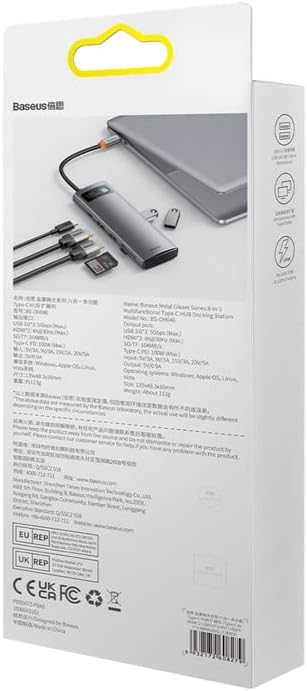
De achterkant view of the product packaging displays detailed technical specifications and compliance information for the Baseus Metal Gleam Series 8-in-1 USB-C Hub.
9. Garantie en ondersteuning
For warranty information, technical support, or further inquiries, please visit the official Baseus webwebsite of neem contact op met hun klantenservice. Bewaar uw aankoopbewijs voor garantieclaims.
Officiële Baseus Webwebsite: www.baseus.com


