1. Inleiding
This manual provides comprehensive instructions for the Naxa NDS-6501 Portable Dual 6.5-inch Bluetooth Speaker. Please read this manual thoroughly before operating the device to ensure proper use and to maximize your experience. Keep this manual for future reference.
2. Inhoud van het pakket
Controleer of alle hieronder vermelde artikelen in uw pakket zitten:
- Naxa NDS-6501 Portable Bluetooth Speaker
- Bedrade microfoon
- USB-oplaadkabel
- Gebruikershandleiding (dit document)
3. Producteigenschappen
The Naxa NDS-6501 speaker offers a range of functionalities designed for portable audio entertainment:
- Dual 6.5-inch full-frequency speakers for clear audio output.
- Bluetooth connectivity for wireless audio streaming from compatible devices.
- Integrated multi-color flame lights with various lighting effects.
- True Wireless Stereo (TWS) function for connecting two NDS-6501 speakers wirelessly.
- Wired microphone input for vocal use.
- Built-in FM radio tuner for local station access.
- USB port and MicroSD/TF card slot for playing audio files from external storage.
- Auxiliary (3.5mm) input for wired audio connections.
- Rechargeable battery providing up to 2 hours of playback time.
4. Bedieningselementen en poorten
The speaker features various controls and input/output ports. A typical layout includes a power button, volume controls, mode selection, playback controls (play/pause, skip tracks), microphone input, USB port, MicroSD card slot, auxiliary input, and a charging port. Refer to the diagram below for specific locations.
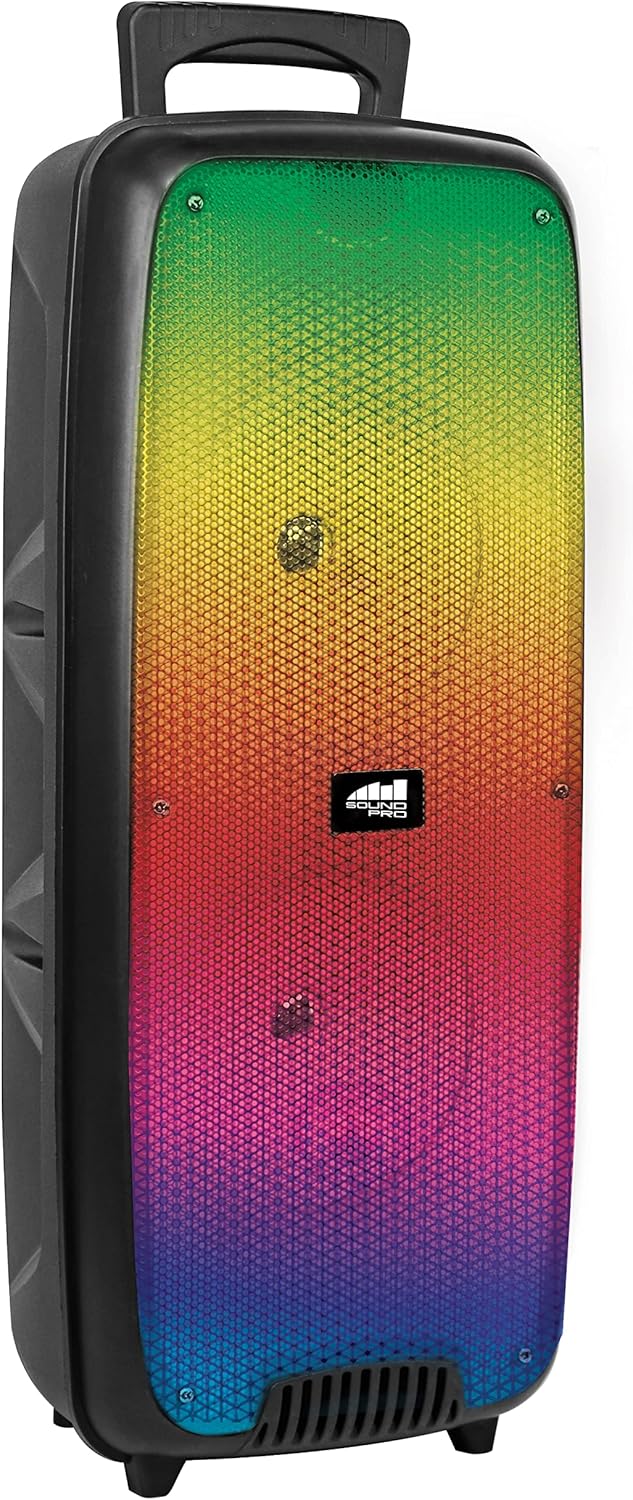
Figuur 4.1: Voorkant view of the Naxa NDS-6501 speaker, showcasing the dual 6.5-inch drivers and multi-color flame lights.

Figuur 4.2: Kant view of the Naxa NDS-6501 speaker, illustrating its portable design with an integrated handle.
5. Instellen
5.1 De luidspreker opladen
- Sluit de meegeleverde USB-oplaadkabel aan op de oplaadpoort van de luidspreker.
- Sluit het andere uiteinde van de USB-kabel aan op een compatibele USB-stroomadapter (niet meegeleverd) of op een USB-poort van een computer.
- Tijdens het opladen brandt het oplaadindicatielampje meestal rood.
- Once fully charged, the indicator light will change color or turn off (refer to specific LED behavior in your product). A full charge provides approximately 2 hours of playback.
5.2 In-/uitschakelen
- To power on: Press and hold the Power button for a few seconds until the speaker activates.
- Om het apparaat uit te schakelen: Houd de aan/uit-knop opnieuw ingedrukt totdat de luidspreker uitschakelt.
6. Gebruiksaanwijzing
6.1 Bluetooth-koppeling
- Ensure the speaker is powered on and in Bluetooth mode. If not, press the Mode button to switch to Bluetooth. The speaker will indicate it is ready for pairing (e.g., a flashing LED or an audible prompt).
- Ga op uw Bluetooth-apparaat (smartphone, tablet, enz.) naar de Bluetooth-instellingen.
- Zoeken naar available devices. You should see "NDS-6501" or a similar name in the list.
- Select "NDS-6501" to initiate pairing.
- Once successfully paired, the speaker will provide an audible confirmation, and the Bluetooth indicator light will become solid.
6.2 True Wireless Stereo (TWS)-koppeling
The TWS function allows you to connect two NDS-6501 speakers for a stereo sound experience.

Figuur 6.1: Illustration of the True Wireless Stereo (TWS) function, enabling two speakers to connect wirelessly from a single Bluetooth source.
- Ensure both NDS-6501 speakers are powered on and in Bluetooth mode, but not yet paired to any device.
- On one of the speakers (this will be the primary speaker), press and hold the TWS button (or a designated pairing button) for a few seconds.
- The primary speaker will search for the secondary speaker. Once connected, both speakers will provide an audible confirmation.
- Now, pair your Bluetooth device to the primary speaker as described in Section 6.1. Audio will play through both speakers in stereo.
6.3 FM-radiobediening
- Druk op de Mode-knop om over te schakelen naar de FM-radiomodus.
- Druk op de afspeel-/pauzeknop om automatisch beschikbare FM-zenders te zoeken en op te slaan.
- Gebruik de knoppen Vorige/Volgende nummer om tussen opgeslagen stations te navigeren.
6.4 USB/MicroSD-weergave
- Insert a USB flash drive or a MicroSD/TF card (with audio files) in de bijbehorende poort.
- The speaker should automatically switch to USB or MicroSD mode and begin playing audio. If not, press the Mode button to select the correct input.
- Use the playback controls (Play/Pause, Previous/Next) to manage your music.
6.5 Gebruik van de microfoon
- Connect the wired microphone to the microphone input jack on the speaker.
- Adjust the microphone volume control (if available) on the speaker to your desired level.
- The microphone audio will be mixed with any music playing through the speaker.
6.6 Lichteffecten
- The speaker features integrated multi-color flame lights.
- Press the Light button (if available) to cycle through different lighting modes or to turn the lights on/off.
- The lights may synchronize with the music playback.
7. Onderhoud
- Schoonmaak: Gebruik een zachte, droge doek om de buitenkant van de luidspreker schoon te maken. Gebruik geen schurende reinigingsmiddelen, was of oplosmiddelen.
- Opslag: Wanneer u de luidspreker gedurende langere tijd niet gebruikt, bergt u deze op op een koele, droge plaats, uit de buurt van direct zonlicht en extreme temperaturen.
- batterij zorg: Om de levensduur van de batterij te verlengen, dient u te voorkomen dat de batterij regelmatig volledig wordt ontladen. Laad de speaker regelmatig op, ook als u hem niet gebruikt.
- Blootstelling aan water: Deze luidspreker is niet waterdicht. Vermijd contact met water of overmatig vocht.
8. Probleemoplossing
| Probleem | Mogelijke oorzaak | Oplossing |
|---|---|---|
| De luidspreker gaat niet aan. | Batterij is leeg. | Laad de luidspreker op met de meegeleverde USB-kabel. |
| Er komt geen geluid uit de luidspreker. | Het volume is te laag; onjuiste invoermodus; apparaat niet gekoppeld. | Increase volume; press Mode button to select correct input; re-pair Bluetooth device. |
| Het Bluetooth-apparaat kan de luidspreker niet vinden. | Luidspreker niet in koppelingsmodus; apparaat te ver weg; storing. | Ensure speaker is in Bluetooth pairing mode; move device closer; avoid obstacles. |
| TWS-koppeling mislukt. | De luidsprekers zijn al gekoppeld aan een apparaat; ze staan te ver uit elkaar. | Ensure both speakers are unpaired from other devices; place speakers within 33 feet of each other. |
| Microfoon werkt niet. | Microfoon niet volledig aangesloten; microfoonvolume laag. | Ensure microphone is securely connected; adjust microphone volume. |
9. Specificaties
| Functie | Specificatie |
|---|---|
| Modelnummer | NDS-6501 |
| Luidsprekergrootte | Dubbele 6.5 inch |
| Connectiviteitstechnologie | Bluetooth, USB, MicroSD, Aux (3.5mm) |
| Audio-ingang | Bedrade microfoon |
| Audio-uitvoermodus | Stereo |
| Maximaal uitgangsvermogen | 3 Watt |
| Spreker AmpLificatie Type: | Actief |
| Batterijtype | Lithium Ion (rechargeable, included) |
| Gemiddelde levensduur van de batterij | Tot 2 uur |
| Productafmetingen (L x B x H) | 24.13 x 19.05 x 57.91 cm (9.5 x 7.5 x 22.8 inch) |
| Artikelgewicht | 2.81 kg (6.2 lbs) |
| Kleur | Zwart |
| UPC | 840005017555 |
10. Garantie en ondersteuning
For warranty information or technical support, please refer to the warranty card included with your product or visit the official Naxa Electronics webwebsite. Bewaar uw aankoopbewijs als bewijs van aankoop voor eventuele garantieclaims.


