1. Product voorbijview
The OREI BK-21 is an advanced 8K 2x1 HDMI Switch designed to streamline your audio-visual setup. This device allows you to connect two HDMI source devices to a single HDMI display, providing seamless switching between inputs. It supports high-resolution video and audio formats, making it ideal for gaming, home theater, and professional applications.

Figure 1: OREI 8K 2x1 HDMI Switch (Model BK-21)
Belangrijke mogelijkheden zijn:
- Supports resolutions up to 8K@60Hz, 4K@120Hz, and 1080p@240Hz.
- HDMI 2.1 and HDCP 2.3/2.2/1.4 compliant.
- High Speed 48Gbps Video Bandwidth.
- Supports HDR10+, HDR10, Dolby Vision, 3D, and CEC.
- Features VRR (Variable Refresh Rate), ALLM (Auto Low-Latency Mode), and QFT (Quick Frame Transport).
- Dual switching options: Automatic and Manual.
2. Inhoud van het pakket
Controleer of alle artikelen in het pakket aanwezig zijn:
- 1x OREI BK-21S HDMI Switcher
- 1x USB-voedingskabel
- 1x Gebruiksaanwijzing

Afbeelding 2: Inhoud van de verpakking
3. Producteigenschappen
The OREI BK-21 HDMI Switch offers a robust set of features for high-performance audio and video distribution:
- Ondersteuning voor hoge resolutie: Experience stunning visuals with support for 8K@60Hz, 4K@120Hz, and 1080p@240Hz.
- Advanced HDMI Standards: Fully compliant with HDMI 2.1 and HDCP 2.3/2.2/1.4 for broad compatibility and secure content transmission.
- Hoge bandbreedte: Supports 48Gbps video bandwidth for uncompressed high-resolution video.
- Dynamische HDR-ondersteuning: Compatible with HDR10+, HDR10, and Dolby Vision for enhanced contrast and color.
- Gaming Optimized Features: Includes VRR (Variable Refresh Rate), ALLM (Auto Low-Latency Mode), and QFT (Quick Frame Transport) for a smoother gaming experience.
- Uitgebreide audio-ondersteuning: Delivers exceptional sound quality with LPCM, Dolby True HD, DTS HD Master Audio, Dolby-AC3, and DTS7.1.
- Brede compatibiliteit: Works with a variety of HDMI devices such as PlayStation 5, Xbox, Roku 4, 4K TV, Amazon Fire TV, Ultra Projector, PS4, Apple TV, Cable box, Blu-ray player, DVD player, PC, and STB.

Figure 3: Supported Video Standards

Figure 4: Audio Support

Afbeelding 5: Brede apparaatcompatibiliteit
4. Verbindingen en installatie
Volg deze stappen om uw OREI BK-21 HDMI-switch aan te sluiten:
- HDMI-bronnen aansluiten: Plug your two HDMI source devices (e.g., gaming console, Blu-ray player) into the HDMI IN1 and HDMI IN2 ports on the switch.
- Verbinding maken met beeldscherm: Connect an HDMI cable from the HDMI OUT port on the switch to the HDMI input on your display (TV, monitor, projector).
- Stroomaansluiting: Connect the provided USB cable to the POWER port on the switch and to a USB power source (e.g., a USB wall adapter, a USB port on your TV or media device). The switch requires 5V DC power.

Figuur 6: Aansluitingen op het achterpaneel
For optimal performance, use high-quality HDMI 2.1 cables under 10 feet. For longer lengths, OREI Fiber Optic HDMI cables are recommended.
Video 1: OREI Direct's overview of the 8K 2x1 HDMI Switch, demonstrating its features and connections.
5. Gebruiksaanwijzing
The OREI BK-21 HDMI Switch offers both manual and automatic switching modes:
- Handmatig schakelen: Press the button on the top of the switch to cycle between HDMI IN1 and HDMI IN2. The corresponding LED indicator (1 or 2) will illuminate to show the currently active input.
- Automatisch schakelen: The switch supports automatic detection of active HDMI sources. When a new source is activated, the switch can automatically switch to that input. This feature can be enabled or disabled as per user preference to prevent unintended switching.

Figure 7: Top Panel with Selection Button and Indicators
6. Technische specificaties
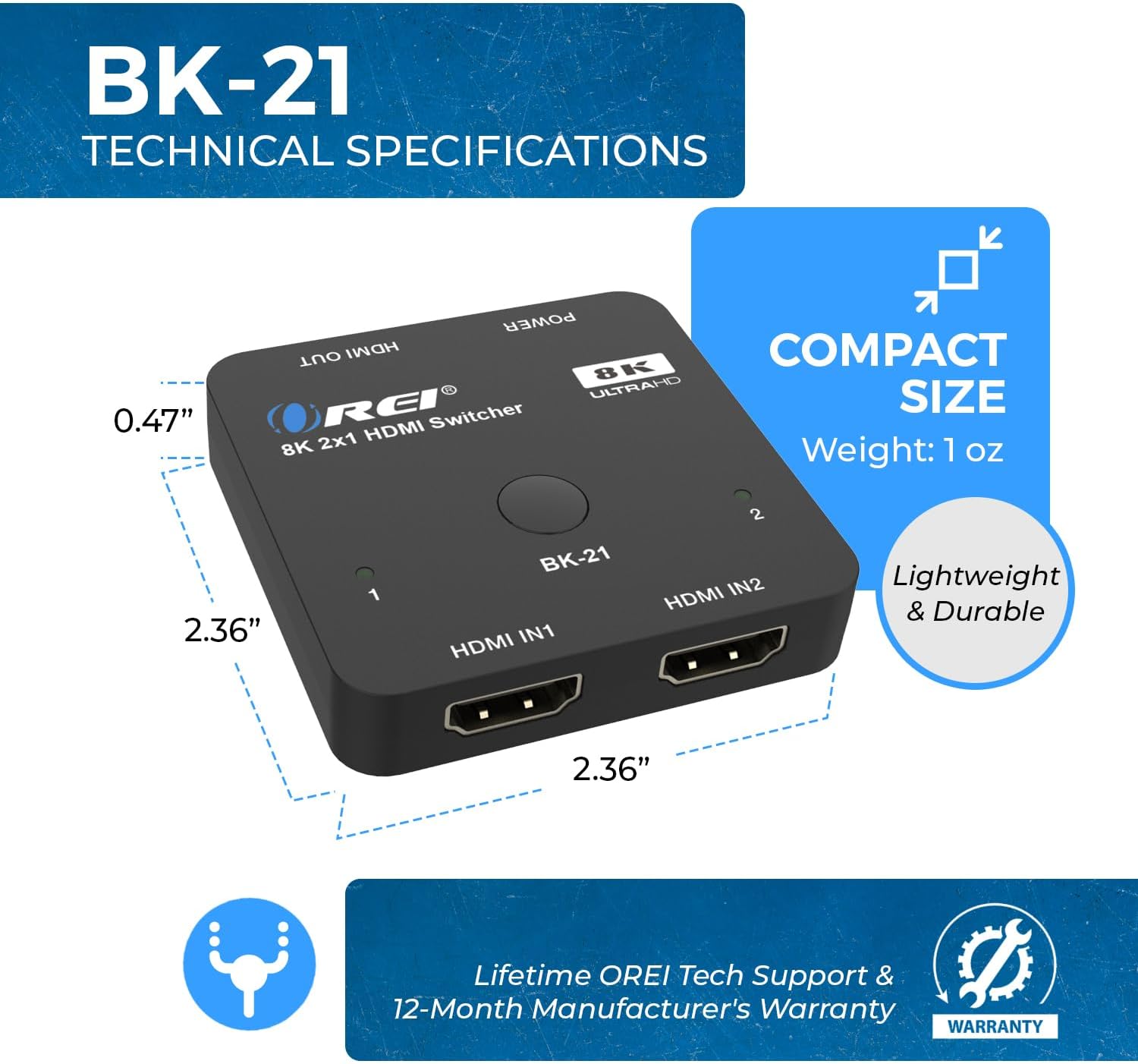
Figuur 8: Compacte afmetingen en afmetingen
| Functie | Beschrijving |
|---|---|
| Modelnummer | BK-21 |
| Productafmetingen | 2 x 4 x 0.5 inch |
| Artikelgewicht | 2.8 ons |
| Kleur | Zwart |
| Aansluitingstype | HDMI |
| Kabeltype | HDMI |
| HDMI-versie | HDMI2.1 |
| HDCP-versie | HDCP 2.3/2.2/1.4 |
| Maximum resolutie | 8K@60Hz, 4K@120Hz, 1080p@240Hz |
| videobandbreedte | 48 Gbps |
| HDR-ondersteuning | HDR10+, HDR10, Dolby Vision |
| Gaming-functies | VRR, ALLM, QFT |
| Audioformaten | LPCM, Dolby True HD, DTS HD Master Audio, Dolby-AC3, DTS7.1 |
| Compatibele apparaten | Blu-Ray Player, DVD Player, Gaming Console (PS5, Xbox), PC, Television, Roku, Amazon Fire TV, Ultra Projector, Apple TV, Cable box, STB |
7. Probleemoplossing
If you encounter issues with your OREI BK-21 HDMI Switch, please refer to the following common troubleshooting steps:
- Geen signaal:
- Zorg ervoor dat alle HDMI-kabels goed zijn aangesloten op zowel de bronapparaten, de switch als het beeldscherm.
- Verify the USB power cable is connected and the power LED on the switch is illuminated.
- Try connecting the HDMI source directly to the display to confirm the source and display are working correctly.
- Test with different HDMI cables, especially high-quality HDMI 2.1 certified cables.
- Ensure the correct input is selected on your display.
- Knipperend of onderbroken signaal:
- Check cable lengths; for 8K/4K@120Hz, shorter, high-quality HDMI 2.1 cables are crucial.
- Zorg ervoor dat de stroomvoorziening stabiel en voldoende is.
- Verlaag de resolutie of vernieuwingsfrequentie van het bronapparaat om te zien of het probleem zich blijft voordoen.
- Audioproblemen:
- Confirm that your display's audio settings are correctly configured.
- Controleer de audio-uitvoerinstellingen op uw bronapparaat.
- Zorg ervoor dat de HDMI-kabels audiotransmissie ondersteunen.
- Automatic Switching Not Working:
- Some devices may not trigger auto-switching effectively. Try manual switching using the button on the switch.
- Ensure the auto-switching feature is enabled if applicable (refer to specific product manual for details on enabling/disabling).
8. Verzorging en onderhoud
To ensure the longevity and optimal performance of your OREI BK-21 HDMI Switch, please follow these guidelines:
- Schoonmaak: Gebruik een zachte, droge doek om het apparaat schoon te maken. Vermijd het gebruik van vloeibare of spuitbusreinigers.
- Opslag: Bewaar het apparaat op een koele, droge plaats, uit de buurt van direct zonlicht en extreme temperaturen.
- Behandeling: Ga voorzichtig om met het apparaat. Laat het niet vallen en stel het niet bloot aan harde stoten.
- Ventilatie: Zorg ervoor dat het apparaat voldoende ventilatie heeft om oververhitting te voorkomen. Blokkeer geen ventilatieopeningen.
- Stroom: Always use the provided USB power cable. Disconnect power during electrical storms or when unused for long periods.
9. Garantie en klantenondersteuning
De OREI BK-21 HDMI-switch wordt geleverd met een 1 jaar volledige garantie. For any technical assistance, troubleshooting, or warranty claims, please contact OREI Support.
Voor verdere hulp kunt u terecht op de Official OREI Store on Amazon Of raadpleeg de contactgegevens op de productverpakking.


